1. Uvod
Thank you for choosing the KALINCO P96 Smartwatch. This device is designed to help you monitor your health, track your fitness activities, and stay connected. This manual provides essential information for setting up, operating, and maintaining your smartwatch to ensure optimal performance and longevity.
2. Izdelek je končanview
The KALINCO P96 Smartwatch features a 1.69-inch TFT display and offers a wide range of functionalities:
- Spremljanje zdravja: Continuous monitoring of heart rate, blood oxygen (SpO2), blood pressure, and sleep patterns. Includes a menstrual cycle tracking function for women.
- Prilagajanje: Split-screen mode for quick access to frequently used functions and over 100 stylish watch faces available via the GloryFit app. You can also upload personal photos as watch faces.
- Športni načini: Over 100 sports modes (running, cycling, rope skipping, dancing, yoga, etc.) with activity tracking for steps, calories burned, distance, heart rate, and blood oxygen during exercise.
- Pametna obvestila: Receive text messages and notifications from apps like WhatsApp, Messenger, Facebook, and Instagram directly on your watch. Notifications can be individually deleted from the watch.
- Durability & Battery Life: IP67 water resistance for daily use (hand washing, rain). Equipped with a 260 mAh battery, providing 5-7 days of active use and 15-20 days of standby time with a 2-hour charge.
- Dodatne funkcije: Features include phone/watch finder, screen brightness adjustment, breathing training, remote photography, music control, sedentary reminder, alarm clock, timer, stopwatch, and weather forecasts.

Image: The KALINCO P96 Smartwatch displaying its 1.69-inch screen with multiple customizable watch faces and user interface elements.
3. Nastavitev
3.1. Polnjenje pametne ure
Before initial use, fully charge your smartwatch. Connect the magnetic charging cable to the charging contacts on the back of the watch and plug the USB end into a standard USB power adapter (not included). A full charge typically takes approximately 2 hours.
3.2. Prenos in namestitev aplikacije
The KALINCO P96 Smartwatch requires the GloryFit application for full functionality and data synchronization. You can download the app from:
- The Apple App Store (for iOS devices)
- Google Play Store (for Android devices)
- Scan the QR code provided in the quick start guide (if available).
The GloryFit app is compatible with smartphones running Android 5.0 or iOS 9.0 and above.
3.3. Seznanjanje s pametnim telefonom
- Prepričajte se, da je Bluetooth na vašem pametnem telefonu omogočen.
- Open the GloryFit app on your smartphone.
- Follow the in-app instructions to search for and connect to your KALINCO P96 Smartwatch. The watch will typically appear as 'P96' or a similar device name.
- Po potrebi potrdite zahtevo za seznanjanje tako na pametnem telefonu kot na pametni uri.
Ko je ura združena, bo sinhronizirala čas in podatke z vašim telefonom.
4. Navodila za uporabo
4.1. Osnovna navigacija
- Povlecite gor/dol: Navigate through menus and notifications.
- Povlecite levo/desno: Dostop do hitrih funkcij ali različnih podatkovnih zaslonov.
- Tapnite: Izberite element ali potrdite dejanje.
- Stranski gumb: Pritisnite, da prebudite zaslon, se vrnete na začetni zaslon ali odprete glavni meni.
4.2. Spremljanje zdravja
The smartwatch continuously monitors several health metrics:
- Srčni utrip: Provides 24-hour heart rate monitoring. View real-time data on the watch or detailed trends in the GloryFit app.
- Kisik v krvi (SpO2): Monitors blood oxygen levels using infrared technology. Access readings on the watch or app.
- Krvni tlak: Measures blood pressure. For accurate readings, ensure the watch is worn correctly and remain still during measurement. Consult a medical professional for precise medical data.
- Sledenje spanju: Samodejno spremlja vaše vzorce spanja, vključno z globokim spanjem, lahkim spanjem in časom budnosti.view your sleep quality analysis in the GloryFit app.
- Sledenje menstrualnega ciklusa: A dedicated feature for women to record and track menstrual cycles within the GloryFit app.

Image: The smartwatch interface showing health monitoring features such as blood oxygen, blood pressure, heart rate, and a visual representation of sleep tracking data.
4.3. Športni načini in sledenje aktivnosti
The P96 Smartwatch supports over 100 sports modes. To use:
- Navigate to the 'Sports' section on your watch.
- Izberite želeno aktivnost (npr. tek, kolesarjenje, joga).
- Start the activity. The watch will track metrics like steps, calories, distance, and heart rate.
- End the activity to save your data. Detailed reports are available in the GloryFit app.

Image: A visual representation of the smartwatch's 100+ sports modes icons and a smartphone screen displaying detailed daily activity tracking data including steps, distance, and calories.
4.4. Pametna obvestila
Once paired with your phone, the watch can display notifications:
- Ensure app notifications are enabled in the GloryFit app settings.
- Incoming calls, text messages, and app alerts will vibrate the watch and display content on the screen.
- You can dismiss or delete notifications directly from the watch.

Image: The smartwatch showing icons for various smart notifications (calls, Facebook, Line, Instagram, etc.) and illustrations of vibration reminders for calls, sedentary alerts, and alarms.
4.5. Prilagajanje
- Obrazi za gledanje: In the GloryFit app, browse and select from over 100 watch faces. You can also upload your own photos to personalize the watch face.
- Način razdeljenega zaslona: Swipe right on the main screen to access the split-screen area, allowing quick selection of frequently used functions.
4.6. Dodatne funkcije
Explore other useful features:
- Štoparica: Za merjenje časa uporabite vgrajeno štoparico.
- Vremenska napoved: View current weather conditions and forecasts (requires app synchronization).
- Nadzor glasbe: Upravljajte predvajanje glasbe na pametnem telefonu (predvajanje, začasna ustavitev, preskakovanje skladb).
- Prilagoditev svetlosti: Adjust screen brightness for optimal visibility in different lighting conditions.
- Najdi telefon/uro: Locate your paired phone or watch if misplaced.
- Vadba dihanja: Vodene dihalne vaje za sprostitev.
- Fotografiranje na daljavo: Uporabite svojo uro kot daljinski sprožilec za kamero telefona.
- Sedeči opomnik: Prejemajte opozorila za gibanje, če ste bili predolgo neaktivni.
- Budilka in časovnik: Set alarms and timers directly from your watch.
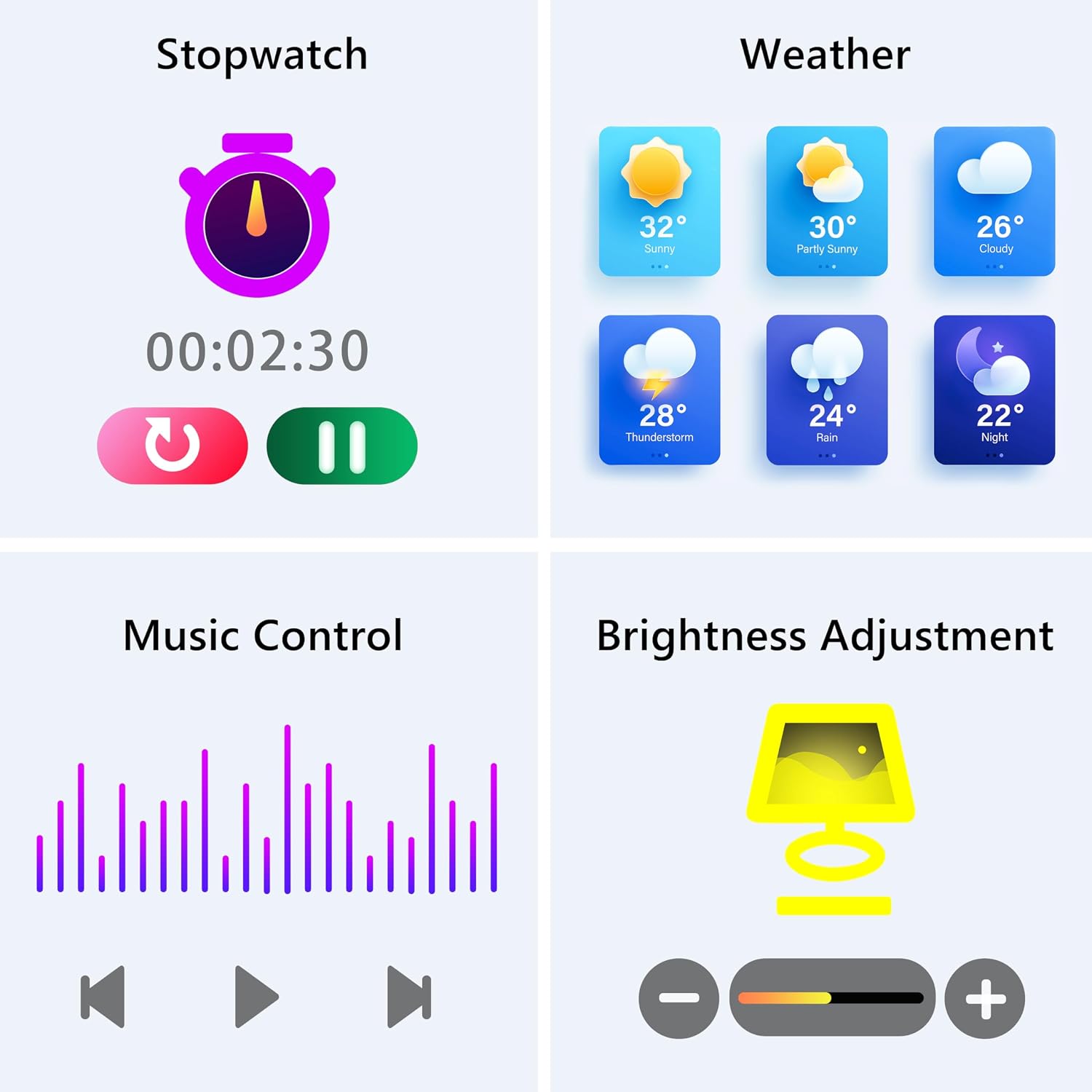
Image: The smartwatch screen showing various utility functions including a stopwatch, weather forecast, music control interface, and brightness adjustment slider.
5. Vzdrževanje
- Čiščenje: Regularly clean your smartwatch and strap with a soft, dry cloth. Avoid using harsh chemicals or abrasive materials.
- Vodoodpornost (IP67): The watch is IP67 water-resistant, meaning it can withstand splashes, hand washing, and rain. It is ne suitable for swimming, showering with hot water, or diving. Avoid prolonged exposure to water.
- Vzdrževanje baterije: Charge the battery fully when indicated. Avoid completely draining the battery frequently to prolong its lifespan. Store the watch in a cool, dry place when not in use for extended periods.
- Posodobitve programske opreme: Keep the GloryFit app updated to ensure your smartwatch has the latest features and performance improvements.
6. Odpravljanje težav
If you encounter issues with your KALINCO P96 Smartwatch, try the following solutions:
- Ura se ne vklopi: Prepričajte se, da je ura popolnoma napolnjena. Priključite jo na polnilnik za vsaj 10–15 minut.
- Seznanitev s telefonom ni mogoča:
- Prepričajte se, da je Bluetooth omogočen v vašem telefonu.
- Prepričajte se, da je ura v dosegu Bluetooth (običajno 10 metrov).
- Znova zaženite telefon in pametno uro.
- Check if the GloryFit app is updated to the latest version.
- If previously paired, try unpairing and re-pairing the device through the GloryFit app.
- Obvestila niso bila prejeta:
- Verify that notifications are enabled for specific apps in the GloryFit app settings.
- Ensure your phone's notification settings allow the GloryFit app to display alerts.
- Check if the watch is properly connected via Bluetooth.
- Netočni zdravstveni podatki:
- Prepričajte se, da je ura tesno prilegana zapestju, ne pretesna ali preohlapna.
- For blood pressure readings, remain still and follow instructions. Note that smartwatch blood pressure measurements are for reference only and should not replace professional medical equipment.
- Očistite senzor na zadnji strani ure.
- Kratka življenjska doba baterije:
- Zmanjšajte svetlost zaslona.
- Onemogočite neprekinjeno spremljanje srčnega utripa, če ga ne potrebujete 24 ur na dan, 7 dni v tednu.
- Omejite število aplikacij, ki pošiljajo obvestila na uro.
If problems persist, please refer to the support section for contact information.
7. Specifikacije
| Funkcija | Podrobnost |
|---|---|
| Znamka | KALINCO |
| Številka modela | P96 |
| Velikost zaslona | 1.69 palcev |
| Operacijski sistem | Multiple Versions of Both iOS and Android |
| Tehnologija povezljivosti | Bluetooth 4.0 |
| Kapaciteta baterije | 260 mAh (litij-polimer) |
| Vodoodpornost | IP67 |
| Združljive naprave | Smartphone (Android 5.0+ / iOS 9.0+) |
| Posebne lastnosti | Text Messaging, Notification, Health Monitoring |
| GPS | GPS prek pametnega telefona |
8. Garancija in podpora
KALINCO is committed to providing exceptional products. Your KALINCO P96 Smartwatch comes with a 12-mesečna garancija od datuma nakupa.
If you encounter any problems, have suggestions, or require assistance, please do not hesitate to contact KALINCO customer support. We are dedicated to providing you with satisfactory solutions at all times.
For support, please refer to the contact information provided with your product packaging or visit the official KALINCO webmesto.


