1. Uvod
Thank you for choosing the boAt Airdopes 641 Truly Wireless Earbuds. This manual provides essential information for setting up, operating, and maintaining your earbuds to ensure optimal performance and longevity. Please read this guide carefully before using the product.
2. Izdelek je končanview
The boAt Airdopes 641 are designed for a seamless audio experience, featuring advanced connectivity and intuitive controls.

Slika: Key features of the Airdopes 641, highlighting RGB LEDs, Instant Wake N' Pair (IWP) technology, Bluetooth 5.0 connectivity, 6mm Dual Drivers for audio, and a Capacitive Touch Panel for controls.
2.1 Komponente
- Ušesna sredstva: Left and Right truly wireless earbuds with in-ear design.
- Polnilna torbica: Prenosna torbica za polnjenje in shranjevanje slušalk.
- USB kabel tipa C: Za polnjenje etuija.
- Uporabniški priročnik: Ta dokument.
2.2 Lastnosti
- Bluetooth 5.0: Za stabilno in učinkovito brezžično povezljivost.
- IWP (Instant Wake N' Pair): Enables quick pairing with your device once the case lid is opened.
- Capacitive Touch Panel: For easy control of music, calls, and voice assistant.
- 6mm Dual Drivers: Zagotavlja poglobljeno zvočno izkušnjo.
- RGB LED: Indicator lights for status.
- Živalski način: Low latency mode for gaming.
- IPX5 Water & Sweat Shield: Zagotavlja zaščito pred brizganjem in znojem.
- Do 30 ur skupnega predvajanja: Combined battery life of earbuds and charging case.
- USB Type-C Polnjenje: Sodoben in priročen polnilni priključek.
3. Nastavitev
3.1 Polnjenje slušalk in etuija
Pred prvo uporabo se prepričajte, da so slušalke in polnilna škatlica popolnoma napolnjene.
- Place both earbuds into the charging case, ensuring they are correctly seated. The earbuds will automatically begin charging.
- Connect the USB Type-C charging cable to the charging port on the case and plug the other end into a compatible USB power adapter (not included).
- The LED indicators on the case will show the charging status. Once fully charged, the indicators may change or turn off.
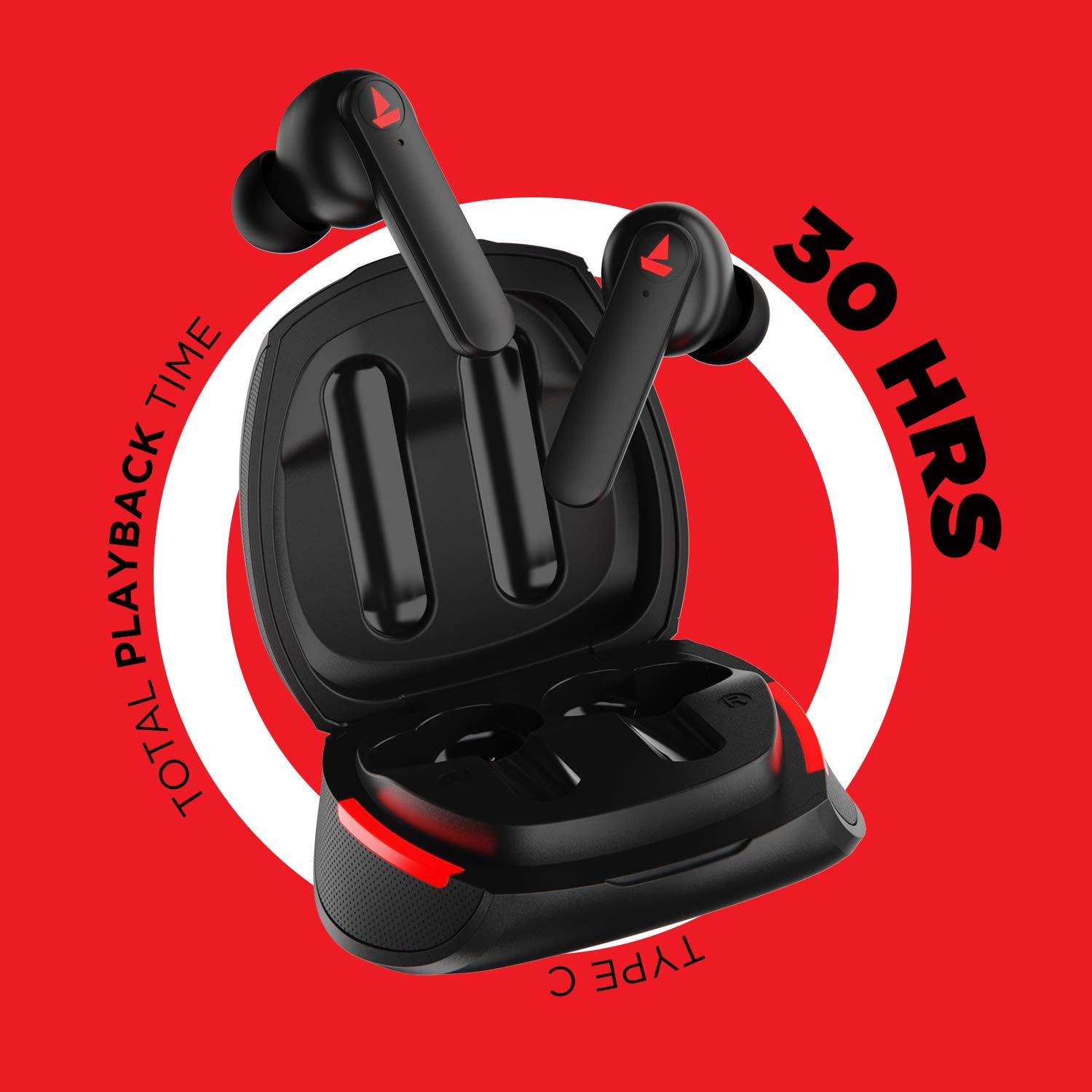
Slika: The Airdopes 641 earbuds resting in their charging case, illustrating the Type-C charging capability and the impressive 30 hours of total playback time.
3.2 Initial Pairing (IWP Technology)
The Airdopes 641 feature Instant Wake N' Pair (IWP) technology for quick and effortless connection.
- Odprite pokrov ohišja za polnjenje. Slušalke se bodo samodejno vklopile in prešle v način seznanjanja.
- Na pametnem telefonu ali napravi, ki podpira Bluetooth, omogočite Bluetooth.
- Iskanje "Airdopes 641" in the list of available devices and select it to pair.
- Once paired, you will hear an audio prompt, and the earbuds will be ready for use.
- The earbuds will automatically connect to the last paired device when the case lid is opened, provided Bluetooth is enabled on the device.
4. Navodila za uporabo
4.1 Vklop/izklop
- Vklop: Open the charging case lid. The earbuds will power on automatically. Alternatively, long-press the Capacitive Touch Control (CTC) on both earbuds for 3 seconds.
- Ugasniti: Place the earbuds back into the charging case and close the lid. They will power off automatically. Alternatively, long-press the CTC on both earbuds for 5 seconds.
4.2 Capacitive Touch Controls (CTC)
The Airdopes 641 feature intuitive touch controls on each earbud.
- Predvajanje/pavza: Single tap on either earbud's CTC.
- Naslednja skladba: Double tap on the right earbud's CTC.
- Prejšnja skladba: Double tap on the left earbud's CTC.
- Sprejmi/končaj klic: Single tap on either earbud's CTC.
- Zavrni klic: Long press on either earbud's CTC for 2 seconds.
- Aktiviranje glasovnega pomočnika: Triple tap on either earbud's CTC.
- Povečaj glasnost: Long press the right earbud's CTC.
- Znižaj glasnost: Long press the left earbud's CTC.
4.3 Način BEAST (Igranje z nizko zakasnitvijo)
Activate BEAST Mode for a low-latency audio experience, ideal for gaming.

Slika: The Airdopes 641 earbuds and their sleek charging case, emphasizing the "BEAST Mode" feature designed to provide a low-latency audio experience for gamers.
- Activate BEAST Mode: Triple tap on the right earbud's CTC.
- Deactivate BEAST Mode: Triple tap on the right earbud's CTC again.
5. Vzdrževanje
Proper care ensures the longevity and performance of your Airdopes 641.
5.1 Čiščenje
- Slušalke in polnilno ohišje nežno obrišite z mehko, suho krpo, ki ne pušča vlaken.
- Ne uporabljajte abrazivnih čistil, alkohola ali kemičnih topil.
- Regularly clean the ear tips and mesh to prevent wax buildup, which can affect sound quality.
5.2 Odpornost na vodo in znoj (IPX5)

Slika: The Airdopes 641 earbuds and their charging case surrounded by water splashes, illustrating their IPX5 rating for water and sweat resistance.
The Airdopes 641 are rated IPX5, meaning they are protected against low-pressure water jets from any direction. This makes them suitable for workouts and light rain.
- Slušalk ne potapljajte v vodo.
- Do not expose them to high-pressure water or steam.
- Preden slušalke vstavite nazaj v polnilno ohišje, se prepričajte, da so suhe, da preprečite poškodbe.
5.3 Shranjevanje
Ko slušalk ne uporabljate, jih shranite v polnilni etui, da jih zaščitite in ohranite napolnjene.
6. Odpravljanje težav
If you encounter issues with your Airdopes 641, try the following solutions.
6.1 Slušalke se ne seznanijo/povezujejo
- Prepričajte se, da sta obe slušalki napolnjeni.
- Make sure Bluetooth is enabled on your device and the earbuds are within range.
- Try forgetting "Airdopes 641" from your device's Bluetooth list and re-pairing.
- Perform a factory reset as described below.
6.2 Ponastavitev na tovarniške nastavitve
A factory reset can resolve many common issues by restoring the earbuds to their original settings.

Slika: A visual guide detailing the steps for a factory reset of the Airdopes 641. It emphasizes clearing the device from pairing history first, then long-pressing the Capacitive Touch Control (CTC) on both earbuds inside the case for 10 seconds until a green LED flashes three times, followed by closing and reopening the case.
- 1. korak: Before performing the reset, clear "Airdopes 641" from your pairing device history by forgetting the device on your phone/tablet.
- 2. korak: Place both earbuds back inside the charging case in the correct orientation.
- 3. korak: Long press the Capacitive Touch Control (CTC) on both earbuds inside the case for up to 10 seconds. The successful reset will be indicated by the flashing of a green LED three times.
- 4. korak: Zaprite pokrov polnilnega ohišja in ga znova odprite.
- 5. korak: Once you take the earbuds out from the charging case, they automatically restart and are ready for a new pairing.
Note: Please make sure the case is charged before performing a factory reset.
6.3 Brez zvoka/nizka glasnost
- Preverite glasnost tako na napravi kot na slušalkah.
- Prepričajte se, da so slušalke pravilno nameščene v ušesih.
- Očistite morebitne umazanije z mrežice ušesnega čepka.
- Poskusite ponovno seznaniti slušalke.
7. Specifikacije
| Ime modela | Zračne luči 641 |
| Tehnologija povezljivosti | Brezžično (Bluetooth) |
| Brezžična komunikacijska tehnologija | Bluetooth 5.0 |
| Vrsta nadzora | Dotik, glasovno upravljanje |
| Vrsta zvočnega gonilnika | Dinamični gonilnik (6 mm) |
| Namestitev ušesa | V ušesu |
| Faktor oblike | V ušesu |
| Material | Plastika |
| Ocena vodoodpornosti | IPX5 |
| Vrata za polnjenje | USB Type-C |
| Združljive naprave | Tablets, Cellphones, Laptops, Desktops, Smart Speaker, Television |
8. Garancija in podpora
For warranty information and customer support, please refer to the warranty card included with your product or visit the official boAt webmesto. Shranite račun za garancijske zahtevke.
Proizvajalec: Imagine Marketing Pvt Ltd


