1. Pomembne varnostne informacije
Please read this manual carefully before using the Neewer RGB190 video light. Keep this manual for future reference.
- Naprave ne izpostavljajte vodi ali visoki vlažnosti.
- Izogibajte se neposredni izpostavljenosti oči LED luči.
- Do not disassemble or modify the product. Repairs should only be performed by authorized personnel.
- Use only the specified battery type (NP-F550) and charger.
- Hraniti izven dosega otrok.
2. Vsebina paketa
Preverite, ali so v vašem paketu priloženi vsi spodaj navedeni elementi:
- RGB190 LED video luč
- NP-F550 Li-ion Battery (2600mAh)
- Polnilec baterij
- Micro USB polnilni kabel
- Beli difuzor
- Adapter za montažo na hladne čevlje
- Uporabniški priročnik

3. Izdelek je končanview
3.1 Komponente in krmilniki
The Neewer RGB190 features a compact design with an intuitive control panel and display.

- Power On/Off/Standby Button: Press and hold to power on or off. Short press for standby.
- Gumb za način (M): Short press to cycle through HSI, CCT, and Scene modes.
- Adjust / SET Dial: Rotate to adjust values (e.g., brightness, hue, color temperature). Press to confirm selection or switch between parameters.
- Vhodna vrata za napajanje: For external AC power adapter (12-15V, not included).
- Predal za baterije: Houses the NP-F series battery.
- LCD zaslon: Displays current settings such as mode, brightness, color temperature, hue, saturation, and battery level.
3.2 Dimenzije in specifikacije

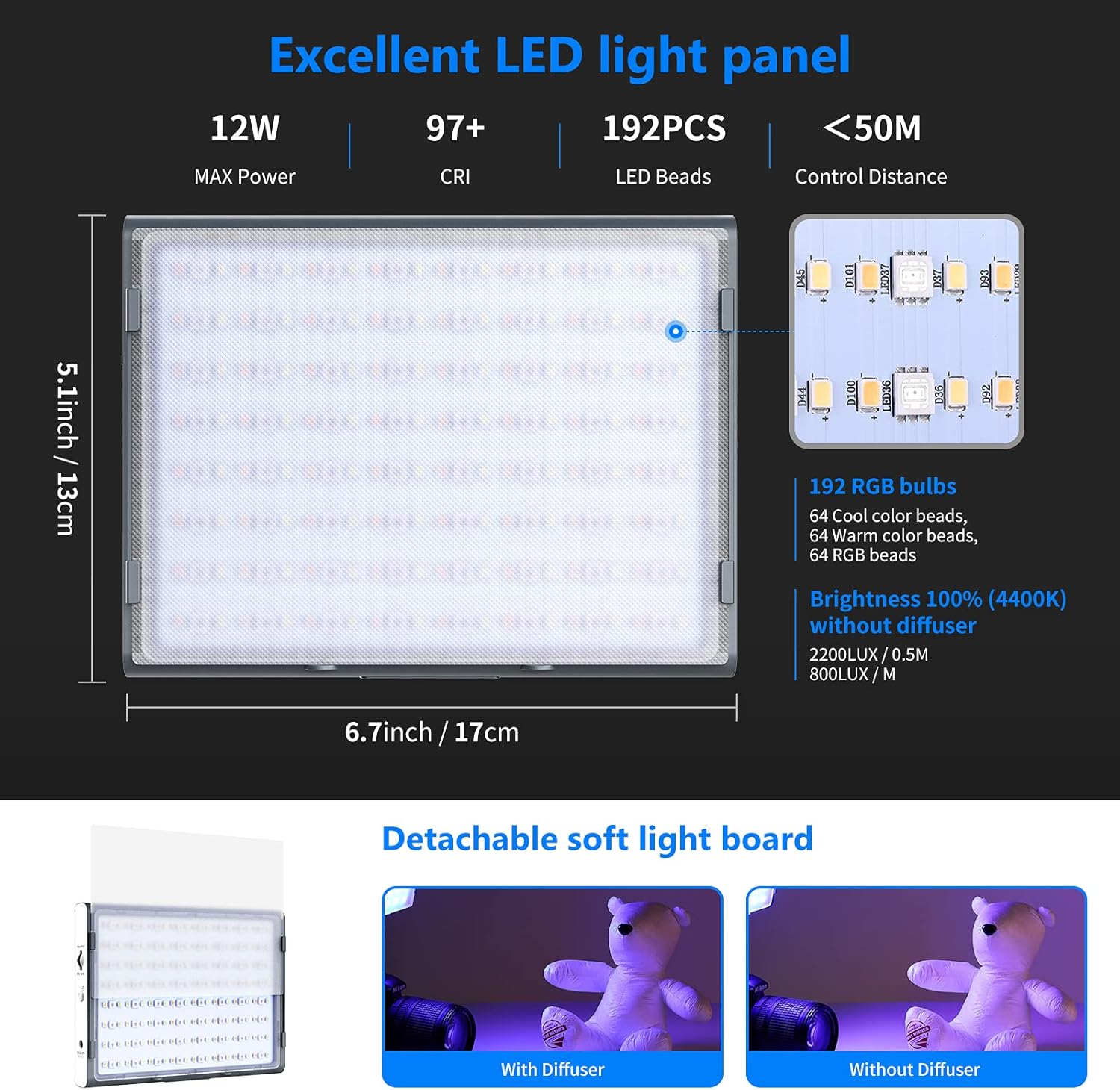
- Dimenzije: 17 cm D x 6.7 cm Š x 1.3 cm V (5.1 cm x 3.3 cm x 13 cm)
- Teža: Približno 1.7 funtov (0.7 kg)
- Največja moč: 12 W
- CRI: 97+
- LED kroglice: 192 (64 Cool, 64 Warm, 64 RGB)
- Nadzorna razdalja: Up to 50 meters (via App)
4. Nastavitev
4.1 Namestitev baterije
- Ensure the light is powered off.
- Open the battery compartment cover on the back of the light.
- Insert the NP-F550 battery, aligning the contacts correctly.
- Trdno zaprite pokrov prostora za baterije.
4.2 Montaža luči
The RGB190 can be mounted on various photographic equipment using the cold shoe mount adapter.

- Attach the cold shoe mount adapter to the 1/4" screw hole at the bottom of the RGB190 light.
- Secure the cold shoe mount adapter onto your camera's hot shoe, a stabilizer, or a tripod.
- Adjust the angle of the light using the adapter's tilt mechanism.
5. Navodila za uporabo
5.1 Vklop/izklop
Press and hold the Power On/Off button for approximately 2 seconds to turn the light on or off. A short press will put the light into standby mode.
5.2 Mode Selection and Adjustment
Short press the 'M' (Mode) button to switch between the available lighting modes: HSI, CCT, and Scene.

HSI Mode (Hue-Saturation-Intensity)
- In HSI mode, rotate the Adjust/SET dial to change the Hue (0-360°).
- Press the Adjust/SET dial to switch to Saturation adjustment (0-100%). Rotate the dial to change saturation.
- Press the Adjust/SET dial again to switch to Brightness adjustment (0-100%). Rotate the dial to change brightness.
Način CCT (barvna temperatura)
- In CCT mode, rotate the Adjust/SET dial to change the Color Temperature (3200K-5600K).
- Press the Adjust/SET dial to switch to Brightness adjustment (0-100%). Rotate the dial to change brightness.
Scene Mode
The RGB190 offers 9 pre-programmed scene effects to enhance your creative lighting.
- In Scene mode, rotate the Adjust/SET dial to cycle through the 9 scene effects: Lightning 1, Lightning 2, Display Screen, Party, Fireworks, Candlelight, Squad Car, Ambulance, Fire Engine.
- Some scenes may have adjustable parameters (e.g., speed or intensity) which can be changed by pressing the Adjust/SET dial and then rotating it.
5.3 Nadzor aplikacij
The Neewer RGB190 can be controlled wirelessly via the Neewer app (Android 4.3 / iOS 11.1 or above).

- Download the 'Neewer' app from your device's app store (Apple App Store or Google Play Store).
- Prepričajte se, da je Bluetooth omogočen na vaši mobilni napravi.
- Open the Neewer app and select 'NEEEWER-RGB190' from the device list to connect.
- Once connected, you can adjust color temperature, brightness, hue (0-360°), and saturation (0-100%) directly from the app.
- The app also includes an RGB wheel for quick color selection, allows saving two presets, and supports controlling up to eight lights simultaneously.
6. Battery and Power Options
The RGB190 offers flexible power options for both indoor and outdoor use.

- Moč baterije: The light is powered by the supplied 2600mAh NP-F550 Li-ion battery. This battery is removable and interchangeable with other NP-F series batteries (NP-F550/NP-F750/NP-F970).
- AC napajanje: For continuous indoor use, the light can be powered by an AC adapter (12-15V, not included) connected to the power input port.
- Polnjenje: Use the provided battery charger and Micro USB charging cable to recharge the NP-F550 battery.
7. Vzdrževanje
- Clean the light panel and body with a soft, dry cloth. Do not use abrasive cleaners or solvents.
- Svetilko shranjujte na hladnem in suhem mestu, stran od neposredne sončne svetlobe in ekstremnih temperatur.
- Remove the battery if the light will not be used for an extended period.
8. Odpravljanje težav
8.1 Lučka se ne prižge
- Check if the battery is correctly installed and charged.
- If using an AC adapter, ensure it is properly connected and providing power.
- Press and hold the power button for 2 seconds to ensure it's not in standby mode.
8.2 Težave s povezavo aplikacije
- Ensure Bluetooth is enabled on your mobile device and the light.
- Make sure the light is within the 50-meter control range.
- Restart the Neewer app and try reconnecting.
- Ensure your app version is up to date.
8.3 Inconsistent Light Output
- Preverite raven napolnjenosti baterije; nizka napolnjenost baterije lahko vpliva na delovanje.
- Ensure no obstructions are blocking the light panel.
- Verify settings in HSI or CCT mode are as desired.
9. Garancija in podpora
Neewer products are designed for reliability and performance. For warranty information or technical support, please refer to the official Neewer webspletno mesto ali se obrnite neposredno na njihovo službo za stranke. Račun shranite kot dokazilo o nakupu za uveljavljanje garancije.


