Uvod
Thank you for choosing the havit RGB Gaming Mouse HV-MS733. This manual provides detailed instructions on how to set up, operate, and maintain your new gaming mouse. Please read this manual carefully before use to ensure optimal performance and longevity of your device.

Spredaj zgoraj view of the havit RGB Gaming Mouse, showcasing its pink color, ergonomic design, and RGB lighting.
Nastavitev
Priključitev miške
- Unpack the havit RGB Gaming Mouse from its packaging.
- Locate an available USB port on your computer (PC or laptop).
- Priključite USB priključek miške v vrata USB.
- Your operating system should automatically detect and install the necessary drivers. No additional software installation is typically required for basic functionality.
- Miška je zdaj pripravljena za uporabo.

The havit RGB Gaming Mouse connected to a computer, ready for use.
Navodila za uporabo
Funkcije gumbov
The havit RGB Gaming Mouse features 7 programmable buttons for enhanced control and customization.
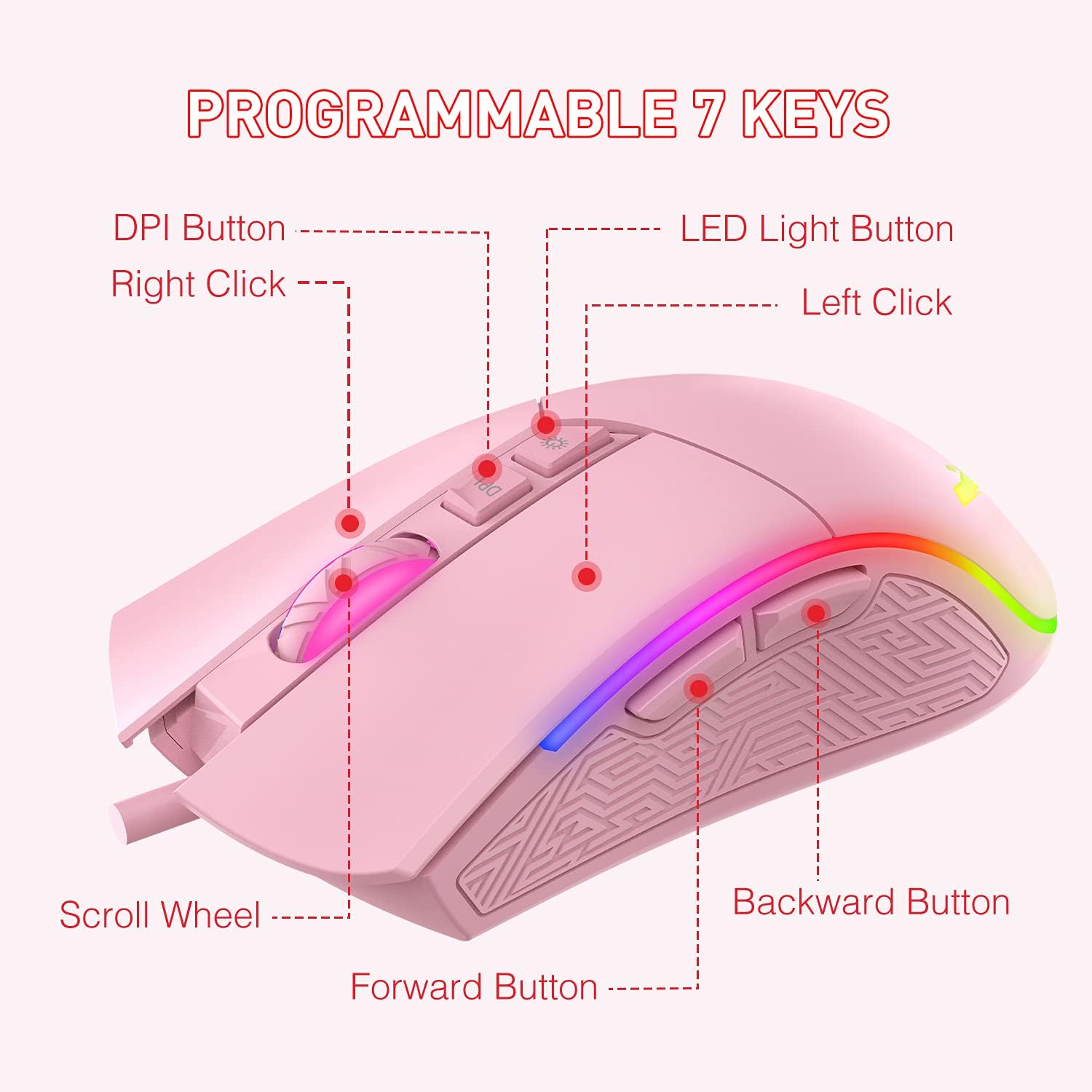
A diagram illustrating the function of each of the 7 programmable buttons on the mouse: Left Click, Right Click, Scroll Wheel, DPI Button, LED Light Button, Forward Button, and Backward Button.
- Levi klik: Standardni primarni gumb miške.
- Desni klik: Standardni sekundarni gumb miške.
- Kolesce za pomikanje: For vertical scrolling and as a clickable middle button.
- Gumb DPI: Preklaplja med stopnjami občutljivosti DPI.
- LED gumb za luč: Changes RGB lighting modes.
- Gumb za naprej: Navigacija naprej v web brskalniki oz file raziskovalci.
- Gumb za nazaj: Navigacija nazaj v web brskalniki oz file raziskovalci.
Prilagoditev DPI
The mouse offers 6 adjustable DPI (Dots Per Inch) levels, allowing you to customize cursor sensitivity to your preference. Press the Gumb DPI to cycle through the available settings. Each DPI level is indicated by a specific LED color:

A visual representation of the six DPI levels (800, 1600, 2400, 3200, 4000, 4800) and their corresponding LED colors (Green, Purple, Blue, Red, Cyan, Yellow).
- 800 DPI: Zelena LED
- 1600 DPI: Vijolična LED
- 2400 DPI: Modra LED
- 3200 DPI: Rdeča LED
- 4000 DPI: Cian LED
- 4800 DPI: Rumena LED
Načini osvetlitve RGB
The mouse features 7 distinct RGB lighting modes. Press the Gumb za LED lučko to switch between these modes or to turn the lighting off.

An image displaying the seven different RGB lighting modes available on the havit gaming mouse: Breathing, Colorful Streaming, Rainbow, Floe Light, Waltz, 4-Seasons, and LED Off.
- Način dihanja
- Colorful Streaming Mode
- Mavrični način
- Floe Light Mode
- Waltz Mode
- 4-Seasons Mode
- LED ugasnjen
Vzdrževanje
Proper care and maintenance will extend the life of your gaming mouse.
- Čiščenje: Za brisanje površine miške uporabite mehko, suho krpo. Za trdovratno umazanijo rahlo obrišiteampkrpo sperite z vodo. Izogibajte se uporabi agresivnih kemikalij ali abrazivnih materialov.
- Skrb za kabel: Do not pull or yank the USB cable. Store the cable neatly to prevent tangling and damage.
- Shranjevanje: Ko miške ne uporabljate, jo shranjujte v čistem in suhem okolju, stran od ekstremnih temperatur.
- Izogibajte se tekočinam: Keep the mouse away from liquids to prevent internal damage.
Odpravljanje težav
If you encounter any issues with your havit RGB Gaming Mouse, please refer to the following common solutions:
| Težava | rešitev |
|---|---|
| Miška se ne odziva |
|
| Nastavitve DPI se ne spreminjajo |
|
| RGB osvetlitev ne deluje ali se zatakne |
|
| Gibanje kazalca je neenakomerno |
|
Specifikacije
Below are the technical specifications for the havit RGB Gaming Mouse HV-MS733:

A diagram showing the physical dimensions of the mouse: 132mm length, 68mm width, and 42.5mm height.
| Funkcija | Podrobnost |
|---|---|
| Številka modela | HV-MS733 |
| Povezljivost | Žični USB |
| DPI ravni | 800, 1600, 2400, 3200, 4000, 4800 |
| Število gumbov | 7 (programabilne) |
| Razsvetljava | RGB Backlit (7 modes) |
| Ročna orientacija | Obojepravni |
| Posebna funkcija | Ergonomsko oblikovanje |
| Teža predmeta | 7 unč (približno 198 gramov) |
| Dimenzije (D x Š x V) | 132 mm x 68 mm x 42.5 mm (5.2 x 2.68 x 1.67 palca) |
Garancija in podpora
For warranty information and customer support, please refer to the documentation included with your purchase or visit the official havit webspletnega mesta. Shranite dokazilo o nakupu za uveljavljanje garancije.


