1. Uvod
The GTMEDIA V8 TURBO is a versatile Full HD 1080P TV receiver designed to provide a comprehensive viewing experience. It supports multiple digital video broadcasting standards including DVB-S2/S2X, DVB-T2, Cable, and J.83B, ensuring compatibility with various signal sources. Featuring H.265 video decoding, a built-in WiFi module, and a CA card slot, this set-top box offers advanced functionality for home entertainment.
This manual provides detailed instructions for setting up, operating, and maintaining your GTMEDIA V8 TURBO TV Receiver. Please read it thoroughly before use to ensure proper installation and optimal performance.
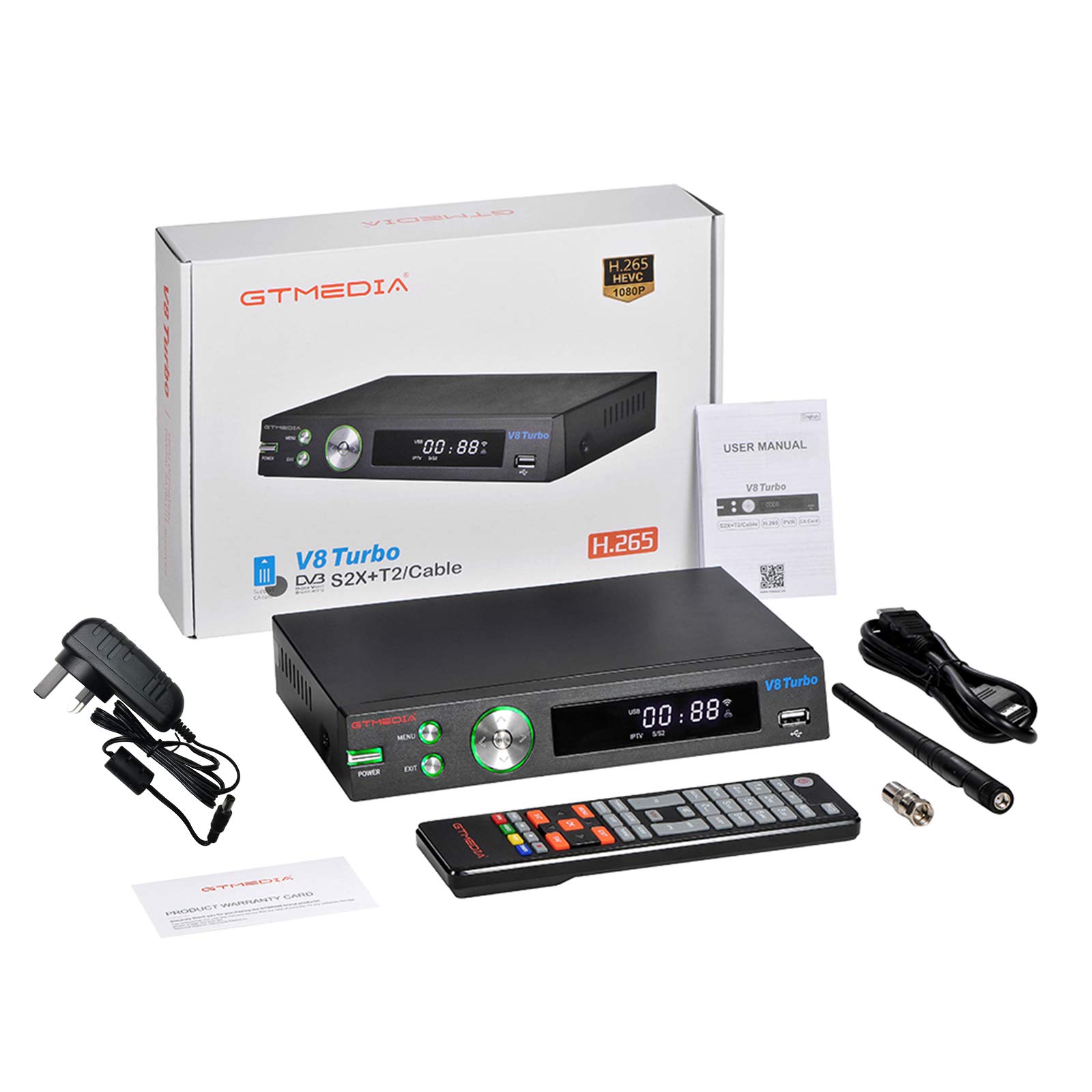
Image 1.1: GTMEDIA V8 TURBO TV Receiver in a home entertainment setup.
2. Vsebina paketa
Please check the package carefully to ensure all items are present and in good condition. If any item is missing or damaged, contact your retailer.
- 1 x GTMEDIA V8 TURBO TV Receiver
- 1 x daljinski upravljalnik
- 1 x napajalnik
- 1 x HD kabel (HDMI)
- 1 x uporabniški priročnik

Image 2.1: All components included in the GTMEDIA V8 TURBO package.
3. Izdelek je končanview
3.1 Sprednja plošča
The front panel of the GTMEDIA V8 TURBO features essential controls and indicators for easy access.
- Gumb za prižig: Vklopi ali izklopi napravo.
- Gumb MENU: Dostop do glavnega menija.
- Gumb EXIT: Izhod iz trenutnega menija ali zaslona.
- Navigation Buttons (Left/Right/Up/Down/OK): Uporablja se za navigacijo in izbiranje po menijih.
- Vrata USB: For connecting USB storage devices for media playback or software upgrades.
- LED zaslon: Prikazuje številko kanala, čas ali stanje delovanja.

Image 3.1: Front panel layout of the GTMEDIA V8 TURBO receiver.
3.2 Zadnja plošča
The rear panel provides all necessary connection ports for external devices.
- LNB IN: Connects to a satellite dish.
- MRAVLJE V: Connects to a terrestrial antenna or cable TV signal.
- HD IZHOD (HDMI): Connects to your TV for high-definition video and audio output.
- SCART: Connects to older TVs or video equipment.
- ETHERNET: Povezuje se z žičnim omrežjem za dostop do interneta.
- RS232: For advanced software upgrades or debugging.
- DC 12 V: Vhod za napajanje.
- WIFI ANT: Connector for the external WiFi antenna.
- Stikalo za vklop: Main power toggle switch.
- CA Card Slot: For inserting Conditional Access (CA) cards.

Image 3.2: Rear panel connections of the GTMEDIA V8 TURBO receiver.
4. Nastavitev
Follow these steps to set up your GTMEDIA V8 TURBO TV Receiver.
4.1 Priključitev na televizor
- Ensure your TV and the V8 TURBO receiver are turned off.
- Connect one end of the provided HD Cable (HDMI) to the HD IZHOD vrata na sprejemniku, drugi konec pa na razpoložljiv vhod HDMI na televizorju.
- Alternatively, for older TVs, connect a SCART cable (not included) from the SCART vrata na sprejemniku in SCART vhod na televizorju.
4.2 Connecting Antenna/Satellite
- For satellite reception, connect your satellite dish cable to the LNB IN pristanišče.
- For terrestrial or cable reception, connect your antenna or cable TV signal to the MRAVLJICA V pristanišče.
4.3 Priključitev napajanja
- Connect the power supply adapter to the DC 12V vrata na sprejemniku.
- Priključite napajalnik v stensko vtičnico.
- Ensure the main Stikalo za vklop on the rear panel is in the 'ON' position.
4.4 Omrežna povezava
- WiFi: Screw the external WiFi antenna onto the WIFI MRAVLJA connector on the rear panel. Once powered on, you can configure WiFi settings through the system menu.
- Ethernet: Priključite ethernetni kabel iz usmerjevalnika v Ethernet vrata na sprejemniku.
4.5 CA Card Insertion
If you have a Conditional Access (CA) card for encrypted channels, insert it into the CA Card Slot on the rear panel, ensuring correct orientation as indicated on the slot.
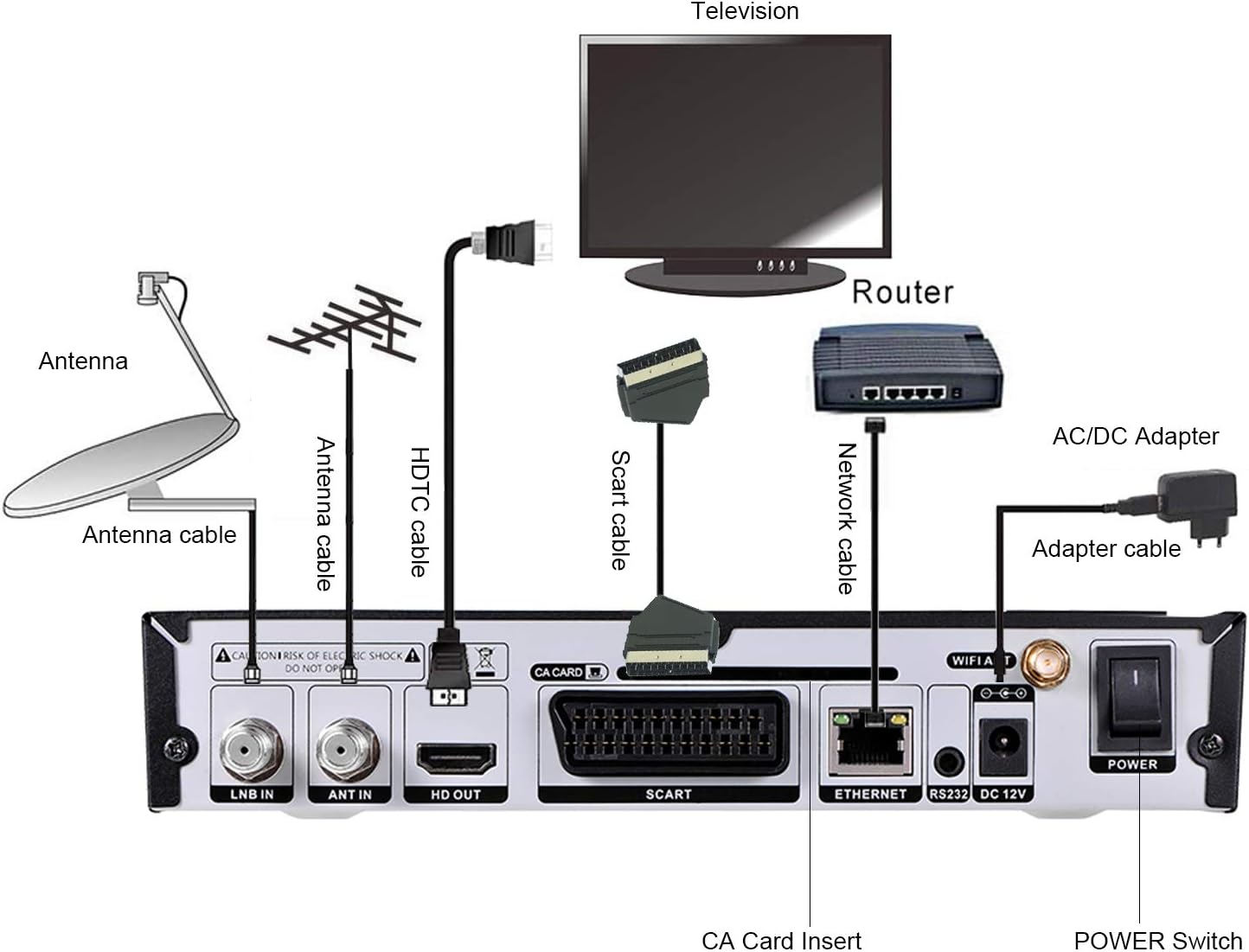
Image 4.1: Connection diagram for the GTMEDIA V8 TURBO receiver.
5. Navodila za uporabo
This section covers basic operation and key features of your receiver.
5.1 Začetni vklop in prva namestitev
- Turn on your TV and select the correct HDMI or SCART input.
- Pritisnite MOČ button on the receiver or remote control.
- The receiver will boot up. Follow the on-screen instructions for initial setup, which typically includes language selection, region, and antenna/satellite configuration.
5.2 Pregled kanala
After initial setup, you will need to scan for channels.
- Pritisnite MENI gumb na daljinskem upravljalniku.
- Navigate to 'Installation' or 'Channel Search'.
- Select your signal type (Satellite, Terrestrial, or Cable) and initiate an 'Auto Scan' or 'Manual Scan'.
- Počakajte, da se skeniranje zaključi. To lahko traja nekaj minut.
5.3 Upravljanje kanalov
The receiver offers various channel editing functions:
- najljubši: Create custom lists of your preferred channels.
- premakniti: Reorder channels in your list.
- Zaklepanje: Protect channels with a password.
- Preskoči: Hide unwanted channels from the main list.
- Izbriši: Remove channels permanently.
- Preimenuj: Change channel names.
- Najdi: Quickly locate channels by name.
- Razvrsti: Arrange channels by various criteria (e.g., alphabetical, transponder).
Access these functions via the 'Channel Manager' or 'Edit Channel' menu option.
5.4 Predvajanje medijev
Connect a USB storage device to the front USB port to play media files.
- Insert a USB drive containing compatible media files (e.g., video, audio, images).
- Pritisnite MENI button and navigate to 'Multimedia' or 'USB'.
- Izberite želeno file type and browse your USB drive to play content.
5.5 naprednih funkcij
- BISS Auto Roll, Full PowerVu, DRE & Biss Key Support: The receiver supports automatic key updates for certain encrypted channels.
- Unicable, DiSEqC1.0/1.1/1.2/USALS Motor Support: Advanced satellite dish control for multi-LNB or motorized systems. Configure these settings in the 'Satellite Setup' menu.
- Multi-room Support: Allows sharing of CA card access across multiple receivers (requires specific network configuration and compatible devices).
6. Vzdrževanje
Proper maintenance ensures the longevity and optimal performance of your GTMEDIA V8 TURBO receiver.
- Čiščenje: Za čiščenje zunanjosti sprejemnika uporabite mehko, suho krpo. Ne uporabljajte tekočih čistil ali abrazivnih materialov.
- Prezračevanje: Ensure the receiver is placed in a well-ventilated area. Do not block the ventilation openings.
- Ugasniti: If the receiver will not be used for an extended period, disconnect it from the power outlet.
- Nadgradnja programske opreme: Periodically check for software updates on the GTMEDIA official website. Updates can be performed via the USB port or RS232 port as described in the system menu.
7. Odpravljanje težav
If you encounter issues with your GTMEDIA V8 TURBO, refer to the following common problems and solutions.
| Težava | Možen vzrok | rešitev |
|---|---|---|
| Brez moči | Power cable disconnected; Power switch off; Faulty power adapter | Check power cable connection; Ensure rear power switch is ON; Try a different power outlet. |
| Ni signala / Črn zaslon | Incorrect TV input; Antenna/satellite cable loose or disconnected; No channels scanned; Weak signal | Select correct HDMI/SCART input on TV; Check antenna/satellite cable connections; Perform a channel scan; Adjust antenna/dish for better signal. |
| Daljinski upravljalnik ne deluje | Batteries depleted; Obstruction between remote and receiver; Remote sensor blocked | Replace batteries; Remove any obstructions; Ensure remote is pointed at the receiver's front panel. |
| Slaba kakovost slike/zvoka | Weak signal; Incorrect video/audio settings | Check signal strength in menu; Adjust antenna/dish; Verify video/audio output settings in system menu. |
| Težave s povezavo Wi-Fi | WiFi antenna loose; Incorrect password; Router too far; Internal WiFi module issue | Ensure WiFi antenna is securely attached; Re-enter WiFi password; Move receiver closer to router or use Ethernet; Contact support if issue persists. |
8. Specifikacije
Detailed technical specifications for the GTMEDIA V8 TURBO TV Receiver.
- Pogostost CPU-ja: 770MHz Dual Core HEVC 10Bit
- Flash pomnilnik: 64 MB SPI Flash
- Pomnilnik DDR2: 1G bit RAM
- Demultiplexer: ISO/IEC 13818-1
- Input Bit Rate: Max 100Mbit/s
- Video dekodiranje: HEVC main profile@level 4.1 and main10 profile@L4.1, High tier MPEG-2 MP@ML, H.264 BP, MP&HP@L3/L4.1/L4.2, AVS Jizhun profile and broadcast profile, MPEG-4 SP profile, advanced simple profile@L5, VC1 SP@ML, MP@HL, AP@L0-3, H263 baseline profile, JPEG decoder
- PAL/NTSC: Automatic PAL/NTSC conversion
- Razmerje stranic: Auto, 16:9 Pillar box, 4:3 Pan & Scan, 4:3 Letter Box
- Avdio dekodiranje: MPEG-1/2 Layer 1/2/3, MPEG-2/4 LC-AAC, MPEG-4 HE-AAC, Dolby AC3/AC3+, DRA CH/5.1CH
- Panel Display: 4-mestni LED zaslon
- WiFi: Built-in 2.4G WiFi Support IEEE 802.11b/g/n
- Nadgradnja programske opreme: Through USB port and RS232
- Funkcije kanala: Recording one channel, view another channel under same TP, various editing functions (favorite, move, lock, skip, delete, rename, find, sort)
- Vhodna voltage: AC 100V-250V, 50 / 60Hz
- Poraba energije: 10W (operation), ≤1W (standby)
- Dimenzije izdelka: 27.1 x 19.6 x 5.9 cm (10.7 x 7.7 x 2.3 palca)
- Teža izdelka: 890 g (30.9 oz)
- Tehnologija povezljivosti: USB, HDMI, Ethernet, SCART
- Vrsta regulatorja: Daljinski upravljalnik
- Posebne lastnosti: Multi-room, Advanced Signal Processing
- Združljive naprave: televizija
- Skupno število vrat HDMI: 1
- Način avdio izhoda: Stereo, prostorski zvok
- Konfiguracija kanala za prostorski zvok: 5.1
- Video kodiranje: HEVC Main 10

Image 8.1: Physical dimensions of the GTMEDIA V8 TURBO receiver.
9. Informacije o garanciji
GTMEDIA products are manufactured to high-quality standards. This product comes with a standard manufacturer's warranty against defects in materials and workmanship. The specific terms and duration of the warranty may vary by region and retailer. Please retain your proof of purchase for warranty claims.
The warranty typically covers manufacturing defects but does not cover damage caused by misuse, accidents, unauthorized modifications, or normal wear and tear. For detailed warranty information, please refer to the warranty card included in your package or contact your point of purchase.
10. Podpora
For technical assistance, troubleshooting beyond this manual, or warranty inquiries, please contact GTMEDIA customer support or your retailer.
- Refer to the official GTMEDIA website for the latest support information, FAQs, and software updates.
- Contact details for customer service may be found on the product packaging or the GTMEDIA webmesto.