1. Uvod
This instruction manual provides detailed guidance for the installation, operation, and maintenance of your Beghelli Dom-e Wi-Fi Full HD Pan/Tilt Surveillance Camera. Please read this manual thoroughly before using the product to ensure proper functionality and safety. Keep this manual for future reference.

Figure 1: Beghelli Dom-e Wi-Fi Full HD Pan/Tilt Surveillance Camera.
2. Izdelek je končanview
The Beghelli Dom-e Wi-Fi Camera is a versatile surveillance device designed for indoor use, offering Full HD 1080p resolution and comprehensive monitoring capabilities. It integrates seamlessly into your smart home system via the Dom-e Beghelli application.
Ključne značilnosti:
- Full HD 1080p Ločljivost: Zagotavlja jasen in podroben video footage.
- Funkcionalnost obračanja in nagiba: Motorized rotation of 355° horizontally and 85° vertically, controllable via the app.
- Nočni vid: Equipped with IR LEDs for clear visibility up to 10 meters in low-light conditions.
- Zaznavanje gibanja: Sends real-time push notifications to your smartphone upon detecting movement, including specific person detection.
- Samodejno sledenje: The "Tracking" function enables the camera to automatically follow moving subjects.
- Dvosmerni zvok: Built-in microphone and speaker allow for hands-free communication.
- Prilagodljive možnosti snemanja: Record directly to your smartphone, to a MicroSD card (up to 128GB, not included), or via optional cloud storage.
- Povezljivost Wi-Fi: Connects to your home Wi-Fi network (2.4 GHz).
- Šifriranje podatkov: Ensures the security of your video data.
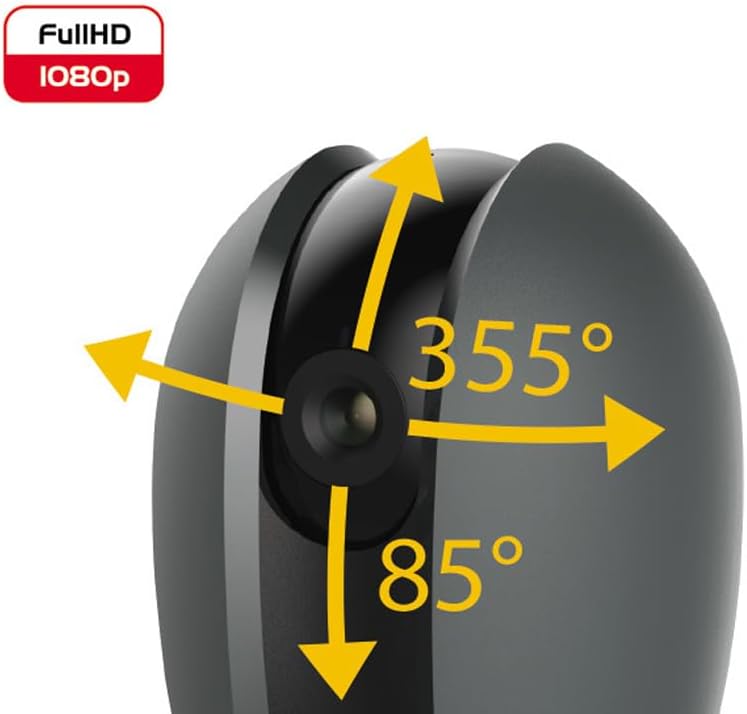
Figure 2: Camera's pan and tilt capabilities.
3. Vsebina paketa
Preverite, ali so v paketu prisotni vsi elementi:
- Beghelli Dom-e Wi-Fi Full HD Pan/Tilt Surveillance Camera
- USB Power Adapter (230V – DC 5V/1A)
- Mounting accessories (if included, not explicitly listed but implied by "wall or ceiling installation")
- Navodila za uporabo (ta dokument)

Figure 3: Product packaging for the Beghelli Dom-e Camera.
4. Nastavitev
4.1 Vklop kamere
- Connect the provided USB power adapter to the camera's power input.
- Plug the adapter into a standard 230V power outlet. The camera will power on and initiate its startup sequence.
4.2 Namestitev mobilne aplikacije
The Beghelli Dom-e camera is controlled via the dedicated "Dom-e Beghelli" mobile application.
- Download the "Dom-e Beghelli" app from the Apple App Store (for iOS 8.0 or later) or Google Play Store (for Android 4.2 or later).
- Namestite aplikacijo na pametni telefon ali tablični računalnik.
- Registrirajte se za nov račun ali se prijavite, če ga že imate.
4.3 Povezovanje z omrežjem Wi-Fi in seznanjanje
Ensure your Wi-Fi network is 2.4 GHz (IEEE802.11 b/g/n). The camera does not support 5 GHz networks.
- Open the Dom-e Beghelli app and follow the on-screen instructions to add a new device.
- Select the Beghelli Dom-e camera from the list of available devices.
- Enter your Wi-Fi network name (SSID) and password when prompted.
- The app will guide you through the pairing process, which typically involves scanning a QR code displayed on your phone with the camera, or listening for an audio prompt.
- Once successfully paired, the camera's status indicator will change, and you will see the live feed in the app.

Figure 4: Simplified setup steps via the Dom-e Beghelli app.
4.4 Namestitev fotoaparata
Kamero je mogoče namestiti na steno ali strop. Izberite lokacijo, ki zagotavlja želeno viewkota in je v dosegu vašega omrežja Wi-Fi ter električne vtičnice.
- Mark the drilling points on the desired surface using the mounting template (if provided).
- Po potrebi izvrtajte luknje in vstavite zidne vložke.
- Secure the mounting bracket (if provided) to the surface.
- Pritrdite kamero na nosilec.
- Adjust the camera's angle manually or via the app after installation.
5. Navodila za uporabo
5.1 V živo View in nadzor vrtenja/nagiba
- Open the Dom-e Beghelli app and select your camera to view krma v živo.
- Use the directional controls within the app to pan the camera horizontally (355°) and tilt it vertically (85°) to adjust the viewobmočje.
5.2 Zaznavanje gibanja in obvestila
- V aplikaciji pojdite v nastavitve kamere, da omogočite zaznavanje gibanja.
- Configure sensitivity levels and detection zones as needed.
- Omogočite potisna obvestila, da boste na pametni telefon prejemali opozorila, ko zazna gibanje.
- The camera also features person detection for more accurate alerts.
5.3 Dvosmerni zvok
- Medtem ko viewing the live feed, tap the microphone icon in the app to speak through the camera's speaker.
- The camera's built-in microphone will capture audio from the monitored area, allowing you to listen in.
5.4 Snemanje in shranjevanje
- Snemanje na kartico MicroSD: Insert a MicroSD card (up to 128GB, not included) into the camera's slot for continuous recording or event-triggered recording.
- Smartphone Recording: You can manually record video clips directly to your smartphone while viewprenos v živo.
- Shramba v oblaku: An optional cloud storage service is available via subscription for off-site video backup. Refer to the app for details.
- Predvideno snemanje: Set up specific times for the camera to record automatically through the app settings.
5.5 Nočni vid
The camera automatically switches to night vision mode in low-light conditions, utilizing its IR LEDs to provide clear black-and-white footagdo 10 metrov.
6. Mobile Application (Dom-e Beghelli App)
The Dom-e Beghelli app is the central control interface for your camera and other compatible smart home devices. It allows for:
- Remote control of camera pan and tilt.
- Access to live video feed and recorded footage.
- Configuration of motion detection, notifications, and recording schedules.
- Dvosmerna zvočna komunikacija.
- Integration with other Dom-e smart home devices (e.g., alarms, smart plugs, lighting).
- Voice control compatibility with Google Assistant and Amazon Alexa (if associated with a compatible smartphone).

Figure 5: The Dom-e Beghelli app interface for camera control.
7. Specifikacije
| Funkcija | Specifikacija |
|---|---|
| Številka modela | 60021 |
| Resolucija | Polna HD 1080p (2 milijona slikovnih pik) |
| Senzor | CMOS 1/2.9" |
| Objektiv | 3.6 mm / f2.0 / 105° |
| Hitrost zaklopa | 1/25 - 1/100,000 sec |
| Pan rotacija | 355 ° vodoravno |
| Vrtenje nagiba | 85 ° navpično |
| Območje nočnega vida | Up to 10 meters (IR LEDs) |
| Avdio | Two-way, hands-free (in/out) |
| Shranjevanje | MicroSD card up to 128GB (not included), Smartphone, Cloud (optional subscription) |
| Standardni Wi-Fi | IEEE802.11 b/g/n (2.4 GHz) |
| Frekvenčni pas | 2.4 GHz - 2.4835 GHz |
| Vhodna moč | 230V – DC 5V/1A (USB adapter included) |
| Največja poraba energije | 4.5 W |
| Dimenzije (D x Š x V) | 63 x 58 x 96 mm (Product description) / 7 x 7 x 11 cm (Specifications) |
| Teža | 330 gramov |
| Material | Plastika |
| Združljivost operacijskega sistema | Apple iPhone iOS 8.0 or later / Android 4.2 or later |
| Priporočena uporaba | Notranja varnost |
Note: Some dimensions may vary slightly between product description and specifications list.
8. Vzdrževanje
8.1 Čiščenje
- Pred čiščenjem se prepričajte, da je kamera izklopljena in izklopljena iz električnega omrežja.
- Za brisanje ohišja fotoaparata uporabite mehko, suho krpo.
- For the lens, use a specialized lens cleaning cloth to avoid scratches.
- Ne uporabljajte tekočih čistil, aerosolov ali abrazivnih topil.
8.2 Posodobitve programske opreme
Periodically check the Dom-e Beghelli app for firmware updates. Keeping your camera's firmware updated ensures optimal performance, security, and access to new features.
9. Odpravljanje težav
| Težava | rešitev |
|---|---|
| Kamera se ne vklopi | Ensure the USB power adapter is securely connected to the camera and a working power outlet. Verify the outlet has power. |
| Ni mogoče vzpostaviti povezave z Wi-Fi |
|
| Ni video prenosa v živo |
|
| Zaznavanje gibanja ne deluje |
|
| Cannot reconnect after Wi-Fi password change | If your Wi-Fi password changes, you will likely need to reset the camera and re-pair it with the app using the new Wi-Fi credentials. Refer to the app for device reset instructions. |
10. Garancija in podpora
For warranty information and technical support, please refer to the documentation provided with your purchase or contact Beghelli customer service directly. You can typically find contact details on the Beghelli official website or within the Dom-e Beghelli application.
Manufacturer: Beghelli
Model: 60021


