1. Uvod
This manual provides detailed instructions for the installation, operation, and maintenance of the SINOTIMER TM919A-2 LCD Digital Programmable Timer Switch. This device is designed for automatic control of electrical appliances based on programmed time schedules, offering daily and weekly programming options.
2. Značilnosti izdelka
- Weekly 7-day programmable digital time switch.
- Več voltage options (5V, 12V, 24V, 110V, 220V, 85-265V). This specific model is 220V.
- Detachable battery design for backup power.
- 35mm DIN rail mounting for easy installation.
- LCD display for clear time and program viewing.
- 16 ON/OFF programs per day or week.
- Funkcija ročnega preklapljanja.
- High capacity 16A switching contact.
3. Varnostne informacije
WARNING: Risk of electric shock. Installation should only be performed by a qualified electrician or competent person.
- Pred namestitvijo ali vzdrževanjem se prepričajte, da je napajanje odklopljeno.
- Do not exceed the maximum load capacity of 16A.
- Preverite pravilno voltage supply for the specific model (220V for TM919A-2).
- Napravo hranite stran od vlage in ekstremnih temperatur.
4. Izdelek je končanview in komponente
The SINOTIMER TM919A-2 features an LCD display, control buttons, and wiring terminals for power input and load control.

Slika 4.1: Spredaj view of the SINOTIMER TM919A-2 Digital Timer Switch, showing the LCD display, control buttons (P, D+, H+, M+, RESET, MANUAL), and wiring terminals.

Slika 4.2: The timer switch with its transparent protective cover opened, revealing the control buttons for programming and manual operation.
Gumbi za upravljanje:
- P (Program): Vstopi v način nastavitve programa.
- D+ (Day): Adjusts day of the week or program day.
- H+ (Hour): Adjusts hour or program hour.
- M+ (Minute): Adjusts minute or program minute.
- PONASTAVITI: Ponastavi vse nastavitve na tovarniške privzete vrednosti.
- PRIROČNIK: Toggles output ON/AUTO/OFF.
5. Nastavitev in namestitev
5.1 Shema ožičenja
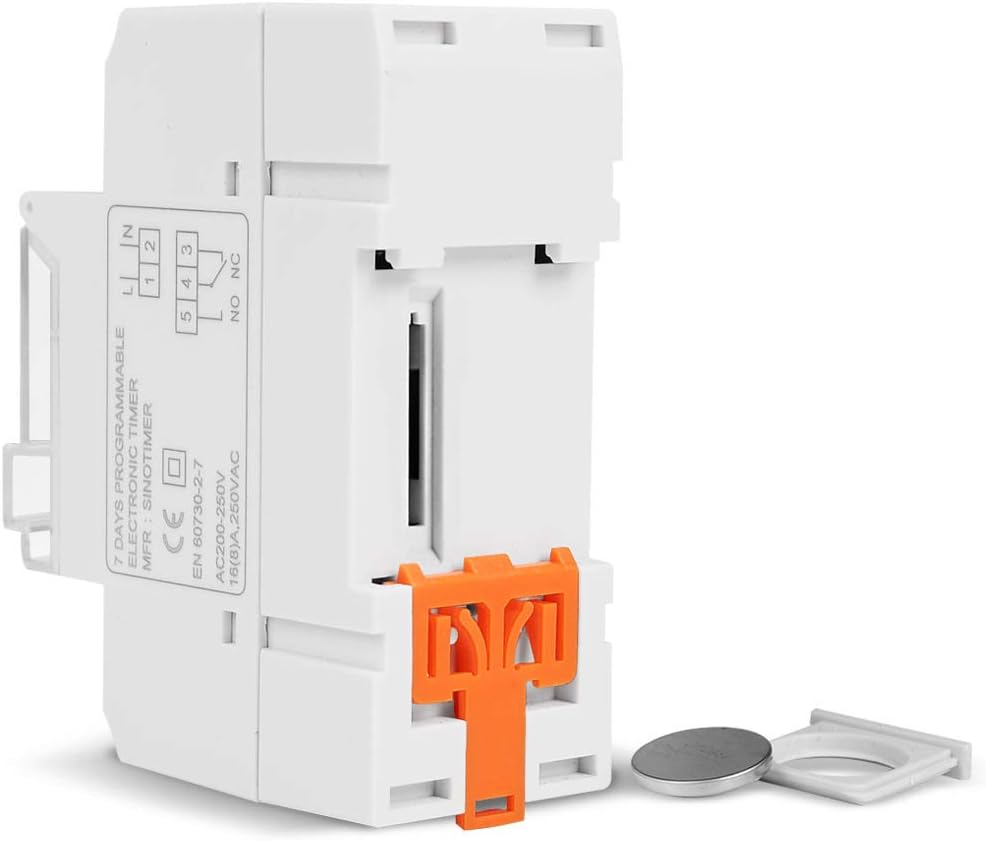
Refer to the wiring diagram on the side of the device and the illustration below for correct connection. Ensure all connections are secure.

Slika 5.1: Stran view of the timer switch displaying the wiring diagram. Terminals 1 and 2 are for power input (L and N). Terminals 3, 4, and 5 are for the relay output (Common, Normally Open, Normally Closed).
- Terminals 1 & 2 (L, N): Connect to the main power supply (220V AC for this model).
- Terminal 3 (NO - Normally Open): Connects to the load when the timer is ON.
- Terminal 4 (COM - Common): Connects to one side of the load and the power supply.
- Terminal 5 (NC - Normally Closed): Connects to the load when the timer is OFF (less common for typical applications).
5.2 Initial Power-up and Reset
Upon first power-up or after a long period without power, the LCD display may be blank. The internal battery provides backup for settings. If the display is unresponsive or shows garbled characters, press the PONASTAVI button using a pointed object (e.g., a pen tip). This will clear all settings and restore the timer to its default state.
5.3 Nastavitev trenutnega časa in dneva
- Pritisnite P button once. The display will show the current time setting.
- Pritisnite D+ da nastavite trenutni dan v tednu.
- Pritisnite H+ da nastavite trenutno uro.
- Pritisnite M+ da nastavite trenutno minuto.
- Pritisnite P button again to exit time setting mode and return to normal operation.
6. Navodila za uporabo
6.1 Programiranje ciklov VKLOP/IZKLOP
Časovnik podpira do 16 programov VKLOP/IZKLOP. Vsak program je sestavljen iz časa VKLOP in časa IZKLOP.
- Pritisnite P button repeatedly until "1 ON" appears on the display. This is the first ON program.
- Pritisnite D+ za izbiro dneva(-ov) za ta program. Možnosti vključujejo posamezne dni, delavnike, vikende ali vseh 7 dni.
- Pritisnite H+ to set the desired hour for the "ON" event.
- Pritisnite M+ to set the desired minute for the "ON" event.
- Pritisnite P again. "1 OFF" will appear. This is the first OFF program.
- Repeat steps 2-4 to set the day(s), hour, and minute for the "OFF" event.
- Nadaljujte s pritiskom P to cycle through "2 ON", "2 OFF", up to "16 ON", "16 OFF". If you do not need all 16 programs, simply press P dokler se zaslon ne vrne na trenutni čas.
- To save and exit programming mode, press the P button until the current time is displayed.
6.2 Ročna preglasitev
The PRIROČNIK button allows you to override the programmed settings temporarily or permanently.
- Pritisnite PRIROČNIK once: Toggles between ON/AUTO/OFF modes.
- VKLOPLJENO: The output is continuously ON, ignoring programs.
- IZKLOPLJENO: The output is continuously OFF, ignoring programs.
- SAMODEJNO: The timer operates according to the programmed ON/OFF cycles. This is the standard operating mode.
7. Vzdrževanje
7.1 Zamenjava baterije
The timer includes a detachable CR2032 lithium battery to maintain time and program settings during power outages. If the display becomes dim or resets frequently, the battery may need replacement.

Slika 7.1: The timer switch shown with its battery compartment open and a CR2032 lithium battery, indicating the detachable battery design.
- Disconnect power to the timer before attempting battery replacement.
- Locate the battery compartment, typically on the side or back of the unit.
- Previdno odstranite staro baterijo CR2032.
- Vstavite novo baterijo CR2032 in pri tem pazite na pravilno polarnost (+ stran navzgor).
- Zaprite predal za baterije.
- Reconnect power and reset the current time and day if necessary.
8. Odpravljanje težav
- Zaslon je prazen:
- Check power supply connections (Terminals 1 & 2).
- Ensure the internal battery is charged or replaced if old.
- Pritisnite PONASTAVI gumb.
- Programi ne delujejo:
- Prepričajte se, da je časovnik vklopljen AUTO mode (check the display for "AUTO"). Press PRIROČNIK za ciklične načine.
- Preverite, ali sta trenutni čas in dan pravilno nastavljena.
- Check that the ON/OFF programs are correctly entered and enabled for the desired days.
- Confirm wiring to the load (Terminals 3, 4, 5) is correct.
- Timer resets unexpectedly:
- The internal battery may be low or depleted. Replace the CR2032 battery.
- Ensure stable power supply to the unit.
9. Specifikacije
| Funkcija | Specifikacija |
|---|---|
| Model | TM919A-2 |
| Napajalnik | 220V AC (as per model) |
| Poraba energije | 4.5 VA (MAKS) |
| Temperaturno območje | -20°C do +50°C |
| Zaslon | LCD |
| Preklopni kontakt | 1 preklopno stikalo |
| Programi | 16 ON/OFF per day or week |
| Histereza | 2 sec/day (at 25°C) |
| Zmogljivost | 16A |
| Obseg časovnika | 1 minuta do 168 ure |
| Minimalni interval | 1 minuta |
| Black-out Memory | 60 days (with internal battery) |
| Teža predmeta | 0.15 kg (5.3 unč) |
| Montaža | 35 mm DIN letev |
| Velikost zaslona | 1.2 palcev |
Slika 9.1: Dimensional drawing of the SINOTIMER TM919A-2, showing measurements in centimeters for height, width, and depth.
10. Garancija in podpora
Specific warranty information for the SINOTIMER TM919A-2 is not provided in the product details. For warranty claims or technical support, please contact your retailer or the manufacturer directly. Keep your purchase receipt as proof of purchase.


