1. Uvod
The Alfatron ALF CAM100 is an HD web camera designed for video conferencing, streaming, and other video communication needs. It provides 1080p video resolution for clear and sharp images. This manual provides instructions for setting up, operating, and maintaining your ALF CAM100 web fotoaparat.
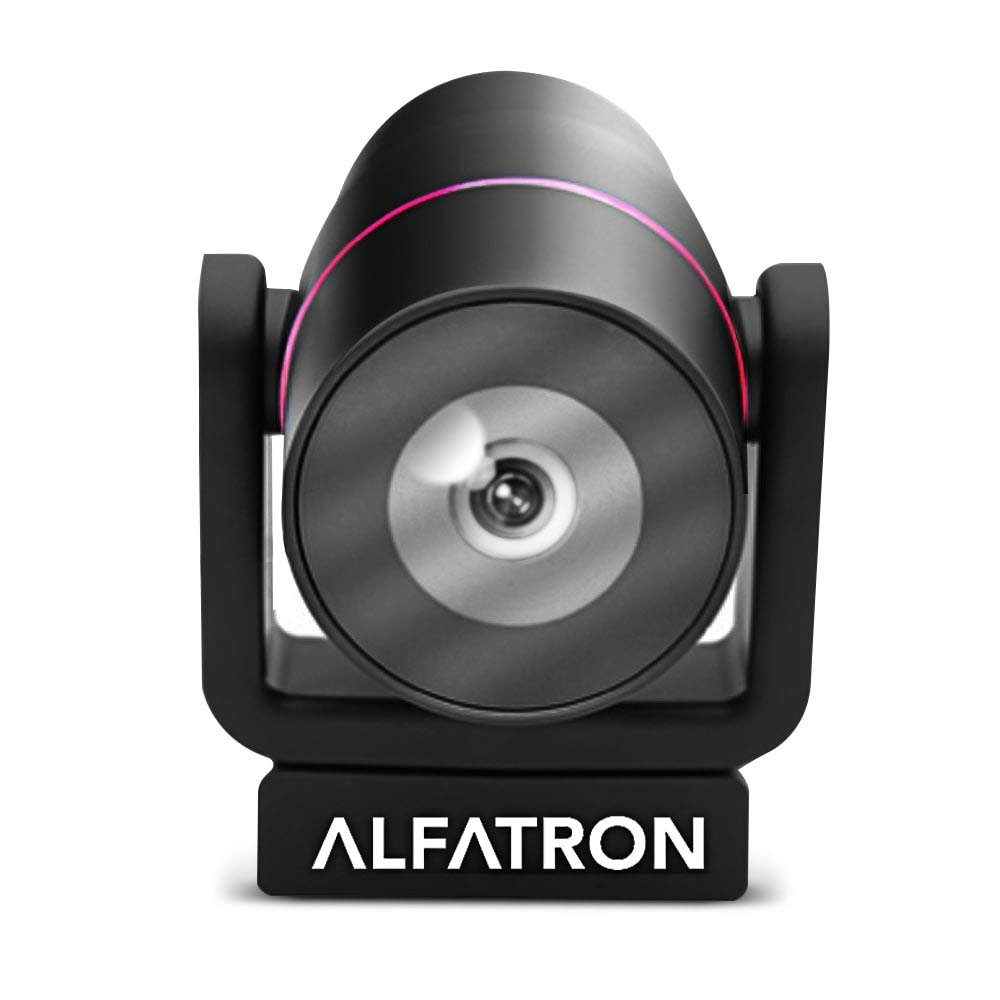
Image 1.1: The Alfatron ALF CAM100 HD Camera, highlighting its 1080p resolution, 120-degree wide shooting angle, and compatibility with video conferencing software like Skype and Zoom.
2. Kaj je v škatli
Preverite, ali so v paketu prisotni vsi elementi:
- Alfatron ALF CAM100 HD Web Kamera
- USB kabel
3. Navodila za nastavitev
The ALF CAM100 web camera is designed for plug-and-play operation, requiring no additional driver installation for most operating systems.
- Priključite USB kabel: Plug the provided USB cable into the USB port on the ALF CAM100 camera.
- Povežite se z računalnikom: Insert the other end of the USB cable into an available USB 2.0 port on your computer.
- Prepoznavanje sistema: Your operating system (Windows, macOS, Linux) should automatically detect and install the necessary drivers for the camera. This process may take a few moments.
- Postavite kamero: Place the camera on a stable surface, monitor, or tripod. The adjustable lens allows for flexible positioning.
- Select Camera in Software: Open your preferred video conferencing or streaming application (e.g., Zoom, Skype, WeChat) and select "ALF CAM100" as your video input device in the application's settings.
4. Navodila za uporabo
4.1 Osnovna operacija
Once connected and selected in your software, the ALF CAM100 will begin streaming video. Ensure adequate lighting for optimal video quality.
4.2 Smart Hanging Mode
The camera features an intelligent hanging mode. If the camera is mounted upside down, it will automatically detect the orientation and adjust the video image stream accordingly, ensuring the picture is always right-side up.

Image 4.1: The Alfatron ALF CAM100 camera mounted in a conference room setting, illustrating its use and the intelligent hanging mode feature that automatically adjusts image orientation.
4.3 Adjustable Lens
The ALF CAM100 is equipped with a mechanically adjustable lens. This allows for precise framing and angle adjustments to achieve the desired view for your video calls or recordings.
5. Funkcije nadview
- Videoposnetek visoke ločljivosti: Streams in 1080p for clear and sharp video quality.
- Wide Range Shooting Angle: Features a 120-degree wide-angle lens to capture more of the environment.
- Univerzalna združljivost: Works with popular video meeting software including Zoom, Skype, and WeChat.
- Plug and Play: Simple USB connection with no driver installation required for most systems.
- Smart Hanging Mode: Automatically adjusts video orientation if the camera is mounted upside down.
- Nastavljiva leča: Mechanically adjustable lens for flexible framing and angle adjustments.
- Zmogljivost pri šibki svetlobi: Designed to perform well in low-light conditions.
6. Vzdrževanje
Proper maintenance ensures the longevity and optimal performance of your ALF CAM100 web fotoaparat.
- Čiščenje leče: Za nežno brisanje objektiva fotoaparata uporabite mehko krpo, ki ne pušča vlaken in je posebej zasnovana za optične leče. Izogibajte se abrazivnim materialom ali močnim kemikalijam.
- Čiščenje telesa: Wipe the camera body with a soft, dry cloth. If necessary, a slightly damp Krpo lahko uporabite, vendar pazite, da v kamero ne pride vlaga.
- Shranjevanje: When not in use for extended periods, store the camera in a clean, dry place away from direct sunlight and extreme temperatures.
- Skrb za kabel: Da preprečite poškodbe, se izogibajte pretiranemu upogibanju ali zvijanju kabla USB.
7. Odpravljanje težav
If you encounter issues with your ALF CAM100 web kamero, glejte naslednje pogoste rešitve:
- Kamera ni zaznana:
- Prepričajte se, da je kabel USB varno priključen tako na fotoaparat kot na računalnik.
- Try connecting the camera to a different USB port on your computer.
- Znova zaženite računalnik.
- Check your operating system's device manager (Windows) or system information (macOS) to see if the camera is listed.
- Brez video izhoda:
- Verify that the ALF CAM100 is selected as the video input device in your video conferencing or streaming application's settings.
- Ensure no other application is currently using the camera, as some software may not allow simultaneous access.
- Check for any privacy settings on your operating system that might be blocking camera access for certain applications.
- Slaba kakovost videa:
- Ensure adequate lighting in your environment. The camera performs best with sufficient illumination.
- Clean the camera lens using a soft, lint-free cloth.
- Check your internet connection speed if streaming, as low bandwidth can affect video quality.
- Confirm that your video application is set to use 1080p resolution if available.
8. Specifikacije
| Funkcija | Podrobnost |
|---|---|
| Številka modela | ALFCAM100 |
| Dimenzije | 104mm x 139mm x 124mm / 7.48 x 6.1 x 5.12 inches |
| Neto teža | 500 g / 1.93 funtov |
| barva | Črna |
| Vmesnik | USB 2.0 |
| Objektiv | 1/2.8, fixed focus, 120-degree angle |
| Senzor | Full HD CMOS Sensor |
| Video ločljivost | 1920 x 1080 (1080p) |
| Hitrost prenosa slike | Do 30 FPS |
| Aperture Coefficient | F2.0 |
| Posebna funkcija | Zmogljivost pri slabi svetlobi |
Note: Dimensions and weight are provided in both metric and imperial units as found in product data.
9. Garancija in podpora
The Alfatron ALF CAM100 comes with a limited 7-year warranty.
For technical support or warranty claims, please refer to the official Alfatron webspletno mesto ali se obrnite na njihovo službo za pomoč strankam. Kontaktni podatki so običajno na voljo na embalaži izdelka ali na proizvajalčevem webmesto.


