1. Uvod
The Epomaker Ajazz i610T is a compact 61-key mechanical keyboard designed for versatility and performance. It supports both Bluetooth wireless and wired (Type-C) dual-mode connectivity, allowing connection to up to three devices simultaneously. Featuring N-key rollover and 17 distinct backlight effects, this keyboard is suitable for various applications, including gaming and professional work environments.
This manual provides detailed instructions for setting up, operating, maintaining, and troubleshooting your Ajazz i610T keyboard.
2. Vsebina paketa
Prosimo, preverite paket za naslednje artikle:
- 1 x mehanska tipkovnica Ajazz i610T
- 1 x kabel Type-C
- 1 x uporabniški priročnik
3. Nastavitev
3.1 Wired Mode Connection
- Locate the Type-C port on the keyboard, typically on the side or back.
- Connect one end of the provided Type-C cable to the keyboard.
- Drugi konec kabla Type-C priključite na prosta vrata USB na računalniku.
- The keyboard will automatically be recognized and function in wired mode. The keyboard will also charge its internal battery while connected via USB.
3.2 Bluetooth Wireless Mode Connection
The Ajazz i610T supports connecting to up to three different Bluetooth devices.
- Ensure the keyboard is powered on. The power switch is usually located on the back or side of the keyboard.
- Pritisnite Fn + Q, Fn + W, oz Fn + E to select one of the three Bluetooth device channels. The corresponding key (Q, W, or E) will flash to indicate pairing mode.
- V napravi (računalniku, tablici, pametnem telefonu) omogočite Bluetooth in poiščite nove naprave.
- Select "Ajazz i610T" (or similar name) from the list of available devices to pair.
- Once paired, the flashing light on the selected key will become solid, indicating a successful connection.
- Za preklapljanje med seznanjenimi napravami preprosto pritisnite Fn + Q, Fn + W, oz Fn + E za želeni kanal.

Slika: Stran view of the Epomaker Ajazz i610T keyboard, highlighting the Type-C port for wired connection and charging.
4. Navodila za uporabo
4.1 Function Key (Fn) Combinations
Zaradi kompaktne razporeditve s 61 tipkami je do številnih funkcij mogoče dostopati prek Fn key in combination with other keys. Refer to the keycaps for specific markings indicating secondary functions.
- Fn + [vrstica s številkami]: Access F1-F12 functions (e.g., Fn + 1 = F1, Fn + 2 = F2, etc.).
- Fn + P: Print Screen (PrtSc).
- Fn + ;: Scroll Lock (ScrlK).
- Fn + ': Pavza.
- Fn + J: Insert.
- Fn + K: Home.
- Fn + L: Page Up (PgUp).
- fn+m: Delete (Del).
- Fn + ,: End.
- Fn + .: Page Down (PgDn).
- Fn + Arrow Keys: Navigate (Up, Down, Left, Right).
- Fn + Spacebar (hold for 3 seconds): Reset to default mode or exit special modes.
4.2 Nadzor osvetlitve ozadja
The keyboard features 17 monochrome backlight effects. Specific key combinations are used to cycle through these effects and adjust brightness.
- Fn + \|: Cycle through different backlight effects.
- Fn + [: Zmanjšajte svetlost osvetlitve ozadja.
- Fn + ]: Povečajte svetlost osvetlitve ozadja.
4.3 Preklop z več pritiski tipk (NKRO)
The Ajazz i610T supports N-Key Rollover, meaning all keys pressed simultaneously will be registered accurately. This feature is particularly beneficial for fast typists and gamers, preventing ghosting or missed key presses.
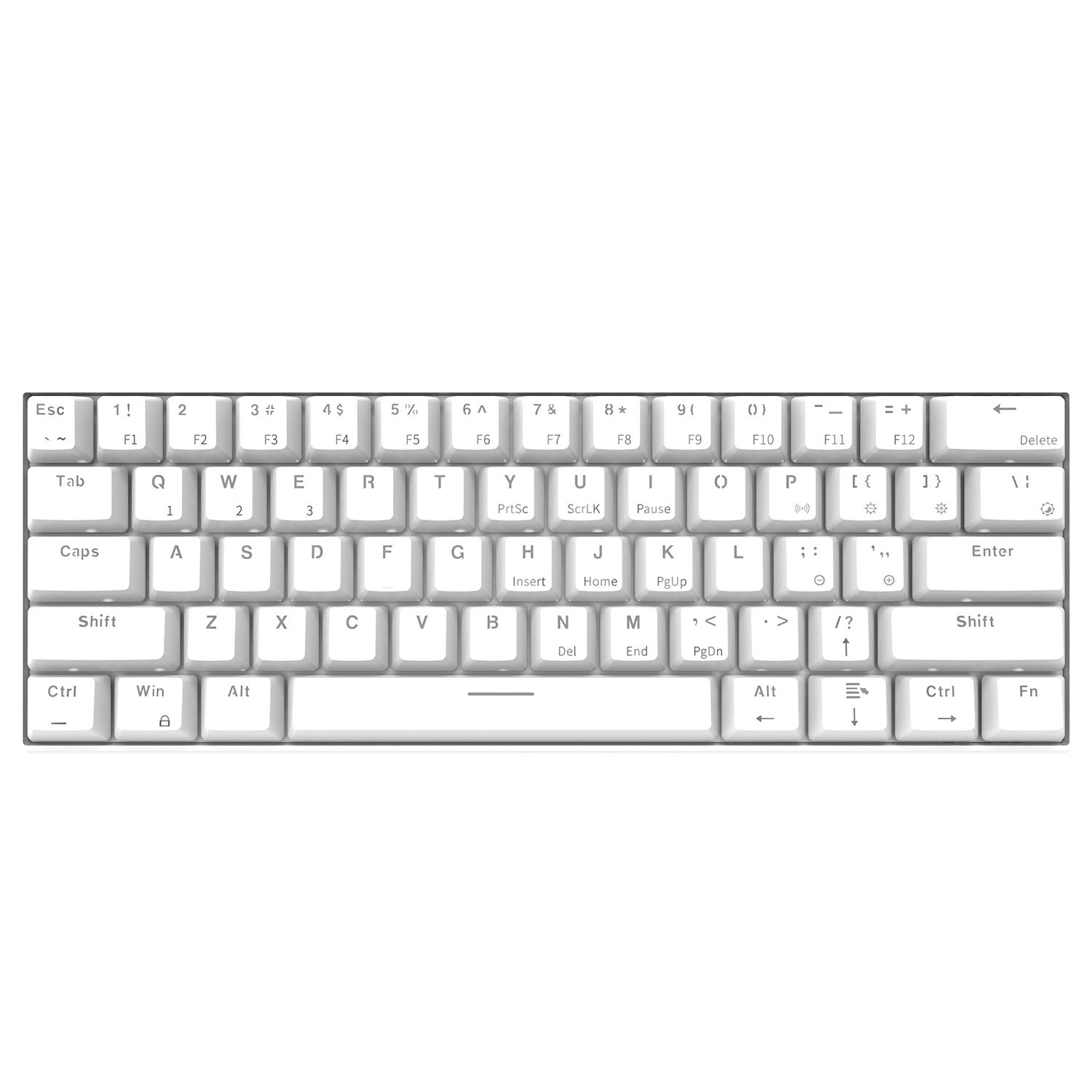
Slika: Pogled od zgoraj navzdol view of the Epomaker Ajazz i610T keyboard, showcasing its compact 61-key layout and keycap legends.
5. Vzdrževanje
Pravilno vzdrževanje zagotavlja dolgo življenjsko dobo in optimalno delovanje vaše tipkovnice.
- Čiščenje: Use a soft, dry cloth to wipe the keyboard surface. For deeper cleaning, use a can of compressed air to remove dust and debris from between the keycaps. For stubborn stains, a slightly damp Uporabite lahko krpo z blagim milom, pri čemer pazite, da v tipkovnico ne pride tekočina.
- Shranjevanje: Tipkovnico shranjujte na hladnem in suhem mestu, stran od neposredne sončne svetlobe in ekstremnih temperatur.
- Izogibajte se razlitjem: Tekočine hranite stran od tipkovnice, da preprečite poškodbe notranjih komponent.
- Skrb za kabel: Avoid bending or twisting the Type-C cable excessively to prevent internal wire damage.
6. Odpravljanje težav
Če imate težave s tipkovnico Ajazz i610T, si oglejte naslednje pogoste rešitve:
| Težava | Možna rešitev |
|---|---|
| Tipkovnica se ne odziva v žičnem načinu. |
|
| Tipkovnica se ne povezuje prek Bluetootha. |
|
| Osvetlitev ozadja ne deluje ali je zataknjena. |
|
| Some keys are not responding. |
|
7. Specifikacije
| Funkcija | Podrobnost |
|---|---|
| Znamka | EPOMAKER / Ajazz |
| Model | i610T |
| Postavitev | 61 tipk (60 % kompaktnost) |
| Povezljivost | Bluetooth 3.0 Wireless / USB Type-C Wired Dual Mode |
| Osvetlitev ozadja | Monochrome Backlight (17 effects) |
| Key Rollover | N-Key Rollover (NKRO) |
| Tip stikala | Mechanical (Black Switch, White color variant) |
| Material | ABS |
| Kapaciteta baterije | 1000 mAh litij-ionski |
| Dolžina kabla | Pribl. 1.5m |
| Podpora za operacijski sistem | Windows 2000/XP/Vista/7/8/10 |
| Mere izdelka (D*Š*V) | 29.1 x 10.1 x 4 cm (11.46 x 3.98 x 1.57 palca) |
| Teža izdelka | Pribl. 580 g (20.46 oz) |

Slika: Pod kotom view of the Epomaker Ajazz i610T keyboard, demonstrating its compact form factor.
8. Garancija in podpora
For warranty information and technical support, please refer to the documentation provided with your purchase or contact the manufacturer directly through their official webspletnega mesta. Shranite dokazilo o nakupu za uveljavljanje garancije.