1. Uvod
This manual provides instructions for the proper setup, operation, and maintenance of your IPD IPH-160 Monaural Wired Headset. The IPH-160 is designed for clear communication in various environments, featuring a noise-cancelling microphone and a 3.5mm jack for broad compatibility.
2. Vsebina paketa
Prosimo, preverite, ali so v vašem paketu vsi elementi:
- IPD IPH-160 Monaural Headset
- Quick Disconnect (QD) to 3.5mm Jack Cable (4-pole)
- Ear Cushions (pre-installed or spare)
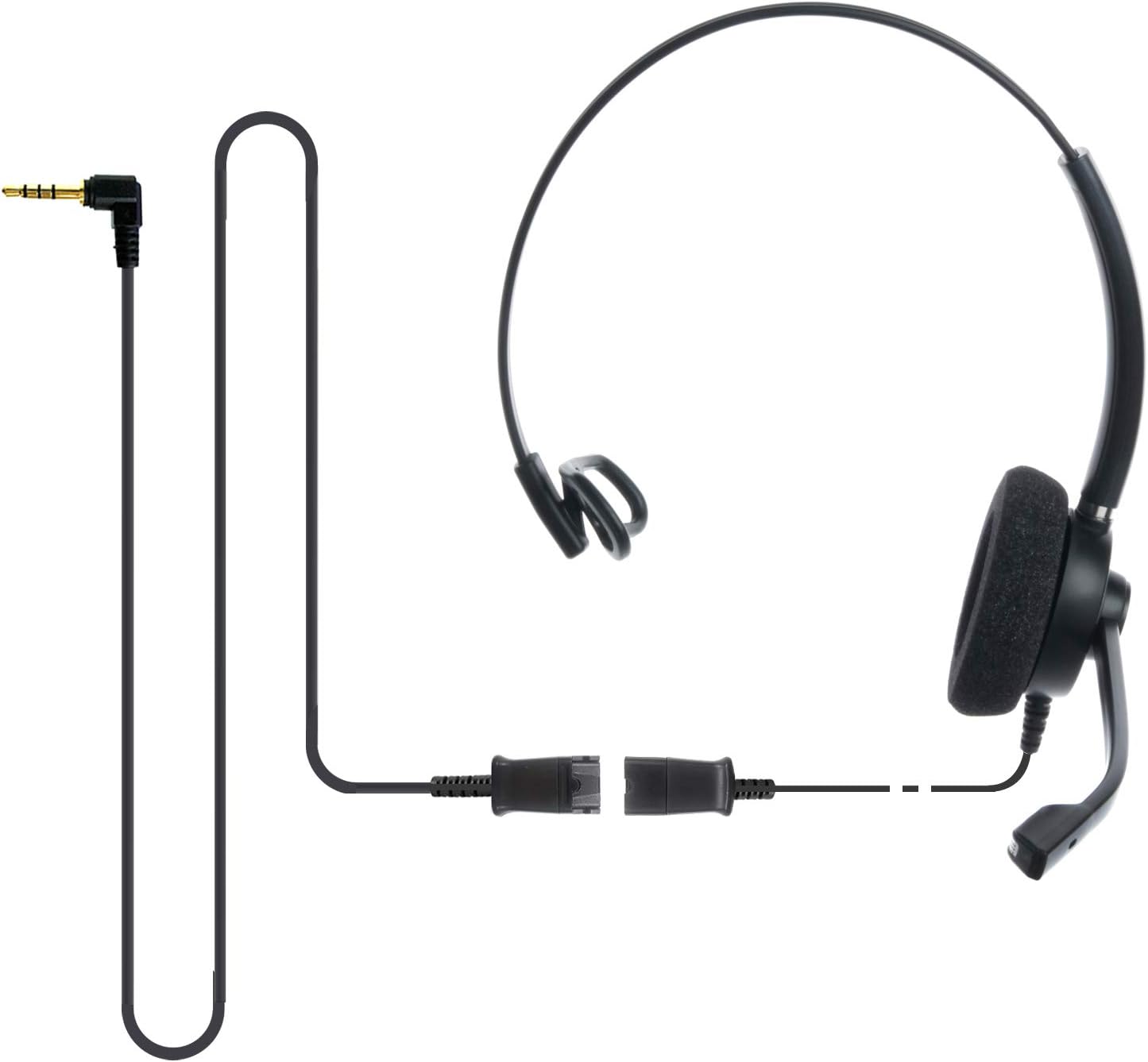
Image: The IPD IPH-160 headset with its detachable Quick Disconnect cable and 3.5mm jack connector.
3. Nastavitev
3.1 Priklop slušalk
- Connect the Quick Disconnect (QD) cable to the headset. Ensure a secure connection.
- Insert the 3.5mm jack of the cable into the corresponding port on your device (Android cell phone, laptop, tablet, Apple MacBook, or other smart device).

Slika: Bližnji posnetek view of the 3.5mm jack connector, illustrating its connection to a mobile device and laptop.
3.2 Združljivost naprav
The 3.5mm jack (4 poles) is compatible with a wide range of devices including:
- Android cell phones (e.g., Samsung, Huawei, HTC, ZTE)
- Prenosni računalniki
- Tablete
- Apple MacBooks with a single 3.5mm headset port
Opomba:
- iPhone 7/7S and later models may require an additional Lightning to 3.5mm adapter (not included).
- If your specific phone model is not listed or you encounter compatibility issues, please contact IPD support for assistance.

Image: The IPD headset shown with various connection options for desk phones, PCs/softphones, and mobile phones, highlighting the versatility of Quick Disconnect cables.
4. Upravljanje slušalk
4.1 Wearing and Adjusting
The IPH-160 headset is designed for all-day comfort. Adjust the headband for a secure yet comfortable fit. The microphone boom is flexible; position it approximately 1-2 inches from your mouth for optimal voice pickup.
4.2 mikrofon za odpravljanje šumov
The headset features a passive noise-cancelling microphone to reduce background noise, ensuring clearer conversations. Proper microphone positioning is crucial for effective noise cancellation.

Image: A user wearing the headset, demonstrating the microphone's position and illustrating the effect of noise cancellation on audio waveforms.
4.3 Acoustic Shock Protection (ASP)
The headset incorporates an Acoustic Shock Protection (ASP) circuit on the speaker. This feature protects your hearing from sudden, unwanted loud noises by cutting sounds over 105dB and maintaining levels below 105dB.
4.4 Wideband Audio
The HD Wideband speaker delivers clear sound, enhancing the quality of your calls and audio monitoring.

Image: A close-up of the headset's ear cushion, visually representing the distinction between acoustic noise and clear sound for high-quality voice communication.
5. Vzdrževanje
5.1 Čiščenje
To maintain hygiene and performance, regularly clean the ear cushions and other surfaces of the headset with a soft, dry cloth. Avoid using harsh chemicals or abrasive materials.
5.2 Shranjevanje
Ko slušalk ne uporabljate, jih shranjujte na čistem in suhem mestu, stran od neposredne sončne svetlobe in ekstremnih temperatur. Da preprečite poškodbe, se kabel ne zapleta.
6. Odpravljanje težav
6.1 Ni zvoka ali nizka glasnost
- Prepričajte se, da je 3.5 mm vtičnica popolnoma vstavljena v napravo.
- Preverite nastavitve glasnosti v napravi.
- Verify that the headset is selected as the audio output device in your computer's sound settings.
- Confirm the Quick Disconnect (QD) cable is securely connected to the headset.
6.2 Mikrofon ne deluje
- Prepričajte se, da je nosilec mikrofona pravilno nameščen blizu vaših ust.
- Check your device's microphone input settings and ensure the headset is selected as the input device.
- Test the headset with another compatible device to rule out a device-specific issue.
6.3 Težave z združljivostjo
If you experience compatibility problems with your device, especially if it's not explicitly listed as compatible, please contact IPD customer support for guidance.
7. Specifikacije
| Funkcija | Specifikacija |
|---|---|
| Ime modela | IPH-160-35 |
| Tehnologija povezljivosti | Žično |
| Priključek za slušalke | 3.5 mm Jack (4-pole) |
| Nadzor hrupa | Pasivno odpravljanje hrupa |
| Frekvenčni odziv | 10 KHz |
| Občutljivost | 58 dB |
| Impedanca | 150 Ohmov |
| Teža predmeta | 198 gramov (7 unč) |
| Material | Plastika |
| Namestitev ušesa | Nad ušesi |
| Posebna funkcija | Odpravljanje hrupa |
| Vključene komponente | Ušesne blazinice |
8. Informacije o garanciji
The IPD IPH-160 Headset comes with a 3-letna garancija od datuma nakupa. Ta garancija krije proizvodne napake pri normalni uporabi. Za uveljavljanje garancije shranite dokazilo o nakupu.
9. Podpora
For technical assistance, warranty claims, or any questions regarding your IPD IPH-160 Headset, please contact IPD customer support. You can find contact information on the official IPD webspletnem mestu ali prek vašega prodajalca.
Obiščite IPD Store za več informacij in izdelkov.


