1. Uvod
The RAINPOINT Bluetooth Sprinkler Timer is designed to automate your garden and lawn watering with precision and ease. Featuring Bluetooth 5.0 connectivity, it allows you to control and program irrigation schedules directly from your smartphone. It supports both irrigation and misting modes, includes a water flow meter, and offers a rain delay function to conserve water.
Ključne značilnosti:
- Bluetooth 5.0 Control: Manage and program your timer from your smartphone within a Bluetooth signal range of up to 165 ft (60m).
- Multiple Application Modes: Choose between 'Irrigation mode' for regular watering and 'Mist mode' for fine misting.
- Water Flow Sensor: Built-in sensor monitors and analyzes water consumption to prevent overwatering.
- Funkcija zakasnitve dežja: Skip watering for 24, 48, or 72 hours based on weather forecasts to conserve water.
- Soil Moisture Sensor Compatibility: Delay watering schedules based on data from optional soil moisture sensors.
2. Izdelek je končanview in komponente
Familiarize yourself with the main parts of your RAINPOINT Bluetooth Sprinkler Timer.

Figure 1: RAINPOINT Bluetooth Sprinkler Timer components, showing the inlet, outlet, and control panel.

Figure 2: Internal valve system of the RAINPOINT Sprinkler Timer, highlighting the auto-shutoff valve, anti-clogging self-cleaning valve, and impurity filter.
3. Specifikacije
| Funkcija | Specifikacija |
|---|---|
| Velikost dovoda | 1" with 3/4" adaptor |
| Izhodna nit | 3/4" |
| Delovni vodni tlak | 0.5 bar to 8 bar (7.25-116 PSI) |
| Working Water Flow | 5 L/min do 35 L/min |
| Ocena vodotesnosti | IP54 |
| Temperatura zalivanja | 0 ℃ do 50 ℃ (32 ℉ do 122 ℉) |
| Vir napajanja | DC 1.5V x 4 AA batteries |
| Irrigation Mode Frequency | Maximum 3 times per day |
| Irrigation Mode Duration | 1 minut do 11 ur 59 minut |
| Mist Period | 1 minut do 11 ur 59 minut |
| Mist Working Time | 5 sekund do 59 sekund |
| Mist Interval | Največ 15 minut |
| Življenjska doba baterije | Več kot 1 leto |
| Material | Plastika |
| Teža predmeta | 10.2 unč |
4. Nastavitev
4.1 Namestitev baterije
- Remove the battery compartment cover from the back of the timer.
- Vstavite 4 nove baterije AA in pazite na pravilno polarnost (+/-).
- Varno namestite pokrov prostora za baterije.

Figure 3: Proper installation of 4 AA batteries into the timer's battery compartment.
4.2 Connecting to Hose and Faucet
- Screw the timer's inlet onto your outdoor faucet. Ensure a tight fit to prevent leaks.
- Connect your garden hose to the timer's outlet.
4.3 Namestitev aplikacije in seznanjanje prek Bluetootha
- Download the "RainPoint" app from your smartphone's app store (iOS or Android).
- Odprite aplikacijo in omogočite Bluetooth na pametnem telefonu.
- In the app, select to add a new device. Follow the on-screen instructions to press and hold the button on the timer until the LED indicator blinks rapidly, then confirm in the app to pair.
Video 1: This video demonstrates the initial setup of the Bluetooth water timer, including battery installation and pairing with the mobile application.
Video 2: This video provides a comprehensive guide on how to use the TTV103BRF Bluetooth water timer, covering app navigation and basic functions.
4.4 Connecting Soil Sensor (Optional)
If you have a RAINPOINT soil moisture sensor, you can connect it to your timer for smart irrigation based on soil humidity.
- Ensure the soil sensor has batteries installed and is powered on.
- In the RainPoint app, navigate to the 'Sensor' tab.
- Follow the app's instructions to connect the soil sensor. The app will display soil humidity and temperature data once connected.
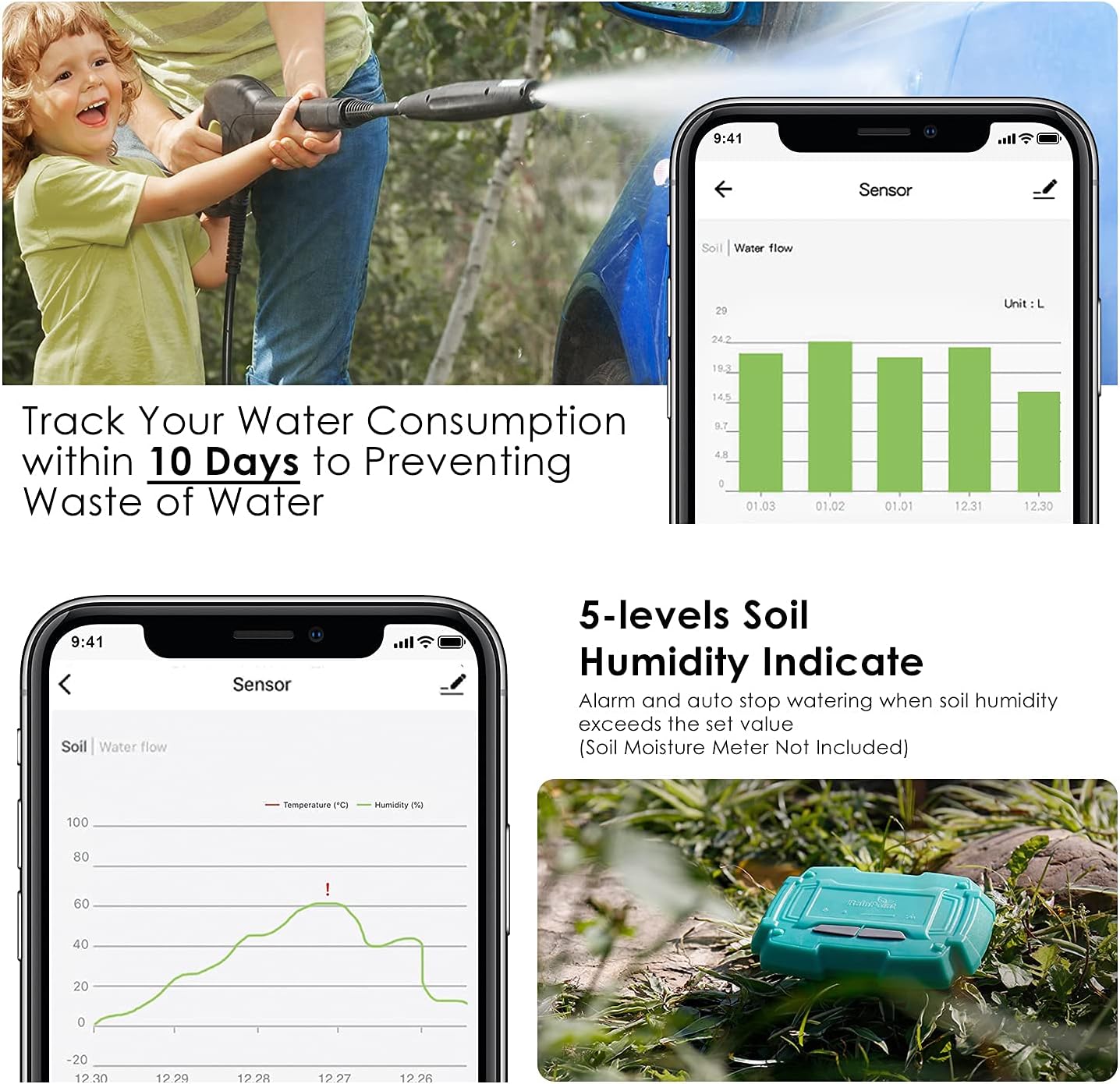
Figure 4: The RainPoint app interface showing soil humidity and temperature data from a connected soil sensor.
5. Navodila za uporabo
5.1 Ročno zalivanje
To initiate watering immediately for a set duration:
- Open the RainPoint app and navigate to the 'Manual' tab.
- Drag the slider to set the desired watering duration (e.g., 5 minutes, 30 minutes).
- Press the 'Play' icon to start manual watering. Press the 'Pause' icon to stop.

Figure 5: Manual watering settings within the RainPoint app, allowing users to set a specific duration for immediate watering.
5.2 Setting Irrigation Plans (Irrigation Mode & Mist Mode)
You can set up to three different irrigation plans (Plan A, B, C) per day.
- Navigate to the 'Plan' tab in the RainPoint app.
- Select a plan (e.g., Plan A) to configure.
- Choose between 'Irrigation Mode' or 'Mist Mode'.
- For Irrigation Mode: Set the start time, watering duration (1 min to 11h 59m), and select the days of the week for the plan to repeat.
- For Mist Mode: Set the start time, mist period (1 min to 11h 59m), mist working time (5s to 59s), interval (max 15 min), and select the days of the week for the plan to repeat.
- Save your plan settings.

Figure 6: The RainPoint app interface showing multiple irrigation plans with customizable start times, durations, and repeat schedules.
5.3 Funkcija zakasnitve zaradi dežja
To temporarily pause your watering schedule due to rain:
- In the 'Plan' tab, locate the 'Rain Delay' section.
- Select the desired delay duration (e.g., 24H, 48H, 72H).
- Časovnik bo po izbranem obdobju zakasnitve samodejno nadaljeval s svojim urnikom.

Figure 7: The RainPoint app displaying options to skip watering for 12, 24, or 72 hours due to rain.
5.4 Water Flow Monitoring
The built-in water flow sensor allows you to track your water consumption.
- Navigate to the 'Parameter' or 'Sensor' tab in the RainPoint app.
- View the water flow data, which can be tracked for up to 10 days, to monitor usage and prevent waste.

Figure 8: The RainPoint app interface showing water consumption data over 10 days.
6. Vzdrževanje
6.1 Zamenjava baterije
Replace batteries when the low power indicator appears in the app or on the device. Follow the battery installation steps in Section 4.1.
6.2 Čiščenje filtra
Periodically check and clean the built-in filter at the timer's inlet to prevent debris from affecting water flow.
- Odklopite časovnik iz pipe.
- Odstranite filtrirno mrežico z dovoda.
- Rinse the filter under running water to remove any accumulated debris.
- Ponovno vstavite čisti filter in ponovno pritrdite časovnik na pipo.
6.3 Prezimovanje
To prevent damage from freezing temperatures:
- Disconnect the timer from the faucet and hose before the first freeze.
- Odstranite baterije.
- Store the timer indoors in a dry, frost-free location.
6.4 Trajnost
The RAINPOINT Sprinkler Timer is constructed with durable materials, making it waterproof, ultraviolet-proof, and corrosion-proof to ensure reliable operation in various outdoor conditions.
Figure 9: The timer is designed to be waterproof, UV-proof, and corrosion-proof for long-lasting performance.
7. Odpravljanje težav
7.1 Težave s povezavo
- Seznanitev z aplikacijo ni mogoča: Ensure Bluetooth is enabled on your smartphone and the timer's LED is blinking rapidly. Check that the timer is within the 165 ft (60m) Bluetooth range.
- Aplikacija se ne odziva: Check battery levels in the timer. Close and reopen the app, or restart your smartphone.
7.2 No Water Flow
- No water from faucet: Ensure your outdoor faucet is fully open.
- Časovnik se ne aktivira: Check battery levels. Verify that an irrigation plan is active or manual watering is initiated.
- Nizek vodni tlak: Ensure adequate water pressure from your source.
- Clogged filter: Refer to Section 6.2 for instructions on cleaning the filter.
7.3 Incorrect Schedule Execution
- Schedule not running: Verify that the irrigation plan is enabled in the app and the correct days of the week are selected. Check the timer's battery status.
- Watering at wrong times: Double-check the start times and durations configured in your irrigation plans within the app.
- Rain delay active: Ensure the rain delay function is not currently active, preventing scheduled watering.
8. Informacije o garanciji
This product comes with a manufacturer's warranty. Please refer to the product packaging or the official RAINPOINT website for specific warranty terms and conditions, including coverage duration and claim procedures.
9. Podpora
For further assistance, technical support, or inquiries about your RAINPOINT Bluetooth Sprinkler Timer, please contact RAINPOINT customer support through the following channels:
- Na spletu: Visit the official RAINPOINT webspletno mesto za pogosta vprašanja in vire za podporo.
- Trgovina Amazon: You can also find support and product information on the RAINPOINT Store on Amazon.


