1. Uvod
The Solar-Power Wireless Endoscope is a versatile inspection tool designed for detailed visual examination in hard-to-reach areas. It connects wirelessly to your smartphone or tablet, providing a live view and allowing you to capture high-resolution images and videos. Its IP68 waterproof rating and adjustable LED lights make it suitable for various environments, including wet or dark conditions. This manual provides instructions for setup, operation, maintenance, and troubleshooting to ensure optimal performance of your device.
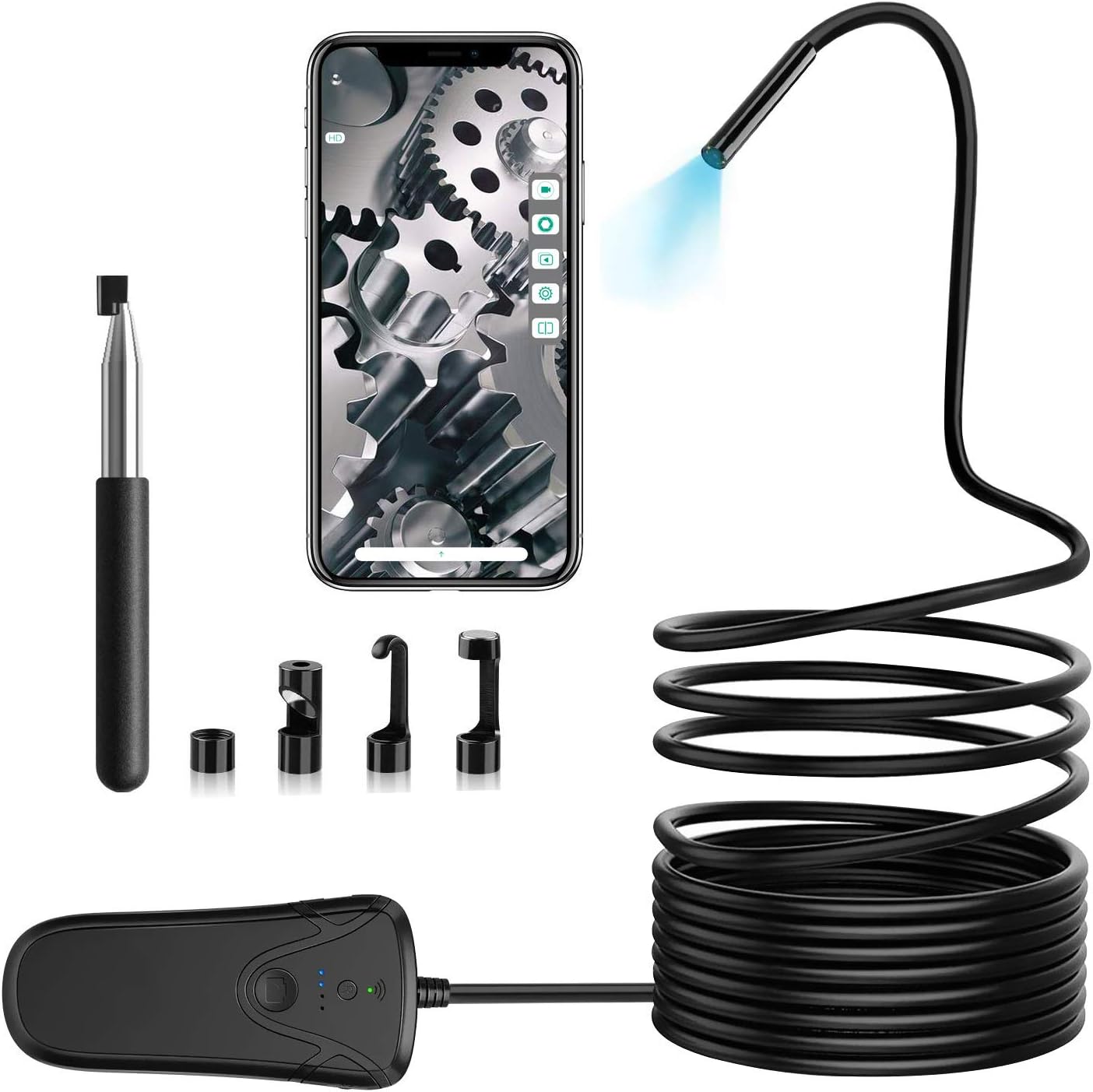
2. Vsebina paketa
Prosimo, preverite, ali so v vašem paketu priloženi vsi spodaj navedeni artikli:
- 1 x Industrial Endoscope
- 1 x mikro-USB kabel
- 1 x etui za shranjevanje
- 1 x uporabniški priročnik
- 4 x Accessories (Mirror, Hook, Magnet, Protective Cap)

3. Navodila za namestitev
3.1 Charging the Endoscope
Before initial use, ensure the endoscope is fully charged. Use a DC5V-1A adapter to charge the endoscope camera via the Micro-USB cable. The charging indicator light will provide feedback on the charging status.
3.2 Koraki za povezavo Wi-Fi
Follow these steps to connect your endoscope to your smartphone or tablet:
- Download the free application "inskam" from Google Play Store (for Android) or the App Store (for iOS).
- Ensure the endoscope is fully charged. Turn on the endoscope camera by pressing the power button on the Wi-Fi box. Wait for the Wi-Fi indicator to stay green, signifying that the endoscope has successfully generated its signal.
- On your smartphone or tablet, go to "Settings" → "Wi-Fi".
- Select the Wi-Fi network named "inskam130A-xxx" (the "xxx" will be unique to your device).
- Enter the password: "12345678" to connect to the inspection camera.
- Open the "inskam" application. You should now be able to view the real-time feed from the endoscope camera.


4. Navodila za uporabo
4.1 Osnovna operacija
Ko ste povezani, lahko view the live feed through the "inskam" app. To capture images or record videos, press the dedicated shutter button located on the endoscope Wi-Fi box. The app also provides functions such as zoom in/out, rotate, and split screens for enhanced viewin analizo.
4.2 Image Quality and Focal Distance
The endoscope is equipped with a 2.0-megapixel CMOS sensor, offering adjustable resolutions of 1920x1080, 1280x720, and 640x480. For optimal clarity, the recommended focal distance is between 5cm and 500cm (approximately 1.97 inches to 16.4 feet).


4.3 Scenariji uporabe
This endoscope is an ideal tool for various inspection tasks, including but not limited to:
- Vehicle inspection (e.g., engine cylinders, exhaust systems)
- Aero engine inspection
- Pipeline and drain inspection
- Mechanical parts maintenance
- Home appliance repair and inspection
- Non-destructive testing in various industrial applications

5. Vzdrževanje in nega
- Zaščitna kapica: Always install the protective cap on the camera lens when not in use or during inspection to prevent damage to the lens.
- Skrb za kabel: The endoscope cable is semi-rigid. Please refrain from folding the cable more than 90 degrees to prevent internal damage. Store the cable coiled loosely.
- Polnjenje: Use only a DC5V-1A adapter for charging to ensure proper battery health and longevity.
- Svetilnost LED: Be aware that higher LED brightness settings will consume more power and may reduce the endoscope's operating time.
- Čiščenje: Gently wipe the camera lens and cable with a soft, dry cloth after each use. For stubborn dirt, a slightly damp cloth can be used, but ensure the device is completely dry before storage.

6. Odpravljanje težav
6.1 Težave s povezavo
If you experience difficulty connecting the endoscope to your smartphone or tablet, try the following:
- Reset the Endoscope: Press the reset button on the Wi-Fi box. This can help re-establish the Wi-Fi signal.
- Check Wi-Fi Indicator: Ensure the Wi-Fi indicator light on the endoscope box is solid green, indicating a stable signal.
- Ponovno vnesite geslo: Double-check that you are entering the correct Wi-Fi password ("12345678").
- Znova zaženite naprave: Try restarting both your endoscope and your smartphone/tablet.
- Ponovna namestitev aplikacije: If issues persist, consider uninstalling and reinstalling the "inskam" app.
- Razdalja: Ensure your smartphone is within the effective Wi-Fi transmission distance of approximately 10 meters from the endoscope.
7. Specifikacije
| Funkcija | Specifikacija |
|---|---|
| Ločljivost kamere | 2.0 Megapixel (1080P) |
| Način povezave | Wi-Fi |
| Goriščna razdalja | 5cm - 500cm (1.97 inches - 16.4 feet) |
| Vodoodporen razred | IP68 |
| Delovna temperatura | 0 to 45 ℃ (32 to 113 ℉) |
| Vhodna moč | DC 5V 500 mAh/1A |
| Dolžina kabla | 10m / 32.8ft |
| Premer kamere | 5.5 mm / 0.216 palcev |
| Vrsta baterije | 1 litij-ion (priložen) |
| Teža predmeta | 1.3 funtov |
8. Garancija in podpora
For warranty information or technical support, please refer to the contact details provided on the product packaging or the official Solar-Power webspletnega mesta. Račun shranite kot dokazilo o nakupu za morebitne garancijske zahtevke.


