1. Uvod
Welcome to the user manual for your Nokia 216 Dual SIM mobile phone. This guide provides essential information to help you set up, operate, and maintain your device. The Nokia 216 (RM-1187) is a classic feature phone designed for reliable communication, featuring dual SIM capability, a 2.4-inch display, and a VGA camera.
Please read this manual carefully to ensure proper use and to get the most out of your phone.
2. Vsebina paketa
Prepričajte se, da so v paketu izdelka prisotni vsi elementi:
- Nokia 216 Dual SIM Mobile Phone (RM-1187)
- Baterija
- Napajalni adapter
- USB kabel
3. Naprava je končanaview
Familiarize yourself with the key components of your Nokia 216 phone.
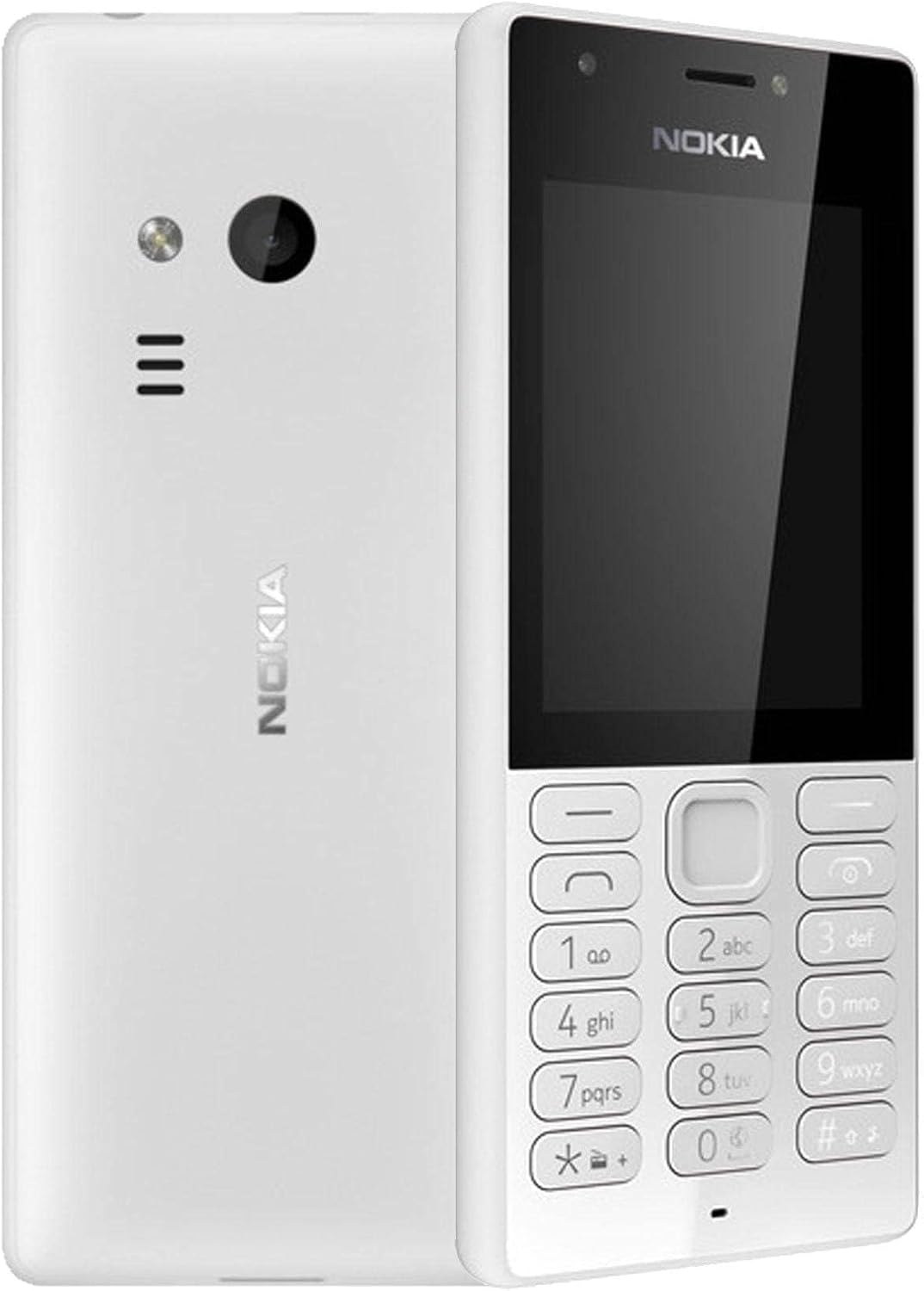
Slika 3.1: Spredaj in zadaj view of the Nokia 216 Dual SIM mobile phone. The front shows the display, earpiece, and numeric keypad. The back features the rear camera, LED flash, and loudspeaker grille.

Slika 3.2: Spredaj view of the Nokia 216 Dual SIM mobile phone. This image highlights the 2.4-inch display, the navigation keys, and the alphanumeric keypad for dialing and text input.

Slika 3.3: Nazaj view of the Nokia 216 Dual SIM mobile phone. This view shows the rear VGA camera lens, the LED flash, and the Nokia branding.
Ključne komponente:
- Zaslon: 2.4-palčni zaslon QVGA.
- Tipkovnica: Alphanumeric keypad for dialing and text entry, with navigation keys.
- Zadnja kamera: VGA camera with LED flash.
- Zvočnik: For audio playback and hands-free calls.
- Mikrofon: For voice input during calls and recordings.
- 3.5 mm avdio priključek: Za slušalke ali zunanje zvočnike.
- Vrata za polnjenje: Micro-USB port for charging and data transfer.
4. Nastavitev
4.1. Insert SIM Card(s)
- Turn off the phone and disconnect any charger.
- Carefully remove the back cover by prying it open from the notch.
- Če je baterija vstavljena, jo dvignite.
- Insert the SIM card(s) into the designated slot(s) with the gold contacts facing down. For dual SIM models, ensure both SIMs are correctly seated.
- If applicable, insert a microSD card into its slot for additional storage.
- Zamenjajte baterijo.
- Align the back cover and press it firmly until it clicks into place.
4.2. Napolnite baterijo
- Priključite napajalnik v stensko vtičnico.
- Plug the micro-USB end of the cable into the phone's charging port.
- Indikator baterije na zaslonu bo prikazal stanje polnjenja.
- Ko je polnilnik popolnoma napolnjen, ga najprej izključite iz telefona in nato še iz stenske vtičnice.
5. Navodila za uporabo
5.1. Vklop/izklop
- Za vklop: Press and hold the power key (usually the red 'End Call' key) until the phone vibrates and the Nokia logo appears.
- Za izklop: Press and hold the power key until the 'Power off' option appears on the screen, then select it.
5.2. Klicanje
- Na začetnem zaslonu vnesite telefonsko številko s številsko tipkovnico.
- Press the green 'Call' key to initiate the call.
- To end a call, press the red 'End Call' key.
5.3. Pošiljanje besedilnih sporočil (SMS)
- Pojdi na meni > Sporočila > Ustvari sporočilo.
- S tipkovnico vnesite sporočilo.
- Vnesite telefonsko številko prejemnika ali jo izberite iz stikov.
- Izberite Pošlji.
5.4. Uporaba kamere
- Pojdi na meni > Kamera.
- Kadrirajte posnetek s pomočjo zaslona.
- Pritisnite srednjo navigacijsko tipko, da posnamete fotografijo.
6. Vzdrževanje in nega
To ensure the longevity and optimal performance of your Nokia 216, follow these care guidelines:
- Napravo hranite suho: Moisture can damage electronic circuits.
- Use original accessories: Only use batteries, chargers, and accessories approved by Nokia.
- Nežno očistite: Use a soft, clean, dry cloth to clean the surface of the device.
- Izogibajte se ekstremnim temperaturam: Do not expose your device to very high or low temperatures.
- Ravnajte previdno: Izogibajte se padcem ali izpostavljanju naprave močnim udarcem.
7. Odpravljanje težav
If you encounter issues with your Nokia 216, try these common troubleshooting steps:
| Težava | rešitev |
|---|---|
| Telefon se ne vklopi | Prepričajte se, da je baterija napolnjena. Priključite polnilnik in poskusite znova. Preverite, ali je baterija pravilno vstavljena. |
| Ni omrežnega signala | Preverite, ali je kartica SIM pravilno vstavljena. Premaknite se na območje z boljšo pokritostjo omrežja. Ponovno zaženite telefon. |
| Baterija se ne polni | Prepričajte se, da je polnilnik pravilno priključen na telefon in električno vtičnico. Poskusite z drugo električno vtičnico ali polnilnikom. Preverite, ali je polnilna vrata poškodovana. |
| Ne morem klicati ali sprejemati klicev | Check network signal. Ensure your SIM card is active and has sufficient credit/plan. Verify that call barring is not enabled. |
8. Specifikacije
| Funkcija | Podrobnost |
|---|---|
| Znamka | Nokia |
| Ime modela | RM-1187 |
| Operacijski sistem | Symbian 9.1 (Series 30) |
| Velikost zaslona | 2.4 palcev |
| Ločljivost zaslona | 240 x 320 slikovnih pik |
| Hitrost osveževanja | 90 Hz |
| Velikost nameščenega RAM-a | 256 MB |
| Zmogljivost pomnilnika | 3.9 GB (Internal, likely for system/apps, expandable via microSD) |
| Model procesorja | A10 |
| Celična tehnologija | 2G |
| Brezžične komunikacijske tehnologije | Cellular |
| Tehnologije povezljivosti | USB, Bluetooth, Wi-Fi |
| GPS | A-GPS |
| Primary Device User Interface | Gumbi, številska tipkovnica, mikrofon |
| Druge funkcije fotoaparata | Rear Camera (VGA) |
| Avdio priključek | 3.5 mm |
| Faktor oblike | Klasična |
| barva | siva |
| Čas pogovora | Do 18 ur |
| Teža predmeta | 339 gramov |
| Dimenzije paketa | 13.4 x 12.6 x 3.6 cm |
| Kaj je v škatli | Napajalnik, USB kabel |
9. Garancija in podpora
For warranty information, please refer to the warranty card included in your product package or visit the official Nokia website. If you require further assistance or technical support, please contact Nokia customer service through their official channels.
Račun shranite kot dokazilo o nakupu za uveljavljanje garancije.


