1. Uvod
The Ledvance DOT-IT TOUCH SLIM is a compact, dimmable, and USB-rechargeable LED luminaire designed for versatile indoor use. Its compact design makes it suitable for small spaces where light is needed but no power outlet is available. This manual provides essential information for the safe and efficient use of your luminaire.

Image 1.1: The Ledvance DOT-IT TOUCH SLIM LED Luminaire, a compact and versatile lighting solution.
2. Varnostna navodila
Prosimo, da natančno preberete in upoštevate ta varnostna navodila, da preprečite poškodbe ali škodo na izdelku:
- Pred uporabo naprave preberite vsa navodila.
- This product is intended for indoor use only (IP20 rating). Do not expose to water, high humidity, or extreme temperatures.
- Keep the luminaire out of reach of children.
- Use only the provided USB cable for charging. Do not use damaged cables or chargers.
- Do not attempt to disassemble, modify, or repair the luminaire yourself. Refer all servicing to qualified personnel.
- Izogibajte se neposredni izpostavljenosti oči LED svetlobnemu viru.
3. Vsebina paketa
Preverite, ali so v paketu prisotni vsi elementi:
- 1x Ledvance DOT-IT TOUCH SLIM LED Luminaire
- 1x Self-adhesive Mounting Magnet
- 1x USB polnilni kabel
4. Nastavitev in namestitev
The DOT-IT TOUCH SLIM luminaire is designed for easy installation using its magnetic mount.
- Izberite lokacijo: Select a clean, dry, and smooth surface where you wish to install the light. Ensure the surface is free from dust, grease, and moisture.
- Prepare the Magnet: Peel off the protective film from one side of the self-adhesive mounting magnet.
- Attach the Magnet: Firmly press the adhesive side of the magnet onto the chosen surface. Hold for a few seconds to ensure a strong bond.
- Mount the Luminaire: Place the DOT-IT TOUCH SLIM luminaire onto the attached magnet. The luminaire will securely attach magnetically. This allows for easy removal when charging is required.
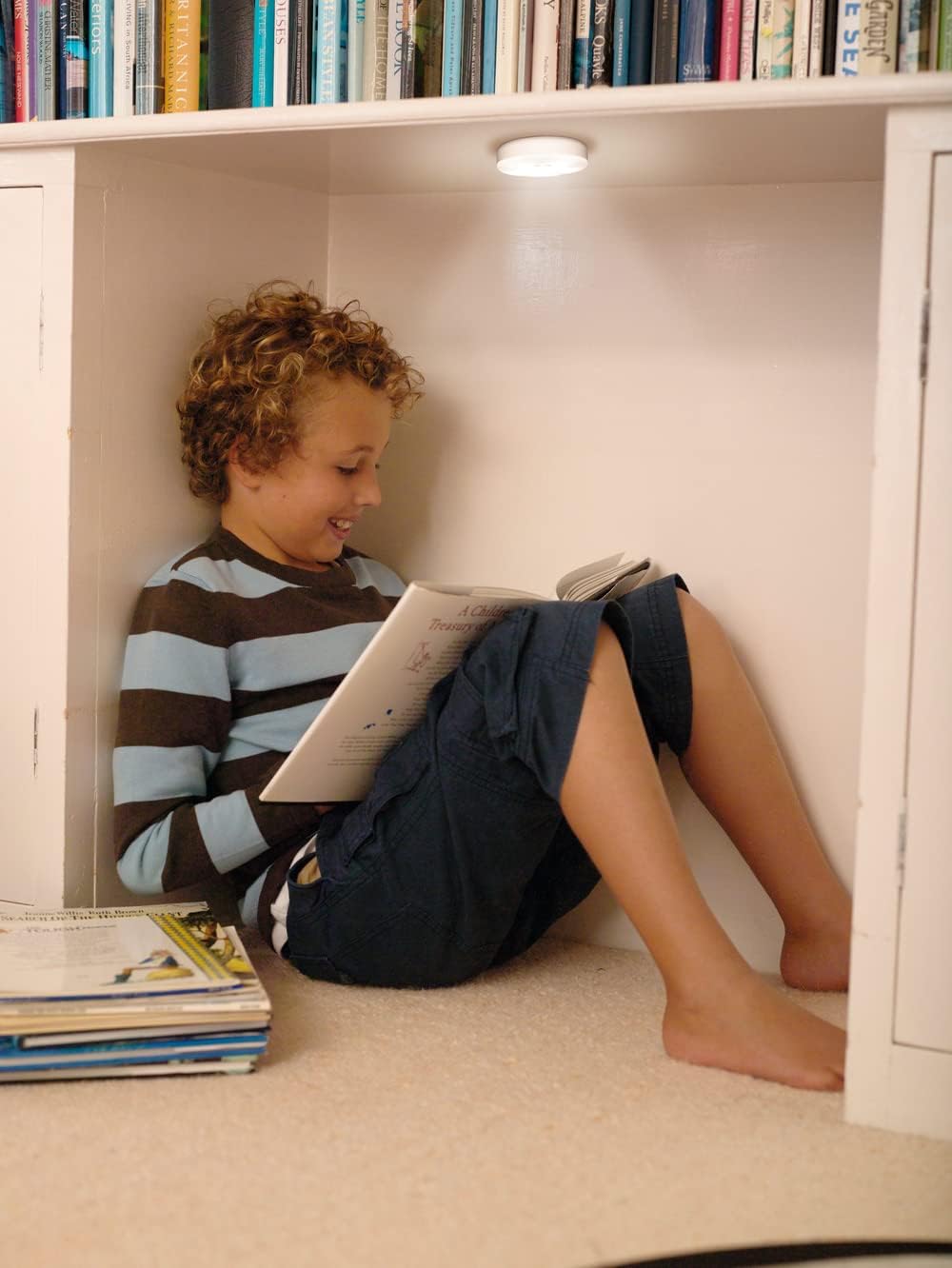
Image 4.1: The luminaire provides convenient lighting in various indoor settings, such as under shelves.
5. Delovanje
The luminaire features a simple touch interface for control.
- Vklop/izklop: Lightly press the center of the luminaire to turn it on or off.
- Zatemnitev: When the light is on, press and hold the center of the luminaire to adjust its brightness. Release your finger when the desired brightness level is achieved.
6. Polnjenje
The DOT-IT TOUCH SLIM is equipped with a built-in rechargeable lithium battery.
- Remove from Mount: Gently pull the luminaire off its magnetic mount.
- Priključite USB kabel: Insert the small end of the provided USB charging cable into the charging port on the side of the luminaire. Connect the larger end of the USB cable to a standard USB power source (e.g., computer USB port, USB wall adapter, power bank).
- Indikator polnjenja: A red indicator light will illuminate on the luminaire to show that it is charging. The light will turn off once the battery is fully charged.
- Prva uporaba: For optimal battery life, ensure the luminaire is fully charged before its initial use.
7. Vzdrževanje
To ensure the longevity and proper functioning of your luminaire:
- Čiščenje: Clean the exterior of the luminaire with a soft, dry cloth. Do not use liquid cleaners, abrasive materials, or solvents.
- Vrata za polnjenje: Periodically check the USB charging port for dust or debris and gently clean if necessary to ensure proper connection.
- Shranjevanje: If storing the luminaire for an extended period, ensure it is fully charged and store it in a cool, dry place. Recharge every few months to maintain battery health.
8. Odpravljanje težav
If you encounter issues with your DOT-IT TOUCH SLIM luminaire, refer to the following common solutions:
- Lučka se ne prižge:
- Ensure the battery is charged. Connect to a USB power source and allow it to charge.
- Verify that the touch surface is clean and unobstructed.
- Light does not dim:
- Ensure you are pressing and holding the center of the luminaire correctly to activate the dimming function.
- Luč se ne polni:
- Check the USB cable for damage and try a different cable if available.
- Try a different USB power source (e.g., another wall adapter, computer port).
- Inspect the charging port on the luminaire for any debris or damage.
9. Specifikacije
| Funkcija | Specifikacija |
|---|---|
| Model | DOT-IT TOUCH SLIM WT LEDV |
| Znamka | LEDVANCE |
| Dimenzije (D x Š x V) | 6.5 x 6.5 x 1.8 cm |
| Teža | 35 g |
| Material | Akrilonitril butadien stiren (ABS) |
| voltage | 5 V |
| Wattage | 0.45 W |
| Barvna temperatura | 4000 Kelvinov (hladna bela) |
| Indeks barvnega upodabljanja (CRI) | 80 |
| Povprečna življenjska doba | 30,000 uri |
| Tip stikala | Dotik |
| Baterija | Rechargeable Lithium (included) |
| Ocena IP | IP20 (samo za uporabo v zaprtih prostorih) |

Image 9.1: Technical drawing showing the dimensions of the luminaire (65mm diameter, 18mm thickness).
10. Garancija in podpora
For detailed warranty information, product registration, or customer support, please refer to the official LEDVANCE webali se obrnite na pooblaščenega prodajalca. Shranite dokazilo o nakupu za uveljavljanje garancije.


