1. Uvod
Thank you for choosing the Genesis 20-Inch Box Fan. This fan is designed to provide powerful and efficient cooling for various indoor spaces, including bedrooms and offices. Its durable construction and user-friendly features ensure reliable performance.
This manual provides important information regarding the safe operation, setup, maintenance, and troubleshooting of your new Genesis Box Fan. Please read it thoroughly before use and retain it for future reference.

Slika 1.1: Spredaj view of the Genesis 20-inch Box Fan. The fan features a black square frame with a protective grille and a central Genesis logo on the fan blades.
2. Pomembne varnostne informacije
Za zmanjšanje tveganja požara, električnega udara ali poškodb upoštevajte naslednje varnostne ukrepe:
- Pred čiščenjem ali kakršnim koli vzdrževanjem ventilator vedno izključite iz električnega omrežja.
- Ventilatorja ne uporabljajte s poškodovanim kablom ali vtičem. Če je kabel ali vtič poškodovan, se obrnite na usposobljeno servisno osebje.
- Ventilatorja hranite stran od vode ali drugih tekočin. Ventilatorja ne potapljajte v vodo.
- Ventilator postavite na stabilno, ravno površino, da preprečite prevračanje.
- Med delovanjem ventilatorja ne vstavljajte prstov ali kakršnih koli predmetov skozi rešetko.
- This fan is equipped with overload safety protection and a fuse in the plug for added safety. If the fuse blows, replace it only with a fuse of the correct type and rating.
- This product is ETL listed and UL approved, ensuring it meets recognized safety standards.
- Samo za notranjo uporabo. Ne uporabljajte na prostem.

Image 2.1: ETL Listed and Approved Logo, indicating the product meets safety standards.
3. Postavitev in namestitev
The Genesis 20-Inch Box Fan requires no assembly and is ready for use right out of the box.
- Razpakiranje: Ventilator previdno vzemite iz embalaže. Embalažo shranite za shranjevanje ali kasnejši transport.
- Umestitev: Place the fan on a firm, level surface such as a floor, dresser, or table. Ensure there is adequate space around the fan for optimal airflow and to prevent obstruction of the air intake/output.
- Napajalni priključek: Plug the fan's power cord into a standard 120V AC electrical outlet.

Image 3.1: The Genesis Box Fan positioned on the floor in an office environment, demonstrating suitable placement.

Image 3.2: The Genesis Box Fan placed on the floor near a doorway in a home, illustrating its versatility for various room types.
4. Navodila za uporabo
Your Genesis Box Fan features a simple rotary control knob for power and speed selection.
- Vklop/izklop: Rotate the control knob clockwise from the "OFF" position to turn the fan on. Rotate it counter-clockwise back to "OFF" to turn the fan off.
- Izbira hitrosti: The fan offers three energy-efficient speed settings:
- Nastavitev 1 (nizka): For gentle airflow and quiet operation.
- Nastavitev 2 (srednja): Za zmerno hlajenje.
- Nastavitev 3 (Visoka): Za maksimalen pretok zraka in hitro hlajenje.

Slika 4.1: Bližnji posnetek view of the fan's control knob, located on the top right corner, used to select power and fan speed settings.
5. Nega in vzdrževanje
Redno čiščenje bo pomagalo ohraniti delovanje ventilatorja in podaljšati njegovo življenjsko dobo.
- Čiščenje: Pred čiščenjem vedno izključite ventilator iz električnega omrežja. Uporabite mehko,amp cloth to wipe the exterior surfaces of the fan. Do not use abrasive cleaners or chemicals.
- Čiščenje rešetke: To clean dust from inside the grilles and blades, use a vacuum cleaner with a brush attachment or compressed air. Do not attempt to disassemble the fan for cleaning.
- Shranjevanje: Če ventilator shranjujete dalj časa, ga pokrijte, da ga zaščitite pred prahom, in ga shranite na hladnem in suhem mestu.

Slika 5.1: Zadaj view of the Genesis Box Fan, showing the back grille which should be kept clean for optimal airflow.
6. Odpravljanje težav
If you encounter issues with your Genesis Box Fan, please refer to the following common problems and solutions:
| Težava | Možen vzrok | rešitev |
|---|---|---|
| Ventilator se ne vklopi. | Not plugged in; power outlet not working; fuse blown in plug; control knob not set to a speed. | Ensure fan is securely plugged into a working outlet. Check household circuit breaker. Inspect the fuse in the plug and replace if necessary (refer to safety section). Rotate the control knob to speed setting 1, 2, or 3. |
| Šibek pretok zraka. | Fan set to low speed; grilles are obstructed by dust. | Increase the fan speed setting. Clean the front and back grilles as described in the maintenance section. |
| Nenavaden hrup ali ropotanje. | Fan not on a level surface; foreign object caught in grille. | Ensure the fan is on a stable, flat surface. Unplug the fan and carefully check for any obstructions in the grilles. |
Če težava po poskusu teh rešitev še vedno obstaja, se obrnite na podporo strankam.
7. Specifikacije izdelka
| Funkcija | Specifikacija |
|---|---|
| Znamka | Genesis |
| Številka modela | G20BOX-BLK |
| barva | Črna |
| Dizajn električnega ventilatorja | Floor Fan / Box Fan |
| Vir napajanja | AC/DC |
| Mere izdelka (D x Š x V) | 4.5"D x 20"Š x 20"V |
| Priporočene uporabe | Cooling (Indoor) |
| Nivo hrupa | 73 dB |
| Wattage | 53 vatov |
| Število rezil | 1 |
| Blade Length / Size | 20 palcev |
| voltage | 120 V |
| Vključene komponente | Enota ventilatorja |
| Posebna funkcija | Manual Control, Durable Copper Motor, Overload Safety Protection with Fuse in Plug |
| Učinkovitost | Energijsko učinkovita |
| Certifikati | ETL Listed, UL Approved |
| Teža predmeta | 8.13 funtov |
| Zahtevana montaža | št |
| Navodila za nego | Obrišite |
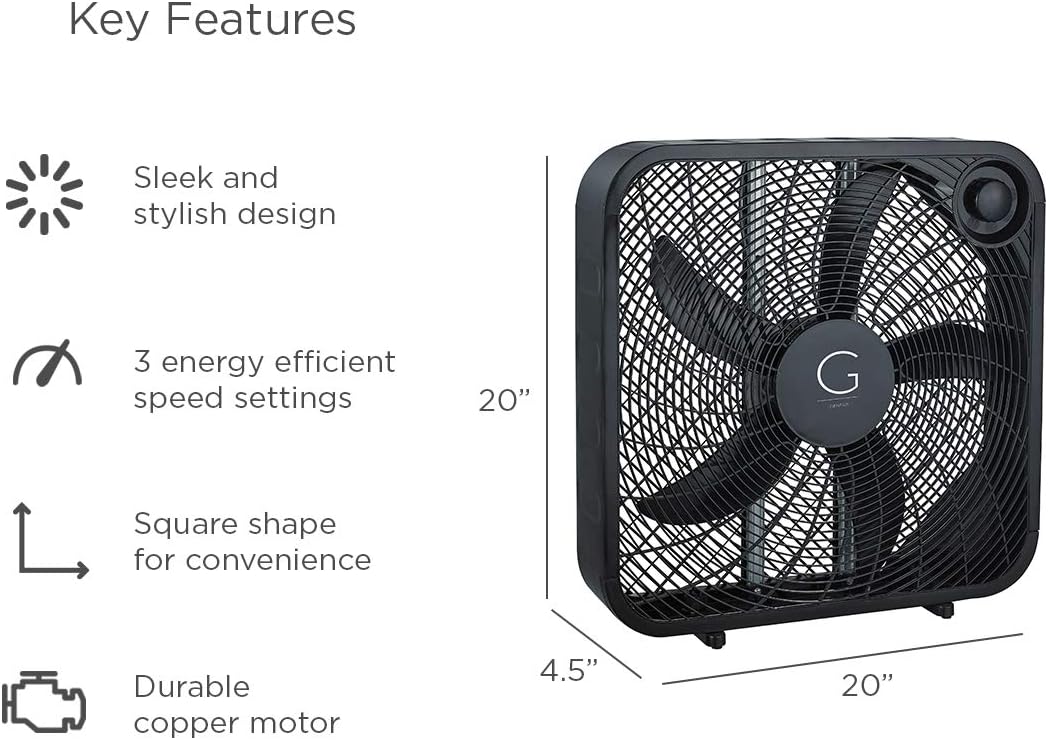
Image 7.1: Visual representation of key features and dimensions (20"W x 20"H x 4.5"D) of the Genesis Box Fan.
8. Informacije o garanciji
Specific warranty details for your Genesis 20" Box Fan may vary. Please refer to the warranty card included with your product or visit the official Genesis webza najnovejšo garancijsko politiko in informacije o registraciji.
Typically, Genesis products are covered by a limited warranty against defects in materials and workmanship under normal use. Keep your purchase receipt as proof of purchase for warranty claims.
9. Podpora strankam
If you have any questions, require technical assistance, or need to report an issue with your Genesis 20" Box Fan, please contact Genesis customer support.
For the most current contact information, please visit the official Genesis webspletno mesto ali pa se obrnite na kontaktne podatke, ki so navedeni na embalaži izdelka.
Obiščete lahko tudi Genesis Store on Amazon za več informacij o izdelku in vire podpore.


