1. Izdelek je končanview
The Fender Mustang GTX100 is a versatile 100-watt guitar amplifier designed for a wide range of musical styles. It features a 12-inch Celestion speaker, advanced digital modeling, and a comprehensive suite of effects. The amplifier includes 200 onboard presets and offers modular signal path flexibility, allowing users to customize their sound. Integrated Bluetooth enables audio streaming for play-along sessions and connectivity with the Fender TONE 3.0 app for deep editing and preset management. WiFi capabilities ensure the amplifier stays updated with the latest features. The included 7-button footswitch provides convenient control over bank selection, effects, and a 60-second looper, making it suitable for live performance.
2. Vsebina paketa
- Fender Mustang GTX100 kitara Amplifier
- Nožno stikalo z 7 gumboma
- Napajalni kabel
- USB kabel
3. Varnostne informacije
Vedno zagotovite amplifier is connected to a grounded power outlet. Do not expose the unit to moisture or extreme temperatures. Disconnect the power cable before cleaning or servicing. Refer to local electrical codes for proper installation and usage. Keep ventilation openings clear to prevent overheating.
4. Nastavitev
4.1 Razpakiranje in namestitev
Previdno odstranite amplifier and footswitch from their packaging. Place the amplifier on a stable, level surface, ensuring adequate ventilation around the unit. Avoid placing it near heat sources or in direct sunlight.
4.2 Povezovanje vašega Amplifier
- Napajalni priključek: Connect the included power cable to the amplifier's power input on the rear panel and then to a grounded electrical outlet.
- Vhod za kitaro: Priključite svojo kitaro v VNOS jack on the top panel of the amplifier.
- Priključek nožnega stikala: Connect the 7-button footswitch to the dedicated NOŽNO STIKALO vhod na zadnji plošči.
- Izbirne povezave:
- Slušalke: Za tiho vadbo priključite slušalke na SLUŠALKE output on the top panel.
- Pomožni vhod: Priključite zunanjo avdio napravo (npr. pametni telefon, predvajalnik MP3) na POMOŽ input on the top panel for play-along.
- USB: Povežite amplifier to a computer via the USB port on the rear panel for recording or software updates.
- XLR Line Outputs: For connecting to a PA system or recording interface, use the STEREO XLR LINE OUT vtičnice na zadnji plošči.
- Zanka učinkov: External effects pedals can be connected via the FX POŠLJI in POVRAT FX vtičnice na zadnji plošči.

Figure 1: Fender Mustang GTX100 Amplifier with 7-Button Footswitch. The amplifier is black with a silver Fender logo, and the footswitch is connected via a cable.
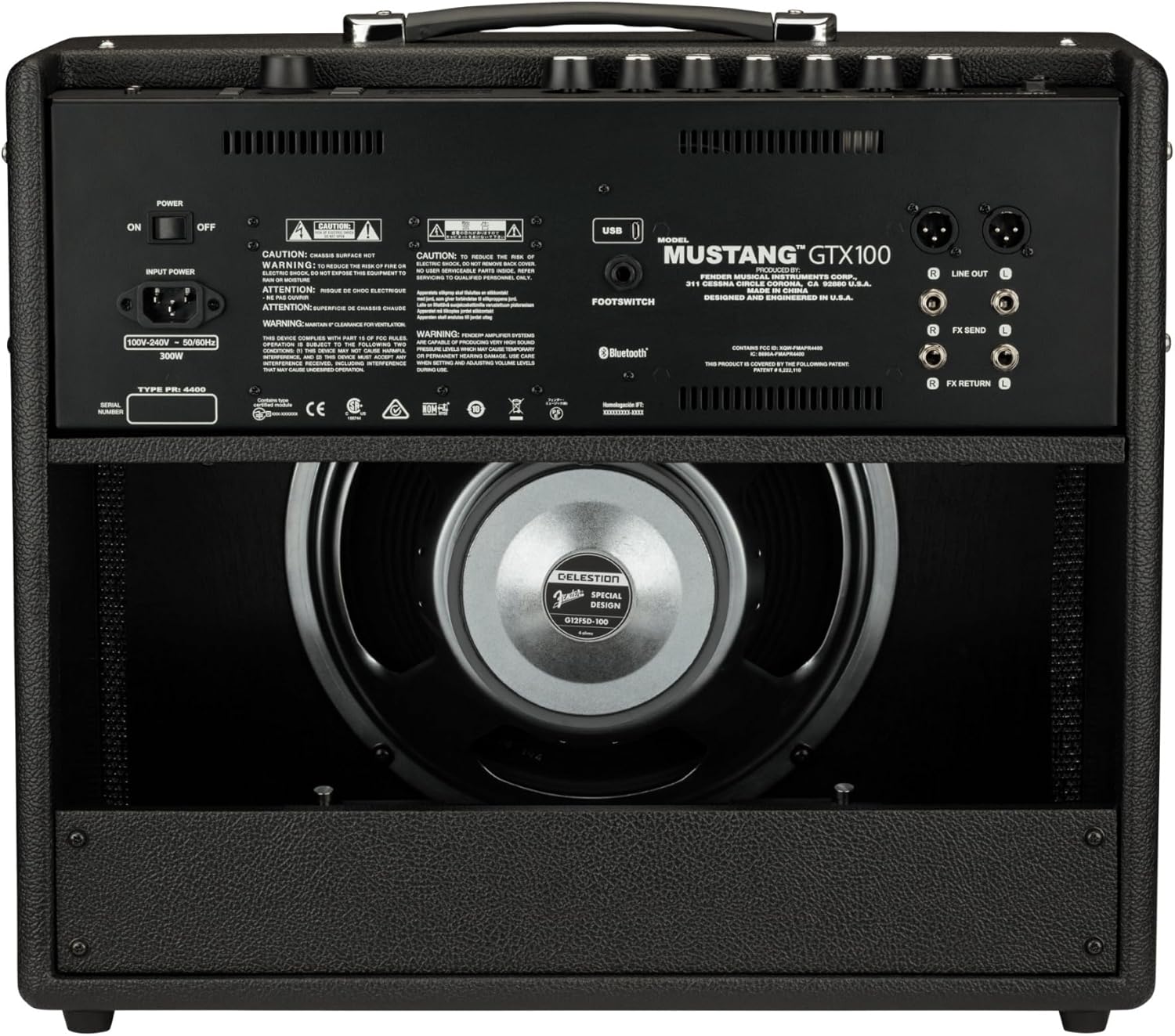
Figure 2: Rear panel connections of the Fender Mustang GTX100 Amplifier. tole view highlights the power input, footswitch jack, stereo XLR line outputs, and effects loop (FX Send/Return).

Figure 3: Top panel controls of the Fender Mustang GTX100 Amplifier. This image displays the input, aux, headphone jacks, gain, volume, tone controls (treble, middle, bass), master volume, and the digital display with navigation buttons.
5. Navodila za uporabo
5.1 Vklop/izklop
Za vklop amplifier, flip the MOČ switch located on the top panel to the 'ON' position. The display will illuminate. To power off, flip the switch back to 'OFF'.
5.2 Navigating Presets and Effects
The Mustang GTX100 features 200 onboard presets, offering a wide array of guitar tones. Use the large rotary encoder knob on the top panel to scroll through and select presets. The crisp full-color display will show the selected preset number and name. You can also use the Fender TONE 3.0 app (available for iOS and Android) via Bluetooth for deep editing, preset browsing from the Fender Tone community, and preset backup/restore.
Video 1: A demonstration of the Fender Mustang LT40S amplifier's preset navigation and sound capabilities. While this video features the LT40S, the core functionality of preset selection and sound variety is similar to the GTX100.
5.3 Using the 7-Button Footswitch
The included 7-button footswitch allows for hands-free control during performance. It provides individual bank up and down functions, easy effects selection, and unlocks the amplifier's integrated 60-second looper. Refer to the footswitch's dedicated manual for detailed operation.
5.4 Pretakanje zvoka prek Bluetootha
Connect your Bluetooth-enabled device to the amplifier to stream audio. This feature is ideal for playing along with your favorite tracks or backing music.
5.5 WiFi Connectivity for Updates
The amplifier's WiFi capabilities allow you to connect to your home network for product updates. This ensures your amplifier always has the latest firmware and features.
5.6 Stereo XLR Line Outputs and Effects Loop
Utilize the stereo XLR line outputs to connect the amplifier directly to a PA system, recording interface, or other outboard gear. The stereo effects loop allows for integration of external effects pedals into your signal chain.
5.7 USB povezljivost
The USB port can be used for direct recording to a computer or for managing presets and firmware updates via the Fender TONE 3.0 desktop application.
6. Vzdrževanje
6.1 Čiščenje
Obrišite zunanjost amplifier with a soft, dry cloth. Do not use abrasive cleaners or solvents. Ensure no liquids enter the ventilation openings or control panel.
6.2 Shranjevanje
Ko ni v uporabi, shranite amplifier in a cool, dry place away from direct sunlight and extreme temperatures. If transporting, use appropriate protective covers or cases.
7. Odpravljanje težav
- Brez napajanja: Ensure the power cable is securely connected to both the amplifier and a working electrical outlet. Check the power switch position.
- Ni zvoka: Verify that your guitar is properly plugged into the INPUT jack. Check the volume and master volume knobs. Ensure any connected headphones or external devices are functioning correctly.
- Popačen zvok: Adjust the gain and volume settings. Check your guitar's output and any external pedals for proper levels.
- Footswitch Not Responding: Ensure the footswitch cable is securely connected to the dedicated input on the rear panel.
- Bluetooth/WiFi Connectivity Issues: Zagotovite amplifier's Bluetooth/WiFi is enabled. Check your device's settings and ensure it's within range. For WiFi, verify network credentials.
8. Specifikacije
| Funkcija | Specifikacija |
|---|---|
| Številka modela | 2310700000 |
| Izhodna vattage | 100 vatov |
| Zvočnik | 12-inch Celestion |
| Teža predmeta | 28.5 funtov |
| Mere izdelka (D x Š x V) | 27.4 x 22.6 x 13.2 palcev |
| Prednastavitve | 200 Onboard |
| Looper | 60-second integrated |
| Povezljivost | Bluetooth, WiFi, USB, Stereo XLR Line Out, Effects Loop |
9. Garancija in podpora
9.1 Omejena garancija
Fender warrants this amplifier to be free from defects in materials and workmanship for two (2) years from the original date of purchase. This warranty is applicable to the original purchaser only and is non-transferable.
9.2 Podpora strankam
For technical assistance, warranty claims, or further information, please visit the official Fender support webspletno mesto ali se obrnite na njihovo službo za pomoč strankam. Za potrditev garancije shranite dokazilo o nakupu.


