1. Uvod
Hvala za nakupasing the TWS i17 Dual Earbuds. This manual provides essential information for setting up, operating, and maintaining your new wireless earbuds. Please read this manual thoroughly before use to ensure optimal performance and longevity of your device.
2. Varnostne informacije
To prevent damage to your earbuds or injury to yourself or others, please observe the following precautions:
- Slušalk ali polnilnega ohišja ne izpostavljajte ekstremnim temperaturam, vlagi ali tekočinam.
- Izogibajte se padcem, udarcem ali razstavljanju naprave.
- Do not use abrasive cleaners or solvents. Clean with a soft, dry cloth.
- Poslušajte pri zmerni glasnosti, da preprečite poškodbe sluha.
- Hraniti izven dosega otrok.
- This product is not water resistant. Avoid exposure to water or excessive moisture.
3. Vsebina paketa
Preverite, ali so v paketu vsi elementi:
- TWS i17 Dual Earbuds (Left and Right)
- etui za polnjenje
- USB polnilni kabel
- Uporabniški priročnik

Image: The TWS i17 Dual Earbuds, with one earbud partially removed from its charging case, showcasinelegantno črno obliko.
4. Nastavitev
4.1 Polnjenje slušalk in etuija
Pred prvo uporabo popolnoma napolnite slušalke in polnilno ohišje.
- Vstavite obe slušalki v polnilno ohišje. Prepričajte se, da sta pravilno nameščeni.
- Connect the USB charging cable to the charging port on the bottom of the case and the other end to a USB power source (e.g., computer, wall adapter).
- The indicator light on the case will show charging status. It will turn off or change color when fully charged.
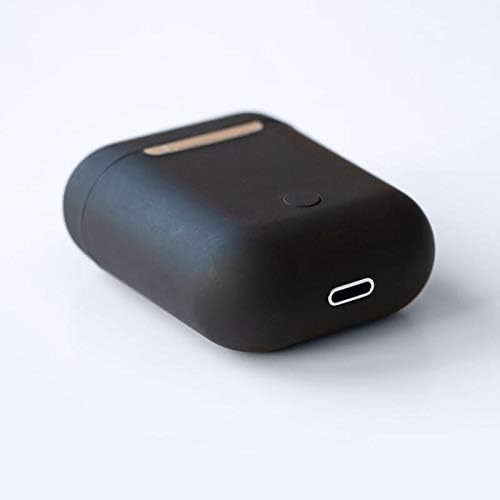
Slika: Bližnji posnetek view of the bottom of the TWS i17 charging case, highlighting the USB charging port and a small button.
4.2 Seznanjanje z vašo napravo
The i17 earbuds use Bluetooth for wireless connection.
- Prepričajte se, da so slušalke napolnjene.
- Odprite polnilno ohišje. Slušalke bodo samodejno prešle v način seznanjanja (indikatorske lučke bodo utripale).
- On your mobile phone or Bluetooth-enabled device, go to Bluetooth settings and turn Bluetooth on.
- Iskanje available devices. Select "i17" from the list.
- Once connected, the indicator lights on the earbuds will stop flashing. You are now ready to use your earbuds.

Image: The TWS i17 Dual Earbuds resting inside their open charging case, ready for pairing or use.
5. Navodila za uporabo
5.1 Vklop/izklop
- Vklop: Vzemite slušalke iz polnilnega ohišja. Samodejno se bodo vklopile in povezale z zadnjo seznanjeno napravo.
- Ugasniti: Slušalke postavite nazaj v polnilno ohišje. Samodejno se bodo izklopile in začele polniti.
5.2 Predvajanje glasbe
- Predvajanje/pavza: Enkrat tapnite eno od slušalk.
- Naslednja skladba: Dvakrat tapnite desno slušalko.
- Prejšnja skladba: Dvakrat se dotaknite leve slušalke.
5.3 Upravljanje klicev
- Sprejmi/končaj klic: Enkrat tapnite eno od slušalk.
- Zavrni klic: Pritisnite in držite katero koli slušalko 2 sekundi.
5.4 Glasovni pomočnik
- Aktivirajte glasovnega pomočnika (Siri/Google Assistant): Trikrat tapnite katero koli slušalko.
6. Vzdrževanje
Proper maintenance ensures the longevity of your earbuds:
- Čiščenje: Za čiščenje slušalk in polnilnega ohišja uporabite mehko, suho krpo, ki ne pušča vlaken. Ne uporabljajte tekočin ali razpršil.
- Shranjevanje: Ko slušalk ne uporabljate, jih shranite v polnilno škatlico, da jih zaščitite in ohranite napolnjene. Hranite na hladnem in suhem mestu.
- Vzdrževanje baterije: To prolong battery life, avoid fully discharging the earbuds frequently. Charge them regularly.

Image: The TWS i17 Dual Earbuds securely stored within their closed charging case, ready for transport or charging.
7. Odpravljanje težav
| Težava | Možen vzrok | rešitev |
|---|---|---|
| Slušalke se ne seznanijo | Low battery; Out of range; Not in pairing mode; Bluetooth off on device. | Charge earbuds; Move closer to device; Ensure case is open for pairing; Turn on Bluetooth on device. |
| Samo ena ušesna slušalka deluje | One earbud not charged; Earbuds not properly synced. | Ensure both earbuds are charged; Place both earbuds back in case, close, then reopen to re-sync. |
| Brez zvoka | Volume too low; Not connected; Media paused. | Increase volume on device; Reconnect earbuds; Check media playback status. |
| Polnilna torbica se ne polni | Faulty cable/adapter; Loose connection. | Try a different USB cable or power adapter; Ensure cable is securely plugged in. |
8. Specifikacije
| Funkcija | Podrobnost |
|---|---|
| Številka modela | i17 |
| Znamka | TWS |
| Tehnologija povezljivosti | Brezžično (Bluetooth) |
| Faktor oblike slušalk | In-Ear |
| Mikrofon priložen | ja |
| Odpravljanje hrupa | št |
| Združljivo z | Mobilni telefoni |
| barva | Črna |
| Material | Plastika |
| Funkcija kabla | Brez kabla |
| Stopnja vodoodpornosti | Ni vodoodporen |
| Dimenzije pošiljanja | 12.6 x 8.8 x 3.6 cm |
| Teža | 96 gramov |
| Prvi razpoložljivi datum | 15. januar 2020 |
9. Garancija in podpora
For warranty information and customer support, please refer to the contact details provided on the product packaging or the official TWS webspletnega mesta. Shranite dokazilo o nakupu za uveljavljanje garancije.
For further assistance, please contact TWS customer service.


