1. Uvod
Hvala za nakupasing the Antec Sensio Pie Maker Model KP8104. This appliance is designed to simplify the process of making delicious pies. Please read this manual thoroughly before operating the pie maker to ensure safe and efficient use. Keep this manual for future reference.
2. Pomembna varnostna navodila
Pri uporabi električnih naprav je treba vedno upoštevati osnovne varnostne ukrepe, vključno z naslednjimi:
- Pred uporabo preberite vsa navodila.
- Ne dotikajte se vročih površin. Uporabite ročaje ali gumbe.
- Za zaščito pred električnim udarom ne potapljajte kabla, vtičev ali naprave v vodo ali drugo tekočino.
- Potreben je natančen nadzor, kadar katero koli napravo uporabljajo otroci ali v njeni bližini.
- Izvlecite vtič iz vtičnice, ko ga ne uporabljate in pred čiščenjem. Pustite, da se ohladi, preden nadenete ali snamete dele.
- Ne uporabljajte nobene naprave s poškodovanim kablom ali vtičem ali po tem, ko naprava ne deluje pravilno ali je bila kakor koli poškodovana.
- Uporaba dodatkov, ki jih proizvajalec aparata ne priporoča, lahko povzroči poškodbe.
- Ne uporabljajte na prostem.
- Kabel ne sme viseti čez rob mize ali pulta ali se dotikati vročih površin.
- Ne postavljajte na ali blizu vročega plinskega ali električnega gorilnika ali v segreto pečico.
- Pri premikanju naprave, ki vsebuje vroče olje ali druge vroče tekočine, morate biti zelo previdni.
- Vedno najprej priključite vtič na napravo, nato pa kabel vtaknite v stensko vtičnico. Če želite prekiniti povezavo, obrnite kateri koli gumb na "off", nato izvlecite vtič iz zidne vtičnice.
- Naprave ne uporabljajte za namene, ki niso predvideni.
3. Nastavitev
Before first use, ensure all packaging materials are removed. Wipe the cooking plates with a damp cloth and dry thoroughly. The appliance is ready for use.
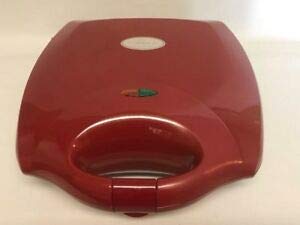
Figure 1: Antec Sensio Pie Maker Model KP8104. This image displays the compact red pie maker with its lid closed, ready for use.
4. Navodila za uporabo
- Priprava: Prepare your pie crust and filling according to your recipe. Ensure the pie maker is clean and dry.
- Predgretje: Close the lid and plug the pie maker into a standard electrical outlet. The indicator light will illuminate, signaling that the appliance is preheating.
- Ready to Bake: Once the pie maker reaches the optimal baking temperature, the indicator light will turn off (or change color, depending on the model). This typically takes 3-5 minutes.
- Dodajte sestavine: Carefully open the lid. Place one pie crust into each cooking cavity. Add your desired filling, ensuring not to overfill. Place the top crusts over the filling.
- Peka: Close the lid firmly. The indicator light will illuminate again as the appliance maintains its temperature. Bake for approximately 8-12 minutes, or until the crusts are golden brown and the filling is heated through. Baking time may vary based on recipe and desired crispness.
- Odstranitev: Using a non-metallic utensil (e.g., plastic or wooden spatula), carefully remove the cooked pies from the cavities.
- Hlajenje: Allow pies to cool slightly before serving.
- Končaj: Unplug the pie maker from the outlet when finished baking.
5. Čiščenje in vzdrževanje
Proper cleaning and maintenance will extend the life of your pie maker.
- Ohlajanje: Pred čiščenjem pustite, da se aparat popolnoma ohladi.
- Odklopite: Ensure the pie maker is unplugged from the electrical outlet.
- Čistilne plošče: Z oglasom obrišite kuhalne plošče proti sprijemanjuamp cloth or sponge. For stubborn residue, use a small amount of cooking oil to soften it, then wipe clean. Do not use abrasive cleaners or metal scouring pads, as these can damage the non-stick coating.
- Zunanjost: Zunanjost aparata obrišite z mehko damp cloth. Do not immerse the pie maker in water or any other liquid.
- Shranjevanje: Store the pie maker in a clean, dry place.
6. Odpravljanje težav
| Težava | Možen vzrok | rešitev |
|---|---|---|
| Aparat se ne vklopi. | Ni priključeno; okvara električne vtičnice. | Prepričajte se, da je vtič varno vstavljen v delujočo vtičnico. Preverite odklopnik. |
| Pies are not cooking evenly. | Uneven filling; appliance not fully preheated. | Ensure filling is evenly distributed. Allow the pie maker to fully preheat before adding ingredients. |
| Pies stick to the cooking plates. | Nezadosten premaz proti prijemanju; plošče niso čiste. | Ensure cooking plates are clean. A light spray of cooking oil can be used if needed, though typically not required for non-stick surfaces. |
7. Specifikacije
- Znamka: Antec
- Model: KP8104
- barva: Rdeča
- Oblika: Okrogla
- Kapaciteta: 1 Kilogram (approximate)
- Nega izdelka: Hand Wash (for removable parts, if applicable; main unit wipe clean)
- Teža artikla: 1 funt
- UPC: 704455690631
8. Garancija in podpora
Antec provides a limited warranty for this product. For detailed warranty information, product support, or to inquire about replacement parts, please refer to the warranty card included with your purchase or visit the official Antec website. Please have your model number (KP8104) and proof of purchase available when contacting support.


