1. Uvod
Thank you for choosing the EKEN V5 Video Doorbell. This manual provides comprehensive instructions for setting up, operating, and maintaining your video doorbell to ensure optimal performance and security for your home.
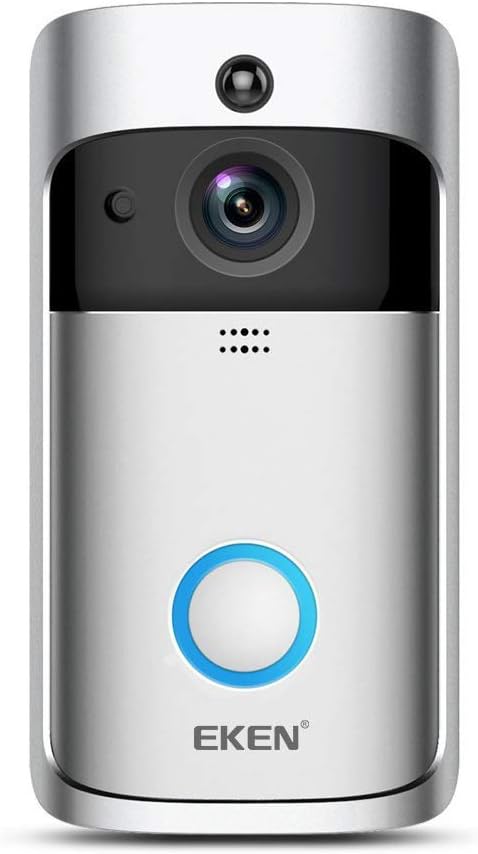
Slika: spredaj view of the EKEN V5 Video Doorbell, showcasing its sleek silver and black design with a prominent blue illuminated ring button.
Ključne značilnosti:
- PIR zaznavanje gibanja: Receive instant notifications on your phone when visitors are detected at your door.
- Nočni vid: Clear visibility in low-light conditions through the ToSee app.
- Family Connection & Real-time Sharing: Monitor and share doorbell footage with up to four mobile phones simultaneously.
- Dvosmerni zvok: Z obiskovalci komunicirajte neposredno prek zvonca.
- Enostavna nastavitev: Simple connection and configuration via the ToSee application.
- Več možnosti napajanja: Supports AC (8/24V) external power or 3x 18650 batteries.
Vsebina paketa:
- 1 x EKEN V5 Doorbell (batteries not included)
- 1 x komplet vijakov za namestitev
- 1 x dvostranski lepilni trak
- 1 x uporabniški priročnik

Image: Contents of the EKEN V5 Video Doorbell package, including the doorbell unit, mounting hardware, adhesive tape, and user manual.
2. Nastavitev in namestitev
2.1 Power Supply Options:
The EKEN V5 Video Doorbell offers flexible power options:
- External AC Power: Connect to an existing doorbell wiring system (8-24V AC).
- Moč baterije: Use three 18650 rechargeable batteries (not included).
A micro SD card (up to 32GB, not included) is required for local video storage.

Slika: Zadaj view of the EKEN V5 Video Doorbell, illustrating the battery compartment for three 18650 batteries and the terminals for AC (8/24V) external power connection.
2.2 Fizična namestitev:
Follow these steps to install your video doorbell on the wall:
- Secure the mounting bracket to your desired location using the provided screws or double-sided adhesive tape.
- If using AC power, connect the doorbell wires to the terminals on the back of the doorbell.
- Insert the 18650 batteries into the battery compartment if using battery power.
- Attach the EKEN V5 doorbell unit to the mounting bracket, ensuring it clicks securely into place.

Image: Visual guide demonstrating the installation process of the EKEN V5 Video Doorbell, showing the mounting bracket, battery insertion, and attaching the doorbell to the wall.
2.3 App Configuration (ToSee App):
To connect and configure your doorbell, download the "ToSee" app:
- Scan the QR code provided in your physical user manual or search for "ToSee" in the Google Play Store (for Android) or Apple App Store (for iOS).
- Follow the in-app instructions to add your EKEN V5 doorbell. This typically involves connecting the doorbell to your 2.4GHz Wi-Fi network.
- Once configured, real-time viewing and all features will be accessible through the ToSee app.
For a visual guide on how to set up the doorbell, you may refer to external video resources. Please note that external video content is not managed by EKEN.
3. Navodila za uporabo
3.1 PIR Motion Detection:
The Passive Infrared (PIR) sensor detects motion and sends immediate notifications to your smartphone. This feature helps you stay aware of activity at your doorstep.
3.2 Night Vision:
The EKEN V5 doorbell is equipped with infrared sensors for clear vision in low-light or nighttime conditions. Activate night mode through the ToSee app to enhance visibility.

Image: A split image demonstrating the difference between day and night vision modes of the EKEN V5 Video Doorbell, showing clear visibility in both conditions.
3.3 Two-Way Audio Communication:
Engage in real-time conversations with visitors at your door using the built-in microphone and speaker. This feature is accessible directly through the ToSee app.
3.4 Family Sharing:
Up to four mobile phones can simultaneously monitor and share the doorbell's live feed. While multiple users can view, only one user can engage in direct two-way intercom communication at a time.

Image: Depiction of various scenarios where the EKEN V5 Video Doorbell provides security and convenience, such as during business trips, shopping, parties, and travel.
4. Vzdrževanje
4.1 Zamenjava baterije:
If using battery power, monitor the battery level via the ToSee app. When the battery is low, remove the doorbell from its mounting bracket and replace the three 18650 batteries. Ensure correct polarity.
4.2 Čiščenje:
To maintain optimal performance, periodically clean the doorbell's lens and body with a soft, dry cloth. Avoid using abrasive cleaners or solvents that could damage the device.
5. Odpravljanje težav
- Brez napajanja: Ensure batteries are correctly inserted and charged, or that the AC power connection is secure and providing adequate voltage (8-24 V).
- Ni povezave Wi-Fi: Verify your Wi-Fi network is 2.4GHz. Ensure the doorbell is within range of your router. Restart your router and the doorbell, then attempt to reconnect via the ToSee app.
- Slaba kakovost videa: Preverite moč signala Wi-Fi. Prepričajte se, da je objektiv kamere čist in brez ovir.
- Zaznavanje gibanja ne deluje: Adjust PIR sensitivity settings within the ToSee app. Ensure there are no physical obstructions blocking the sensor.
- Brez obvestil: Check app notification settings on your smartphone and within the ToSee app. Ensure the app has necessary permissions.
For further assistance, refer to the help section within the ToSee application or contact EKEN customer support.
6. Specifikacije
| Funkcija | Podrobnost |
|---|---|
| Model | V5 |
| Napajalnik | AC (8/24V) or 3x 18650 Batteries (not included) |
| Shranjevanje | Max 32GB Micro SD Card (not included) |
| Povezljivost | 2.4GHz Wi-Fi Compatible |
| Zaznavanje gibanja | PIR senzor |
| Nočni vid | Podprto |
| Združljivost aplikacij | ToSee App (iOS & Android) |
| Teža | 299.37 gramov |
| ASIN | B07THT7Z4N |

Image: Diagram showing the dimensions of the EKEN V5 Video Doorbell (5.65 x 2.93 x 1.28 inches) and icons representing its key features like 720p HD Video, Two-way Audio, 2.4GHz Wi-Fi, Night Vision, PIR Motion Detection, and Battery powered operation.
7. Garancija in podpora
Information regarding specific warranty terms for the EKEN V5 Video Doorbell is not available in this document. Please refer to the product packaging or the official EKEN webza podrobne informacije o garanciji.
For technical support or further inquiries, please visit the manufacturer's official support channels or contact your retailer.


