1. Izdelek je končanview
The TMEZON MZ-WF8430W is a wireless security camera system designed for comprehensive surveillance. It features 3-megapixel cameras, an 8-channel Network Video Recorder (NVR), and robust IP66 weatherproofing for outdoor use. This system supports remote monitoring via smartphones and PCs, includes motion detection, and offers clear night vision capabilities.

Slika: Konecview of the TMEZON Wireless Security Camera System, highlighting key features like WiFi, motion detection, night vision, IP66 waterproofing, remote monitoring, and email alerts.

Image: Detailed feature icons for the TMEZON system, including WiFi connectivity, motion detection, night vision mode, IP66 waterproof rating, remote surveillance, and email alerts.
2. Nastavitev
2.1 Razpakiranje
Carefully unpack all components from the box. Ensure all items listed in the packing list are present and undamaged.
Video: An unboxing demonstration of the OHWOAI 3MP Wireless Security Camera 8-Camera Set, showing all included components and accessories.
2.2 Initial Setup & Connections
The system is designed for easy auto-pairing, minimizing complex wiring. Connect the NVR to a monitor using an HDMI or VGA cable. Power on the NVR and cameras. The cameras should automatically connect to the NVR.

Image: Diagram illustrating the auto-pairing feature of the TMEZON wireless security camera system, showing cameras wirelessly connecting to the NVR without complex wiring.
Refer to the diagram below for NVR port connections:

Image: A detailed diagram of the TMEZON NVR's rear panel, showing ports for HDMI/VGA, Ethernet, USB mouse, and power input.
2.3 Namestitev kamere
The cameras are IP66 waterproof and dustproof, making them suitable for both indoor and outdoor environments. Choose strategic locations for optimal coverage.

Slika: npramples of suitable installation locations for the TMEZON cameras, including indoor and various outdoor settings, highlighting their versatility.
3. Navodila za uporabo
3.1 Kakovost videa
The system provides 3-megapixel (1944p) video capture resolution, offering clear and detailed images for effective surveillance.
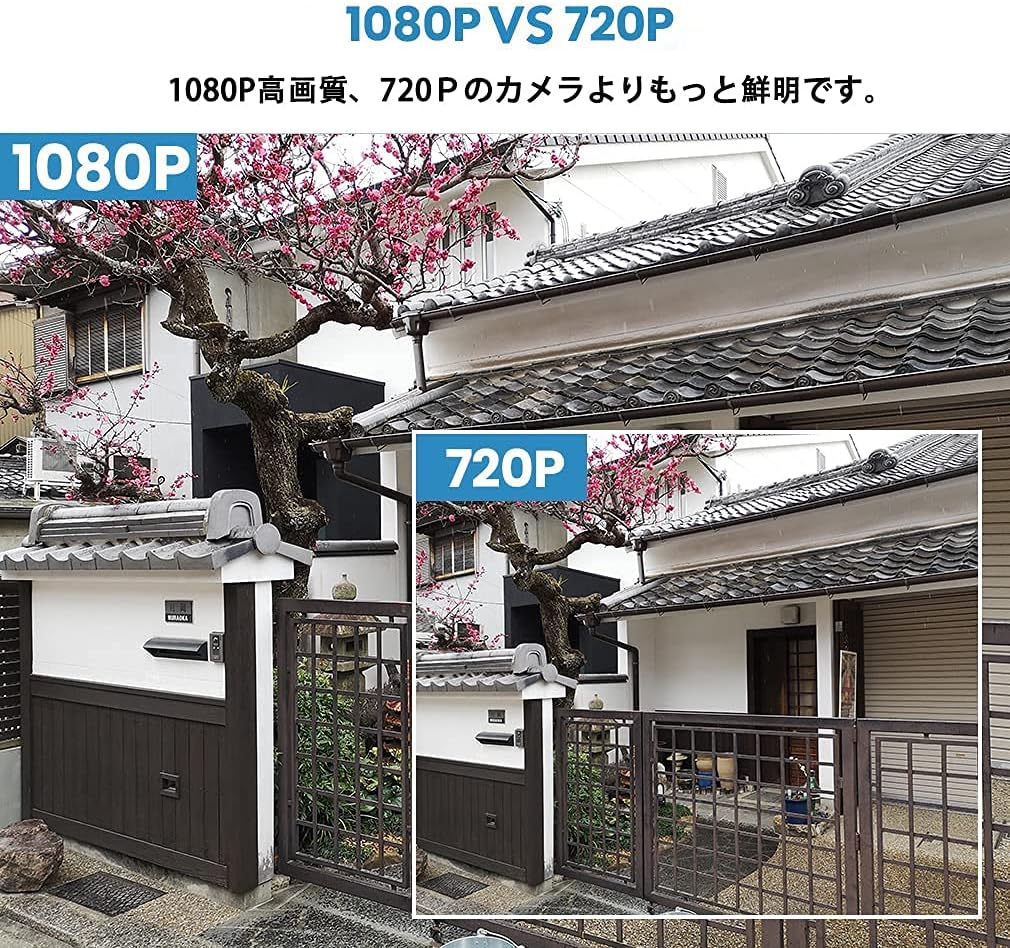
Image: A visual comparison demonstrating the superior clarity of 1080P video resolution compared to 720P, showcasing the system's high-definition capabilities.
3.2 Zaznavanje gibanja in opozorila
The system features advanced motion detection. When motion is detected, you will receive smart notifications, including email alerts and snapshot alarms, directly to your smartphone or PC. This allows for remote monitoring and peace of mind whether you are at home or away.

Image: A visual representation of the motion detection feature, showing a person triggering an alert on a smartphone, with an email/snapshot notification.
3.3 Oddaljeni dostop
Monitor your property from anywhere using the dedicated mobile app on your smartphone or tablet, or via PC. The system allows for live viewin predvajanje posnete glasbetage.

Image: Screenshots showing the security camera feed being accessed remotely on various devices, including a tablet, laptop, and smartphone (Android and Apple).
Video: A tutorial demonstrating how to add a device using the ESEECLOUD app, including scanning a QR code for setup and device configuration.
4. Vzdrževanje
To ensure optimal performance and longevity of your TMEZON security camera system, regular maintenance is recommended:
- Čiščenje leč: Občasno očistite objektive fotoaparata z mehko krpoamp krpo, da odstranite prah in madeže, ki lahko vplivajo na jasnost slike.
- Pregled kabla: Check all power and network cables for any signs of wear, damage, or loose connections.
- Posodobitve programske opreme: Ensure your NVR firmware and mobile app are updated to the latest versions for improved security and features.
- Varstvo okolja: While cameras are IP66 rated, avoid directing high-pressure water jets directly at them during cleaning.

Image: An outdoor security camera shown operating effectively in rainy conditions, demonstrating its IP66 waterproof and dustproof capabilities.
5. Odpravljanje težav
If you encounter any issues with your TMEZON security camera system, please refer to the following common troubleshooting steps:
- Brez video vira: Check power connections for both the NVR and cameras. Ensure the NVR is connected to a monitor and the correct input source is selected.
- Slaba kakovost slike: Clean camera lenses. Ensure cameras are within optimal range of the NVR for strong wireless signal. Adjust camera position if necessary.
- Zaznavanje gibanja se ne sproži: Verify motion detection settings in the NVR or app. Adjust sensitivity and detection zones.
- Težave z oddaljenim dostopom: Ensure the NVR is connected to the internet via Ethernet. Check your network settings and firewall configurations. Restart the NVR and your router.
- Brez snemanja: Check if the HDD is properly installed and functioning (if applicable). Verify recording schedules and settings.
For further assistance, please contact TMEZON customer support.
6. Specifikacije
| Funkcija | Podrobnost |
|---|---|
| Znamka | TMEZON |
| Številka modela | MZ-WF8430W |
| Tehnologija povezljivosti | Brezžično |
| Ločljivost zajema videa | 1944p (3 milijonov slikovnih pik) |
| Število kanalov | 8 |
| Posebne lastnosti | Waterproof (IP66), Motion Detection, Night Vision |
| Največja zmogljivost pomnilnika | 2 TB (HDD, if included in package) |
| Območje nočnega vida | 30 metrov |
| Način snemanja | Na podlagi dogodkov |
| Priporočene uporabe | Na prostem |
| Product Body Size | 30 x 30 x 30 cm (približno) |

Image: The TMEZON NVR unit displayed with an 8-camera setup and an indication of a 2TB HDD for storage.
7. Garancija in podpora
TMEZON products are designed for reliability and performance. For warranty information and technical support, please refer to the contact details provided in your product packaging or visit the official TMEZON webmesto.
Za garancijske zahtevke shranite dokazilo o nakupu.


