1. Izdelek je končanview
The Intermatic ET2725C is a versatile electronic timer designed for precise control of electrical loads. It features an easy-to-use interface for scheduling, offering to-the-minute programming capabilities for a wide range of applications. This model supports 50 holiday blocks with independent scheduling and up to 96 ON/OFF events, accommodating complex scheduling requirements. A key feature is its 100-hour backup power, provided by a supercapacitor, eliminating the need for batteries.
Ključne značilnosti:
- 100-hour supercapacitor backup, eliminating battery requirements.
- Up to 96 programmable set points or events.
- Up to 50 holiday blocks with independent scheduling capabilities.
- Samodejni vnos glastage selection from 120 to 277 Vac, 60 Hz.
- Additional mode of operation that converts ON/OFF buttons into 2-hour overrides.
2. Kaj je v škatli
Po odprtju embalaže preverite, ali so vse komponente prisotne in nepoškodovane.
- Intermatic Electronic Timer (Model ET2725C)
- Navodila za uporabo (ta dokument)
3. Varnostne informacije
OPOZORILO: Nevarnost požara ali električnega udara
- Always disconnect power at the circuit breaker(s) or disconnect switch(es) before installing or servicing this equipment.
- More than one circuit breaker or disconnect switch may be required to de-energize the equipment completely before servicing.
- Installation and/or wiring must be performed in accordance with all national and local electrical code requirements.
- Use COPPER conductors ONLY for wiring connections.
- Do NOT remove the internal insulator.
For wiring, lift the terminal cover, remove the screw, and swing it aside. Replace the screw and plastic insulator covering the terminal before powering on the device.
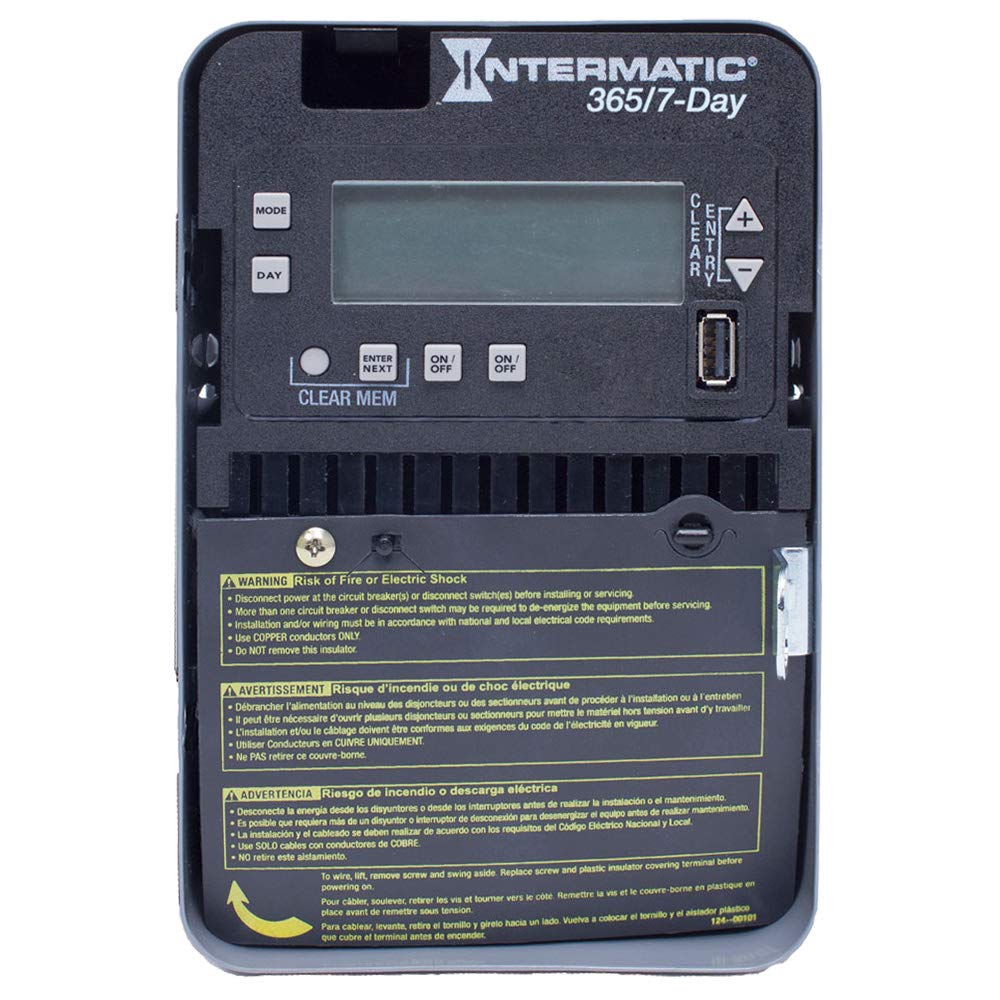
Figure 1: Front panel of the Intermatic ET2725C Electronic Timer, showing the display, control buttons (MODE, DAY, ENTER/NEXT, ON/OFF, CLEAR/ENTRY, +, -), and multi-language safety warnings at the bottom.
4. Namestitev in ožičenje
Proper installation is crucial for the safe and reliable operation of the ET2725C timer. Ensure all safety precautions are followed.
4.1 Montaža
Mount the timer securely in a suitable enclosure or location, ensuring it is protected from environmental elements and accessible for programming and maintenance. Refer to local electrical codes for specific mounting requirements.
4.2 Navodila za ožičenje
- Odklop napajanja: Before beginning any wiring, ensure that power to the circuit is completely disconnected at the main circuit breaker or disconnect switch. Verify with a voltage tester.
- Dostopni terminali: To access the wiring terminals, lift the terminal cover, remove the retaining screw, and swing the cover aside.
- Povežite ožičenje: Connect the appropriate copper conductors to the timer terminals as per the wiring diagram provided with the unit and local electrical codes. The timer supports 120 to 277 Vac, 60 Hz.
- Varne povezave: Zagotovite, da so vse žične povezave tesne in varne.
- Replace Insulator: Before restoring power, replace the plastic insulator covering the terminals and secure the terminal cover with its screw. This is critical for safety.
- Obnovi moč: Ko je vse ožičenje končano in preverjeno, ponovno vzpostavite napajanje tokokroga.
5. Operation and Programming
The ET2725C timer features a user-friendly interface for setting time, date, and programming events. The display and buttons (MODE, DAY, ENTER/NEXT, ON/OFF, CLEAR/ENTRY, +, -) are used for navigation and input.
5.1 Initial Setup (Setting Time and Date)
- Ob prvem vklopu ali po daljšem izpadu napajanjatage (beyond 100 hours), the display may show default settings or require time/date input.
- Pritisnite NAČIN gumb za vstop v nastavitveni meni.
- Uporabite + or - buttons to adjust the current time (hour and minute).
- Pritisnite DAN da nastavite trenutni dan v tednu.
- Pritisnite VNESI/NAPREJ to confirm settings and move to the next parameter.
- Continue adjusting year, month, and day as prompted until the current date and time are correctly set.
5.2 Programiranje dogodkov VKLOP/IZKLOP
The timer allows for up to 96 ON/OFF events. Each event can be programmed for specific times and days.
- Pritisnite NAČIN repeatedly until "PROG" or "EVENT" mode is displayed.
- Uporaba VNESI/NAPREJ to select an event number (e.g., P1 ON).
- Uporaba + or - to set the desired ON time for the event.
- Pritisnite DAN to select the days of the week for this event (e.g., Mon-Fri, Daily, Weekends, or individual days).
- Pritisnite VNESI/NAPREJ to move to the OFF time for the same event (e.g., P1 OFF).
- Repeat steps 3-4 for the OFF time.
- Nadaljuj z VNESI/NAPREJ to program additional events or exit programming mode.
5.3 Holiday Programming
The ET2725C supports up to 50 holiday blocks, allowing for temporary schedule overrides for specific dates.
- Access the holiday programming mode (refer to the on-screen prompts or specific button combinations).
- Select a holiday block.
- Nastavite začetni in končni datum za obdobje počitnic.
- Define the desired ON/OFF state or program a specific schedule for the holiday period.
- Confirm and save the holiday block.
5.4 Ročna preglasitev
The ON/OFF buttons can be used for manual overrides. In a specific mode, these buttons can provide a 2-hour override function, temporarily changing the load state without affecting the programmed schedule.
- Pritisnite VKLOP/IZKLOP button to manually switch the load ON or OFF.
- In override mode, a single press may activate a 2-hour override. Consult the display for confirmation.
5.5 Clearing Memory
To clear all programmed events and reset the timer to factory defaults (excluding current time/date), use the POČISTI POMNILNIK function. This typically involves pressing and holding the POČISTI POMNILNIK button for a few seconds until the display confirms the reset.
6. Vzdrževanje
The Intermatic ET2725C timer is designed for long-term, reliable operation with minimal maintenance.
- Čiščenje: Zunanjost časovnika občasno obrišite z mehko, suho krpo. Ne uporabljajte abrazivnih čistil ali topil.
- Povezave: Annually, or as required by local codes, inspect wiring connections to ensure they remain tight and free from corrosion. Always disconnect power before inspecting connections.
- Superkondenzator: The internal supercapacitor provides backup power for up to 100 hours. No user maintenance or replacement is required for this component.
7. Odpravljanje težav
If you encounter issues with your ET2725C timer, refer to the following common troubleshooting steps:
| Težava | Možen vzrok | rešitev |
|---|---|---|
| Prikaz časovnika je prazen. | Naprava ni pod napetostjo; odklopnik se je sprožil. | Check circuit breaker and ensure power is supplied to the timer. Verify wiring connections. |
| Programi se ne izvajajo. | Incorrect time/date setting; program not enabled; manual override active. | Verify current time and date. Ensure programs are correctly set and enabled. Check for active manual overrides. |
| Load does not switch ON/OFF. | Incorrect wiring; faulty load; timer malfunction. | Verify wiring connections (power off first). Test the load independently. If issues persist, contact Intermatic support. |
| Čas/datum se ponastavi po izpadu napajanjatage. | Napajanjetage exceeded 100-hour supercapacitor backup. | Reset the current time and date manually. This is normal behavior if the outage je podaljšan. |
If troubleshooting steps do not resolve the issue, please contact Intermatic customer support.
8. Specifikacije
| Funkcija | Podrobnost |
|---|---|
| Številka modela | ET2725C |
| voltage | 120 to 277 Vac, 60 Hz (Automatic Selection) |
| Ampstarost | 30 Amps |
| Način delovanja | 7/365 dni |
| Število kanalov | 2 |
| Dogodki programa | Do 96 dogodkov VKLOP/IZKLOP |
| Holiday Blocks | Up to 50 with independent scheduling |
| Rezervno napajanje | 100-hour supercapacitor (no batteries required) |
| Material | Plastika |
| Dimenzije izdelka | 7 cm G x 7 cm Š x 7 cm V (približno) |
| Teža predmeta | 0.01 Ounces (approximate) |
9. Garancija in podpora
For warranty information, technical support, or service inquiries regarding your Intermatic ET2725C Electronic Timer, please contact Intermatic customer service directly. Refer to the official Intermatic webZa najnovejše kontaktne podatke in garancijske pogoje se obrnite na spletno mesto ali embalažo izdelka.
Proizvajalec: Intermatic
Prvič na voljo: 13. maj 2019


