1. Uvod in konecview
Thank you for choosing the Lorex Analog 4K Weatherproof Indoor/Outdoor HD Wired Add-On Security Camera. This manual provides essential information for the proper installation, operation, and maintenance of your new security camera. This camera is designed as an add-on unit and requires a compatible Lorex recorder (DVR/NVR) for full functionality.
This camera features 4K resolution for superior image clarity, robust weatherproof construction for reliable indoor and outdoor use, and advanced deterrence features such as motion-activated lights and remote-triggered sirens. Its long-range night vision ensures comprehensive surveillance even in low-light conditions.
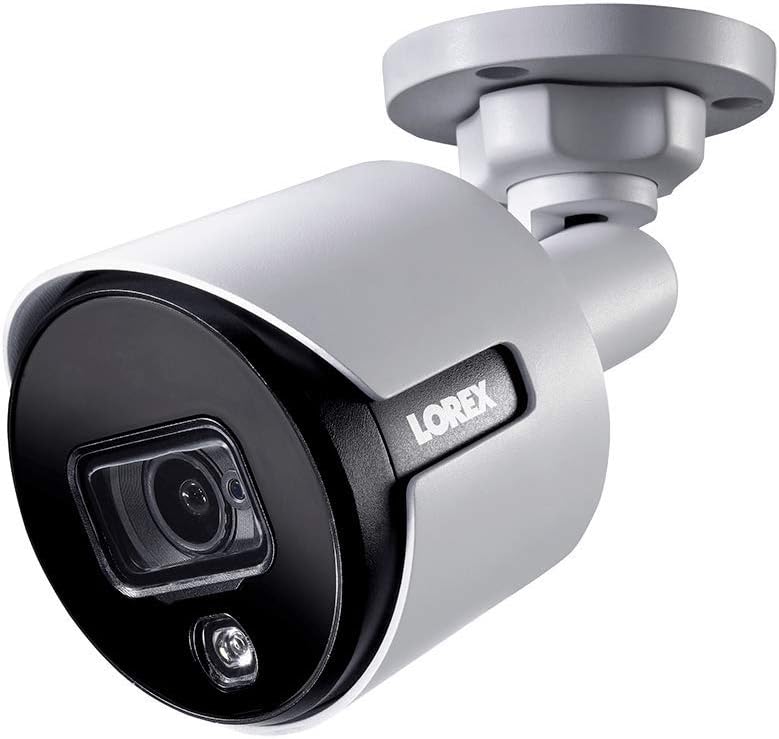
Slika 1.1: Sprednji kot view of the Lorex 4K Weatherproof Security Camera. This image shows the camera's bullet form factor, lens, and integrated light.
2. Vsebina paketa
The Lorex Analog 4K Weatherproof Indoor/Outdoor HD Wired Add-On Security Camera package includes:
- 1 x Lorex Analog 4K Weatherproof Indoor/Outdoor HD Wired Add-On Security Camera (Model: LBV8543XW)
- Komplet za montažo (vijaki in stenski vložki)
- Allen Key (for adjustment)
Note: This is an add-on camera. Video cables, power adapters, and a compatible Lorex recorder are sold separately and are required for operation.
3. Ključne značilnosti
- 4K Ultra HD ločljivost: Provides exceptional detail and clarity with an 8MP effective still resolution.
- Vodoodporna zasnova (IP67): Durable metal housing ensures reliable performance in various weather conditions, suitable for both indoor and outdoor installation.
- Long Range Night Vision: See clearly up to 150 feet (45m) in ambient night conditions and up to 98 feet (30m) in total darkness. Features Color Night Vision for enhanced detail in low light.
- Opozorilna lučka, ki se aktivira ob gibanju: Integrated LED light can be triggered by motion to deter intruders.
- Daljinsko sprožena sirena: Activate a loud siren directly from your Lorex recorder or connected app to scare away unwanted visitors.
- Wired Connectivity (BNC): Ensures a stable and secure connection to your Lorex DVR/NVR system.
- Široka delovna temperatura: Functions reliably in temperatures up to 60 degrees Celsius.
4. Nastavitev in namestitev
Before installation, ensure you have a compatible Lorex recorder (DVR/NVR) and necessary video/power cables.
4.1 Izbira lokacije
Izberite lokacijo, ki zagotavlja želeno viewing angle and is within reach of your Lorex recorder and a power source. Consider areas prone to intrusion, such as entry points or vulnerable perimeters. The camera is suitable for ceiling mount and wall mount applications.

Slika 4.1: stran view of the Lorex 4K Weatherproof Security Camera, showing its adjustable mounting base.
4.2 Namestitev fotoaparata
- Označite vrtalne luknje: Use the mounting template (if provided) or the camera base to mark the positions for drilling.
- Vrtanje lukenj: Drill pilot holes for the mounting screws. If mounting on drywall or masonry, insert the provided wall plugs.
- Varna kamera: Align the camera base with the drilled holes and secure it using the provided screws.
- Prilagodi kot: Loosen the adjustment screws on the camera body using the Allen key to position the camera for the optimal viewKot nastavitve. Po nastavitvi privijte vijake.
4.3 Priključitev kamere
- Povežite video kabel: Connect one end of the BNC video cable (not included) to the camera's BNC port and the other end to an available video input channel on your Lorex recorder.
- Priključite napajanje: Connect the camera's power input to a compatible power adapter (not included). Ensure the power adapter is connected to a power outlet.
- Power On Recorder: Ensure your Lorex recorder is powered on and properly configured.
5. Navodila za uporabo
Once the camera is physically installed and connected to your Lorex recorder, you can begin operation.
5.1 Viewing Live Feed
Access your Lorex recorder's interface (via monitor, Lorex Home app, or client software) to view the live video feed from the camera. Ensure the correct channel is selected.

Slika 5.1: Bližnji posnetek view of the Lorex 4K Weatherproof Security Camera's lens and integrated light.
5.2 Motion Detection and Smart Deterrence
Your Lorex recorder manages motion detection settings. Refer to your recorder's manual for detailed instructions on configuring motion zones and sensitivity.
- Motion-Activated Light: The camera's integrated light can be set to activate automatically upon motion detection. This setting is typically configured within your Lorex recorder's deterrence or alarm settings.
- Daljinsko sprožena sirena: You can manually activate the camera's siren through your Lorex recorder's interface or the Lorex Home app. This feature is useful for immediate deterrence.

Figure 5.2: The Lorex 4K Weatherproof Security Camera mounted on a brick wall at night, demonstrating its motion-activated light feature.
5.3 Nočni vid
The camera automatically switches to night vision mode in low-light conditions. The infrared (IR) LEDs provide illumination for clear black and white video. Color Night Vision (CNV) may be available if there is sufficient ambient light, providing full-color video in low-light scenarios.
6. Vzdrževanje
Redno vzdrževanje zagotavlja optimalno delovanje in dolgo življenjsko dobo vaše varnostne kamere.
- Čiščenje: Objektiv in ohišje fotoaparata občasno očistite z mehko krpoamp krpo. Izogibajte se abrazivnim čistilom ali topilom, ki bi lahko poškodovala površino ali lečo.
- Preverite povezave: Ensure all cable connections (BNC and power) are secure and free from corrosion, especially for outdoor installations.
- Posodobitve vdelane programske opreme: Regularly check the Lorex website or your recorder's settings for available firmware updates for your camera and recorder to ensure the latest features and security enhancements.
- Okoljski pogoji: While weatherproof, extreme conditions outside the specified operating temperature range (up to 60°C) may affect performance.
7. Odpravljanje težav
If you encounter issues with your Lorex camera, refer to the following common troubleshooting steps:
| Težava | Možen vzrok | rešitev |
|---|---|---|
| Ni video signala iz kamere | Zrahljana kabelska povezava Kamera nima napajanja Incorrect channel selected on recorder | Check BNC and power connections. Ensure power adapter is working and connected. Verify the correct input channel on your Lorex recorder. |
| Slaba kakovost slike / zamegljen video | Umazana leča Improper focus (if adjustable) Cable interference/damage | Očistite lečo kamere z mehko krpo. Prepričajte se, da je kamera pravilno izostrena (če je primerno). Check video cable for damage or interference. Use high-quality cables. |
| Nočni vid ne deluje | IR LED diode so blokirane Nezadostna moč Nastavitve kamere | Ensure nothing is blocking the IR LEDs. Preverite stabilno napajanje. Check night vision settings on your Lorex recorder. |
| Zaznavanje gibanja se ne sproži | Incorrect motion zone setup Prenizka občutljivost Ovira v view | Review and adjust motion detection zones on your recorder. Increase motion sensitivity. Clear any obstructions from the camera's field of view. |
For more advanced troubleshooting, consult your Lorex recorder's user manual or visit the Lorex support webmesto.
8. Specifikacije
| Funkcija | Specifikacija |
|---|---|
| Številka modela | LBV8543XW |
| Ločljivost zajema videa | 4K (efektivna ločljivost fotografij 8 MP) |
| Tehnologija povezljivosti | BNC (Wired) |
| Notranja/zunanja uporaba | Notranji, zunanji |
| Ocena mednarodne zaščite | IP67 (odporen na vremenske vplive) |
| Območje nočnega vida | 150 čevljev (45 m) |
| Posebne lastnosti | Motion Sensor, Night Vision, Motion Activated Lights, Remote-Triggered Siren |
| Faktor oblike | Metka |
| Material | Kovina |
| Delovna temperatura (zgornja) | 60 stopinj Celzija |
| Mere izdelka (D x Š x V) | 16 x 6 x 6 palcev |
| Teža predmeta | 0.01 unč |
| UPC | 695529017136 |
| Nadzorna metoda | App, Remote (via compatible Lorex recorder) |
9. Garancija in podpora
Lorex products are designed for reliability and performance. For information regarding your product's warranty, please refer to the warranty policy available on the official Lorex website or the documentation included with your Lorex recorder.
For technical support, product registration, or to download the latest software and firmware updates, please visit the official Lorex support page or the Lorex Store:
- Lorex Store: Visit the Lorex Store on Amazon
- Uporabniški priročnik (PDF): A comprehensive user guide in PDF format is also available for download: Prenesite uporabniški priročnik
When contacting support, please have your product model number (LBV8543XW) and serial number ready.


