1. Uvod
Thank you for choosing the EWEADN GX-50 USB Keyboard. This manual provides essential information for setting up, operating, and maintaining your new keyboard. Please read these instructions carefully to ensure optimal performance and longevity of your device.
2. Vsebina paketa
Prosimo, preverite paket za naslednje artikle:
- EWEADN GX-50 USB Keyboard
- Uporabniški priročnik (ta dokument)
3. Izdelek je končanview
The EWEADN GX-50 is a full-sized 104-key USB keyboard designed for PC and laptop use. It features a standard QWERTY layout and USB connectivity for reliable performance. The keyboard also includes customizable backlighting for enhanced visibility and aesthetics.

Slika 3.1: EWEADN GX-50 USB Keyboard. This image displays the full 104-key layout of the keyboard in its standard white color, viewposneto pod rahlim kotom.
3.1 Ključne lastnosti
- Postavitev v polni velikosti: 104 keys, including a numeric keypad.
- USB povezljivost: Plug-and-play functionality.
- Osvetlitev ozadja: Integrated backlighting with multiple color options.
- Trajna zasnova: Constructed for everyday use.
4. Navodila za nastavitev
Follow these steps to connect your EWEADN GX-50 USB Keyboard to your computer:
- Razpakirajte tipkovnico: Previdno vzemite tipkovnico iz embalaže.
- Poiščite vrata USB: Identify an available USB Type-A port on your PC or laptop.
- Priključite USB kabel: Insert the USB connector of the keyboard cable firmly into the USB port on your computer.
- Namestitev gonilnika: The operating system (e.g., Windows 10) will automatically detect and install the necessary drivers. This process may take a few moments.
- Preverite funkcionalnost: Once the drivers are installed, the keyboard is ready for use. Test by typing in a text editor or browser.
5. Navodila za uporabo
5.1 Osnovno tipkanje
The EWEADN GX-50 keyboard functions like a standard 104-key keyboard. Simply press the desired keys to input text or commands into your computer.
5.2 Funkcijske tipke (F1–F12)
The function keys (F1 through F12) perform various tasks depending on the application or operating system. Some common uses include:
- F1: pomoč
- F2: Rename (files/folders)
- F5: Refresh (web strani)
- F11: Celozaslonski način
5.3 Nadzor osvetlitve ozadja
The GX-50 keyboard features integrated backlighting. Use the following key combinations to control the backlight:
- Fn + zaklepanje pomikanja: Toggles backlight on/off or cycles through lighting modes.
- Fn + Home/End: Adjusts backlight brightness (if supported).
- Fn + Page Up/Page Down: Changes backlight color or effect (if supported).
Refer to the visual examples below for different backlight appearances:
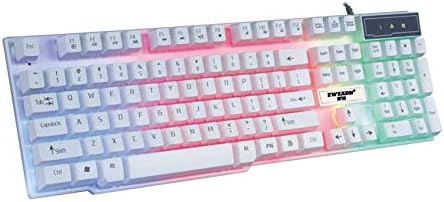
Slika 5.1: Keyboard with multi-color (RGB) backlighting activated. This image shows the keys illuminated with a spectrum of colors.
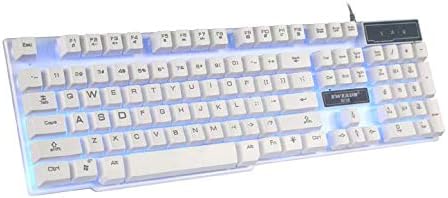
Slika 5.2: Keyboard with blue backlighting. The keys are illuminated with a solid blue color.

Slika 5.3: Keyboard with pink backlighting. The keys are illuminated with a solid pink color.
6. Vzdrževanje in nega
To ensure the longevity and proper functioning of your EWEADN GX-50 keyboard, follow these maintenance guidelines:
- Čiščenje:
- Pred čiščenjem tipkovnico odklopite iz računalnika.
- Uporabite mehko krpo, ki ne pušča vlaken, dampTipke in površino obrišite z vodo ali blago čistilno raztopino.
- Izogibajte se uporabi agresivnih kemikalij, abrazivnih čistil ali topil.
- Za odstranjevanje prahu in umazanije med tipkami uporabite stisnjen zrak.
- Shranjevanje: Tipkovnico shranjujte na hladnem in suhem mestu, stran od neposredne sončne svetlobe in ekstremnih temperatur.
- Izogibajte se razlitjem: Tekočine hranite stran od tipkovnice, da preprečite poškodbe notranjih komponent.
7. Odpravljanje težav
If you encounter issues with your EWEADN GX-50 keyboard, refer to the following common troubleshooting steps:
| Težava | Možna rešitev |
|---|---|
| Tipkovnica se ne odziva. |
|
| Določene tipke ne delujejo. |
|
| Backlighting is not working or behaving incorrectly. |
|
If the problem persists after trying these solutions, please contact EWEADN customer support for further assistance.
8. Specifikacije
| Funkcija | Podrobnost |
|---|---|
| Znamka | Eweadn |
| Številka modela | GX-50 |
| Povezljivost | USB žično |
| Število ključev | 104 |
| Jezik tipkovnice | angleščina |
| Združljive naprave | PC, prenosni računalnik |
| Združljivost operacijskega sistema | Windows 10 (and generally compatible with other Windows versions, macOS, Linux) |
| barva | Bela |
| Stopnja vodoodpornosti | Ni vodoodporen |
9. Garancija in podpora
EWEADN products are designed for reliability and performance. For warranty information, please refer to the warranty card included with your purchase or visit the official EWEADN website. If you require technical support or have questions not covered in this manual, please contact EWEADN customer service through their official channels.
Račun shranite kot dokazilo o nakupu za uveljavljanje garancije.


