1. Uvod
The myTouchSmart In-Wall Push-Button Countdown Timer Switch (Model 40953) is designed to simplify your routine by providing convenient automation for indoor or outdoor lighting and various appliances. This timer replaces any standard single-pole light switch and offers preset countdown times to automatically turn off connected devices. It is compatible with LED, CFL, incandescent, and halogen bulbs.

The product packaging displays the in-wall digital countdown timer switch, highlighting its key features such as preset countdown times and compatibility with various bulb types.
2. Varnostne informacije
Before beginning installation, read all instructions carefully. Improper installation can result in electrical shock or fire. Always consult a qualified electrician if you are unsure about any part of the installation process.
- IZKLOPI NAPAJANJE at the circuit breaker or fuse box before wiring.
- Ta naprava je namenjena za namestitev v skladu z nacionalnim električnim kodeksom in lokalnimi predpisi.
- Uporabljajte samo bakreno žico.
- NEUTRAL WIRE REQUIRED za delovanje.
3. Namestitev
3.1 Potrebna orodja
- Izvijač (križni in ploščati)
- Odstranjevalci žice
- Električni trak
- voltage Tester (priporočeno)
3.2 Navodila za ožičenje
- Izklopite napajanje to the switch location at the circuit breaker or fuse box. Verify power is off using a voltage tester.
- Odstranite obstoječo stensko ploščo in stikalo iz stenske omarice.
- Carefully disconnect the wires from the old switch. Identify and label the LINE (hot), LOAD, NEUTRAL, and GROUND wires. The timer requires a neutral wire for proper operation.
- Connect the wires to the myTouchSmart timer using the screw terminals:
- Povežite LINE (hot) wire to the terminal labeled 'LINE'.
- Povežite NALOŽITEV wire (to the light/appliance) to the terminal labeled 'LOAD'.
- Povežite NEVTRALNO wire (typically white) to the terminal labeled 'NEUTRAL'.
- Povežite TLA wire (typically bare copper or green) to the terminal labeled 'GROUND'.
- Zagotovite, da so vse žične povezave varne.
- Carefully push the wired timer into the wall box.
- Mount the timer to the wall box using the provided screws.
- Attach the desired color faceplate (White or Light Almond included, wallplate not included).
- Obnovite napajanje na odklopniku.

Zadnji del view of the timer, displaying the screw terminals for Line, Load, Neutral, and Ground connections, essential for proper installation.

Stranski profesionalecfile of the timer, showing its depth and how it fits into a standard electrical wall box, with wiring connections visible.
4. Navodila za uporabo
The myTouchSmart timer features an ON/OFF door panel that conceals preset buttons and LEDs when closed. Opening the door provides access to all countdown options.
4.1 Activating a Countdown
- Open the front door panel to reveal the preset buttons.
- Press the desired countdown button: 5 Min, 10 Min, 30 Min, 60 Min, 2 Hour, or 4 ura.
- A blue LED indicator light next to the selected button will illuminate, confirming the countdown is active. The connected device will turn on and remain on for the selected duration, then automatically turn off.
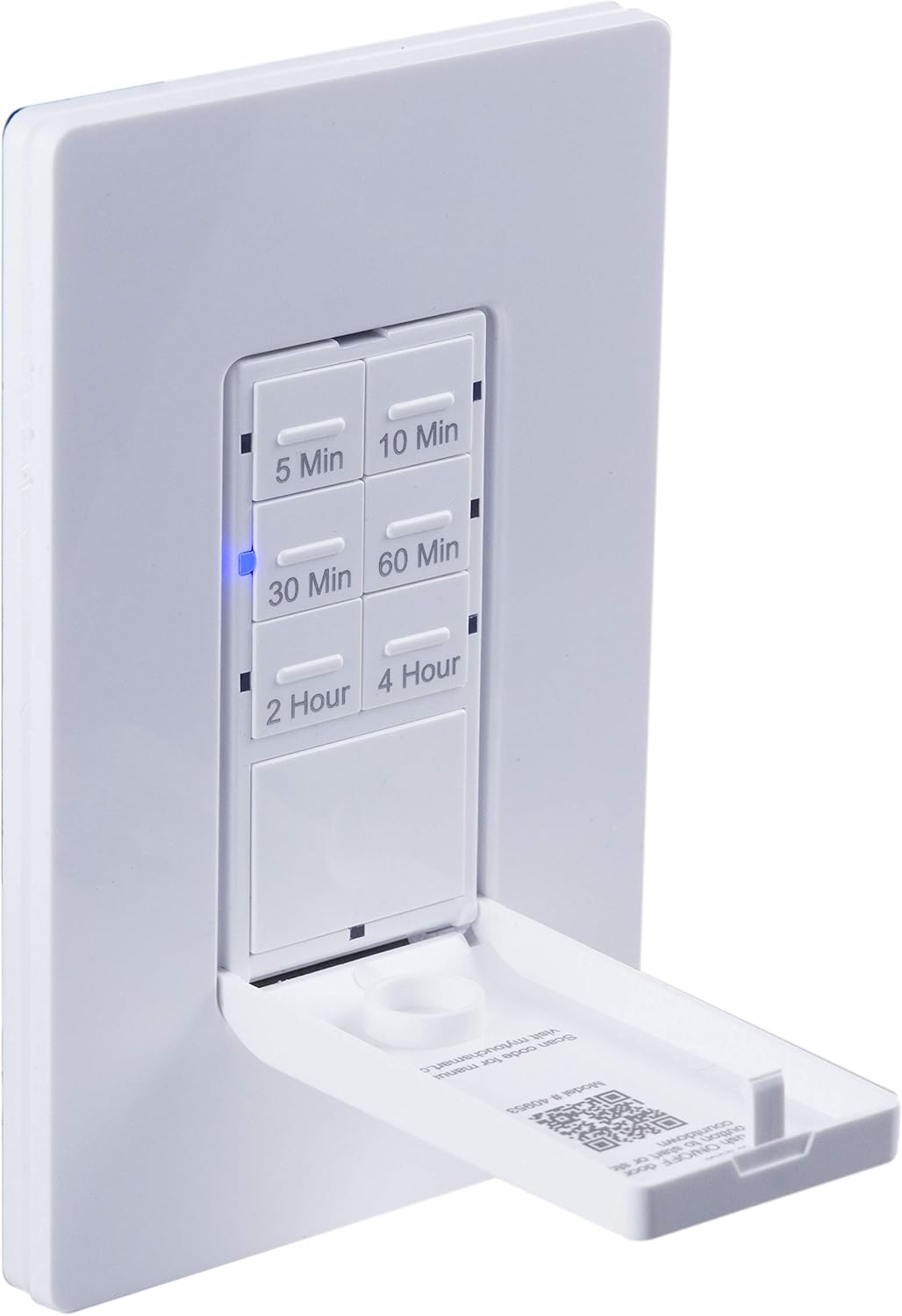
Bližnji posnetek view of the timer with its front door panel open, exposing the six preset countdown buttons (5, 10, 30, 60 minutes, 2, and 4 hours) and the manual ON/OFF button.

The in-wall timer with its door open, showing the preset buttons and a blue LED illuminated next to the '30 Min' button, indicating an active countdown.

A hand pressing one of the preset countdown buttons on the timer, demonstrating user interaction.
4.2 Ročno preglasitev VKLOP/IZKLOP
- To manually turn the connected device ON or OFF at any time, press the large ON/OFF button located at the bottom of the timer (this button is also the door panel when closed).
- Pressing this button will override any active countdown. If no countdown is active, it functions as a standard ON/OFF switch.
4.3 Aplikacije
This timer is suitable for a variety of applications, including:
- Notranja in zunanja razsvetljava
- Izpušni ventilatorji
- Grelniki
- Other compatible appliances

An image illustrating various applications for the timer, including controlling indoor/outdoor lights, ceiling fans, and exhaust fans.
5. Vzdrževanje
The myTouchSmart timer requires minimal maintenance. Follow these guidelines:
- Čiščenje: Disconnect power at the circuit breaker before cleaning. Wipe the surface with a soft, damp krpo. Ne uporabljajte močnih kemikalij ali abrazivnih čistil.
- Pregled: Periodically check for any loose connections or damage to the switch. If any damage is observed, discontinue use and consult a qualified electrician.
6. Odpravljanje težav
If you experience issues with your myTouchSmart timer, refer to the following common problems and solutions:
| Težava | Možen vzrok | rešitev |
|---|---|---|
| Časovnik se ne vklopi/izklopi. | No power to the switch; Incorrect wiring (Line/Load reversed); Loose connections. | Check circuit breaker. Verify wiring connections (Line to Line, Load to Load, Neutral, Ground). Ensure all wires are securely fastened. |
| Countdown does not activate. | Button not fully pressed; Faulty unit. | Ensure the desired countdown button is pressed firmly until the blue LED illuminates. If issue persists, contact customer support. |
| LED indikatorji ne delujejo. | No power; Unit malfunction. | Check power supply. If the timer functions but LEDs do not, contact customer support. |
| Občasno delovanje. | Loose wiring; Overload. | Check all wiring connections for tightness. Ensure the connected load does not exceed the timer's electrical ratings. |
Če koraki za odpravljanje težav ne odpravijo težave, se obrnite na podporo strankam.
7. Specifikacije
| Funkcija | Specifikacija |
|---|---|
| Številka modela | 40953 |
| Način delovanja | Automatically, Off, Push Button |
| Trenutna ocena | 15 Amps |
| Delovna zvezatage | 120 VAC, 60 Hz |
| Uporovna obremenitev | 15A |
| Volframova obremenitev | 1200 W |
| Ocena motorja | 1 / 2 HP |
| Združljive žarnice | LED, CFL, žarnica, halogen |
| Vrsta namestitve | Stenski nosilec |
| Dimenzije (D x Š x V) | 2.75 x 4.85 x 6.85 palcev |
| Teža predmeta | 5.9 unč |
| Nevtralna žica | Obvezno |
| Vključene komponente | In-Wall Timer, White/Light Almond Door Panels |
8. Garancija in podpora
Za informacije o garanciji in tehnično podporo se obrnite na uradno spletno stran proizvajalca webspletno mesto ali se obrnite na njihovo službo za pomoč strankam. Shranite račun kot dokazilo o nakupu.
Proizvajalec: myTouchSmart
UPC: 030878409537
Webspletno mesto: www.mytouchsmart.com (Prosimo, preverite uradno webspletno mesto za najnovejše informacije o podpori.)


