Uvod
Welcome to the Ipega PG-9033 Bluetooth Gamepad user manual. This guide provides detailed instructions for setting up, operating, maintaining, and troubleshooting your new wireless controller. Please read this manual carefully before use to ensure optimal performance and longevity of your device.
Konec izdelkaview
The Ipega PG-9033 is a versatile Bluetooth gamepad designed for an enhanced gaming experience across multiple platforms, including Android, iOS, and PC. It features an adjustable phone holder, dual analog sticks, a D-pad, and action buttons.

Figure 1: The Ipega PG-9033 Bluetooth Gamepad with a smartphone securely mounted in its adjustable holder, actively displaying a racing game. This illustrates the controller's primary use for mobile gaming.
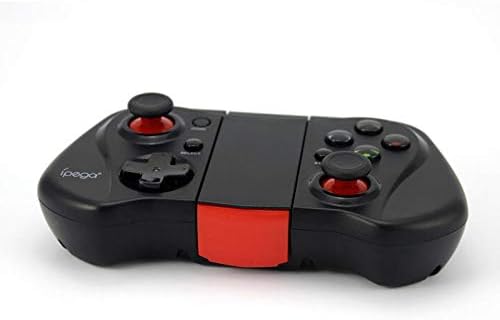
Slika 2: Stran A view of the Ipega PG-9033 Bluetooth Gamepad, showcasing its ergonomic design and compact form factor when not in use. The red accent on the central hinge is visible.
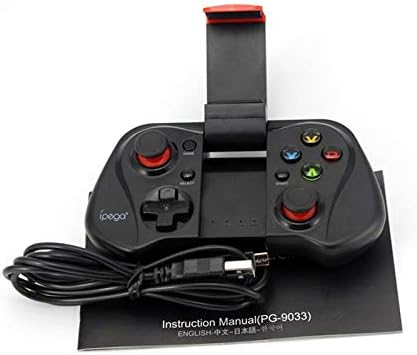
Figure 3: The Ipega PG-9033 Bluetooth Gamepad displayed alongside its USB charging cable and the included instruction manual, which clearly indicates the model number PG-9033.

Slika 4: Zadnji del view of the Ipega PG-9033 Bluetooth Gamepad, featuring a label with technical details such as "BLUETOOTH CONTROLLER," working voltage, working current, and input specifications.
Nastavitev
Polnjenje igralne ploščice
Before first use, fully charge the gamepad using the provided USB cable.
- Connect the micro-USB end of the charging cable to the gamepad's charging port.
- Connect the USB-A end to a USB power source (e.g., computer, USB wall adapter).
- The charging indicator light will illuminate. It will typically turn off or change color when fully charged.
Seznanjanje z napravo
The PG-9033 supports different pairing modes for various operating systems.
Android Pairing
- Ensure the gamepad is off.
- Pritisnite in držite DOMOV gumb in X button simultaneously until the indicator light flashes rapidly. This puts the gamepad into Android pairing mode.
- On your Android device, go to Bluetooth settings and search for available devices.
- Select "PG-9033" from the list to pair. The indicator light will become solid when connected.
iOS Pairing (iCade Mode)
- Ensure the gamepad is off.
- Pritisnite in držite DOMOV gumb in B button simultaneously until the indicator light flashes rapidly. This puts the gamepad into iOS iCade pairing mode.
- On your iOS device, go to Bluetooth settings and search for available devices.
- Select "PG-9033" from the list to pair. The indicator light will become solid when connected.
Note: iCade mode has limited game compatibility. For broader iOS compatibility, check specific game requirements.
Povezovanje z računalnikom
- Ensure the gamepad is off.
- Pritisnite in držite DOMOV gumb in A button simultaneously until the indicator light flashes rapidly. This puts the gamepad into PC pairing mode.
- On your PC, go to Bluetooth settings and search for available devices.
- Select "PG-9033" from the list to pair. The indicator light will become solid when connected.
Note: A Bluetooth adapter may be required for PCs without built-in Bluetooth.
Navodila za uporabo
Priključitev pametnega telefona
- Gently extend the adjustable phone holder located on the top of the gamepad.
- Carefully place your smartphone into the holder, ensuring it is securely gripped and centered.
- Prilagodite kot za optimalno viewing.
Game Mode Selection
The gamepad automatically enters the last used mode upon reconnection. To switch modes, disconnect the gamepad and re-pair using the desired mode's button combination (HOME + X for Android, HOME + B for iOS, HOME + A for PC).
Vklop/izklop
Za vklop pritisnite DOMOV gumb. Za izklop pritisnite in držite DOMOV button for approximately 5 seconds until the indicator light turns off. The gamepad will automatically power off after a period of inactivity.
Vzdrževanje
To ensure the longevity and proper functioning of your Ipega PG-9033 gamepad, follow these maintenance guidelines:
- Napravo hranite suho. Izogibajte se izpostavljanju vlagi ali tekočinam.
- Igralno ploščico očistite z mehko, suho krpo. Ne uporabljajte agresivnih kemikalij ali abrazivnih čistil.
- Igralno palico shranjujte na hladnem in suhem mestu, stran od neposredne sončne svetlobe in ekstremnih temperatur.
- Izogibajte se padcem ali izpostavljanju igralne plošče močnim udarcem.
- Redno polnite baterijo, tudi če je ne uporabljate, da ohranite njeno zdravje.
Do not attempt to disassemble the gamepad. This will void the warranty and may cause damage.
Odpravljanje težav
Gamepad not connecting or pairing:
- Prepričajte se, da je igralna ploščica popolnoma napolnjena.
- Preverite, ali je Bluetooth omogočen v vaši napravi.
- Make sure the gamepad is in the correct pairing mode for your device (Android, iOS, or PC).
- Poskusite pozabiti napravo v nastavitvah Bluetooth in jo znova seznaniti.
- Znova zaženite igralno ploščo in napravo.
Gumbi ali igralne palice se ne odzivajo:
- Preverite, ali je igralna plošča pravilno priključena.
- Ensure the game you are playing supports external controllers.
- Some games may require specific controller mapping or settings adjustments within the game.
- If the issue persists, try resetting the gamepad (if a reset button is available, typically a small pinhole).
Zamik ali vhodna zamuda:
- Ensure your device is not too far from the gamepad. Maintain a clear line of sight.
- Zmanjšajte motnje zaradi drugih brezžičnih naprav.
- Zaprite nepotrebne aplikacije v ozadju na vaši napravi.
Telefon ne ustreza držalu:
- The holder is designed for most smartphones. Ensure your phone's dimensions are within the supported range.
- Remove any bulky phone cases that might prevent a secure fit.
Specifikacije
| Funkcija | Podrobnost |
|---|---|
| Model | PG-9033 |
| Znamka | Ipega |
| Povezljivost | Bluetooth |
| Združljivost | Android, iOS (iCade), PC |
| Delovni letniktage | DC 3.7V |
| Delovni tok | 30mA |
| Vhodna voltage | DC 5V 500mA |
| ASIN | B07P52YH7M |
Garancija in podpora
For warranty information and technical support, please refer to the official Ipega webspletno mesto ali se obrnite na prodajalca. Račun shranite kot dokazilo o nakupu.
Ta priročnik je zgolj informativne narave. Specifikacije se lahko spremenijo brez predhodnega obvestila.


