Uvod
This manual provides instructions for the operation and maintenance of your Senville Remote Control, model AR2015-IR. This remote is designed for use with Senville AURA Series and LETO Series mini split air conditioning systems. Please read this manual thoroughly before using the remote control to ensure proper function and longevity.
Konec izdelkaview
The Senville AR2015-IR remote control allows you to manage various functions of your compatible Senville mini split system, including temperature settings, operating modes, fan speed, and special features.
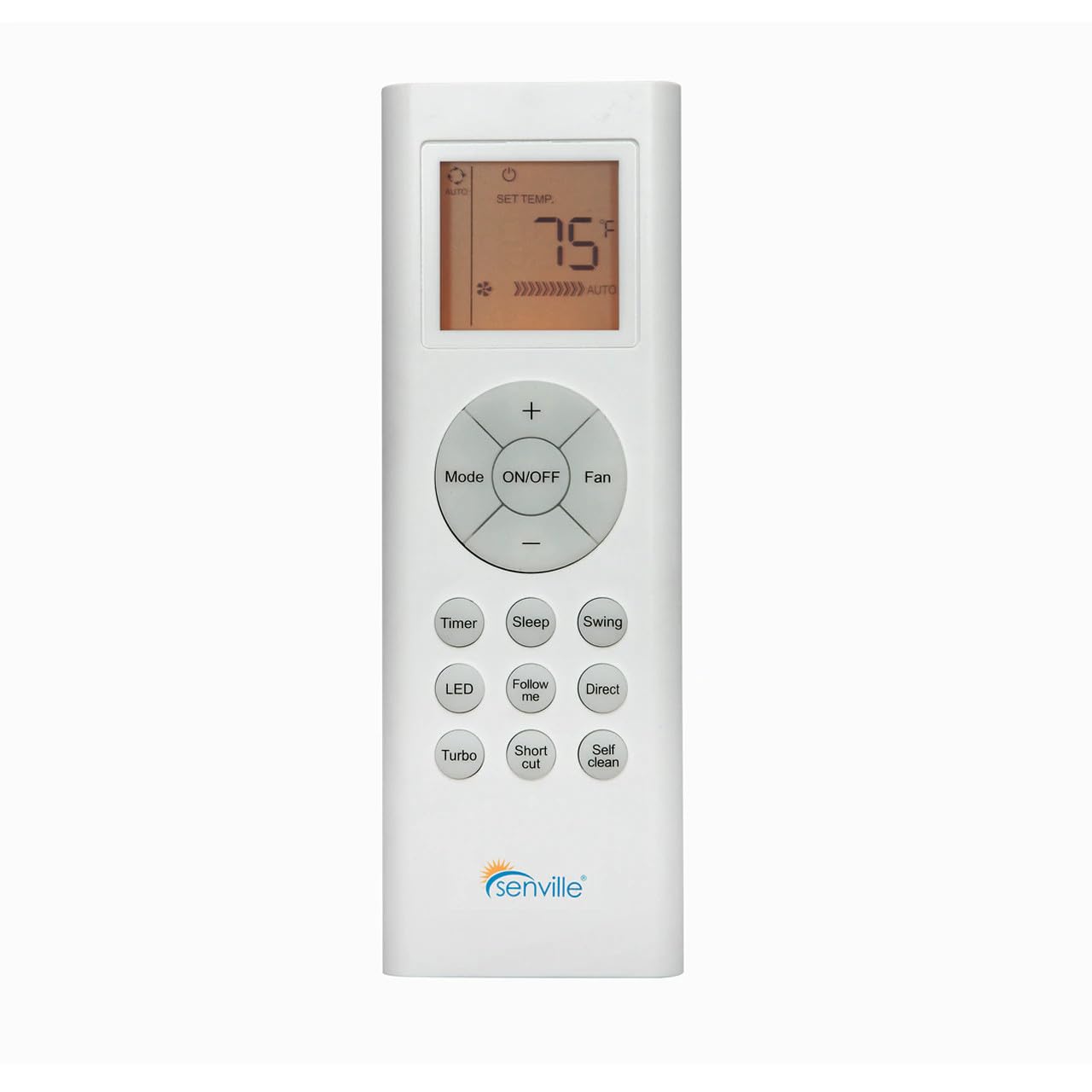
Slika 1: Spredaj view of the Senville AR2015-IR Remote Control. It features an LCD screen at the top, a central circular button cluster for power, mode, fan, and temperature adjustment, and additional function buttons below.
Nastavitev
1. Namestitev baterije
- Poiščite pokrov prostora za baterije na zadnji strani daljinskega upravljalnika.
- Potisnite pokrov navzdol ali pritisnite zapah, da ga odprete.
- Vstavite dve bateriji AAA (nista priloženi) in pazite na pravilno polarnost (+ in -), kot je označeno v notranjosti predala.
- Ponovno namestite pokrov prostora za baterije.
Opomba: The remote control does not require programming and should function immediately upon battery installation with compatible Senville AURA and LETO series units.
Navodila za uporabo
Funkcije gumbov
- VKLOP/IZKLOP: Press to turn the air conditioning unit on or off.
- način: Preklaplja načine delovanja: Samodejno, Hlajenje, Sušenje, Ogrevanje, Ventilator.
- Ventilator: Prilagodi hitrost ventilatorja: Samodejno, Nizko, Srednje, Visoko.
- Temperature (+/-): Increases or decreases the set temperature. The display shows the set temperature in Fahrenheit or Celsius.
- Časovnik: Nastavi časovnik samodejnega vklopa ali samodejnega izklopa.
- Spanje: Activates or deactivates the Sleep mode for energy-efficient operation during sleep.
- Nihaj: Nadzira funkcijo nihanja navpičnih lamel.
- LED: Turns the indoor unit's display LED light on or off.
- Sledite mi: Activates the Follow Me function, which senses the temperature at the remote's location.
- neposredno: Adjusts the horizontal louver direction.
- Turbo: Aktivira hitro hlajenje ali ogrevanje za kratek čas.
- Bližnjica: Recalls your preferred settings.
- Samoočiščenje: Zažene funkcijo samočiščenja notranje enote.
Izbira enote temperature
To switch between Fahrenheit (°F) and Celsius (°C), ensure the unit is off. Press and hold the Temperature (+) and Temperature (-) buttons simultaneously for approximately 3 seconds. The display will change to the alternate unit.
Vzdrževanje
Zamenjava baterije
Replace batteries when the display becomes dim or the remote's range decreases. Always replace both batteries at the same time with new AAA batteries. Dispose of used batteries according to local regulations.
Čiščenje daljinskega upravljalnika
Daljinski upravljalnik obrišite z mehko, suho krpo. Ne uporabljajte tekočih čistil ali abrazivnih materialov, saj lahko poškodujejo površino daljinskega upravljalnika ali notranje komponente.
Odpravljanje težav
- Daljinec se ne odziva:
- Preverite, ali so baterije pravilno vstavljene in niso izpraznjene. Po potrebi jih zamenjajte.
- Ensure there are no obstructions between the remote control and the indoor unit's receiver.
- Confirm the remote is pointed directly at the indoor unit.
- Zaslon je zatemnjen ali prazen:
- Zamenjajte baterije.
- Unit not responding to specific functions:
- Verify that your specific Senville unit model supports the function you are trying to use. Refer to your air conditioner's manual for compatibility.
Specifikacije
| Številka modela | AR2015-IR |
| Združljive naprave | Senville AURA Series, Senville LETO Series mini split air conditioners (HF, HF/Z, CD/X Models) |
| Tehnologija povezljivosti | Infrardeči |
| Vir napajanja | 2 x AAA baterije (niso vključene) |
| Dimenzije (D x Š x V) | 6.89 x 2.68 x 0.83 palcev |
| Teža | 2.89 unč (brez baterij) |
Garancija in podpora
For warranty information or technical support regarding your Senville Remote Control or compatible air conditioning unit, please refer to the documentation provided with your main Senville product or visit the official Senville website. Contacting Senville customer service directly is recommended for specific inquiries.
Več informacij in virov za podporo najdete na Trgovina Senville na Amazonu.


