1. Uvod
Welcome to the user manual for your AAXA LED Pico Micro Video Projector. This compact and versatile projector is designed for personal media sharing, business presentations, and home cinema experiences. This manual provides detailed instructions on setting up, operating, maintaining, and troubleshooting your device to ensure optimal performance.
Vsebina paketa
Prosimo, preverite, ali so v vašem paketu vsi elementi:
- Mikro video projektor AAXA LED Pico
- USB kabel
- AV Cable
- Mini Tripod (optional, may vary by package)
- Napajalnik (ni izrecno naveden, vendar je namenjen polnjenju)
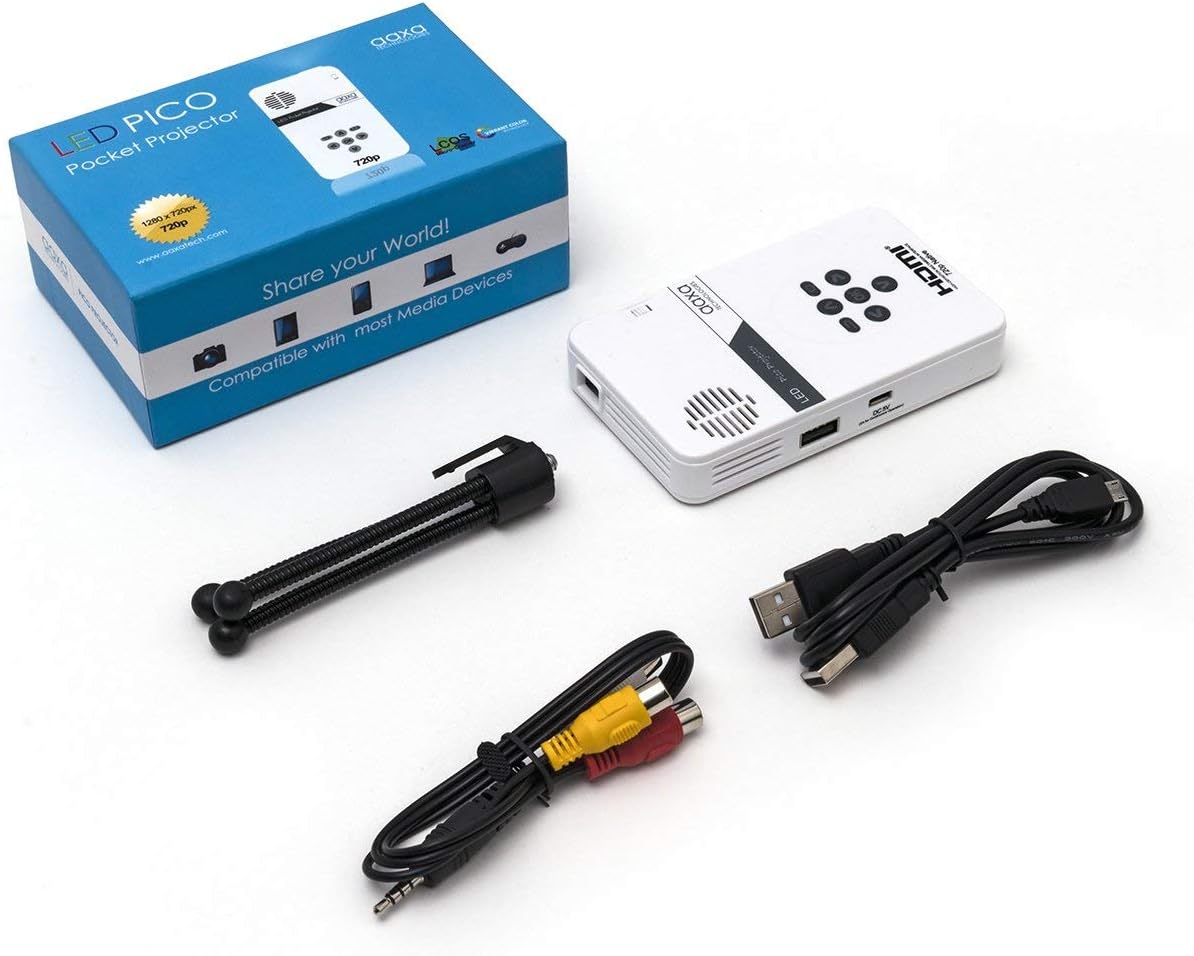
Figure 1: Package contents including the projector, cables, and tripod.
2. Izdelek je končanview
The AAXA LED Pico Micro Video Projector is a compact device featuring a user-friendly interface and multiple connectivity options. It is designed for portability and ease of use.
Ključne značilnosti:
- Ultra Bright 25 Lumens LED light source with 15,000-hour lifespan.
- High Definition 720p (1280x720) native resolution, supporting up to 1080p input.
- Vibrant Color Technology for rich and accurate colors.
- Built-in 80-minute rechargeable Lithium-ion battery.
- Integrated media player and speakers.
- Compact and lightweight design (4.25 x 2.36 x 0.7 inches, 6.3 ounces).
Kontrole in vrata:
Familiarize yourself with the various controls and connection ports on your projector:

Slika 2: Zgornji del view of the projector with navigation buttons (Up, Down, Left, Right, OK, Menu, Back) and speaker grille.
- Gumbi za krmarjenje: Uporablja se za navigacijo po menijih in izbiranje možnosti.
- Rešetka zvočnika: For audio output from the built-in speakers.
- Kolo za ostrenje: Located on the side, used to adjust image clarity.

Slika 3: Spredaj view of the projector showing the HDMI, AV, and 3.5mm audio out ports.
- Vhod HDMI: Povežite se s prenosniki, igralnimi konzolami ali drugimi napravami, ki podpirajo HDMI.
- AV vhod: Za priključitev starejših naprav s priloženim AV kablom.
- 3.5 mm avdio izhod: Priključite zunanje slušalke ali zvočnike.

Slika 4: stran view of the projector showing the USB port and DC 5V charging port.
- Vrata USB: Za priklop USB pogonov za predvajanje medijev.
- DC 5V vhod: Vhodna moč za polnjenje notranje baterije.

Slika 5: stran view of the projector showing the TF Card slot.
- Micro SD (TF Card) Slot: Insert a Micro SD card (up to 16GB) for media playback.
3. Nastavitev
3.1 Vklop/izklop in polnjenje
- Polnjenje: Connect the supplied micro USB cable to the DC 5V input on the projector and a compatible USB power source. The LED indicator will show charging status.
- Vklop: Press and hold the power button (usually located near the focus wheel or on the top panel) until the projector powers on.
- Ugasniti: Press and hold the power button again until the projector shuts down.
3.2 Postavitev projektorja
Place the projector on a stable, flat surface. For optimal image quality, project onto a smooth, light-colored wall or a dedicated projector screen. The distance from the surface will determine the image size.

Figure 6: The projector can be mounted on a tripod for stable positioning and angle adjustment.
3.3 Prilagoditev fokusa
To achieve a clear image, rotate the focus wheel located on the side of the projector until the projected image appears sharp and in focus.
4. Navodila za uporabo
4.1 Povezovanje naprav
- HDMI: Connect an HDMI cable from your source device (laptop, game console, etc.) to the HDMI input port on the projector. Select HDMI as the input source in the projector's menu.
- OD: Use the provided AV cable to connect to devices with composite video and audio outputs. Select AV as the input source.
- USB/Micro SD: Insert a USB flash drive into the USB port or a Micro SD card into the TF Card slot. The projector's media player interface will typically appear, allowing you to browse and play files.
4.2 Predvajanje medijev
The built-in media player supports various video, music, and picture formats. Use the navigation buttons on the projector to browse files and select content for playback.
4.3 Avdio izhod
The projector has built-in speakers. For private listening or enhanced audio, connect headphones or external speakers to the 3.5mm Audio Out port.
5. Vzdrževanje
- Čiščenje: Use a soft, dry cloth to clean the exterior of the projector. For the lens, use a lens cleaning cloth and specialized lens cleaning solution. Do not use abrasive cleaners.
- Shranjevanje: Ko projektorja ne uporabljate, ga shranite na hladnem in suhem mestu, stran od neposredne sončne svetlobe in ekstremnih temperatur.
- Vzdrževanje baterije: To prolong battery life, avoid fully discharging the battery frequently. Charge the projector regularly, even if not in active use.
6. Odpravljanje težav
| Težava | Možen vzrok | rešitev |
|---|---|---|
| Ni projicirane slike | Projektor ni vklopljen; napačen vhodni vir; ohlapna kabelska povezava. | Ensure projector is on and charged. Select correct input source (HDMI, AV, USB/SD). Check all cable connections. |
| Slika je zamegljena | Focus not adjusted; projector too close/far from surface. | Adjust the focus wheel until the image is clear. Adjust the distance of the projector from the projection surface. |
| Brez zvoka | Glasnost je prenizka; priključena je zunanja zvočna naprava; zvočna oblika ni podprta. | Increase volume. Disconnect external audio devices if using internal speakers. Ensure audio format is supported. |
| Projektor se nepričakovano izklopi | Low battery; overheating. | Charge the battery. Ensure proper ventilation and clear any obstructions from vents. |
7. Specifikacije
| Funkcija | Podrobnost |
|---|---|
| Znamka | AAXA Technologies |
| Številka modela | KP-101-01-cr |
| Ločljivost zaslona | 1280 x 720 (Native), Max 1080p Input |
| Svetlost | 25 lumnov |
| Življenje svetlobnega vira | 15,000 ur (LED) |
| Tehnologija povezljivosti | HDMI, USB, Micro SD, 3.5mm Aux Out, Composite AV |
| Življenjska doba baterije | Up to 80 minutes (Lithium-Ion) |
| Dimenzije izdelka | 4.25 x 2.36 x 0.7 palcev |
| Teža predmeta | 6.3 unč |
| Priporočene uporabe | Poslovno, Izobraževalno, Domači kino |
8. Garancija in podpora
This product is offered as an Amazon Renewed item, which means it has been professionally inspected and tested to work and look like new. Amazon Renewed products are eligible for replacement or refund under the Amazon Renewed Guarantee if you are not satisfied with your purchase.
For further assistance or technical support, please refer to the official AAXA Technologies webspletno mesto ali se obrnite neposredno na njihovo službo za stranke.


