1. Uvod
Hvala za nakupasing the Alpha EK-60 61-Key Electronic Piano Keyboard. This manual provides detailed instructions for the proper setup, operation, and maintenance of your new instrument. The EK-60 is designed to offer a rich musical experience with its versatile features, including a wide range of tones and rhythms, intelligent teaching functions, and various connectivity options. Please read this manual thoroughly before using the product to ensure optimal performance and longevity.
2. Varnostne informacije
Da preprečite električni udar, požar ali poškodbe enote, upoštevajte naslednje varnostne ukrepe:
- Do not expose the keyboard to rain or moisture.
- Do not place objects filled with liquids, such as vases, on the keyboard.
- Ne blokirajte prezračevalnih odprtin.
- Uporabljajte samo navedeni napajalnik.
- Enote ne razstavljajte ali spreminjajte. Vsa servisna dela prepustite usposobljenemu osebju.
- Hraniti izven dosega majhnih otrok.
3. Vsebina paketa
Prosimo, preverite, ali so v vašem paketu vključeni vsi naslednji elementi:
- 1 x Alpha 61-Key Standard Keyboard EK-60
- 1 x Nastavljivo stojalo
- 1 x držalo za note
- 1 x napajalnik
- 1 x Uporabniški priročnik (ta dokument)
4. Izdelek je končanview
Familiarize yourself with the components of your Alpha EK-60 keyboard.
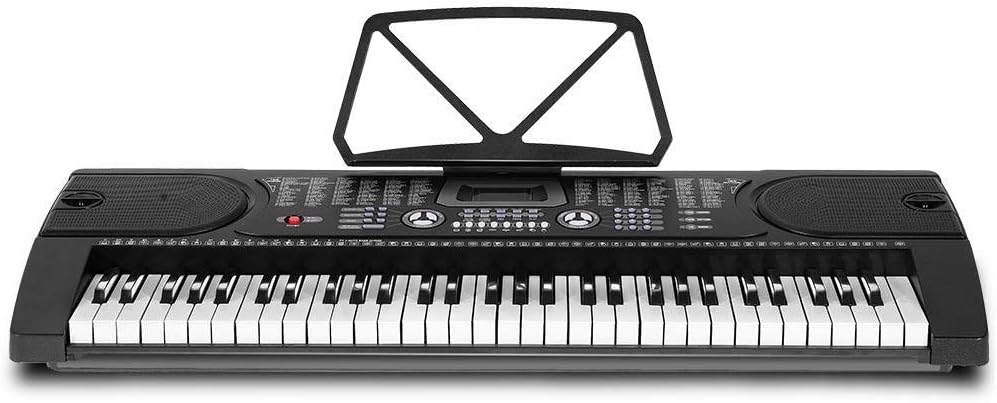
Slika 4.1: Od zgoraj navzdol view of the Alpha EK-60 keyboard, highlighting the control panel, integrated speakers, and the 61 standard piano keys.

Figure 4.2: Detail of the LED display for convenient settings adjustment and the battery compartment for portable use.

Slika 4.3: View of the multiple jacks including Audio Input, Microphone Input, and Headphone Output for versatile connectivity.
Ključne značilnosti:
- 61-Key Standard Piano Keyboard
- LED display for easy navigation
- 24 demo pesmi
- 255 timbres (instrument sounds)
- 255 rhythms (accompaniment styles)
- 61 kinds of keyboard percussions
- 8 Panel Percussions
- Master volume, accompaniment volume, and tempo control
- Intelligent teaching function: one-key, follow and ensemble function
- Funkcija programiranja ritma
- Auto chord and chord timbre option
- Funkcija snemanja in predvajanja
- Sustain and vibrato effects
- Microphone input and speaker output
- Headphone jack for silent practice
- Battery powered option (6 x AA-size batteries, not included)
5. Nastavitev
5.1 Sestavljanje stojala
- Unpack all components of the adjustable stand.
- Connect the horizontal support bars to the vertical legs, ensuring they are securely fastened.
- Adjust the height of the stand to your preferred playing position using the adjustment knobs. The stand is adjustable from 59cm to 79cm in height.
- Place the keyboard securely on top of the assembled stand.
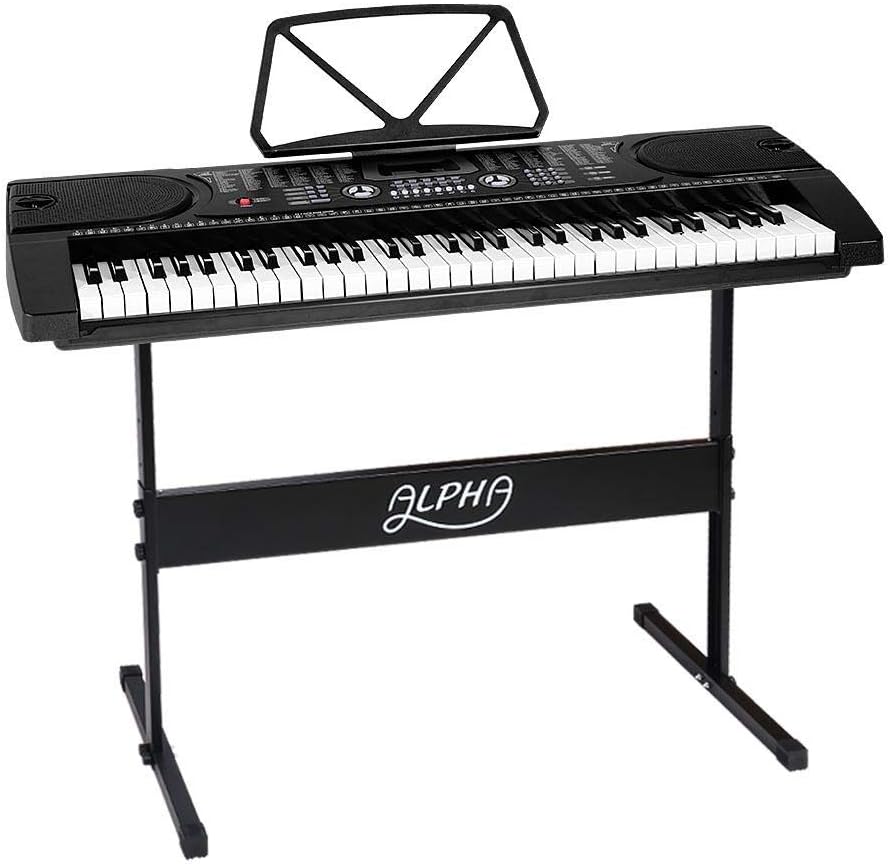
Figure 5.1: The Alpha EK-60 keyboard fully assembled on its adjustable stand, ready for use.
5.2 Vklop tipkovnice
The Alpha EK-60 can be powered by the included AC adaptor or by batteries.
Uporaba napajalnika:
- Connect the DC plug of the power adaptor to the DC 9V input jack on the rear of the keyboard.
- Priključite napajalnik v standardno stensko vtičnico.
Uporaba baterij:
- Poiščite predal za baterije na spodnji strani tipkovnice.
- Odprite pokrov prostora za baterije.
- Insert 6 x AA-size batteries (not included), ensuring correct polarity (+/-).
- Trdno zaprite pokrov prostora za baterije.
Note: When using batteries, disconnect the AC adaptor. The keyboard will automatically switch to battery power if the adaptor is removed.
6. Navodila za uporabo
6.1 Osnovna operacija
- Vklop/izklop: Pritisnite MOČ gumb za vklop ali izklop tipkovnice.
- Nadzor glasnosti: Uporabite GLAVNA GLASNOST gumb za nastavitev celotne ravni zvoka.
- Tempo nadzor: Uporabite TEMPO gumbi za nastavitev hitrosti ritmov in demo skladb.
6.2 Izbira tonov in ritmov
- Tones (Timbre): Pritisnite TIMBR button, then use the number pad or +/- buttons to select from 255 different instrument sounds. The selected timbre number will appear on the LED display.
- Ritmi: Pritisnite RITEM button, then use the number pad or +/- buttons to select from 255 accompaniment rhythms. Press START/STOP za začetek ali konec ritma.
6.3 Intelligent Teaching Function
The EK-60 features a 3-step intelligent teaching system to help you learn to play.
- En ključ: Plays the melody of a demo song by pressing any key.
- Sledi: Waits for you to play the correct note before proceeding with the melody.
- Skupaj: Plays the accompaniment while you play the melody.
To use, select a demo song, then press the desired teaching mode button (EN KLJUČ, SLEDI, oz ANSAMBEL).
6.4 Snemanje in predvajanje
The keyboard allows you to record your performances.
- Pritisnite REC button to start recording. The LED display will indicate recording mode.
- Predvajajte želeno melodijo.
- Pritisnite IGRAJ button to stop recording and play back your recorded performance.
6.5 Povezljivost
- Priključek za slušalke: Priključite slušalke na SLUŠALKE jack for silent practice.
- Vhod za mikrofon: Priključite mikrofon na VHOD MIC jack to sing along while playing.
- Avdio vhod/izhod: Uporabite AUDIO VHOD to connect external audio devices (e.g., MP3 player) and the AUDIO IZHOD to connect to external speakers or an amplifier.
7. Vzdrževanje
Proper care will ensure the longevity of your Alpha EK-60 keyboard.
- Čiščenje: Tipkovnico obrišite z mehko, suho krpo. Za trdovratno umazanijo uporabite rahloamp cloth and then wipe dry immediately. Do not use abrasive cleaners, waxes, or solvents.
- Shranjevanje: Ko tipkovnice dlje časa ne uporabljate, jo shranite na hladnem in suhem mestu, stran od neposredne sončne svetlobe in ekstremnih temperatur. Če uporabljate baterije, jih pred dolgotrajnim shranjevanjem odstranite, da preprečite puščanje.
- Ravnanje: Pazite, da vam tipkovnica ne pade na tla ali da je ne izpostavljate močnim udarcem.
8. Odpravljanje težav
If you encounter any issues with your keyboard, refer to the following table for common problems and solutions.
| Težava | Možen vzrok | rešitev |
|---|---|---|
| Brez zvoka | Volume is too low; Power is off; Headphones connected; Faulty power connection. | Increase master volume; Turn on power; Disconnect headphones; Check power adaptor or replace batteries. |
| Tipke se ne odzivajo | Keyboard is in a teaching mode; Internal malfunction. | Exit teaching mode; Power cycle the keyboard. If issue persists, contact support. |
| Rhythm/Demo song not playing | Rhythm/Demo song not selected; START/STOP button not pressed. | Select a rhythm/demo song; Press START/STOP. |
| Popačen zvok | Volume too high; External device connected incorrectly. | Reduce volume; Check connections of external devices. |
Če težava po poskusu teh rešitev še vedno obstaja, se obrnite na podporo strankam.
9. Specifikacije
| Funkcija | Opis |
|---|---|
| Model | EK-60 |
| Ključi | 61 Standard Piano Keys |
| Key Width | 1.9 cm |
| Tones (Timbres) | 255 |
| Ritmi | 255 |
| Demo pesmi | 24 |
| Največja polifonija | 8 |
| Povezljivost | Audio Input, Audio Output, Headphone Jack (3.5mm), Microphone Input (3.5mm) |
| Napajalnik | AC Adaptor (DC 9V) or 6 x AA-size batteries (not included) |
| Dimenzije (tipkovnica) | 86 cm (D) x 32.5 cm (Š) |
| Dimensions (Overall with Stand) | 86cm (L) x 32.5cm (W) x 59-79cm (H) |
| Teža | 6.2 kilogramov |
| barva | Črna |

Figure 9.1: Detailed dimensions of the Alpha EK-60 keyboard and its adjustable stand.
10. Garancija in podpora
10.1 Informacije o garanciji
The Alpha EK-60 keyboard comes with a 1-letna garancija from the date of purchase. This warranty covers manufacturing defects and ensures the product is free from defects in material and workmanship under normal use. It does not cover damage caused by misuse, accident, unauthorized modification, or normal wear and tear.
10.2 Podpora strankam
For any queries, technical assistance, or warranty claims, please contact the seller or manufacturer directly. Please have your purchase receipt and product model number (EK-60) ready when contacting support.


