1. Uvod
This manual provides essential information for the safe and efficient operation of your LEGRAND Keor SP 310190 Uninterruptible Power Supply (UPS). The Keor SP 310190 is designed to protect your electronic devices from power outages, surges, and fluctuations, ensuring continuous power supply and data integrity. Please read this manual thoroughly before installation and use, and retain it for future reference.
2. Varnostne informacije
Pomembna varnostna navodila:
- Ne odpirajte UPS-aasing. V notranjosti ni delov, ki bi jih lahko uporabnik popravil. Vsa servisna dela prepustite usposobljenemu serviserju.
- Do not connect appliances that could overload the UPS, such as laser printers or heaters.
- Ensure the UPS is connected to a grounded power outlet.
- UPS-a ne izpostavljajte dežju, vlagi ali prekomerni vlažnosti.
- Position the UPS in a well-ventilated area, away from direct sunlight or heat sources.
- In case of emergency, press the power button to turn off the UPS and disconnect it from the AC power supply.
- Battery replacement should only be performed by qualified personnel using the same type and number of batteries.
3. Vsebina paketa
Preverite, ali so v paketu vsi spodaj navedeni predmeti. Če kateri koli predmet manjka ali je poškodovan, se obrnite na prodajalca.
- LEGRAND Keor SP 310190 UPS Unit
- Napajalni kabel
- Komunikacijski kabel USB
- Uporabniški priročnik (ta dokument)
4. Izdelek je končanview
The LEGRAND Keor SP 310190 UPS features a compact design with essential ports for power protection. Below are diagrams illustrating the front and rear panels of the unit.

Slika 4.1: Spredaj in ob strani View UPS-a
This image displays the main unit from a front-side perspective, highlighting the power button and LED indicators on the white panel, and the distinctive textured black casing.
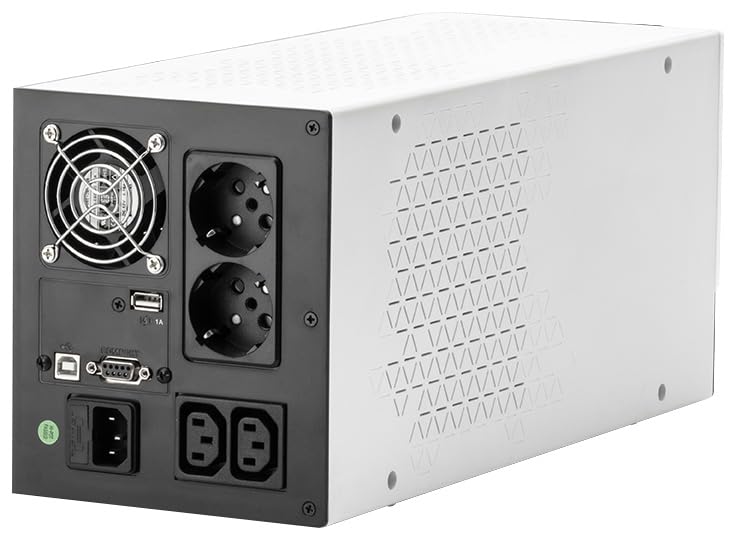
Slika 4.2: Priključki na zadnji plošči
The rear panel provides all necessary connection points, including two grounded (Schuko) outlets, two IEC outlets for battery backup, a USB port for communication, and a cooling fan for optimal performance.

Slika 4.3: stran View UPS-a
Ta slika prikazuje stranskega profesionalcafile of the UPS, emphasizing the ventilation design on the white panel and the overall robust construction.
4.1 Indikatorji in krmilni elementi na sprednji plošči
- Gumb za vklop: Used to turn the UPS ON or OFF.
- LED indikatorji: Display the operational status of the UPS, including AC mode, battery mode, fault, and battery level. Refer to the operating section for detailed explanations.
4.2 Priključki na zadnji plošči
- AC vhod: Connects the UPS to the main power supply.
- Grounded Outlets (Schuko): Two outlets providing battery backup and surge protection.
- IEC Outlets: Two additional outlets providing battery backup and surge protection.
- Vrata USB: For communication with a computer to monitor UPS status and perform controlled shutdowns.
- Communication Port (DB9): For advanced communication with network devices or management systems.
- Hladilni ventilator: Zagotavlja ustrezno prezračevanje in preprečuje pregrevanje.
5. Nastavitev
Follow these steps to set up your LEGRAND Keor SP 310190 UPS:
- Razpakiranje: Carefully remove the UPS from its packaging. Inspect for any shipping damage.
- Umestitev: Place the UPS on a flat, stable surface in a cool, dry, and well-ventilated area. Ensure there is adequate space around the unit for airflow. Avoid placing it near heat sources or in direct sunlight.
- Začetno polnjenje: Connect the UPS to a grounded wall outlet using the provided power cord. Allow the unit to charge for at least 8 hours before connecting any devices to ensure optimal battery performance. The UPS will automatically begin charging when connected to AC power.
- Priključne naprave:
- Plug your computer, monitor, and other critical electronic devices into the grounded (Schuko) or IEC outlets on the rear panel of the UPS.
- Do not connect surge protectors or power strips to the UPS outlets, as this can reduce the effectiveness of the UPS.
- Ensure the total power consumption of connected devices does not exceed the UPS's capacity (900W).
- USB Communication (Optional): Connect the USB cable from the UPS to your computer's USB port. Install the appropriate UPS management software (usually available from the manufacturer's website) to enable monitoring and automatic shutdown features.
6. Navodila za uporabo
6.1 Vklop/izklop UPS-a
- Prižgati: Press and hold the power button on the front panel for approximately 3 seconds until you hear a beep and the LED indicators illuminate.
- Izklopiti: Press and hold the power button for approximately 3 seconds until you hear a beep and the LED indicators turn off.
6.2 LED indikatorji
The front panel LEDs provide visual feedback on the UPS status:
| Indikator | Stanje | Opis |
|---|---|---|
| Zelena LED (neprekinjeno) | AC način | The UPS is operating on utility power and providing power to connected devices. The battery is charging or fully charged. |
| Green LED (Flashing) | Baterijski način | The UPS is operating on battery power due to a power outage or fluctuation. An audible alarm will also sound. |
| Rdeča LED (neprekinjeno) | Fault/Overload | Indicates a system fault or an overload condition. Disconnect non-essential devices and restart the UPS. |
| Red LED (Flashing) | Prazna baterija | The battery charge is low. Save your work and shut down connected devices immediately. |
6.3 Samodejno Voltage Uredba (AVR)
The LEGRAND Keor SP 310190 features Automatic Voltage Regulation (AVR). This function automatically corrects minor voltage fluctuations (sags and surges) without switching to battery power, thereby extending battery life and providing stable power to your devices.
7. Vzdrževanje
Proper maintenance ensures the longevity and optimal performance of your UPS.
- Vzdrževanje baterije:
- Napravo UPS naj bo priključena na izmenično napajanje, da bo baterija ostala napolnjena.
- Perform a battery self-test periodically (if supported by software) or discharge the UPS by unplugging it from the wall and letting it run on battery for a short period every 3-6 months. This helps calibrate the battery and ensures it's functioning correctly.
- Batteries typically last 3-5 years. If the UPS consistently indicates a low battery or fails to provide adequate backup time, the battery may need replacement. Contact qualified service personnel for battery replacement.
- Čiščenje:
- Ensure the UPS is turned off and disconnected from the AC power supply before cleaning.
- Use a soft, dry cloth to wipe the exterior of the unit. Do not use liquid or aerosol cleaners.
- Za zagotovitev ustreznega pretoka zraka prezračevalne odprtine ne dovolite prahu in umazanije.
8. Odpravljanje težav
This section addresses common issues you might encounter with your UPS. If the problem persists after following these steps, please contact customer support.
| Težava | Možen vzrok | rešitev |
|---|---|---|
| UPS se ne vklopi. | No AC input power; Low battery; Faulty unit. | Check AC power connection. Ensure the UPS is charged for at least 8 hours. If still unresponsive, contact support. |
| UPS beeps continuously in AC mode. | Preobremenitev; Notranja napaka. | Disconnect non-essential devices. If the alarm continues, turn off the UPS and contact support. |
| Kratek čas varnostnega kopiranja. | Battery not fully charged; Battery end-of-life; Overload. | Ensure the UPS is fully charged. Reduce connected load. If the battery is old (2+ years), consider professional battery replacement. |
| UPS does not provide power to connected devices. | UPS is off; Overload; Faulty outlet. | Ensure the UPS is turned on. Check for overload. Try a different outlet on the UPS. |
| USB communication not working. | USB cable disconnected; Software not installed/configured. | Check USB cable connection. Install and configure the UPS management software. |
9. Specifikacije
Key technical specifications for the LEGRAND Keor SP 310190 UPS:
- Model: 310190
- Nazivna moč: 1500 VA / 900 W
- Vhodna voltage: 230 volt
- Izhodna voltage: 230 volt
- Vrsta baterije: Lead-acid (2 x 12V/9Ah)
- Običajni čas polnjenja: 10 minutes (to 90% capacity)
- Prodajna mesta: 2 x Grounded (Schuko), 2 x IEC
- Komunikacijska vrata: USB-HID, DB9
- Samodejna Voltage Uredba (AVR): ja
- Dimenzije izdelka: 47 x 24.5 x 27 cm
- Teža artikla: 10.67 kg
- barva: Črna
- Proizvajalec: Legrand
- Država izvora: Kitajska
10. Garancija in podpora
LEGRAND products are manufactured to high-quality standards and are backed by a limited warranty. For specific warranty terms and conditions, please refer to the warranty card included with your product or visit the official Legrand website. For technical support, troubleshooting assistance, or to inquire about service, please contact Legrand customer service through their official channels. Keep your purchase receipt as proof of purchase for warranty claims.
Spletni viri: For additional information, software downloads, and FAQs, please visit the official Legrand webmesto.


