1. Uvod
The Echo Glow is a multicolor smart lamp designed to enhance your smart home experience. It pairs with any compatible Alexa device, allowing you to control its color and brightness using voice commands. This device is ideal for creating colorful routines, setting visual timers, and adding dynamic lighting for various activities like gaming, watching videos, or listening to music. Its simple setup ensures a hassle-free experience.

Figure 1.1: The Echo Glow smart lamp v domačem okolju.
2. Varnostne informacije
Please read and follow all safety instructions carefully to prevent injury or damage to your device.
- Naprave ne izpostavljajte vodi ali vlagi.
- Uporabljajte samo napajalnik, ki je priložen napravi.
- Naprave ne poskušajte razstaviti, popraviti ali spremeniti.
- Napravo hranite stran od neposredne sončne svetlobe in virov toplote.
- Zagotovite ustrezno prezračevanje okoli naprave.
3. Kaj je v škatli
Preverite, ali so v embalaži vsi elementi:
- Echo Glow device
- Napajalnik (5W)
- Vodnik za hiter začetek
4. Nastavitev
Setting up your Echo Glow is designed to be quick and straightforward.
4.1. Vklop
- Plug the provided power adapter into the Echo Glow.
- Plug the other end of the power adapter into a wall outlet. The Echo Glow will power on automatically.
4.2. Connecting to Wi-Fi and Alexa
The Echo Glow connects to your Wi-Fi network and is controlled via an Alexa-enabled device or the Alexa app.
- Download and open the Amazon Alexa app on your Fire OS, Android, or iOS device.
- Ensure your Alexa-enabled device (e.g., Echo Dot, Echo Plus) is set up and connected to the same Wi-Fi network.
- In the Alexa app, navigate to the 'Devices' section.
- Za dodajanje nove naprave tapnite ikono »+«.
- Select 'Light' and then 'Amazon Echo Glow'.
- Follow the on-screen instructions to complete the setup. The Echo Glow supports 2.4 GHz Wi-Fi only (802.11 b/g/n).
Amazon Wi-Fi simple setup can also be used to connect the device to your Wi-Fi network with minimal steps.
5. Navodila za uporabo
The Echo Glow offers various functionalities controlled primarily through Alexa voice commands or the Alexa app.
5.1. Glasovni nadzor
Once paired with an Alexa-enabled device, you can control the Echo Glow using your voice. Ensure your Echo Glow has a recognizable name in the Alexa app (e.g., 'Glow Lamp', 'Charlie's Lamp').
- Spremeni barvo: "Alexa, set [Glow Lamp name] to blue."
- Prilagodi svetlost: "Alexa, dim [Glow Lamp name] to 50%." or "Alexa, brighten [Glow Lamp name]."
- Vklop/izklop: "Alexa, turn on [Glow Lamp name]." / "Alexa, turn off [Glow Lamp name]."

Figure 5.1: The Echo Glow can display a wide spectrum of colors.
5.2. Routines and Timers
Integrate the Echo Glow into your daily routines or use it for visual timers.
- Color-Changing Timer: Use the Echo Glow as a visual reminder for activities. For example, "Alexa, set a Rainbow Timer for 30 minutes on Charlie's Lamp." The colors will change as time progresses.
- Wake-up Light Alarm: Create routines in the Alexa app to have the Echo Glow gradually brighten or change color to help with waking up. For example, "Alexa, set a wakeup light alarm for 7 AM on My Light."
- Bedtime Routines: Set the Echo Glow to dim or change to a calming color as part of a bedtime routine.
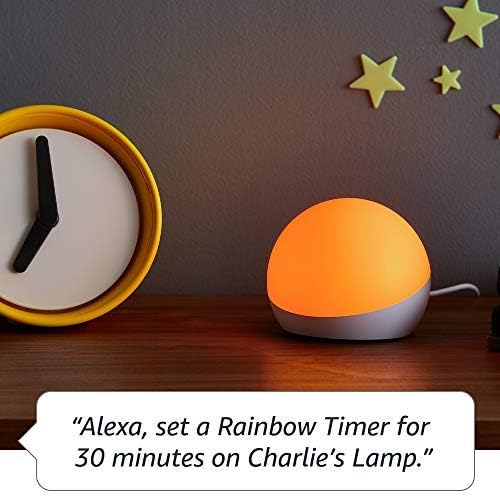
Figure 5.2: Using Echo Glow for a Rainbow Timer.
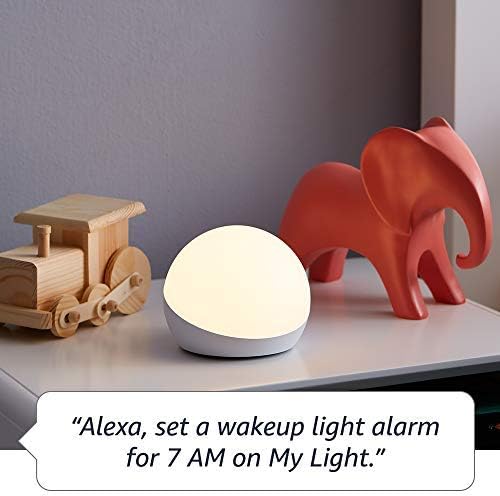
Figure 5.3: Echo Glow as a wake-up light alarm.
5.3. Creating and Choosing Lighting
The Echo Glow can add ambiance to various activities:
- Igranje iger: Set dynamic colors to match your gaming environment.
- Gledanje videoposnetkov: Create a cozy or immersive viewizkušnje.
- Poslušanje glasbe: Sync the lighting to the mood of your music (requires specific Alexa routines or skills).

Figure 5.4: Echo Glow adding color to a child's play space.
6. Vzdrževanje
The Echo Glow requires minimal maintenance.
- Čiščenje: Unplug the device before cleaning. Use a soft, dry, lint-free cloth to wipe the exterior. Do not use abrasive cleaners or sprays.
- Shranjevanje: Če napravo shranjujete dlje časa, jo izključite iz električnega omrežja in jo shranite na hladnem in suhem mestu.
7. Odpravljanje težav
If you encounter issues with your Echo Glow, try the following steps:
- Naprava se ne odziva:
- Ensure the power adapter is securely plugged into both the Echo Glow and the wall outlet.
- Unplug the Echo Glow, wait 30 seconds, and plug it back in.
- Verify that your Alexa-enabled device is online and functioning correctly.
- Ni mogoče vzpostaviti povezave z Wi-Fi:
- Confirm your Wi-Fi network is 2.4 GHz. The Echo Glow does not support 5GHz networks.
- Ensure your Wi-Fi password is entered correctly in the Alexa app.
- Move the Echo Glow closer to your Wi-Fi router.
- Znova zaženite usmerjevalnik Wi-Fi.
- Glasovni ukazi ne delujejo:
- Ensure your Alexa-enabled device can hear you clearly.
- Verify the Echo Glow is correctly named in the Alexa app and use that name in your commands.
- Check the Alexa app for any pending updates for your Echo Glow or Alexa-enabled device.
8. Specifikacije
| Funkcija | Podrobnost |
|---|---|
| Dimenzije | 100 x 100 x 81 mm (3.9” x 3.9” x 3.2”) |
| Teža | 245 g (8.6 oz) |
| Povezljivost Wi-Fi | 2.4 GHz only, 802.11 b/g/n. Does not support 5GHz networks or ad-hoc networks. |
| Vrsta svetlobe | 100 lumnov tople bele (2600K) in barvne LED diode RGB |
| Združljivost | Works exclusively with Alexa-enabled devices (Echo Dot, Echo Plus, Alexa app). Compatible with Fire OS, Android, and iOS devices. Does not contain microphones or speakers. |
| Starostni razpon | Starost 3 leta in več |
9. Garancija in podpora
Your Echo Glow is covered by a limited warranty.
- Garancijska doba: 90-day limited warranty and service.
- Pogoji uporabe: Use of Echo Glow is subject to the terms found on the official Amazon webmesto.
- Podpora strankam: For further assistance, troubleshooting, or warranty claims, please visit the Amazon customer support webspletno mesto ali se obrnite neposredno na njihovo podporno ekipo.


