1. Uvod
The Optex ORT 8930-HD is a digital terrestrial receiver designed to receive free-to-air digital programs broadcast in MPEG2/MPEG4 format, compatible with DVB-T2 and HEVC/H.265 standards. This device connects to your television via HDMI or SCART. It features a USB input for future software updates, multimedia file playback (photos, music, videos), and direct recording to an external USB storage device (not included).
This manual provides detailed instructions for the proper installation, operation, and maintenance of your Optex ORT 8930-HD receiver. Please read it thoroughly before use to ensure optimal performance and to prevent damage.
2. Varnostne informacije
- Poskrbite za ustrezno prezračevanje okoli naprave, da preprečite pregrevanje.
- Do not expose the receiver to rain, moisture, or extreme temperatures.
- Naprave ne postavljajte v bližino virov toplote, kot so radiatorji ali peči.
- Uporabljajte samo napajalnik, ki je priložen enoti.
- Ne odpirajte casing; vsa servisna dela prepustite usposobljenemu osebju.
- Med nevihtami ali če naprave dalj časa ne uporabljate, izključite napajalni kabel iz vtičnice.
3. Vsebina paketa
Preverite, ali so v paketu prisotni vsi elementi:
- 1 x Optex ORT 8930-HD Digital Receiver
- 1 x daljinski upravljalnik
- 1 x uporabniški priročnik
4. Izdelek je končanview
4.1 Sprednja plošča

Slika 1: Spredaj view of the Optex ORT 8930-HD receiver, showing the display, USB port, and control buttons.
The front panel includes a digital display for channel numbers, a USB 2.0 port for external storage, and basic control buttons (CH+, CH-, Power).
4.2 Zadnja plošča
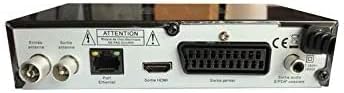
Slika 2: Zadaj view of the Optex ORT 8930-HD receiver, displaying various connectivity ports.
Zadnja plošča ponuja naslednje priključke:
- Antenna In/Out: IEC 9.52 mm connectors for terrestrial antenna.
- HDMI izhod: For connecting to an HD television.
- SCART Connector: For connecting to older televisions.
- S/PDIF Coaxial Audio: Digitalni avdio izhod.
- Vhodna moč: For the external power adapter.
4.3 Daljinski upravljalnik

Slika 3: The remote control unit for the Optex ORT 8930-HD receiver.
The remote control allows full operation of the receiver, including power, channel selection, volume, menu navigation, recording functions, and multimedia playback controls.
5. Nastavitev
5.1 Priključitev antene
- Connect your terrestrial antenna cable to the "Antenna In" port on the rear panel of the receiver.
- If you wish to loop the antenna signal to another device, connect a coaxial cable from the "Antenna Out" port to the input of the next device.
5.2 Priključitev na televizor
Izberite enega od naslednjih načinov povezave:
- HDMI (Recommended for HD): Connect an HDMI cable from the "HDMI Output" port on the receiver to an available HDMI input on your television.
- SCART: Connect a SCART cable from the "SCART Connector" on the receiver to the SCART input on your television.
5.3 Napajalni priključek
- Connect the power adapter to the power input port on the receiver.
- Priključite napajalnik v ustrezno stensko vtičnico.
5.4 Začetno skeniranje kanalov
- Vklopite televizor in izberite pravilen vhodni vir (HDMI ali SCART), ki ustreza vaši povezavi.
- Power on the Optex ORT 8930-HD receiver.
- The first-time setup wizard should appear. Follow the on-screen instructions to perform an automatic channel search. This will scan for all available digital terrestrial channels in your area.
- If the wizard does not appear, navigate to the "Menu" > "Installation" > "Automatic Search" using the remote control.
6. Navodila za uporabo
6.1 Osnovna operacija
- Vklop/izklop: Pritisnite MOČ na daljinskem upravljalniku ali sprednji plošči.
- Izbira kanala: Uporabite CH+ / CH- buttons or enter the channel number directly using the numeric keypad.
- Nadzor glasnosti: Uporabite GLASNOST+ / ZV.- gumbi.
- Mute: Pritisnite MUTE gumb za začasno utišanje zvoka.
6.2 Upravljanje kanalov
- Automatic/Manual Search: Dostop skozi meni > Namestitev to rescan for channels.
- LCN funkcija: The Logical Channel Numbering (LCN) function automatically sorts channels into a logical order. This can usually be enabled/disabled in the installation menu.
- Favorite List: Create personalized lists of your preferred channels for quick access. Refer to the on-screen menu for instructions on adding and managing favorite channels.
6.3 Snemanje in predvajanje
To use recording and multimedia playback features, connect a USB storage device (e.g., USB flash drive or external hard drive) to the USB port on the front panel.
- USB snemanje: Pritisnite REC button on the remote control to start recording the current program. Press STOP končati snemanje.
- Funkcija časovnega zamika: This allows you to pause live TV and resume watching later. Activate Timeshift via the remote control (usually a dedicated button or through the menu).
- Predvajanje multimedije: Access the multimedia player via the meni. You can browse and play music, photo, and video files stored on your connected USB device.
6.4 Elektronski programski vodnik (EPG)
Pritisnite EPG na daljinskem upravljalniku do view elektronski programski vodnik, ki prikazuje programske razporede za prihajajoče oddaje.
6.5 Starševsko zaklepanje
Set up a parental lock to restrict access to certain channels or programs. This feature is typically found in the meni > Sistemske nastavitve > Starševski nadzor razdelek.
6.6 Funkcija časovnika
The timer function allows you to schedule the receiver to turn on/off or record a specific program at a set time. Access this feature through the meni.
6.7 Software Update via USB
Občasno preverite proizvajalčeve website for available software updates. Download the update file to a USB drive and follow the instructions in the meni > Sistemske nastavitve > Posodobitev programske opreme section to install it.
7. Vzdrževanje
- Čiščenje: Use a soft, dry cloth to clean the exterior of the receiver. Do not use liquid or aerosol cleaners.
- Prezračevanje: Prepričajte se, da prezračevalne reže na napravi niso blokirane, da preprečite pregrevanje.
- Programska oprema: Keep the receiver's software updated to ensure optimal performance and access to the latest features.
8. Odpravljanje težav
| Težava | Možen vzrok | rešitev |
|---|---|---|
| Brez moči | Power cable disconnected; power outlet faulty. | Preverite priklop napajalnega kabla; poskusite z drugo vtičnico. |
| Ni signala / Ni kanalov | Antenna not connected; incorrect input source on TV; no channel scan performed. | Check antenna connection; select correct TV input; perform an automatic channel scan. |
| Daljinski upravljalnik ne deluje | Batteries depleted; obstruction between remote and receiver. | Zamenjajte baterije; zagotovite neoviran pogled na IR senzor sprejemnika. |
| Snemanje na USB ne deluje | USB device not connected or formatted incorrectly; insufficient storage space. | Ensure USB device is properly connected; format USB device (FAT32/NTFS); check available space. |
| Naprava se zamrzne ali se ne odziva | Začasna programska napaka. | Disconnect power for a few seconds, then reconnect. If problem persists, check for software updates. |
9. Specifikacije
| Funkcija | Podrobnost |
|---|---|
| Model | ORT 8930-HD |
| Znamka | Optex |
| Vrsta sprejemnika | Prizemni (DVB-T2) |
| Video dekodiranje | HEVC/H.265, MPEG-2.5 |
| Povezljivost | 1x HDMI, 1x SCART, 1x USB 2.0, 1x S/PDIF Coaxial Audio, Antenna In/Out |
| Zmogljivost kanala | Over 1000 channels |
| Snemanje | External USB media (PVR function) |
| Predvajanje multimedije | Music, Photos, Videos |
| Posebne lastnosti | Timeshift, EPG, Parental Lock, Favorite List, Multi-language Menu, LCN, 5V Antenna Power, Timer Function, Dolby Digital+ compatible |
| Način avdio izhoda | [SOM] |
| Konfiguracija prostorskega zvoka zvočnikov | 5.1 |
| Izhodna moč | 5 vatov |
| Teža izdelka | 600 g |
10. Garancija in podpora
Specific warranty information is not provided within this manual. Please refer to the warranty card included with your purchase, contact your retailer, or visit the official Optex webza podrobne garancijske pogoje.
For technical support or service inquiries, please contact your local Optex distributor or the customer service department as indicated on the product packaging or manufacturer's webmesto.


