1. Uvod
Thank you for choosing the NEDIS Automatic Lead Acid Battery Charger, model BACCH02. This charger is designed for safe and efficient charging and maintenance of 2V, 6V, and 12V lead-acid batteries. Please read this manual thoroughly before use to ensure proper operation and to prevent damage to the charger or battery.
2. Varnostna navodila
Pri uporabi polnilnika baterij vedno upoštevajte naslednje varnostne ukrepe:
- This charger is for indoor use only. Do not expose to rain or moisture.
- Hraniti izven dosega otrok.
- Med polnjenjem zagotovite ustrezno prezračevanje, da preprečite kopičenje plinov.
- Avoid sparks, flames, or smoking near the battery during charging. Batteries can produce explosive gases.
- Pri delu z baterijami nosite zaščito za oči in zaščitno obleko.
- Always disconnect the AC power supply before connecting or disconnecting the battery clamps.
- Priključite rdeči (+) clamp na pozitivni pol akumulatorja in črni (-) polamp na negativni pol akumulatorja.
- Ne poskušajte polniti zamrznjenih, poškodovanih ali nepolnilnih baterij.
- Ne odpirajte polnilnika casing. Vsa servisna dela prepustite usposobljenemu osebju.
- Če je napajalni kabel poškodovan, ga mora zamenjati proizvajalec, njegov serviser ali podobno usposobljena oseba, da se izognete nevarnosti.
3. Izdelek je končanview
The NEDIS BACCH02 is a compact and automatic battery charger. It features a main unit with LED indicators and a voltage selection switch, connected to an AC power cable and DC output cables with battery clamps.

Image: The main unit of the NEDIS BACCH02 charger, showing the LED indicators for polarity and charge status, and the voltage izbirno stikalo.
Sestavine:
- Polnilna enota: Main body containing the electronics.
- voltage Izbirno stikalo: Allows selection between 2V, 6V, and 12V charging modes.
- Polarity LED (Red): Indicates incorrect battery connection.
- Charge LED (Green): Indicates charging status (blinking for charging, solid for fully charged).
- Baterija Clamps: Red (+) and Black (-) for connecting to the battery terminals.
- AC napajalni kabel: For connecting to a wall outlet.
4. Nastavitev
Za nastavitev polnilnika baterij sledite tem korakom:
- Ensure Charger is Unplugged: Before making any connections, ensure the charger's AC power cable is disconnected from the wall outlet.
- Identify Battery Voltage: Določite voltage of the battery you intend to charge (2V, 6V, or 12V).
- Select Correct Voltage: Uporabite voltage selection switch on the charger unit to set the appropriate voltage (2 V, 6 V ali 12 V) za vašo baterijo.
- Priključite baterijo Clamps:
- Povežite rdeča (+) baterija clamp na pozitivni (+) pol akumulatorja.
- Povežite črna (-) baterija clamp na negativni (-) pol akumulatorja.
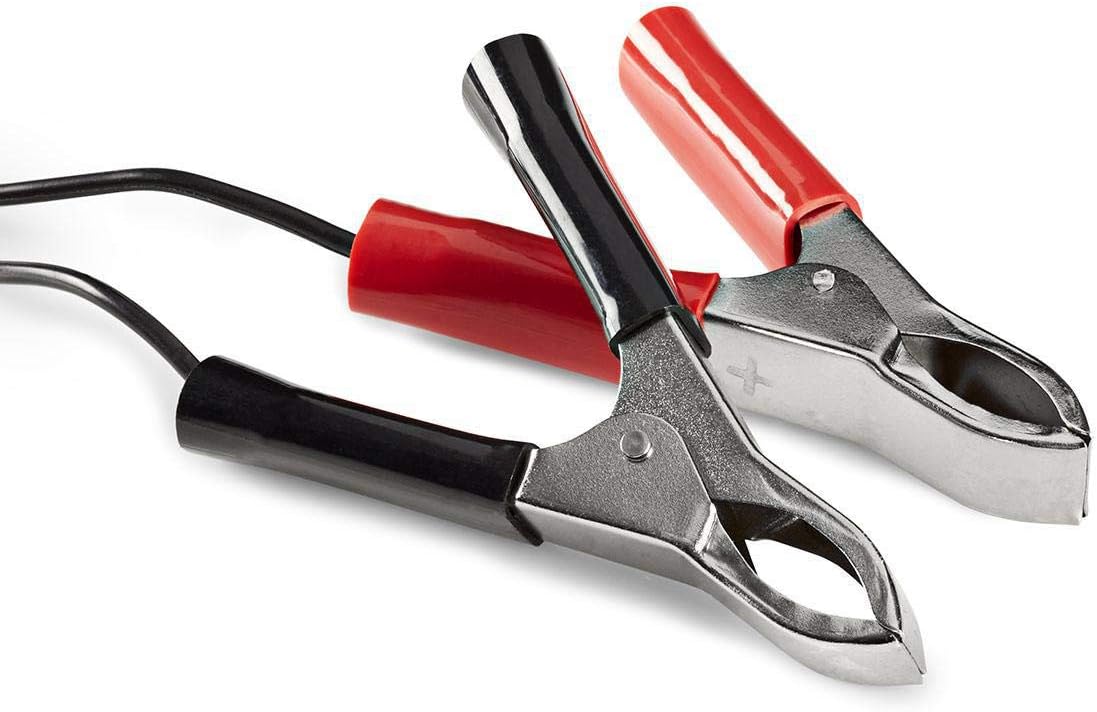
Image: Close-up of the red (positive) and black (negative) battery clamps.
- Povežite se z napajanjem: Ko je baterija clamps are securely connected, plug the charger's AC power cable into a standard 220V wall outlet.
5. Navodila za uporabo
The NEDIS BACCH02 is a fully automatic charger. Once connected to the battery and power, it will automatically begin the charging process.
Postopek polnjenja:
- Preverjanje polarnosti: If the red 'Polarity' LED illuminates, it indicates that the battery clamps are connected incorrectly. Immediately unplug the charger from the AC outlet and correct the connections before plugging it back in.
- Indikacija polnjenja: The green 'Charge' LED will blink when the battery is actively charging.
- Indikacija polne napolnjenosti: When the battery is fully charged, the green 'Charge' LED will stop blinking and remain solid. The charger will then automatically switch to a maintenance (float) charge mode to keep the battery at optimal capacity without overcharging.
Odklop polnilnika:
To disconnect the charger after use:
- Unplug the charger's AC power cable from the wall outlet first.
- Disconnect the black (-) battery clamp from the negative terminal of the battery.
- Disconnect the red (+) battery clamp s pozitivnega pola akumulatorja.
6. Vzdrževanje
Pravilno vzdrževanje zagotavlja dolgo življenjsko dobo vašega polnilnika:
- Keep the charger clean and dry. Wipe with a soft, dry cloth. Do not use abrasive cleaners or solvents.
- Ko polnilnika ne uporabljate, ga hranite na hladnem in suhem mestu.
- Regularly inspect the AC power cable, DC output cables, and battery clampPreverite morebitne znake poškodb, obrabe ali korozije. Po potrebi zamenjajte.
7. Odpravljanje težav
Če imate težave s polnilnikom, glejte naslednjo tabelo:
| Težava | Možen vzrok | rešitev |
|---|---|---|
| Polnilnik se ne vklopi / Nobena LED lučka ne sveti | No power supply; Faulty outlet; Damaged cable. | Check AC power connection; Try a different outlet; Inspect cable for damage. |
| Red 'Polarity' LED is lit | Povezava obratne polarnosti. | Unplug charger, correct battery clamp connections (red to +, black to -), then plug back in. |
| Green 'Charge' LED not blinking / Battery not charging | Battery too deeply discharged; Incorrect voltage selected; Damaged battery. | Poskrbite za pravilno glasnosttage is selected; Battery may be beyond recovery; Have battery tested by a professional. |
| Charger unit feels excessively hot | Normal operation (some warmth is expected); Overload; Internal fault. | Ensure adequate ventilation; Disconnect immediately if excessively hot and contact support. |
8. Specifikacije
| Funkcija | Specifikacija |
|---|---|
| Model | BACCH02 |
| Številka modela artikla | 5412810284245 |
| Vhodna voltage | 220 V AC |
| Izhodna voltage | 2V / 6V / 12V DC (selectable) |
| Suitable Battery Capacity | 2.2 Ah do 10 Ah |
| Zaščitne funkcije | Reverse Polarity, Short Circuit |
| Mere izdelka (D x Š x V) | 7 x 10 x 6 cm |
| Teža predmeta | 680 gramov |
| Skladnost | CE |
| barva | Črna |
9. Garancija in podpora
This product is covered by the standard warranty terms provided by the retailer at the time of purchase. For specific warranty details, please refer to your purchase documentation or contact the retailer directly.
For technical support, troubleshooting assistance beyond what is provided in this manual, or inquiries regarding parts and service, please contact your point of purchase or the manufacturer's customer service department.


