1. Uvod
This manual provides essential information for the safe and effective use of your IronBox Electric 5-15P to Locking C13 Power Cord. This power cord is designed for reliable power connections in various environments, including server rooms, offices, and home setups. Please read these instructions carefully before use.

Image: IronBox Electric 5-15P to Locking C13 Power Cord, highlighting its UL Listed, REACH Compliant, and RoHS Compliant certifications.
2. Značilnosti izdelka
- Vzdržljiva konstrukcija: Features an 18/3 SJT jacket, designed to resist wear, bending, and damage, ensuring long-lasting performance in various environments.
- Visoka moč: Rated for 10A and 125V, suitable for devices like networking equipment, computers, and monitors requiring consistent power.
- Varen zaklepni mehanizem: The integrated locking C13 connector ensures a tight connection, preventing accidental unplugging.
- Vsestranske možnosti dolžine: Available in various lengths to suit different setup needs and reduce cable clutter. This specific model is 4ft long.
- Dependable Quality: UL listed and tested for voltage, continuity, and polarity to ensure safe and reliable operation.
- Široka združljivost: Compatible with power distribution units, networking hardware, computers, and monitors.

Image: Illustration showing the internal structure of the durable 18/3 SJT wire, highlighting its robust construction.

Image: Graphic illustrating the wide compatibility of IronBox Electric power cords with various devices like computers, monitors, and networking hardware.
3. Nastavitev in namestitev
Follow these steps to properly connect your IronBox Electric 5-15P to Locking C13 Power Cord:
- Step 1: Insert the C13 Connector. Align the C13 end of the power cord with the C14 inlet on your device (e.g., computer, monitor, PDU). Insert the connector firmly.
- Step 2: Engage the Locking Mechanism. Once inserted, the internal locking mechanism will engage automatically, securing the connection. You may hear a slight click.
- Step 3: Connect to Power Outlet. Insert the 5-15P plug into a standard 125V wall outlet or power strip.

Image: Diagram showing the initial insertion of the C13 connector into a device inlet.

Image: Diagram illustrating the C13 connector's internal locking mechanism engaging with the device inlet.

Image: Diagram showing the 5-15P plug being inserted into a power outlet.
To disconnect the C13 end, gently pull the red tab on the connector while pulling the connector away from the device. Do not force the connector out without disengaging the lock.
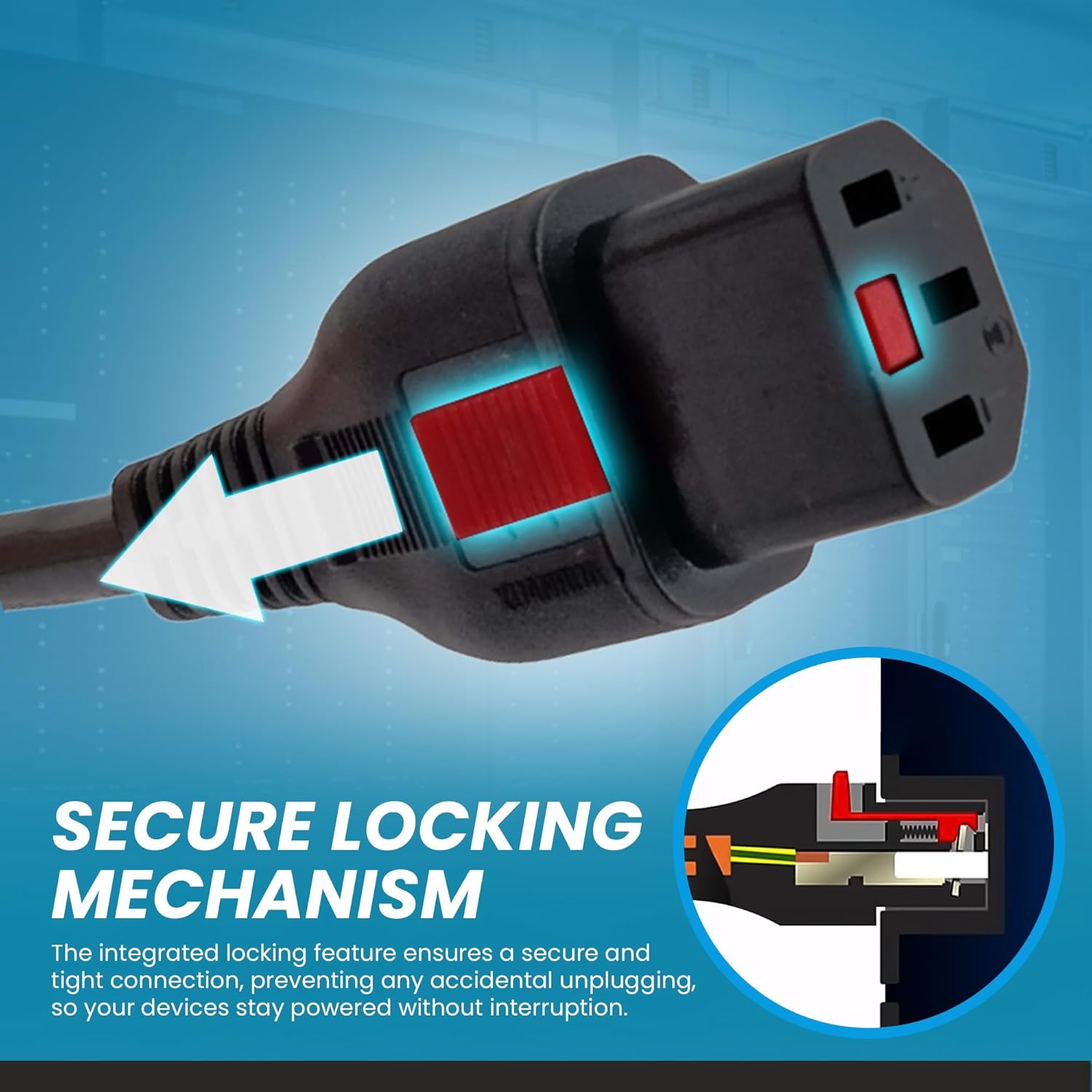
Slika: Podrobna view of the C13 connector's integrated locking feature, showing the red release tab.
4. Navodila za uporabo
Once properly connected, the power cord will supply power to your device. The locking C13 connector is designed to prevent accidental disconnections, ensuring continuous power supply to critical equipment.
Always ensure the power cord is not kinked, pinched, or placed under heavy objects to maintain optimal performance and safety.
Video: An official IronBox Electric video demonstrating the features and applications of their power cords, including the locking mechanism. This video highlights the reliability and versatility of the product line.
5. Vzdrževanje
To ensure the longevity and safe operation of your power cord, follow these maintenance guidelines:
- Redni pregled: Periodically inspect the cord for any signs of damage, such as cuts, fraying, or exposed wires. Discontinue use immediately if damage is found.
- Čiščenje: Wipe the cord with a dry, soft cloth to remove dust and dirt. Do not use liquid cleaners directly on the connectors or cable.
- Shranjevanje: When not in use, store the power cord in a cool, dry place, away from direct sunlight and extreme temperatures. Avoid tightly coiling the cable to prevent internal damage.
- Izogibajte se stresu: Do not pull the cord by the cable itself to disconnect it; always grasp the plug or connector housing. Avoid placing heavy objects on the cable or running it through doorways where it might be pinched.
6. Odpravljanje težav
If you encounter issues with your IronBox Electric 5-15P to Locking C13 Power Cord, consider the following:
- Naprava nima napajanja:
- Ensure both the 5-15P plug and the C13 connector are fully inserted into their respective outlets/inlets.
- Verify that the wall outlet or power strip is functional by testing it with another device.
- Check for any visible damage to the power cord. If damaged, replace the cord.
- C13 Connector Does Not Lock Securely:
- Ensure the C13 connector is fully pushed into the device's C14 inlet. The locking mechanism requires full insertion to engage.
- Inspect the C14 inlet on your device for any obstructions or damage.
- If the connector feels loose even after full insertion, the locking mechanism might be faulty. Contact support for assistance.
- Accidental Disconnection:
- Confirm that the locking mechanism was properly engaged during installation. A slight tug should not dislodge the connector if locked correctly.
- Avoid excessive tension or pulling on the cable, which can stress the connection point.
7. Specifikacije
| Številka modela | IBX-00024-04 |
| Vrsta konektorja (moški) | NEMA 5-15P |
| Vrsta konektorja (ženski) | Locking IEC C13 |
| Trenutna ocena | 10 Amps |
| voltage Ocena | 125 volta |
| Žični merilnik | 18/3 AWG |
| Vrsta jakne | SJT |
| Certifikati | Na seznamu UL |
| Dolžina | 4 ft |
8. Garancija in podpora
Iron Box products are manufactured to high-quality standards. For warranty information or technical support, please refer to the official Iron Box webspletno mesto ali se obrnite neposredno na njihovo službo za stranke. Za uveljavljanje garancije shranite račun.
Lahko obiščete Iron Box Store on Amazon za več informacij.


