1. Uvod
Hvala za nakupasing the GPX PDB1077B Portable DVD Player. This device offers versatile entertainment with its 10.1-inch display, DVD/CD playback capabilities, and built-in Bluetooth wireless transmitter for audio streaming to compatible headphones. This manual provides detailed instructions for setup, operation, and maintenance to ensure optimal performance and longevity of your device.
2. Pomembne varnostne informacije
Please read all safety warnings and instructions carefully before using this product. Retain this manual for future reference.
- vir energije: Uporabljajte samo navedeni napajalnik. Napačna glasnosttage lahko poškoduje napravo in razveljavi garancijo.
- Voda in vlaga: Naprave ne izpostavljajte dežju, vlagi in je ne potapljajte v vodo.
- Toplota: Napravo hranite stran od virov toplote, kot so radiatorji, grelniki, štedilniki ali druge naprave (vključno z amplifiers), ki proizvajajo toploto.
- Prezračevanje: Zagotovite ustrezno prezračevanje. Ne blokirajte prezračevalnih odprtin.
- Čiščenje: Čistite samo s suho krpo. Ne uporabljajte tekočih čistil ali čistil v obliki aerosolov.
- Servisiranje: Tega izdelka ne poskušajte servisirati sami. Vsa servisna dela prepustite usposobljenemu servisnemu osebju.
- Varnost baterije: The device contains a rechargeable battery. Do not expose to excessive heat or direct sunlight. Dispose of batteries properly according to local regulations.
- Zaščita sluha: Izogibajte se dolgotrajnemu poslušanju pri visoki glasnosti, da preprečite poškodbe sluha.
3. Vsebina paketa
Preverite, ali so v vašem paketu priloženi vsi spodaj navedeni elementi:
- GPX PDB1077B Portable DVD Player
- Brezžične Bluetooth slušalke
- Daljinski upravljalnik
- AC/DC napajalnik
- Avtomobilski napajalnik
- AV Cable
- Uporabniški priročnik (ta dokument)
4. Izdelek je končanview
Familiarize yourself with the components of your GPX PDB1077B Portable DVD Player.
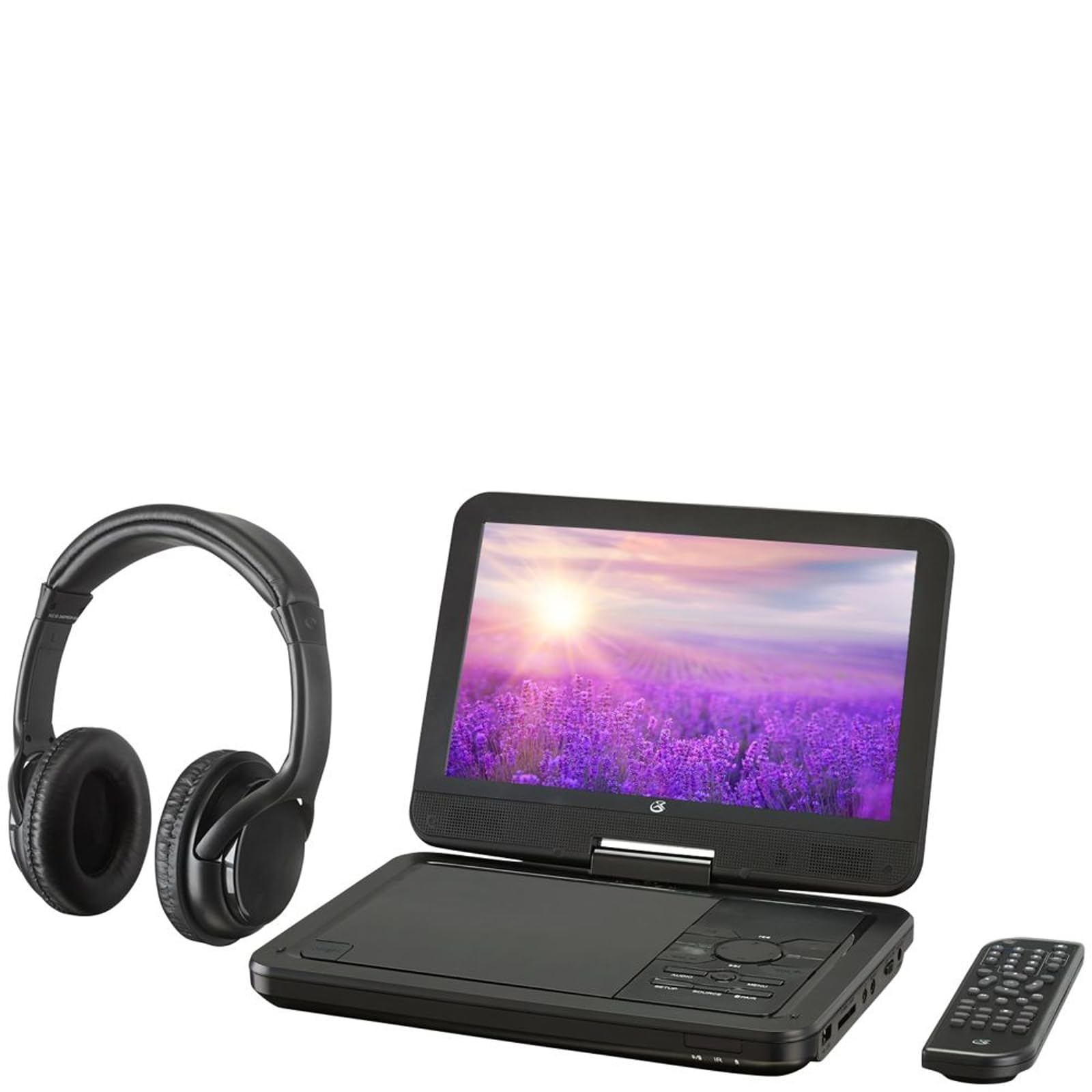
Slika 4.1: The GPX PDB1077B Portable DVD Player, showing the 10.1-inch screen, control panel, wireless Bluetooth headphones, and remote control.
4.1 Portable DVD Player Unit
The main unit features a swivel screen, disc tray, and control buttons. Key components include:
- 10.1-palčni LCD zaslon: Za viewing video content.
- Pladenj za disk: Za vstavljanje DVD-jev in CD-jev.
- Nadzorna plošča: Buttons for playback, menu navigation, volume, and source selection.
- Pristanišča: USB, SD card slot, AV out, headphone jack, DC in.
- Govorci: Vgrajeni stereo zvočniki.
4.2 Wireless Bluetooth Headphones
The included headphones connect wirelessly to the DVD player via Bluetooth for private listening.
Slika 4.2: Bližnji posnetek view of the black wireless Bluetooth headphones, featuring padded earcups and an adjustable headband.
4.3 Daljinski upravljalnik
Daljinski upravljalnik omogoča priročen dostop do vseh funkcij na daljavo.
Slika 4.3: Bližnji posnetek view of the compact black remote control with various buttons for playback, menu navigation, and volume adjustment.
5. Navodila za namestitev
5.1 Polnjenje naprave
- Connect the AC/DC power adapter to the DC IN port on the DVD player.
- Priključite adapter v običajno stensko vtičnico.
- Indikatorska lučka polnjenja bo zasvetila. Popolno polnjenje traja približno 3–4 ure.
- For in-car use, connect the car power adapter to the DC IN port and your vehicle's 12V power outlet.
5.2 Vklop/izklop
- To power on, slide the POWER switch to the ON position. The screen will light up.
- Za izklop potisnite stikalo POWER v položaj OFF.
5.3 Connecting Bluetooth Headphones
- Ensure the DVD player is powered on.
- Turn on the Bluetooth headphones and put them into pairing mode (refer to headphone manual if needed).
- On the DVD player, navigate to the Bluetooth settings menu.
- Select "Scan for Devices" or similar option.
- Choose your headphones from the list of available devices to pair.
- Once paired, audio will automatically transmit to the headphones.
5.4 Connecting to an External Display (Optional)
Use the included AV cable to connect the DVD player to a TV or monitor.
- Connect one end of the AV cable to the AV OUT port on the DVD player.
- Connect the other end to the AV IN ports (Yellow for Video, White for Left Audio, Red for Right Audio) on your external display.
- Select the correct AV input on your external display.
6. Navodila za uporabo
6.1 Playing DVDs and CDs
- Open the disc tray by gently lifting the screen.
- Place a DVD or CD onto the spindle with the label side facing up.
- Gently close the disc tray.
- Predvajalnik bo samodejno zaznal disk in začel predvajati ali prikazal meni diska.
- Use the navigation buttons (Up, Down, Left, Right, Enter) on the control panel or remote to navigate menus.
- Pritisnite PREDVAJAJ/PAVZA gumb za začetek ali premor predvajanja.
- Pritisnite STOP za ustavitev predvajanja.
6.2 Using USB and SD Card Media
- Vstavite USB-ključek v vrata USB ali SD-kartico v režo za SD-kartico.
- Pritisnite VIR button on the control panel or remote to select "USB" or "SD".
- Krmarite po svojem files using the control buttons.
- Izberite a file (e.g., MP3, JPEG) and press ENTER igrati oz. view.
6.3 Prilagajanje nastavitev
Access the system settings to customize your viewin izkušnje poslušanja.
- Pritisnite NASTAVITEV button on the remote or control panel.
- Use the navigation buttons to select options such as:
- Nastavitve zaslona: Adjust brightness, contrast, color.
- Nastavitve zvoka: Adjust volume, equalizer.
- Jezikovne nastavitve: Select OSD language, audio language, subtitle language.
- Starševski nadzor: Set rating levels for disc playback.
- Pritisnite ENTER za potrditev izbir in NASTAVITEV spet za izhod.
6.4 Uporaba daljinskega upravljalnika
The remote control provides full functionality. Ensure batteries are correctly inserted (2 x AAA, not included).
| Gumb | funkcija |
|---|---|
| MOČ | Vklopi ali izklopi predvajalnik. |
| NASTAVITEV | Dostopi do menija za nastavitve sistema. |
| VIR | Switches between DVD, USB, SD, and AV input modes. |
| PREDVAJAJ/PAVZA | Zažene ali zaustavi predvajanje. |
| STOP | Ustavi predvajanje. |
| VOL + / VOL- | Prilagodi raven glasnosti. |
| NAVIGATE (Up/Down/Left/Right/ENTER) | Navigacija po menijih in potrditev izbir. |
| MENI | Accesses the disc menu during DVD playback. |
7. Vzdrževanje
7.1 Čiščenje naprave
- Pred čiščenjem se prepričajte, da je naprava izklopljena in izklopljena.
- Za brisanje zunanjih površin uporabite mehko, suho krpo, ki ne pušča vlaken.
- Za zaslon uporabite čistilno raztopino, posebno za zaslone, in krpo iz mikrovlaken, pri čemer nežno pritiskajte.
- Ne uporabljajte abrazivnih čistil, voskov ali topil.
7.2 Nega diska
- Diske prijemajte za robove, da se izognete prstnim odtisom.
- Ko diskov ne uporabljate, jih shranjujte v njihovih ovitkih, da preprečite praske.
- Umazane diske očistite z mehko krpo, ki ne pušča vlaken, in jih brišite od sredine navzven.
7.3 Skrb za baterije
- To prolong battery life, fully charge the device before first use.
- If storing the device for an extended period, charge it to approximately 50% every few months.
- Izogibajte se izpostavljanju naprave ekstremnim temperaturam.
8. Odpravljanje težav
If you encounter issues with your GPX PDB1077B, refer to the following common problems and solutions.
| Težava | Možen vzrok | rešitev |
|---|---|---|
| Brez moči | Battery drained; Power adapter not connected properly; Power switch off. | Charge the device; Ensure power adapter is securely connected; Slide power switch to ON. |
| No Disc Playback | Disk je bil nepravilno vstavljen; Disk je umazan ali opraskan; Format diska ni podprt. | Reinsert disc label-side up; Clean or replace disc; Check supported media types in specifications. |
| Brez zvoka | Volume too low; Mute function active; Headphones not connected/paired correctly. | Increase volume; Deactivate mute; Reconnect or re-pair headphones. |
| Bluetooth Headphones Not Pairing | Headphones not in pairing mode; Player not in Bluetooth scan mode; Interference. | Ensure headphones are in pairing mode; Activate Bluetooth scan on player; Move closer to player, away from other devices. |
| Daljinski upravljalnik ne deluje | Batteries are dead or inserted incorrectly; Obstruction between remote and player; Remote sensor blocked. | Replace batteries, check polarity; Remove obstructions; Ensure remote sensor on player is clear. |
9. Specifikacije
Technical specifications for the GPX PDB1077B Portable DVD Player.
| Funkcija | Podrobnost |
|---|---|
| Model | PDB1077B |
| Velikost zaslona | 10.1 palcev |
| Vrsta zaslona | LCD |
| Izvorna ločljivost | 1024 x 600 |
| Podprti mediji | DVD, DVD±R/RW, CD, CD-R/RW, MP3 CD, JPEG CD |
| Povezljivost | Bluetooth wireless transmitter, USB port, SD card slot, AV Out, Headphone Jack, DC In |
| Vir napajanja | Built-in rechargeable battery, AC/DC adapter, Car adapter |
10. Garancija in podpora strankam
GPX products are designed for reliability and performance. For specific warranty information, please refer to the warranty card included with your purchase or visit the official GPX website. If you require technical assistance or have questions regarding your device, please contact GPX customer support.
GPX Official Webspletno mesto: www.gpx.com
Please note that warranty terms and customer support availability may vary by region.


