1. Uvod
This manual provides detailed instructions for the setup, operation, and maintenance of your Xerox VersaLink C505/X Color Laser Multifunction Printer. The C505/X is designed for efficient performance in fast-paced work environments, offering print, copy, scan, and fax functionalities.
Key features include a customizable 7-inch color touchscreen for intuitive control, mobile and cloud connectivity, and robust security measures.
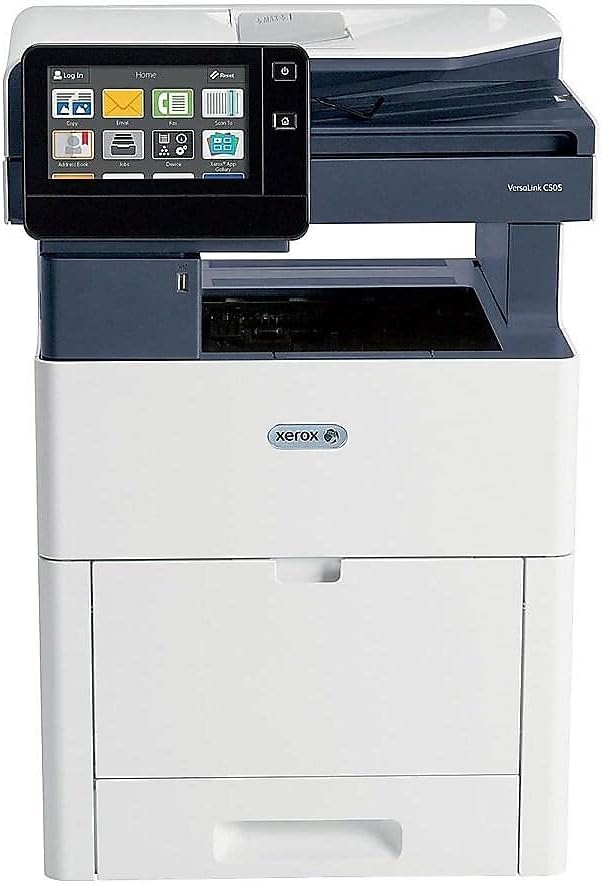
Slika 1: Spredaj view of the Xerox VersaLink C505/X Multifunction Printer.
2. Nastavitev
2.1 Razpakiranje in začetni pregled
Carefully remove the printer from its packaging. Verify that all components listed below are present and undamaged:
- Xerox VersaLink C505 Color MFP
- Starter capacity toner cartridges (one each of cyan, magenta, yellow: 2,400 capacity; black: 5,000 capacity)
- CD s programsko opremo in dokumentacijo
- Navodila za namestitev
- Quick User Guides
- Napajalni kabel
2.2 Napajalni priključek
- Tiskalnik postavite na stabilno, ravno površino.
- Priloženi napajalni kabel priključite na vhod za napajanje tiskalnika in nato na ozemljeno električno vtičnico.
- Do not power on the device until all other connections are made.
2.3 Namestitev kartuše s tonerjem
Install the starter toner cartridges into their respective slots. Refer to the Quick User Guides for specific instructions on opening the toner access panel and inserting cartridges.

Figure 2: Toner cartridge access panel open, showing toner installation.
2.4 Omrežna in USB povezava
The printer supports both Ethernet and USB connectivity.
- Ethernet: Priključite ethernetni kabel iz ethernetnih vrat tiskalnika na omrežni usmerjevalnik ali stikalo.
- USB: Connect a USB cable from the printer's USB port to your computer.
2.5 Namestitev programske opreme
Insert the provided software and documentation CD into your computer's CD/DVD drive. Follow the on-screen instructions to install the necessary drivers and utilities. Alternatively, visit the official Xerox support webspletno mesto za najnovejše gonilnike.
3. Upravljanje tiskalnika
3.1 Vmesnik zaslona na dotik
The 7-inch color touchscreen provides access to all printer functions. Navigate through menus by tapping and swiping, similar to a smartphone. The home screen displays icons for various functions such as Print, Copy, Scan, and Fax.

Figure 3: Close-up of the 7-inch color touchscreen control panel.
3.2 Tiskanje
Za tiskanje dokumentov:
- Prepričajte se, da je tiskalnik povezan z računalnikom ali omrežjem.
- Open the document on your computer and select the print option.
- Choose the Xerox VersaLink C505/X from the list of available printers.
- Adjust print settings (e.g., color/monochrome, duplex printing, paper size) as needed. The printer supports up to 43 ppm color and 45 ppm monochrome, with automatic duplexing.
- Confirm the print job.
3.3 Kopiranje
Za izdelavo kopij:
- Place the original document on the scanner glass or in the automatic document feeder (ADF).
- On the touchscreen, tap the "Copy" icon.
- Select desired settings such as number of copies, color/black and white, and two-sided copying. The maximum copy speed is 45 ppm (black & white) with resolutions up to 1200 x 2400 dpi.
- Pritisnite gumb "Start".
3.4 Skeniranje
To scan documents:
- Dokument položite na steklo skenerja ali v samodejni podajalnik dokumentov.
- On the touchscreen, tap the "Scan" icon.
- Choose the scan destination (e.g., email, network folder, USB drive) and adjust scan settings.
- Pritisnite gumb "Start".
3.5 Faksiranje
Za pošiljanje faksa:
- Dokument položite na steklo skenerja ali v samodejni podajalnik dokumentov.
- On the touchscreen, tap the "Fax" icon.
- Vnesite številko faksa prejemnika.
- Prilagodite vse potrebne nastavitve faksa.
- Pritisnite gumb "Start".
3.6 Mobile and Cloud Connectivity
The VersaLink C505/X offers out-of-the-box connectivity to cloud services like Google Drive, Microsoft OneDrive, and DropBox. Additional options are available through the Xerox App Gallery, allowing for flexible workflow integration.
4. Vzdrževanje
4.1 Zamenjava kartuše s tonerjem
When a toner cartridge is low or empty, the printer's display will indicate which cartridge needs replacement. Always use genuine Xerox toner cartridges for optimal performance and print quality.
- Open the front access panel of the printer.
- Carefully remove the empty toner cartridge by pulling it straight out.
- Razpakirajte novo kartušo s tonerjem in jo nežno pretresite, da se toner enakomerno porazdeli.
- Vstavite novo kartušo v ustrezno režo, dokler se ne zaskoči.
- Close the front access panel.
4.2 Čiščenje
Redno čiščenje pomaga ohranjati kakovost tiskanja in podaljšuje življenjsko dobo tiskalnika.
- Zunanjost: Obrišite zunanje površine z mehko damp, krpo, ki ne pušča vlaken.
- Steklo optičnega bralnika: Use a soft cloth moistened with glass cleaner to clean the scanner glass. Ensure no residue remains.
- Notranje komponente: Refer to the detailed user manual on the software and documentation CD for instructions on cleaning internal components, such as the print heads or rollers, if necessary.
5. Odpravljanje težav
This section addresses common issues you might encounter with your Xerox VersaLink C505/X. For more complex problems, consult the full user manual or contact support.
5.1 Zastoji papirja
If a paper jam occurs, the touchscreen will display an error message indicating the location of the jam. Follow the on-screen instructions to clear the jammed paper. Always pull paper in the direction of the paper path to avoid tearing.
5.2 Težave s kakovostjo tiskanja
If printouts show streaks, faded areas, or incorrect colors:
- Preverite raven tonerja in zamenjajte vse kartuše, v katerih je skoraj nič tonerja.
- Prepričajte se, da uporabljate ustrezen papir za tiskanje.
- Izvedite diagnostiko kakovosti tiskanja na nadzorni plošči tiskalnika.
- Clean the print heads or other internal components as instructed in the detailed manual.
5.3 Težave s povezljivostjo
If the printer is not communicating with your computer or network:
- Verify that all cables (power, USB, Ethernet) are securely connected.
- Znova zaženite tiskalnik in računalnik/usmerjevalnik.
- Check network settings on the printer's touchscreen.
- Ensure the correct printer drivers are installed on your computer.
6. Specifikacije
| Funkcija | Podrobnost |
|---|---|
| Ime modela | Xerox C505/X VersaLink |
| Funkcije | Tiskanje, kopiranje, skeniranje, faksiranje |
| Tehnologija tiskanja | Barvni laser |
| Največja hitrost tiskanja (enobarvno) | 45 ppm |
| Največja hitrost tiskanja (barvno) | 43 ppm |
| Največja ločljivost tiskanja (črno-belo) | 2400 dpi |
| Največja ločljivost tiskanja (barvno) | 1200 x 2400 dpi |
| Dvostransko tiskanje | Samodejno |
| Vrsta optičnega bralnika | Dokument |
| Največja hitrost kopiranja (črno-belo) | 45 ppm |
| Največja ločljivost kopiranja (barvno) | Do 1200 x 2400 dpi |
| Nadzorna metoda | App, Touch (7-inch display) |
| Povezljivost | USB-Ethernet |
| Največja kapaciteta vhodnih listov | 3250 listov |
| Standardni pladnji | 2 (550 Sheet Tray, 150 Sheet Multi Purpose Tray) |
| Podprte velikosti medijev | Letter (8.5 x 11 inches), Legal (8.5 x 14 inches) |
| Vrsta črnila | Toner (Black, Cyan, Magenta, Yellow) |
| Zmogljivost pomnilnika | 4096 MB |
| Dimenzije izdelka | 26"D x 23"Š x 31"V |
| Teža predmeta | 77.2 funtov |
| Wattage | 600 vatov |
7. Garancija in podpora
7.1 Garancija izdelka
The Xerox VersaLink C505/X Color Laser MFP comes with a standard one-year full warranty from the date of purchase. This warranty covers defects in materials and workmanship under normal use. For detailed terms and conditions, please refer to the warranty documentation included with your product or visit the official Xerox webmesto.
7.2 Podpora strankam
For technical assistance, troubleshooting, or service requests, please contact Xerox customer support. Support contact information can be found on the Xerox webspletnem mestu ali v dokumentaciji, ki je priložena tiskalniku.
Spletni viri: Visit the official Xerox support website for FAQs, driver downloads, and additional user guides.


