1. Uvod
Hvala za nakupasing the Supersonic SC-20H DVD Player. This manual provides essential information for the proper installation, operation, and maintenance of your device. Please read this manual thoroughly before using the product and retain it for future reference.
2. Varnostne informacije
Za zagotovitev varnega delovanja in preprečevanje poškodb upoštevajte naslednje varnostne ukrepe:
- vir energije: Connect the player only to a power supply within the specified range (110-240V, 50/60Hz).
- Prezračevanje: Ne blokirajte prezračevalnih odprtin. Zagotovite dovolj prostora okoli enote za pravilen pretok zraka.
- Vlaga: Predvajalnika ne izpostavljajte dežju, vlagi ali kapljajočim/brizgajočim tekočinam. Na napravo ne postavljajte predmetov, napolnjenih s tekočinami, kot so vaze.
- Toplota: Predvajalnika hranite stran od virov toplote, kot so radiatorji, grelniki, štedilniki ali druge naprave (vključno z amplifiers), ki proizvajajo toploto.
- Čiščenje: Pred čiščenjem izključite predvajalnik iz stenske vtičnice. Za čiščenje uporabite suho krpo.
- Servisiranje: Tega izdelka ne poskušajte servisirati sami. Vsa servisna dela prepustite usposobljenemu servisnemu osebju.
- Opozorilo kalifornijskega predloga 65: Ta izdelek vsebuje kemikalije, za katere zvezna država Kalifornija ve, da povzročajo raka in prirojene okvare ali druge reproduktivne poškodbe.
3. Vsebina paketa
Preverite, ali so v paketu prisotni vsi elementi:
- Supersonic SC-20H DVD Player
- Napajalni kabel
- AV Cables (Composite)
- Full Function Remote Control (Batteries not included)
- Uporabniški priročnik (ta dokument)
4. Izdelek je končanview
4.1 Sprednja plošča
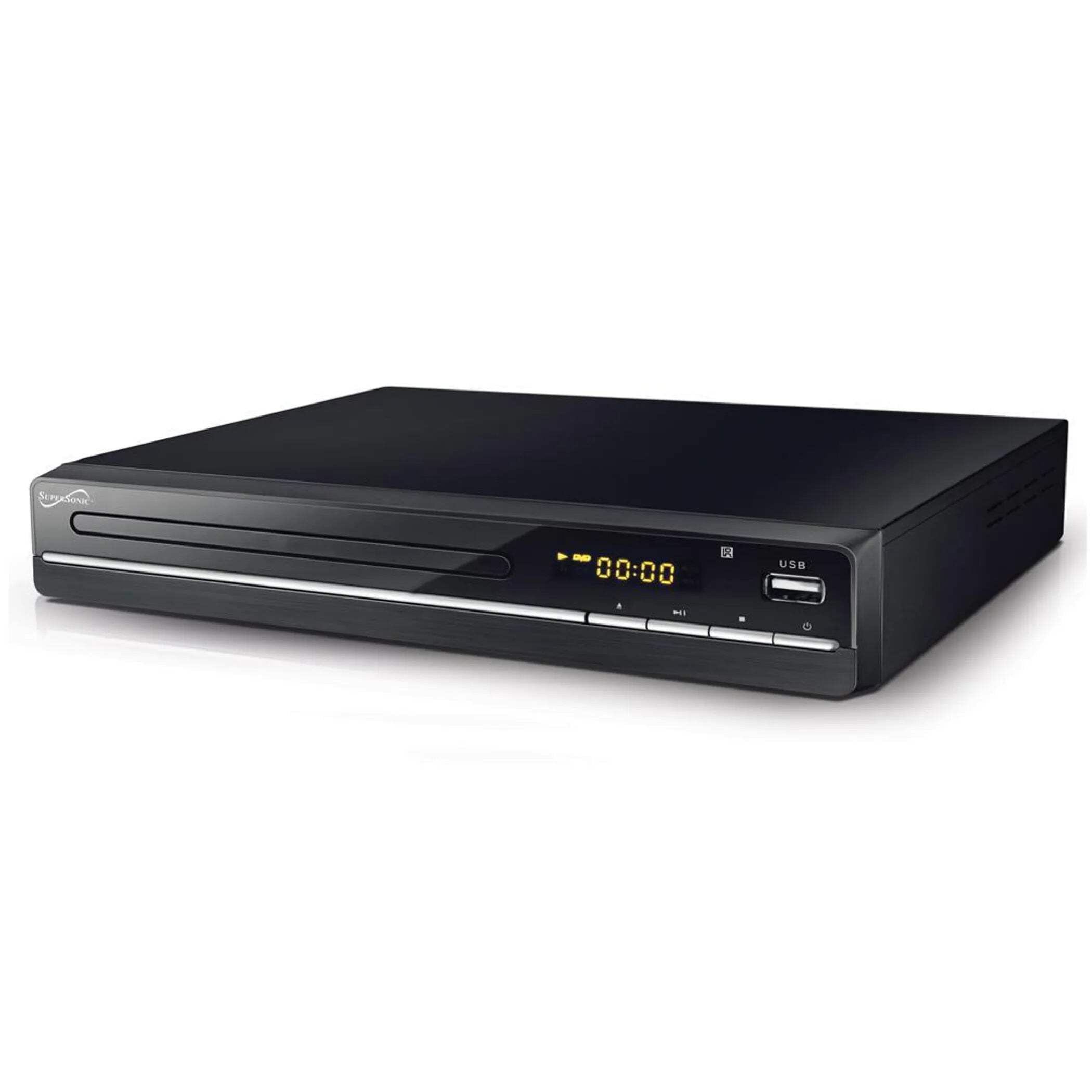
The image above displays the front panel of the SC-20H DVD Player. Key features include:
- Pladenj za disk: For inserting DVDs, VCDs, CDs, and other compatible discs.
- Zaslon: Shows playback time, track number, and other operational information.
- Gumbi za upravljanje: Includes Play/Pause, Stop, Previous, Next, and Power buttons for direct control.
- Vhod USB: Allows connection of USB flash drives for media playback.
- Reža za kartico SD: Za vstavljanje SD kartic za predvajanje medijev files. (Note: The image primarily shows the USB port, but the product features indicate an SD input as well, typically located near the USB port or on the side).
4.2 Zadnja plošča
The rear panel of the DVD player contains all the necessary connection ports for audio and video output.
- HDMI izhod: Connects to an HDMI-enabled TV or display for high-definition audio and video.
- Composite A/V Output (RCA): Yellow (Video), White (Left Audio), Red (Right Audio) jacks for standard definition connection to older TVs.
- Component YUV Output: Y (Luminance), Pb (Blue difference), Pr (Red difference) jacks for progressive scan video output, offering better quality than composite.
- Vhodna moč: For connecting the power supply cable.
5. Nastavitev
5.1 Priključitev na televizor
Izberite enega od naslednjih načinov povezave:
- HDMI priključek (priporočeno):
- En konec kabla HDMI (ni priložen) priključite v vrata HDMI OUT na predvajalniku DVD.
- Connect the other end of the HDMI cable to an HDMI IN port on your television.
- Z daljinskim upravljalnikom televizorja izberite ustrezni vhod HDMI.
- Composite A/V Connection:
- Connect the yellow RCA cable to the VIDEO OUT port on the DVD player and the VIDEO IN port on your TV.
- Connect the white RCA cable to the L AUDIO OUT port on the DVD player and the L AUDIO IN port on your TV.
- Connect the red RCA cable to the R AUDIO OUT port on the DVD player and the R AUDIO IN port on your TV.
- Select the corresponding A/V input on your TV.
- Component YUV Connection:
- Connect the Y, Pb, and Pr cables to the corresponding YUV OUT ports on the DVD player and YUV IN ports on your TV.
- For audio, use the white and red RCA cables to connect the L/R AUDIO OUT ports on the DVD player to the L/R AUDIO IN ports on your TV.
- Select the corresponding Component input on your TV.
5.2 Napajalni priključek
After connecting the audio/video cables, plug the power supply cable into the DVD player's power input and then into a wall outlet.
6. Navodila za uporabo
6.1 Osnovno predvajanje diskov
- Vklop: Press the Power button on the front panel or remote control.
- Vstavite disk: Press the OPEN/CLOSE button to open the disc tray. Place a compatible disc (DVD, VCD, CD, KODAK CD, DVD±R/RW, CD-R, CD-RW) onto the tray with the label side facing up. Press OPEN/CLOSE again to close the tray.
- Predvajanje: The player will typically begin playback automatically. If not, press the PLAY button.
- Premor/nadaljevanje: Press the PAUSE button to temporarily stop playback. Press PLAY again to resume.
- Ustavite: Pritisnite gumb STOP, da končate predvajanje.
- Skip Tracks/Chapters: Use the PREVIOUS and NEXT buttons to navigate between tracks or chapters.
6.2 USB/SD Media Playback
- Vstavi medij: Vstavite USB-ključek v vrata USB ali SD-kartico v režo za SD-kartico.
- Izberite vir: Use the SOURCE or USB/SD button on the remote control to switch to the USB or SD input.
- Prebrskaj Files: Use the navigation buttons (Up, Down, Left, Right) and OK button on the remote to browse through your media files (MP3, video formats).
- Igraj File: Izberite želeno file and press the PLAY button to begin playback.
6.3 System Settings (OSD Menu)
Access the On-Screen Display (OSD) menu to configure various settings:
- Dostop do menija: Press the SETUP button on the remote control.
- Navigacija: Use the navigation buttons to move through menu options.
- Izbira: Pritisnite OK, da izberete možnost ali odprete podmeni.
- Izhod: Press SETUP again to exit the menu.
Ključne nastavitve vključujejo:
- jezik: Set OSD menu language and subtitle language (supports multiple languages).
- Razmerje stranic: Choose between 4:3 (Standard) and 16:9 (Widescreen) for video output.
- Starševski nadzor: Set a password and rating level to restrict playback of certain content.
- Nastavitve zvoka: Adjust audio output modes (e.g., Surround).
7. Vzdrževanje
Proper maintenance ensures the longevity of your DVD player:
- Čiščenje enote: Zunanjost predvajalnika obrišite z mehko, suho krpo. Ne uporabljajte tekočih čistil ali aerosolnih razpršil.
- Čistilni diski: Use a soft, lint-free cloth to wipe discs from the center outwards. Do not use abrasive cleaners or solvents.
- Ravnanje z diski: Always hold discs by their edges to avoid fingerprints and scratches. Store discs in their cases when not in use.
- Prezračevanje: Prepričajte se, da so prezračevalne odprtine čiste od prahu in umazanije, da preprečite pregrevanje.
8. Odpravljanje težav
Če naletite na težave, si oglejte naslednje pogoste težave in rešitve:
| Težava | Možen vzrok | rešitev |
|---|---|---|
| Brez moči | Napajalni kabel ni priključen; vtičnica je okvarjena | Prepričajte se, da je napajalni kabel varno priključen. Preizkusite vtičnico z drugo napravo. |
| Brez slike | Incorrect video connection; Wrong TV input selected | Check video cables (HDMI, Composite, Component) are correctly connected. Select the correct input source on your TV. |
| Brez zvoka | Incorrect audio connection; TV/player volume too low; Mute activated | Check audio cables (HDMI, RCA) are correctly connected. Increase volume on TV and player. Deactivate mute function. |
| Disk se ne predvaja | Disc inserted incorrectly; Disc is dirty or scratched; Incompatible disc format | Ensure disc is inserted label-side up. Clean the disc. Check if the disc format is supported (DVD, VCD, CD, KODAK CD, DVD±R/RW, CD-R, CD-RW, MP3). |
| Medij USB/SD se ne predvaja | Incorrect source selected; Incompatible file format; USB/SD device faulty | Select USB or SD source. Ensure media files are compatible. Try another USB/SD device. |
9. Specifikacije
Detailed technical specifications for the Supersonic SC-20H DVD Player:
- Model: SC-20H
- Znamka: Nadzvočno
- Združljivost diska: DVD, VCD, KODAK CD, DVD±R/RW, CD, CD-R, CD-RW, MP3
- Video izhod: HDMI, Composite A/V, Component YUV
- Način avdio izhoda: Surround
- Resolucija: 1920x1080 (via HDMI)
- Povezljivost: USB 2.0, SD Card Slot
- Napajanje: 110-240V, 50/60Hz
- Poraba energije: 15 W
- Dimenzije (D x Š x V): 10.5 x 10 x 3.3 palcev
- Teža artikla: 1.75 funtov
- Posebne lastnosti: Multi-language subtitles (up to 32 languages), PAL/NTSC compatible, Parental Lock, Aspect Ratio (4:3, 16:9)
10. Garancija in podpora
For warranty information and technical support, please refer to the documentation included with your purchase or visit the official Supersonic webspletnega mesta. Shranite dokazilo o nakupu za morebitne garancijske zahtevke.


