1. Uvod
The AUTOPHIX OM126 is a versatile On-Board Diagnostics II (OBD2) scanner designed to help vehicle owners and technicians diagnose engine-related issues. This tool allows you to read and clear Diagnostic Trouble Codes (DTCs), view live data, and check I/M readiness status, providing essential information for maintaining your vehicle's performance and emissions compliance. This manual provides detailed instructions for the proper use and maintenance of your OM126 scanner.
2. Varnostne informacije
Always observe safety precautions when working on a vehicle. Improper use of diagnostic tools can lead to personal injury or damage to the vehicle. Read and follow all instructions carefully.
- Prepričajte se, da je vozilo parkirano na ravni površini z zategnjeno parkirno zavoro.
- Turn off the ignition before connecting or disconnecting the scanner.
- Nosite ustrezno osebno zaščitno opremo, kot so zaščitna očala.
- Izogibajte se stiku z vročimi komponentami motorja ali gibljivimi deli.
- Ne upravljajte skenerja med vožnjo.
- Skenerja hranite stran od vode, olja in ekstremnih temperatur.
3. Izdelek je končanview
The AUTOPHIX OM126 is a compact and user-friendly diagnostic tool. It features a clear display and intuitive buttons for easy navigation through its functions.
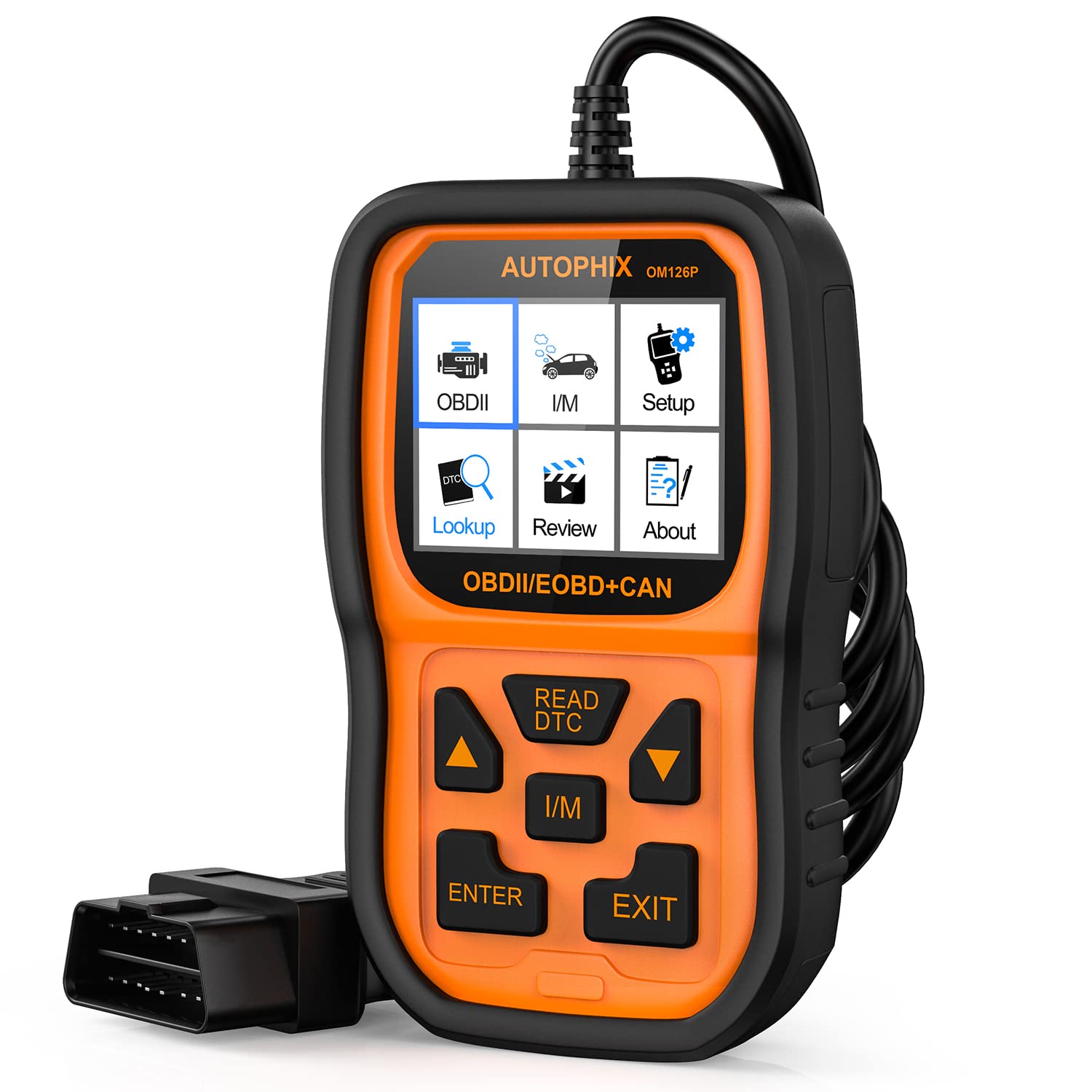
Slika 3.1: Spredaj view of the AUTOPHIX OM126 OBD2 Scanner, showing the display screen and control buttons.
Ključne značilnosti:
- Reads and clears generic and manufacturer-specific Diagnostic Trouble Codes (DTCs).
- Turns off Check Engine Light (MIL).
- Displays I/M readiness status.
- Pridobi podatke o vozilu (VIN, CIN, CVN).
- Podpira več jezikov.
- Plug-and-play operation.
4. Nastavitev
4.1 Initial Software Update (Recommended)
Before first use, it is recommended to update the scanner's software to ensure compatibility with the latest vehicle models and diagnostic protocols. Visit the official AUTOPHIX website to download the update tool and follow the provided instructions. This typically involves connecting the scanner to a computer via a USB cable.
4.2 Povezava z vozilom
- Locate the vehicle's 16-pin Data Link Connector (DLC). This port is usually found under the dashboard on the driver's side. Refer to your vehicle's owner's manual for the exact location.
- Prepričajte se, da je kontakt vozila v položaju IZKLOP.
- Plug the OM126 scanner's OBD2 cable into the vehicle's DLC. Ensure a firm connection.
- Turn the vehicle's ignition to the ON position (engine off). The scanner will automatically power on and establish communication with the vehicle's onboard computer.
5. Navodila za uporabo
5.1 Navigacija po meniju
Use the UP/DOWN arrow buttons to scroll through menu options. Press the ENTER button to select an option or confirm an action. The ESC/BACK button is used to return to the previous screen or cancel an operation.
5.2 Branje diagnostičnih kod napak (DTC)
- From the main menu, select "Read Codes" and press ENTER.
- The scanner will communicate with the vehicle and display any stored DTCs. Each code will typically include a numerical identifier and a brief description.
- Use the UP/DOWN buttons to scroll through multiple codes if present.
5.3 Brisanje diagnostičnih kod napak (DTC)
Clearing DTCs will turn off the Check Engine Light (MIL) and erase all diagnostic data. Only clear codes after addressing the underlying issue, as they will reappear if the fault persists.
- From the main menu, select "Erase Codes" and press ENTER.
- A confirmation message will appear. Select "Yes" and press ENTER to proceed.
- The scanner will confirm that the codes have been cleared.
5.4 Stanje pripravljenosti I/M
The I/M Readiness function checks if the various emissions-related systems on the vehicle are operating correctly and have completed their self-tests. This is useful for emissions inspections.
- From the main menu, select "I/M Readiness" and press ENTER.
- The display will show the status of various monitors (e.g., O2 Sensor, Catalyst, EVAP System) as either "OK" (complete) or "INC" (incomplete).
5.5 Viewinformacije o vozilu
This function allows you to retrieve the Vehicle Identification Number (VIN), Calibration ID (CIN), and Calibration Verification Number (CVN).
- From the main menu, select "Vehicle Info" and press ENTER.
- Skener bo prikazal razpoložljive podatke o vozilu.
6. Vzdrževanje
- Čiščenje: Za čiščenje optičnega bralnika uporabite mehko, suho krpoasing in zaslon. Ne uporabljajte abrazivnih čistil ali topil.
- Shranjevanje: Store the scanner in a clean, dry environment, away from direct sunlight and extreme temperatures. Keep it in its original packaging or a protective case when not in use.
- Posodobitve programske opreme: Periodically check the AUTOPHIX official webspletno mesto za posodobitve programske opreme, da se zagotovi optimalno delovanje in združljivost.
7. Odpravljanje težav
If you encounter issues while using the AUTOPHIX OM126, refer to the following common troubleshooting steps:
- Skener se ne vklopi:
- Prepričajte se, da je kabel OBD2 varno priključen na DLC vozila.
- Preverite, ali je kontakt vozila v položaju VKLOPLJEN (motor izklopljen).
- Preverite varovalko vozila za priključek OBD2 (glejte priročnik za uporabo vašega vozila).
- Napaka v komunikaciji z vozilom:
- Confirm the vehicle supports the OBD2 protocol (most vehicles manufactured after 1996 in the US, 2001 in EU gasoline, 2004 in EU diesel).
- Prepričajte se, da je vžig VKLOPLJEN in motor IZKLOPLJEN.
- Try connecting the scanner to a different OBD2-compliant vehicle to rule out scanner malfunction.
- Check for any loose connections in the OBD2 cable.
- Kod ni mogoče izbrisati:
- Prepričajte se, da je vžig VKLOPLJEN in motor IZKLOPLJEN.
- If the underlying fault is still present, codes will not clear or will reappear immediately. Address the vehicle's issue first.
- Screen is blank after update:
- This can sometimes occur during the update process. Ensure the update process is completed fully as per the instructions on the AUTOPHIX webmesto.
- Odklopite in ponovno priklopite napravo.
8. Specifikacije
| Funkcija | Specifikacija |
|---|---|
| Model | OM126 |
| Teža predmeta | 11.2 unč |
| Dimenzije izdelka | 9 x 5 x 2.6 palcev |
| voltage | 12 volta |
| Velikost zaslona | 2.4 palcev |
| Operacijski sistem | Windows 7 (for update software) |
| Vir napajanja | Battery Powered (via vehicle OBD2 port) |


