1. Uvod
This manual provides essential instructions for the installation, operation, and maintenance of your Lorex LBV2531 1080p Full HD Weatherproof Bullet Security Camera. Please read this manual thoroughly before installation and retain it for future reference.
The Lorex LBV2531 camera is designed for both indoor and outdoor surveillance, offering 1080p Full HD resolution and infrared night vision capabilities. This camera is an analog bullet security camera and requires connection to a compatible Digital Video Recorder (DVR) system for full functionality.
Compatibility Note: This camera is new technology and will not work with older model DVRs. It is compatible with Lorex MPX Series DVRs (LHV2000-Series and new DV700-Series only) and Q-See QC Series 1080P HD series DVRs.
2. Vsebina paketa
Verify that all components are present in your package. Typical contents for a single camera unit include:
- Lorex LBV2531 1080p Full HD Bullet Security Camera
- Montažni komplet (vijaki, stenski sidri)
- Power Adapter (may be sold separately or included with DVR kit)
- Video/Power Cable (may be sold separately or included with DVR kit)
3. Nastavitev in namestitev
3.1 Načrtovanje namestitve
Before mounting, plan the camera's location. Consider the desired viewing area, proximity to a power source, and the path for the video/power cable to your DVR. Ensure the camera is positioned to avoid direct sunlight or strong light sources that could cause glare.
3.2 Namestitev fotoaparata
- Pozicioniranje: Hold the camera in the desired mounting location and mark the screw holes.
- Vrtanje: Drill pilot holes for the mounting screws. If mounting on drywall or masonry, insert the provided wall anchors.
- Varovanje: Podstavek kamere pritrdite na površino s priloženimi vijaki.
- Nastavitev kota: Loosen the adjustment screws on the camera body to position the camera for the optimal viewKot nastavitve. Po nastavitvi privijte vijake.
3.3 Priključitev kamere
The Lorex LBV2531 camera uses a BNC connector for video and a DC power connector. You will need a combined video/power cable (typically BNC to BNC for video and DC plug to DC jack for power) to connect the camera to your DVR and power source.
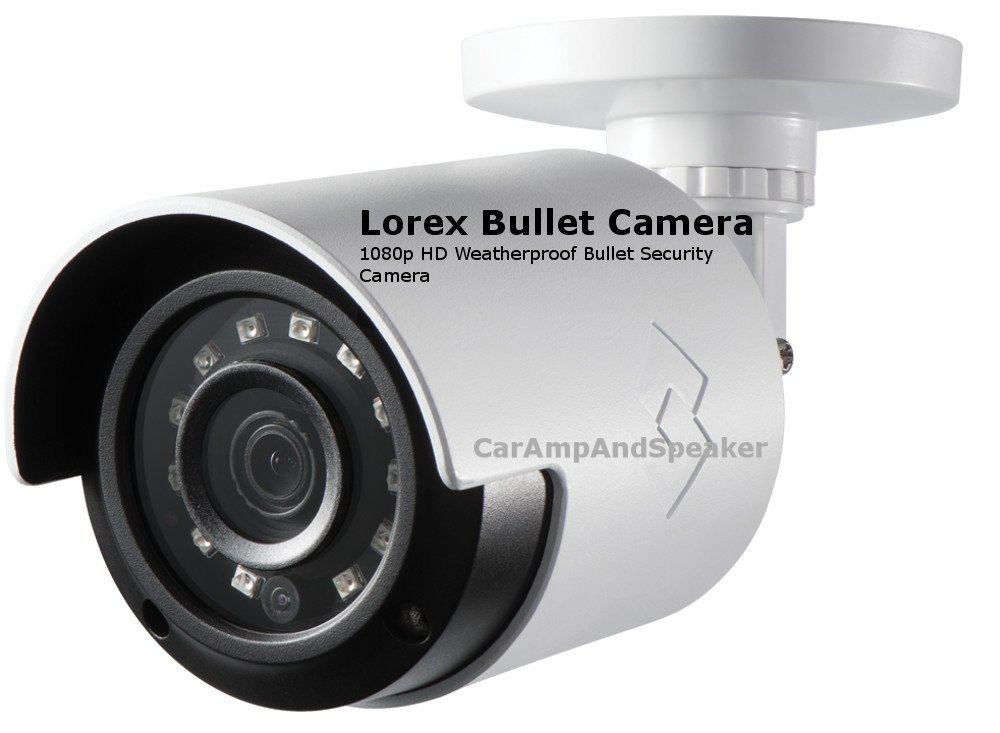
Figure 1: Lorex LBV2531 Bullet Security Camera. This image shows the main camera unit, illustrating its bullet form factor and general design.

Slika 2: Nprample of a 60-foot BNC and Power Cable. This cable type is used to transmit video signals and provide power to the camera, connecting it to the DVR and power adapter.
- Video povezava: Connect the BNC connector from the camera to an available BNC video input port on your compatible Lorex or Q-See DVR.
- Napajalni priključek: Connect the power connector from the camera to the power adapter. Plug the power adapter into a standard electrical outlet.

Slika 3: Nprample of an AC Adapter for a Security Camera. This adapter converts AC power from a wall outlet to the DC power required by the camera.
Once connected, power on your DVR system. The camera feed should appear on your monitor.
4. Upravljanje kamere
The Lorex LBV2531 camera functions as part of a surveillance system managed by a compatible DVR. Camera operation, such as live viewing, recording, playback, and motion detection settings, are controlled through the DVR interface.
- V živo View: Access the live feed from your camera through your DVR's monitor output or via a connected mobile application (if supported by your DVR).
- snemanje: Configure recording schedules and modes (continuous, motion-activated) through your DVR settings. The camera supports 1080p video capture resolution.
- Nočni vid: The camera features IR night vision and 'Night Color' low light technology, automatically activating in low-light conditions to provide clear images.
- Zaznavanje gibanja: The camera supports motion-only alert types. Set up motion detection zones and sensitivity via your DVR to trigger recordings or alerts.
Refer to your specific Lorex or Q-See DVR's instruction manual for detailed information on configuring recording, alerts, and remote viewznačilnosti.
5. Vzdrževanje
Redno vzdrževanje zagotavlja optimalno delovanje in dolgo življenjsko dobo vaše varnostne kamere.
- Čiščenje leče: Gently wipe the camera lens with a soft, clean, lint-free cloth. For stubborn dirt, use a mild lens cleaning solution. Avoid abrasive cleaners.
- Preverjanje povezav: Periodically inspect all cable connections for corrosion, damage, or loose fittings, especially for outdoor installations.
- Vodotesnost: The camera has an IP66 international protection rating, indicating it is protected against dust and powerful water jets. Ensure all cable connections are properly sealed and protected from direct exposure to harsh weather elements to maintain this rating.
- Posodobitve vdelane programske opreme: Preverite Lorex website periodically for any firmware updates for your camera or compatible DVR, as these can improve performance and add features.
6. Odpravljanje težav
If you encounter issues with your Lorex LBV2531 camera, refer to the following common troubleshooting steps:
- Ni slike na zaslonu:
- Ensure the camera is properly powered. Check the power adapter and outlet.
- Verify the BNC video cable is securely connected to both the camera and the DVR.
- Confirm the camera is connected to a compatible DVR input channel.
- Try connecting the camera to a different DVR channel or a different compatible DVR to isolate the issue.
- Slaba kakovost slike:
- Očistite objektiv fotoaparata glede umazanije ali madežev.
- Check cable connections for any damage or loose fittings that might cause signal degradation.
- Prepričajte se, da kamera ni usmerjena neposredno v močne vire svetlobe.
- Verify your DVR's display settings are configured for 1080p resolution.
- Nočni vid ne deluje:
- Ensure there are no obstructions blocking the camera's infrared (IR) LEDs.
- Check if the camera is receiving sufficient power.
- In some cases, strong ambient light nearby can prevent IR from activating.
- Težave z zaznavanjem gibanja:
- Review the motion detection settings on your DVR, including sensitivity and detection zones.
- Prepričajte se, da je kamera view is not obstructed by moving objects like tree branches or shadows that could trigger false alerts.
For more advanced troubleshooting, consult your DVR's user manual or contact Lorex technical support.
7. Specifikacije
| Funkcija | Specifikacija |
|---|---|
| Številka modela | LBV2531 |
| Ločljivost zajema videa | 1080p Full HD |
| Faktor oblike | Metka |
| Tehnologija povezljivosti | Analog (Wired) |
| Notranja/zunanja uporaba | Notranji, zunanji |
| Ocena mednarodne zaščite | IP66 (odporen na vremenske vplive) |
| Tehnologija slabe svetlobe | Nočna barva |
| Vir napajanja | AC/DC |
| Vrsta opozorila | Samo gibanje |
| Material | Polikarbonat (PC) |
| Mere izdelka (D x Š x V) | 16.8 x 12.2 x 8.8 palcev |
| Teža predmeta | 4.47 funtov |
| UPC | 697691924984 |
8. Garancija in podpora
For information regarding your product's warranty, please refer to the warranty card included with your purchase or visit the official Lorex website. Lorex provides technical support for its products.
If you require assistance with installation, troubleshooting, or have questions about your Lorex LBV2531 camera, please contact Lorex Customer Support through their official webspletnega mesta ali kontaktnih podatkov, navedenih v dokumentaciji izdelka.
Spletni viri: For additional support, FAQs, and software downloads, visit the Lorex support page: www.lorex.com/support


