Navodila za uporabo napajalnika Keithley 2303-PJ
Model: 2303-PJ
1. Izdelek je končanview
The Keithley 2303-PJ is a specialized power supply designed for testing portable, battery-operated devices. It offers advanced capabilities to simulate a battery's performance across a wide range of conditions, including output resistance and voltage response. This instrument is crucial for accurately testing device charge control circuitry and overall battery simulation.
Glavne lastnosti vključujejo:
- Ultra-fast response to transient load currents
- Variable output resistance
- 100nA DC current sensitivity
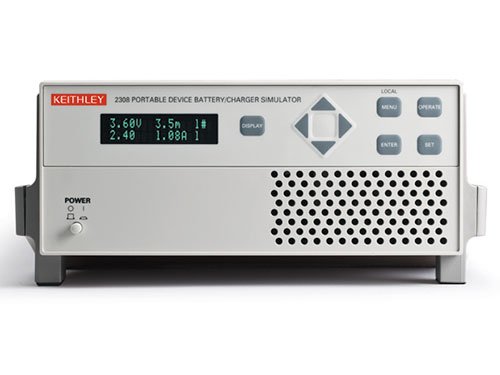
Figure 1: Front panel of the Keithley 2303-PJ Power Supply. The display shows voltage and current readings (e.g., 3.60V, 1.08A). Controls include a navigation pad, 'DISPLAY', 'MENU', 'OPERATE', 'ENTER', 'SET' buttons, and a 'POWER' button with indicator lights.
2. Nastavitev
- Razpakiranje in pregled: Carefully remove the instrument from its packaging. Inspect for any signs of damage during transit. Report any damage to the shipping carrier and Keithley immediately.
- Napajalni priključek: Connect the supplied AC power cord to the instrument's rear panel power inlet and then to a grounded AC power outlet. Ensure the power source matches the instrument's voltage zahteve.
- Začetni vklop: Pritisnite MOČ button located on the front panel. The display should illuminate, indicating the unit is operational.
- Connecting to Device Under Test (DUT): Use appropriate test leads to connect the output terminals of the 2303-PJ to the device you intend to test. Observe correct polarity.
- Prezračevanje: Ensure adequate ventilation around the instrument. Do not block the ventilation grilles on the sides or rear of the unit.
3. Navodila za uporabo
3.1 Kontrole sprednje plošče
- Zaslon: Prikazuje izhodno glasnosttage, current, and other operational parameters.
- Navigacijski gumbi (gor, dol, levo, desno): Used to navigate through menus and adjust parameter values.
- Gumb ENTER: Confirms selections or entered values.
- Gumb SET: Enters parameter setting mode.
- Gumb MENU: Accesses the main menu for configuration and advanced settings.
- OPERATE Button: Toggles the output on or off.
- Gumb ZA PRIKAZ: Cycles through different display modes or views.
3.2 Osnovna operacija
- Nastavitev Voltage in tok:
- Pritisnite NASTAVI gumb.
- Use the navigation buttons to select the voltage or current parameter you wish to adjust.
- Use the navigation buttons (typically Up/Down) to change the value.
- Pritisnite ENTER za potrditev nastavitve.
- Omogočanje izhoda:
- Once parameters are set, press the DELUJTE button to enable the power output. The output indicator should illuminate.
- To disable the output, press DELUJTE znova.
- Spremljanje odčitkov:
The display continuously shows the actual output voltage and current. Use the ZASLON button to cycle through different measurement viewče so na voljo.
4. Vzdrževanje
- Čiščenje: Keep the instrument clean by wiping the exterior with a soft, damp cloth. Do not use abrasive cleaners or solvents. Ensure the unit is powered off and disconnected from the AC supply before cleaning.
- Prezračevanje: Periodically check that the ventilation grilles are free from dust and debris to ensure proper airflow and prevent overheating.
- Shranjevanje: When not in use for extended periods, store the instrument in a clean, dry environment within its specified operating temperature and humidity ranges.
- Umerjanje: For optimal performance and accuracy, periodic calibration by qualified personnel is recommended. Refer to the Keithley service manual or contact Keithley support for calibration procedures and intervals.
5. Odpravljanje težav
| Težava | Možen vzrok | rešitev |
|---|---|---|
| Instrument se ne vklopi. | No AC power; faulty power cord; internal fuse blown. | Check AC power connection and outlet. Try a different power cord. If fuse is suspected, contact qualified service personnel. |
| Brez izhodne voltage/tok. | Output disabled; incorrect settings; overload protection active; faulty connections. | Pritisnite DELUJTE to enable output. Verify voltage/current settings. Check for short circuits or overloads on the DUT. Ensure test leads are securely connected. |
| Unstable or inaccurate readings. | Poor connections; external interference; instrument needs calibration. | Check all connections for looseness or corrosion. Ensure the instrument is away from strong electromagnetic fields. Consider professional calibration. |
| Pregrevanje. | Blocked ventilation; excessive ambient temperature; continuous operation at maximum load. | Ensure ventilation grilles are clear. Operate in a cooler environment. Reduce load or allow for cool-down periods. |
For issues not listed here or if troubleshooting steps do not resolve the problem, please contact Keithley technical support.
6. Specifikacije
| Parameter | Vrednost |
|---|---|
| Proizvajalec | Keithley |
| Številka dela | 2303-PJ |
| Številka modela artikla | 2303-PJ |
| Teža predmeta | 5.44 kg |
| Dimenzije paketa | 48.26 x 33.02 x 22.86 cm |
| Količina paketa artikla | 1 |
| Ali so potrebne baterije? | št |
| Prvič na voljo | 4. november 2016 |
7. Garancija in podpora
Warranty information for the Keithley 2303-PJ Power Supply is typically provided with the product at the time of purchase or can be found on the official Keithley webspletnega mesta. Prosimo, shranite dokazilo o nakupu za uveljavljanje garancije.
For technical support, service, or calibration inquiries, please contact Keithley customer service directly. Refer to the contact information provided in your product documentation or on the official Keithley webspletno mesto (www.tek.com/keithley).


