1. Uvod
This user manual provides comprehensive instructions for the setup, operation, maintenance, and troubleshooting of your CipherLab 1500P HP 1D Corded Barcode Scanner. Please read this manual thoroughly before using the device to ensure proper functionality and to maximize its lifespan. Keep this manual for future reference.
2. Izdelek je končanview
The CipherLab 1500P HP is a high-performance 1D corded barcode scanner designed for efficient data capture. It comes with a USB cable for connectivity and an autosense stand for hands-free operation.
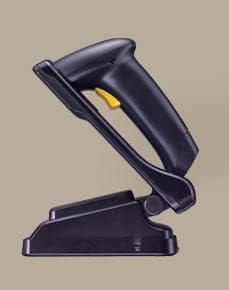
Slika 2.1: CipherLab 1500P HP barcode scanner placed in its autosense stand. The scanner is black with a yellow trigger button, and the stand is also black, providing a stable base for the scanner.
Vsebina paketa:
- CipherLab 1500P HP Barcode Scanner
- Priključni kabel USB
- Autosense Stand
- This User Manual (or link to digital version)
3. Nastavitev
- Razpakirajte napravo: Carefully remove the barcode scanner, USB cable, and autosense stand from their packaging.
- Priključite USB kabel:
- Locate the USB port on the base of the barcode scanner.
- Insert the smaller end of the USB cable into the scanner's port.
- Insert the larger USB-A end of the cable into an available USB port on your host computer or point-of-sale (POS) system.
- Namestitev gonilnika (Plug & Play): The CipherLab 1500P HP is typically a plug-and-play device. Your operating system should automatically detect and install the necessary drivers. Wait for the installation to complete (usually indicated by a notification).
- Position the Autosense Stand: Place the autosense stand on a stable, flat surface. The stand is designed to hold the scanner in an optimal position for hands-free scanning.
- Place Scanner in Stand: Gently place the barcode scanner into the autosense stand. Ensure it is securely seated. The scanner will automatically switch to presentation mode when placed in the stand, allowing it to detect and scan barcodes without pressing the trigger.
- Preizkus povezljivosti: Open a text editor (e.g., Notepad, WordPad) or a compatible application on your computer. Scan a known barcode. The scanned data should appear in the text editor, confirming successful setup.
4. Navodila za uporabo
Ročni način:
- Remove the scanner from the autosense stand.
- Usmerite okno za skeniranje proti črtni kodi, ki jo želite skenirati.
- Press and hold the yellow trigger button. A red scanning line will emit from the scanner.
- Position the scanner so the red line crosses the entire barcode.
- Once the barcode is successfully read, the scanner will emit an audible beep and/or a visual indicator (e.g., LED flash). The data will be transmitted to your connected device.
- Spustite sprožilni gumb.
Autosense (Presentation) Mode:
- Ensure the scanner is securely placed in the autosense stand.
- Hold the barcode in front of the scanner's window.
- The scanner will automatically detect the barcode and activate its scanning engine.
- Once the barcode is successfully read, the scanner will emit an audible beep and/or a visual indicator. The data will be transmitted to your connected device.
Nasveti za skeniranje:
- Prepričajte se, da je črtna koda čista in nepoškodovana.
- Za optimalno branje prilagodite razdaljo med skenerjem in črtno kodo.
- Avoid scanning at extreme angles; try to keep the scanner perpendicular to the barcode.
- For reflective surfaces, try tilting the scanner slightly to avoid glare.
5. Vzdrževanje
- Čiščenje:
- Redno čistite okno za skeniranje z mehko krpo, ki ne pušča vlaken.
- Za trdovratno umazanijo rahlo dampKrpo obrišite z vodo ali blagim, neabrazivnim čistilom. Čistila ne pršite neposredno na optični bralnik.
- Avoid using harsh chemicals, solvents, or abrasive materials, as these can damage the scanner's surface or internal components.
- Shranjevanje: Skener shranjujte na hladnem in suhem mestu, stran od neposredne sončne svetlobe in ekstremnih temperatur.
- Skrb za kabel: Izogibajte se pretiranemu upogibanju ali zvijanju kabla USB, saj lahko s tem poškodujete notranje žice.
- Nega stojala: Keep the autosense stand clean and free of obstructions to ensure the scanner can be placed and removed smoothly.
6. Odpravljanje težav
| Težava | Možen vzrok | rešitev |
|---|---|---|
| Skener ne bere črtnih kod. |
|
|
| V računalnik se ne prenašajo nobeni podatki. |
|
|
| Scanner beeps but no data. |
|
|
7. Specifikacije
| Funkcija | Podrobnost |
|---|---|
| Model | 1500P HP (33-A1500PCBKU001) |
| Vrsta | 1D Corded Barcode Scanner |
| Povezljivost | USB |
| Priloženi dodatki | USB Cable, Autosense Stand |
| Proizvajalec | CipherLab |
| ASIN | B01MDRIJRS |
| Prvi razpoložljivi datum | 24. januar 2024 |
8. Garancija in podpora
For specific warranty information regarding your CipherLab 1500P HP barcode scanner, please refer to the warranty card included with your product or contact your point of purchase. Warranty terms may vary by region and reseller.
For technical support, driver downloads, or additional product documentation, please visit the official CipherLab website or contact their customer support directly. You may need your product model number (33-A1500PCBKU001) and serial number for support inquiries.
CipherLab Official Webspletno mesto: www.cipherlab.com