Uvod
Hvala za nakupasing the Havit HV-MS991GT Wireless Mouse. This manual provides essential information for setting up, operating, maintaining, and troubleshooting your device. Please read it carefully before use to ensure optimal performance and longevity of your mouse.
Navodila za namestitev
- Razpakirajte miško: Carefully remove the mouse and the USB receiver from the packaging.
- Namestite baterije:
Locate the battery compartment on the underside of the mouse. Open the cover and insert one AA battery (not included), ensuring correct polarity (+/-). Close the battery compartment cover.
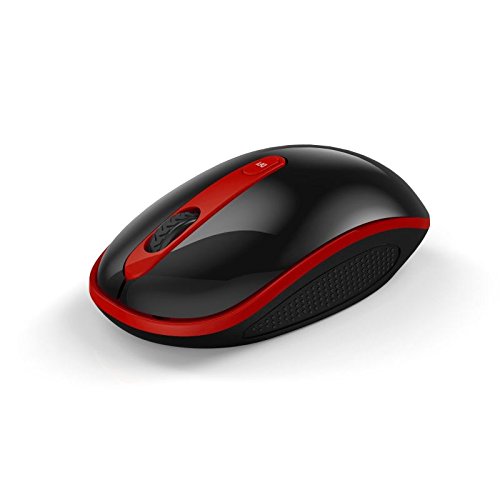
Image: The Havit HV-MS991GT Wireless Mouse, featuring a black body with red accents and a scroll wheel. This image illustrates the overall design of the mouse.
- Priključite USB sprejemnik: Plug the mini USB receiver into an available USB port on your computer. The system will automatically detect and install the necessary drivers.
- Vklop miške: Locate the power switch on the underside of the mouse and slide it to the "ON" position. The mouse is now ready for use.
Navodila za uporabo
The Havit HV-MS991GT Wireless Mouse is designed for intuitive use with standard mouse functions.
- Osnovne funkcije:
- Levi klik: Primarna izbira in aktivacija.
- Desni klik: Dostopa do kontekstnih menijev.
- Kolesce za pomikanje: Pomika dokumente in web strani navpično. Drsno kolesce deluje tudi kot srednji klik.
- Prilagoditev DPI: This mouse features adjustable DPI settings (1000-1600 DPI) for varying cursor speeds and precision. A dedicated DPI button, usually located near the scroll wheel, allows you to cycle through these settings. Press the button to switch between DPI levels.
- Brezžični doseg: The advanced 2.4GHz wireless technology provides an effective working distance of up to 15 meters (approximately 49 feet) from the USB receiver.
- Združljivost sistema: This mouse is compatible with Windows 2000, Windows XP, Windows Vista, Windows 7, and Windows 8 operating systems.
Vzdrževanje
- Čiščenje: To clean the mouse, gently wipe its surface with a soft, dry cloth. For stubborn dirt, slightly dampen the cloth with water. Avoid using harsh chemicals or abrasive cleaners, as these can damage the mouse's finish.
- Zamenjava baterije: When the mouse performance degrades or it stops responding, it is likely time to replace the battery. Follow the battery installation steps in the "Setup Instructions" section.
- Funkcija samodejnega spanja: The mouse features a built-in auto sleep function to conserve battery life. If the mouse is inactive for a period, it will enter a low-power sleep mode. To wake it up, simply move the mouse or click any button.
- Shranjevanje sprejemnika: The mini USB receiver can be stored inside the mouse's battery compartment when not in use, making it convenient for travel and preventing loss.
Odpravljanje težav
| Težava | rešitev |
|---|---|
| Miška se ne odziva. |
|
| Premikanje kurzorja je neenakomerno ali počasno. |
|
| Wireless connection is unstable. |
|
Specifikacije
| Funkcija | Podrobnost |
|---|---|
| Znamka | Havit |
| Številka modela | HV-MS991GT |
| Tehnologija povezljivosti | 2.4GHz Wireless |
| Nastavitve DPI | 1000-1600 DPI |
| Število gumbov | 4 |
| Ključno življenje | 1,000,000-krat |
| Brezžično Domet | Do 15 metre |
| Podpora za operacijski sistem | Windows 2000/XP/Vista/7/8 |
| Povprečna življenjska doba baterije | 12 mesecev |
| Baterije priložene | No (Requires 1x AA battery) |
| Teža predmeta | 120 g |
| Dimenzije paketa | 16.2 x 10.8 x 6 cm |
Garancija in podpora
Specific warranty information for the Havit HV-MS991GT Wireless Mouse is not provided in this manual. Please refer to the product packaging or the manufacturer's official website for details regarding warranty coverage and customer support contact information.