1. Uvod
This manual provides instructions for the proper use and maintenance of your Paulmann 500.01 Smart Home Bluetooth Remote Control. This remote allows you to control various Paulmann Smart Home Bluetooth lighting products, offering convenient operation without the need for a smartphone or tablet application.
2. Izdelek je končanview
The Paulmann 500.01 remote control is designed for intuitive control of your Paulmann Smart Home lighting. It features dedicated buttons for power, brightness adjustment, color temperature control, and scene selection.

Slika 1: Spredaj view of the Paulmann 500.01 Smart Home Bluetooth Remote Control. It is a black, rectangular remote with multiple buttons for controlling smart home lighting functions.
2.1. Ključne značilnosti
- Controls all Paulmann Bluetooth Smart Home products.
- Operating range of up to 10 meters in open field conditions.
- Battery-powered for portability (requires AAA batteries).
2.2. Vsebina paketa
- Paulmann 500.01 Smart Home Bluetooth Remote Control
- Uporabniški priročnik (ta dokument)
- Opomba: Baterije AAA niso priložene in jih je treba kupiti posebej.
3. Nastavitev
3.1. Namestitev baterije
- Poiščite pokrov prostora za baterije na zadnji strani daljinskega upravljalnika.
- Pokrov nežno potisnite ali privzdignite.
- Vstavite dve (2) bateriji AAA in pri tem pazite na pravilno polarnost (+ in -), kot je označeno v notranjosti predala.
- Pokrovček predala za baterije namestite nazaj, dokler se ne zaskoči.
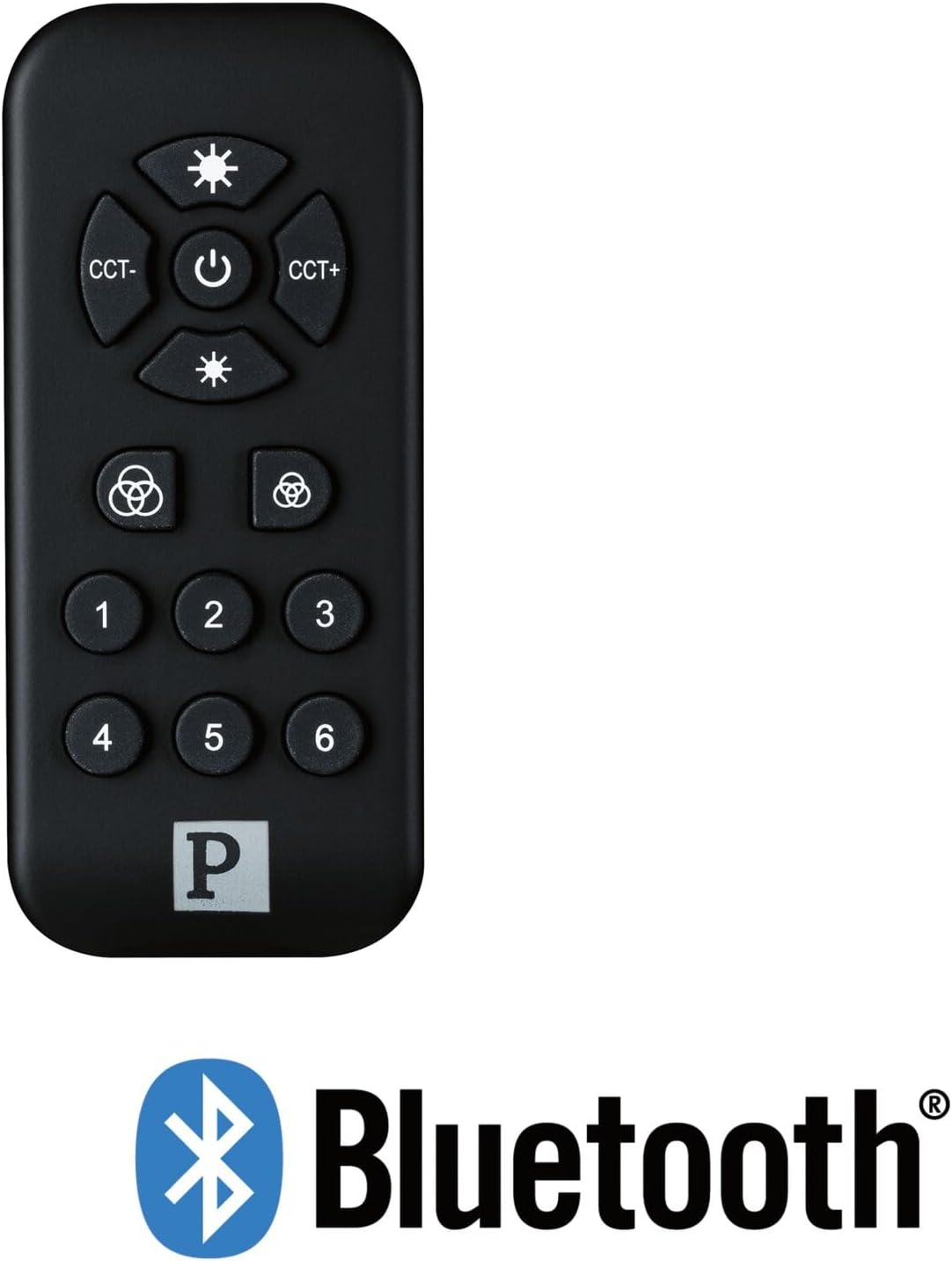
Slika 2: The Paulmann 500.01 remote control displayed alongside the Bluetooth logo, indicating its wireless connectivity technology.
3.2. Pairing with Smart Home Devices
To use the remote control, it must be paired with your Paulmann Smart Home Bluetooth lighting products. The specific pairing process may vary slightly depending on the individual lighting product. Generally, the steps involve:
- Ensure your Paulmann Smart Home lighting device is powered on and in pairing mode (refer to the specific device's manual for details on how to activate pairing mode).
- Na daljinskem upravljalniku pritisnite in držite Moč button (or a designated pairing button, if available) for several seconds until an indicator light on the remote or the lighting device confirms pairing initiation.
- Once paired, the lighting device should respond to commands from the remote control.
- If pairing fails, ensure the remote is within range (up to 10 meters) and repeat the process.
For detailed pairing instructions, always consult the user manual of the specific Paulmann Smart Home lighting product you intend to control.
4. Navodila za uporabo
The Paulmann 500.01 remote control features several buttons for controlling your Smart Home lighting:
- Gumb za vklop (sredinski): Press to turn the connected lighting devices ON or OFF.
- Brightness Up (Top Sun Icon): Increases the brightness of the light.
- Brightness Down (Bottom Sun Icon): Decreases the brightness of the light.
- CCT- (Left CCT Button): Adjusts the color temperature towards warmer white.
- CCT+ (Right CCT Button): Adjusts the color temperature towards cooler white.
- Color Cycle / Scene Buttons (Color Wheel Icons): These buttons typically cycle through predefined color modes or activate specific lighting scenes. Refer to your lighting device's manual for exact functionality.
- Oštevilčeni gumbi (1-6): These buttons are usually used to select or save specific lighting scenes or groups of devices. Their function can often be customized through the Paulmann Smart Home app or by following specific pairing procedures with your lighting products.
5. Vzdrževanje
5.1. Čiščenje
Za čiščenje daljinskega upravljalnika uporabite mehko, suho krpo. Ne uporabljajte abrazivnih čistil, topil ali agresivnih kemikalij, saj lahko poškodujejo površino ali notranje komponente.
5.2. Zamenjava baterije
When the remote control's performance degrades or it stops responding, it is likely time to replace the batteries. Follow the battery installation steps outlined in Section 3.1. Always replace both AAA batteries simultaneously with new ones.
6. Odpravljanje težav
| Težava | Možen vzrok | rešitev |
|---|---|---|
| Daljinski upravljalnik se ne odziva. | Prazne ali nepravilno vstavljene baterije. | Zamenjajte baterije in pazite na pravilno polarnost. |
| Daljinski upravljalnik se ne odziva. | Izven dosega. | Move closer to the lighting device (within 10 meters). |
| Daljinski upravljalnik se ne odziva. | Not paired with the device. | Sledite navodilom za seznanjanje v poglavju 3.2. |
| Občasni nadzor. | Motnje ali šibek signal. | Ensure no obstructions between remote and device. Check for other Bluetooth devices causing interference. |
7. Specifikacije
- Znamka: Paulman
- Številka modela: 50001
- Tehnologija povezljivosti: Bluetooth
- barva: Črna
- Združljive naprave: Paulmann Smart Home lighting products
- Vrsta regulatorja: Nadzor gumbov
- Največji obseg: 10 metrov
- Zahteva za baterijo: 2 x AAA baterije
8. Garancija in podpora
For warranty information and technical support, please refer to the official Paulmann website or contact Paulmann customer service directly. Keep your purchase receipt as proof of purchase for any warranty claims.
Kontaktne podatke in vire za podporo običajno najdete na uradni spletni strani proizvajalca webspletno mesto: www.paulmann.com


