1. Izdelek je končanview
The Kit Magnetic Bluetooth Keyboard Case transforms your 9-10 inch tablet into a portable laptop, offering both protection and enhanced typing capabilities. Its sleek design features a leather-effect finish and an integrated stand for versatile use. The detachable Bluetooth keyboard ensures quick and easy pairing with a wide range of devices.
Ključne značilnosti:
- Bluetooth povezljivost: Seamlessly connect the wireless keyboard to your tablet.
- Široka združljivost: Designed for 9-10 inch iOS, Android, and Windows tablets, including various iPad and Samsung Galaxy Tab models.
- Dolga življenjska doba baterije: The rechargeable battery provides approximately 65 hours of continuous typing.
- Integrirano stojalo: Folds into a stable stand for comfortable viewkoti pisanja in tipkanja.
- Magnetno oblikovanje: Securely holds the tablet and keyboard in place.

Image: The Kit Magnetic Bluetooth Keyboard Case with a tablet securely placed, illustrating its use as a portable workstation.
2. Kako začeti
2.1 Vsebina paketa
- Kit Magnetic Bluetooth Keyboard Case
- USB polnilni kabel
- Uporabniški priročnik
2.2 Polnjenje tipkovnice
Before first use, fully charge the keyboard. Connect the provided USB charging cable to the keyboard's charging port and plug the other end into a USB power source (e.g., computer USB port, USB wall adapter). The charging indicator light will illuminate during charging and turn off when fully charged.
2.3 Vstavljanje tabličnega računalnika
- Open the keyboard case flat.
- Carefully slide your 9-10 inch tablet into the designated slot or frame within the case. Ensure it is securely seated and aligned with any cutouts for buttons or ports.
- The magnetic design will help hold the tablet in place.
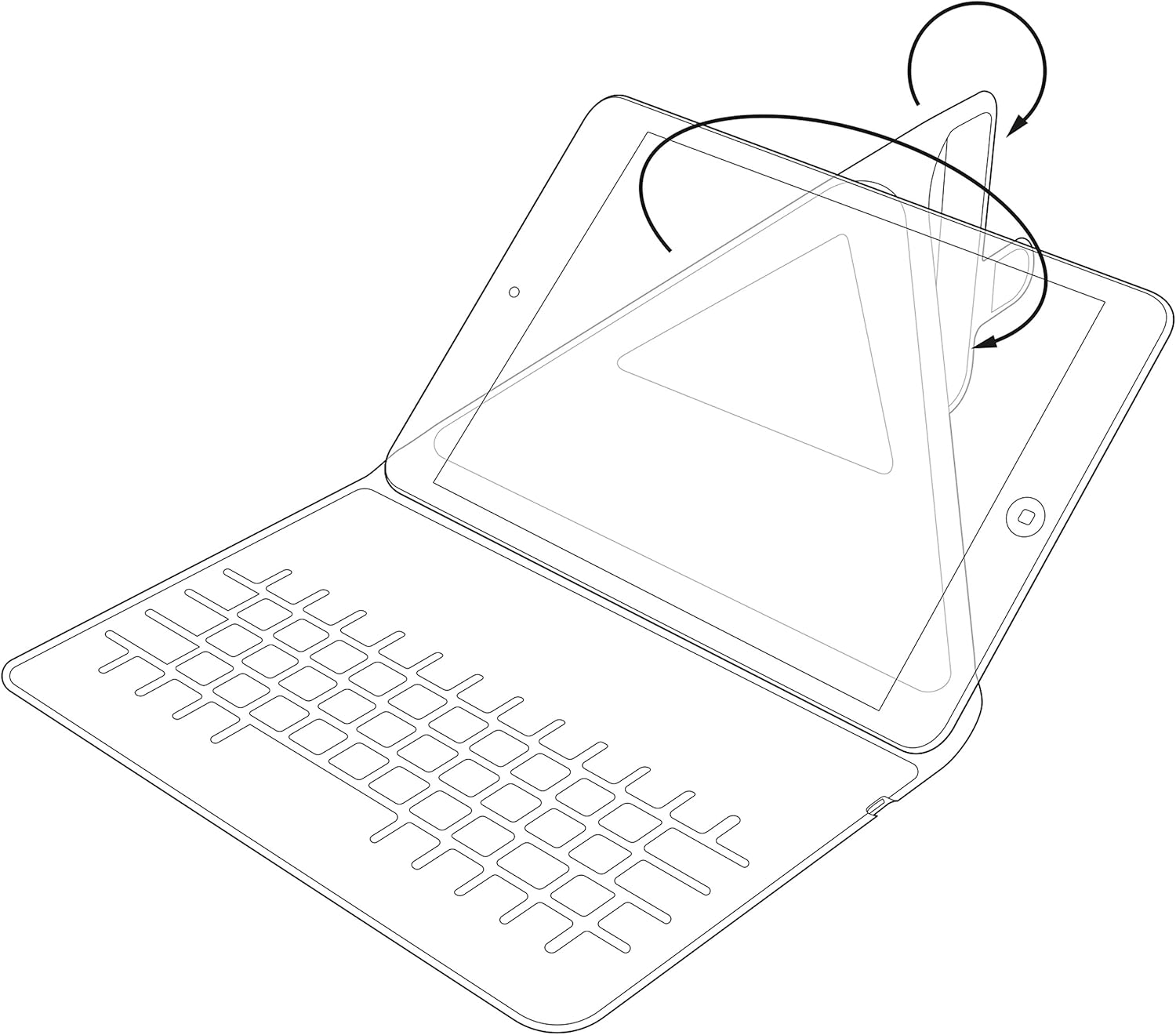
Image: Diagram showing the process of inserting a tablet into the case's holding mechanism.
2.4 Seznanjanje tipkovnice Bluetooth
- Turn on the keyboard by sliding the power switch to the 'ON' position. The power indicator light will briefly illuminate.
- Press the 'Connect' or 'Pair' button on the keyboard (refer to the keyboard layout for exact button location). The Bluetooth indicator light will start blinking, indicating it is in pairing mode.
- On your tablet, go to 'Settings' > 'Bluetooth'. Ensure Bluetooth is enabled.
- Your tablet will search for available Bluetooth devices. Select 'Kit Keyboard' or a similar name from the list of found devices.
- If prompted, enter the pairing code displayed on your tablet screen using the keyboard, then press 'Enter'.
- Once paired, the Bluetooth indicator light on the keyboard will stop blinking and remain solid or turn off, and your tablet will show the keyboard as 'Connected'.
3. Navodila za uporabo
3.1 Funkcije tipkovnice
The keyboard features a standard QWERTY layout with additional function keys (Fn) for quick access to multimedia controls, volume, and other tablet-specific functions. Refer to the key labels for their specific actions. For example, you may find keys for Home, Search, Volume Up/Down, Play/Pause, etc.

Slika: Podrobna view of the keyboard layout, highlighting various function keys and standard alphanumeric keys.
3.2 Uporaba integriranega stojala
The case is designed to fold into a stable stand, allowing you to position your tablet at an optimal viewing angle for typing, watching videos, or making video calls. Simply fold the back cover of the case to create a triangular support structure.

Image: Diagram demonstrating the folding mechanism of the case to create a stable viewing stand for the tablet.
4. Nega in vzdrževanje
- Čiščenje: Uporabite mehko, damp cloth to wipe the exterior of the case. For the keyboard, use a dry, lint-free cloth. Avoid harsh chemicals or abrasive cleaners.
- Shranjevanje: Ko tipkovnice dlje časa ne uporabljate, jo shranite na hladnem in suhem mestu.
- Vzdrževanje baterije: Da podaljšate življenjsko dobo baterije, se izogibajte pogostemu praznjenju tipkovnice. Redno jo polnite, tudi če ni popolnoma izpraznjena.
- Izogibajte se tekočinam: Keep the keyboard case away from water and other liquids to prevent damage to electronic components.
5. Odpravljanje težav
5.1 Tipkovnica se ne povezuje/seznanja
- Ensure the keyboard is turned ON and fully charged.
- Prepričajte se, da je Bluetooth v tabličnem računalniku omogočen.
- Place the keyboard and tablet within close proximity (within 10 meters).
- Delete any previous pairings of the keyboard from your tablet's Bluetooth settings and attempt to pair again.
- Restart both the keyboard (turn off and on) and your tablet.
5.2 Tipke se ne odzivajo
- Preverite raven napolnjenosti baterije tipkovnice in jo po potrebi napolnite.
- Ensure the keyboard is properly connected via Bluetooth. Re-pair if needed.
- Očistite morebitne umazanije okoli tipk.
5.3 Težave s polnjenjem
- Verify that the charging cable is securely connected to both the keyboard and the power source.
- Poskusite z drugimi vrati USB ali napajalnikom.
- Prepričajte se, da polnilni kabel ni poškodovan.
6. Specifikacije izdelka
| Znamka | Komplet |
| Številka modela | KBMAG10BK |
| Dimenzije izdelka | 1.6 x 20 x 24.5 cm |
| Teža predmeta | 356 g |
| barva | Črna |
| Material | Usnje |
| Tehnologija povezljivosti | Bluetooth |
| Vrsta baterije | Litijev polimer |
| Vsebnost energije baterije | 1 vatnih ur |
| Združljive naprave | 9-10 inch iOS, Android, Windows Tablets (e.g., iPad, Samsung Galaxy Tab) |
7. Garancija in podpora
This Kit Magnetic Bluetooth Keyboard Case comes with a full one-year warranty from the date of purchase. For any technical assistance, troubleshooting, or warranty claims, please contact Kit's experienced and friendly UK-based customer service team. Refer to your purchase documentation for specific contact details.