1. Končanoview
The iHome iBT35 is a rugged, portable, and waterproof Bluetooth stereo speaker designed for both indoor and outdoor use. It features a built-in speakerphone for hands-free calling and is engineered to withstand various environmental conditions, making it an ideal companion for travel and outdoor activities.

Slika 1.1: Spredaj view of the iHome iBT35 speaker, showcasing its black body, blue trim, and attached carabiner clip.
2. Ključne značilnosti
- Robusten dizajn: Built to withstand military-grade drop tests, offering durability against accidental falls.
- Vodotesen (ocena IP67): Fully waterproof, allowing submersion up to 3 feet for 30 minutes. It also floats, making it suitable for poolside use.
- Bluetooth povezljivost: Brezžično pretakajte zvok iz združljivih naprav.
- Vgrajen zvočnik: Answer and end calls directly from the speaker.
- Dolga življenjska doba baterije: Up to 8 hours of playback in normal mode, extendable to 14 hours in Eco mode.
- Vhod Aux: For wired connection to non-Bluetooth audio sources.
- Carabiner Clip with Bottle Opener: Convenient for portability and utility.
3. Nastavitev
3.1 Polnjenje zvočnika
Before initial use, fully charge the iBT35 speaker. Use the provided Micro USB cable to connect the speaker's 'POWER IN' port to a USB power source (e.g., computer USB port, USB wall adapter). The charging indicator light will show the charging status.

Image 3.1: Side panel of the iBT35 with the protective door open, showing the AUX-IN, POWER IN, and ON/ECO/OFF switch.
3.2 Vklop/izklop
Locate the 'ON/ECO/OFF' switch behind the waterproof door on the side of the speaker. Slide the switch to 'ON' to power on the speaker. To conserve battery, slide the switch to 'ECO' mode, which slightly reduces volume levels for extended playback. Slide to 'OFF' to power down.
3.3 Bluetooth seznanjanje
- Prepričajte se, da je zvočnik vklopljen.
- Pritisnite in držite Gumb za seznanjanje Bluetooth (often combined with Play/Pause) on the top panel until the Bluetooth indicator light flashes, indicating it's in pairing mode.
- V mobilni napravi omogočite Bluetooth in poiščite razpoložljive naprave.
- Select "iHome iBT35" from the list.
- Once paired, the Bluetooth indicator light will become solid, and you will hear an audible confirmation.
3.4 Using Aux-in
For devices without Bluetooth, connect an audio cable (not included) from your device's headphone jack to the 'AUX-IN' port on the speaker (located behind the waterproof door). The speaker will automatically switch to Aux-in mode.
4. Navodila za uporabo
4.1 Kontrolniki na zgornji plošči
- Gumb za prižig (krog z navpično črto): Press to power on/off (short press for power, long press for pairing if combined).
- Povečaj glasnost (+): Povečaj glasnost predvajanja.
- Zmanjšanje glasnosti (-): Zmanjšajte glasnost predvajanja.
- Predvajaj/pavza (play/pause icon): Play or pause audio playback. Also functions as Bluetooth pairing button (long press).
- Naslednja skladba (double arrow right): Skip to the next audio track. Also functions as 'Talk' button for calls.
- Prejšnja skladba (double arrow left): Go to the previous audio track. Also functions as 'End' button for calls.
4.2 Funkcionalnost zvočnika
When paired with a mobile phone:
- Sprejmi klic: Press the 'Talk' button (Next Track button) to answer an incoming call.
- Končaj klic: Press the 'End' button (Previous Track button) to end an active call.
5. Vzdrževanje
5.1 Maintaining Waterproofing
To ensure the iBT35 remains waterproof, always make sure the side protective door covering the ports (AUX-IN, POWER IN, ON/ECO/OFF switch) is completely closed and securely sealed before exposing the speaker to water or moisture.
5.2 Čiščenje
Očistite zvočnik z mehko damp cloth. Do not use abrasive cleaners or solvents, as these may damage the finish or rubberized coating.
5.3 Ponastavitev zvočnika
If the speaker becomes unresponsive or experiences connectivity issues, locate the small 'RESET' pinhole button behind the side waterproof door. Use a thin object (like a paperclip) to gently press and hold the reset button for a few seconds. This will restart the speaker without losing pairing information.
6. Odpravljanje težav
- Brez napajanja: Ensure the speaker is charged. Connect it to a power source using the Micro USB cable. Check the 'ON/ECO/OFF' switch is in the 'ON' or 'ECO' position.
- Seznanitev prek Bluetootha ni mogoča: Make sure the speaker is in pairing mode (flashing Bluetooth indicator). Ensure your device's Bluetooth is enabled and within range. Try turning both devices off and on again. If issues persist, perform a reset on the speaker.
- Slaba kakovost/popačenje zvoka: Reduce the volume on both the speaker and your connected device. Ensure there are no obstructions between the speaker and the Bluetooth device. If using Aux-in, check the cable connection.
- Speaker Not Waterproof: Verify that the side protective door is fully closed and sealed. Any gap will compromise its waterproof capabilities.
Helpful Video: iHome iBT35 Waterproof Bluetooth Speaker Overview
Ta videoposnetek ponuja vizualni pregledview of the iHome iBT35 speaker, demonstrating its design, features, and rugged capabilities, including its waterproof nature and various ports.
7. Specifikacije
| Funkcija | Podrobnost |
|---|---|
| Ime modela | iBT35 |
| Vrsta zvočnika | Na prostem |
| Posebne lastnosti | Built-in Microphone, Waterproof (IP67) |
| Priporočene uporabe | Smartphones, Tablets, Outdoor Activities |
| Združljive naprave | Namizni računalnik, prenosni računalnik, pametni telefon, tablični računalnik |
| Dimenzije izdelka | 8"D x 4"Š x 4"V |
| Teža predmeta | 1.5 funta |
| Nadzorna metoda | Dotik |
| Brezžična komunikacija | Bluetooth |
| Vir napajanja | Napajanje na baterije |
| Vrsta zvočnega gonilnika | Dinamični gonilnik |
| Slog | Robusten zunanji |
| Proizvajalec | IHOME |
| Največja izhodna moč zvočnika | 3 vatov |
| Način avdio izhoda | Stereo |
| Vrsta namestitve | Samostoječ |
| UPC / GTIN | 047532910162 |
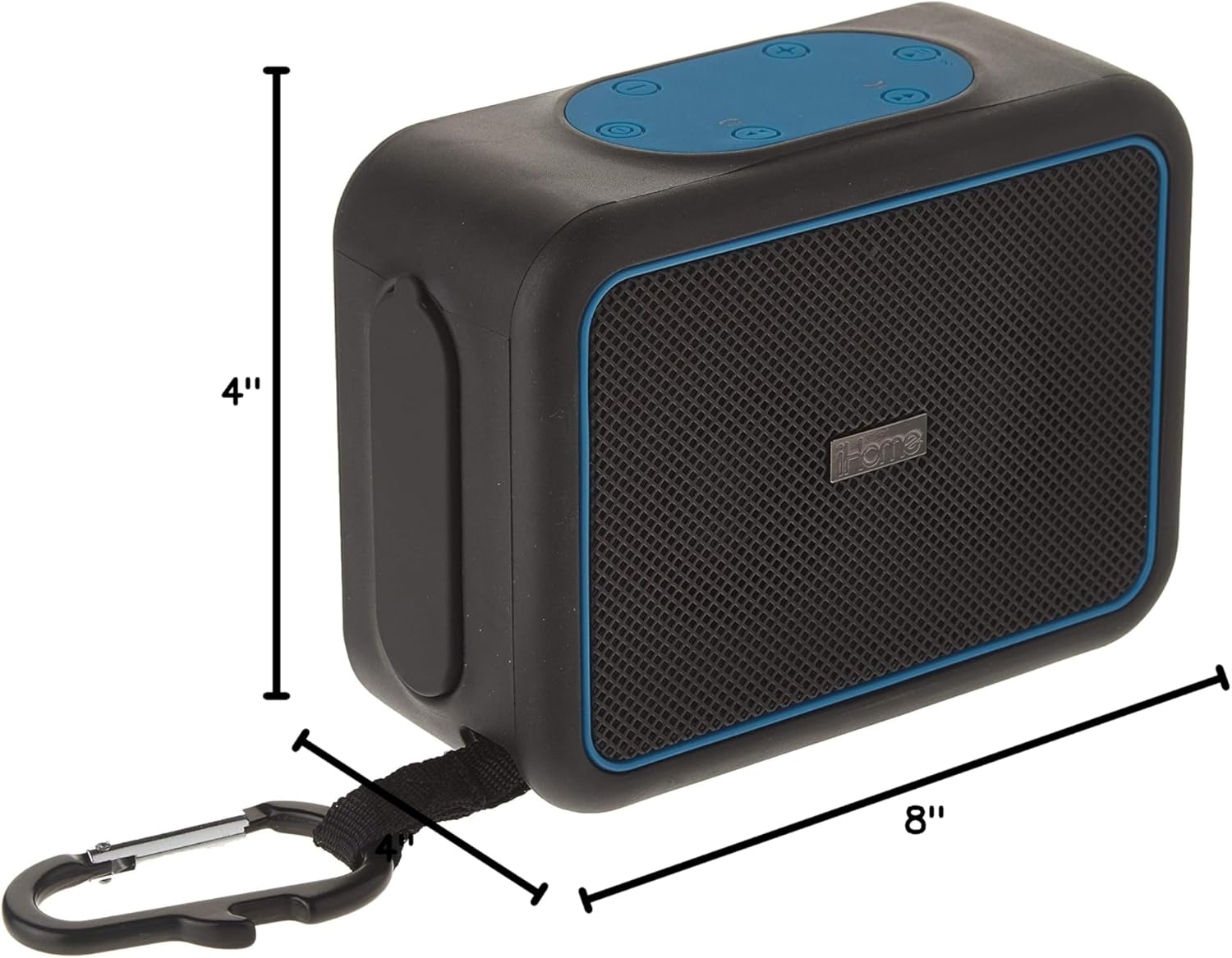
Image 7.1: Dimensions of the iHome iBT35 speaker.
8. Garancija in podpora
The iHome iBT35 speaker comes with an Extended Warranty. For specific warranty terms, conditions, and to register your product, please refer to the warranty card included in your product packaging or visit the official iHome support website. For technical assistance or further inquiries, please contact iHome customer support.


