1. Uvod
This manual provides detailed instructions for the safe and effective operation of the Extech EX355 True RMS Multimeter. The EX355 is a professional digital multimeter designed for a wide range of electrical measurements, including AC/DC voltage, current, resistance, capacitance, frequency, duty cycle, and temperature. It features True RMS for accurate readings of non-sinusoidal waveforms, Non-Contact Voltage (NCV) detection for enhanced safety, Low Impedance (LoZ) mode to prevent ghost voltage readings, and a Low Pass Filter (LPF) for noise reduction in electrical environments.
Please read this manual thoroughly before using the device to ensure proper function and to prevent potential hazards.
2. Varnostne informacije
Always adhere to the following safety precautions to avoid personal injury or damage to the multimeter:
- Preberite vsa navodila: Familiarize yourself with the operation and safety features before use.
- Observe all warnings: Pay close attention to all warnings and cautions marked on the meter and in this manual.
- Use proper range: Always select the correct function and range for your measurement.
- Inspect test leads: Before each use, check test leads for damaged insulation or exposed metal. Replace if damaged.
- Do not exceed maximum input limits: Nikoli ne uporabljajte voltage or current that exceeds the specified maximum limits for the meter.
- Avoid live circuits: Do not measure resistance, continuity, or diode on live circuits.
- Bodite previdni pri visoki voltages: Be extremely careful when working with voltagnad 60 V enosmernega toka ali 30 V izmeničnega toka (RMS), saj predstavljajo nevarnost električnega udara.
- Do not operate if damaged: If the meter appears damaged or is not operating properly, discontinue use immediately.
- Zamenjava baterije: Replace batteries as soon as the low battery indicator appears to ensure accurate readings.
- KAT III 600 V: This meter is designed for measurements in CAT III 600V environments.
3. Izdelek je končanview
The Extech EX355 is a versatile True RMS Multimeter equipped with several advanced features for accurate and safe electrical testing.
Ključne značilnosti:
- 12 Measurement Functions: Vključuje AC/DC zv.tage, current, resistance, capacitance, frequency, duty cycle, and temperature.
- True RMS Accuracy: Ensures precise readings for both standard and distorted electrical waveforms.
- Brezkontaktna voltagZaznavanje e (NCV): Allows for quick and safe detection of AC voltage brez neposrednega stika.
- Low Impedance (LoZ) Mode: Prevents false readings caused by ghost voltages in circuits.
- Nizkoprepustni filter (LPF): Reduces high-frequency noise for stable and accurate measurements in noisy environments.
- Zaslon: 4000 count LCD display with backlight.
- Data Hold, Min/Max, Relative Mode: For capturing and analyzing measurements.
- Samodejni izklop: Varčuje z baterijo.
- Continuity and Diode Test: Essential for circuit diagnostics.

Figure 1: The Extech EX355 True RMS Multimeter. This image shows the front view of the multimeter, highlighting its display, rotary dial, function buttons, and input jacks.
4. Nastavitev
4.1 Namestitev baterije
The Extech EX355 requires two (2) AA batteries for operation. These are typically included with the device.
- Prepričajte se, da je multimeter izklopljen.
- Poiščite pokrov predala za baterije na zadnji strani enote.
- Odvijte pritrdilni vijak(e) in previdno odstranite pokrov.
- Vstavite dve bateriji tipa AA in pri tem upoštevajte pravilno polarnost (+ in -), kot je označeno v notranjosti predala.
- Namestite pokrov predalčka za baterije in ga pritrdite z vijakom(-i).
Opomba: Replace batteries immediately when the low battery indicator appears on the display to maintain measurement accuracy.
4.2 Priključitev merilnih vodnikov
Always connect the test leads correctly for the desired measurement function.
- Za večino volumnatage, resistance, continuity, diode, capacitance, and frequency measurements, insert the red test lead into the VΩHzCAP jack and the black test lead into the COM jack.
- For current measurements up to 10A, insert the red test lead into the 10A jack and the black test lead into the COM jack.
- For current measurements up to 400mA, insert the red test lead into the mAµA jack and the black test lead into the COM jack.
- Ensure test leads are fully inserted into the jacks.
5. Navodila za uporabo
This section details how to perform various measurements using the Extech EX355 multimeter.
5.1 AC/DC Voltage Merjenje
- Nastavite vrtljivi gumb na V~ (AC Voltage) ali V- (DC Voltage) položaj.
- Rdeči testni kabel priključite na VΩHzCAP jack and the black test lead to the COM jack.
- Dotaknite se merilnih sond točk vezja, kjer je voltage je treba izmeriti.
- Preberite zvtage vrednost na zaslonu.
5.2 Merjenje izmeničnega/enosmernega toka
Pozor: Never connect the multimeter in parallel with a voltage source when measuring current. Always connect in series with the load.
- Set the rotary dial to the appropriate A~ (AC tok) ali A- (DC Current) range (e.g., 10A or mAµA).
- Rdeči testni kabel priključite na 10A or mAµA jack and the black test lead to the COM jack.
- Open the circuit where current is to be measured and connect the test probes in series.
- Odčitajte trenutno vrednost na zaslonu.
5.3 Merjenje upora
Opozorilo: Pred merjenjem upornosti se prepričajte, da je tokokrog izklopljen.
- Nastavite vrtljivi gumb na Ω (Odporni) položaj.
- Rdeči testni kabel priključite na VΩHzCAP jack and the black test lead to the COM jack.
- Z merilnimi sondami se dotaknite komponente ali dela vezja, ki ga želite izmeriti.
- Na zaslonu preberite vrednost upora.
5.4 Merjenje kapacitivnosti
Opozorilo: Discharge capacitors before measuring to prevent damage to the meter.
- Nastavite vrtljivi gumb na CAP (Kapacitivnost) položaj.
- Rdeči testni kabel priključite na VΩHzCAP jack and the black test lead to the COM jack.
- Dotaknite se merilnih sond na priključkih kondenzatorja.
- Preberite vrednost kapacitivnosti na zaslonu.
5.5 Merjenje frekvence in delovnega cikla
- Nastavite vrtljivi gumb na Hz /% (Frequency/Duty Cycle) position.
- Rdeči testni kabel priključite na VΩHzCAP jack and the black test lead to the COM jack.
- Touch the test probes to the signal source.
- Pritisnite Hz /% button to toggle between frequency and duty cycle readings.
5.6 Merjenje temperature
The EX355 includes a general purpose bead wire temperature probe.
- Nastavite vrtljivi gumb na Temp Položaj (Temperatura).
- Vstavite temperaturno sondo v VΩHzCAP (pozitivno) in COM (negative) jacks, observing polarity.
- Konico temperaturne sonde namestite na ali v predmet, ki ga želite izmeriti.
- Read the temperature value on the display. The unit can display in Celsius or Fahrenheit.

Figure 2: Using the Extech EX355 to measure temperature in an HVAC vent. The image shows a person holding the multimeter and inserting the temperature probe into an air conditioning vent.
5.7 brezkontaktna zvtage (NCV) zaznavanje
NCV mode allows for quick detection of AC voltagbrez neposrednega stika, kar povečuje varnost.
- Nastavite vrtljivi gumb na NCV položaj.
- Move the top of the multimeter near a conductor or outlet.
- The NCV indicator light will illuminate and an audible beep will sound if AC voltage is detected. The intensity of the beep and light may increase with stronger fields.
5.8 Low Impedance (LoZ) Mode
LoZ mode helps eliminate false readings caused by ghost voltages.
- Nastavite vrtljivi gumb na LoZ V položaj.
- Connect the test leads as for standard voltage meritev.
- The meter will present a low impedance load to the circuit, dissipating ghost voltages and providing a more accurate reading of actual voltage.
5.9 nizkoprepustni filter (LPF)
The LPF function is used to filter out high-frequency noise, providing stable readings in variable frequency drive (VFD) applications or other noisy electrical environments.
- Set the rotary dial to an AC Voltage (V~) or AC Current (A~) obseg.
- Pritisnite LPF button to activate the low pass filter. The LPF icon will appear on the display.
- Perform your measurement as usual. The meter will now display readings with high-frequency noise attenuated.
- Pritisnite LPF button again to deactivate the filter.
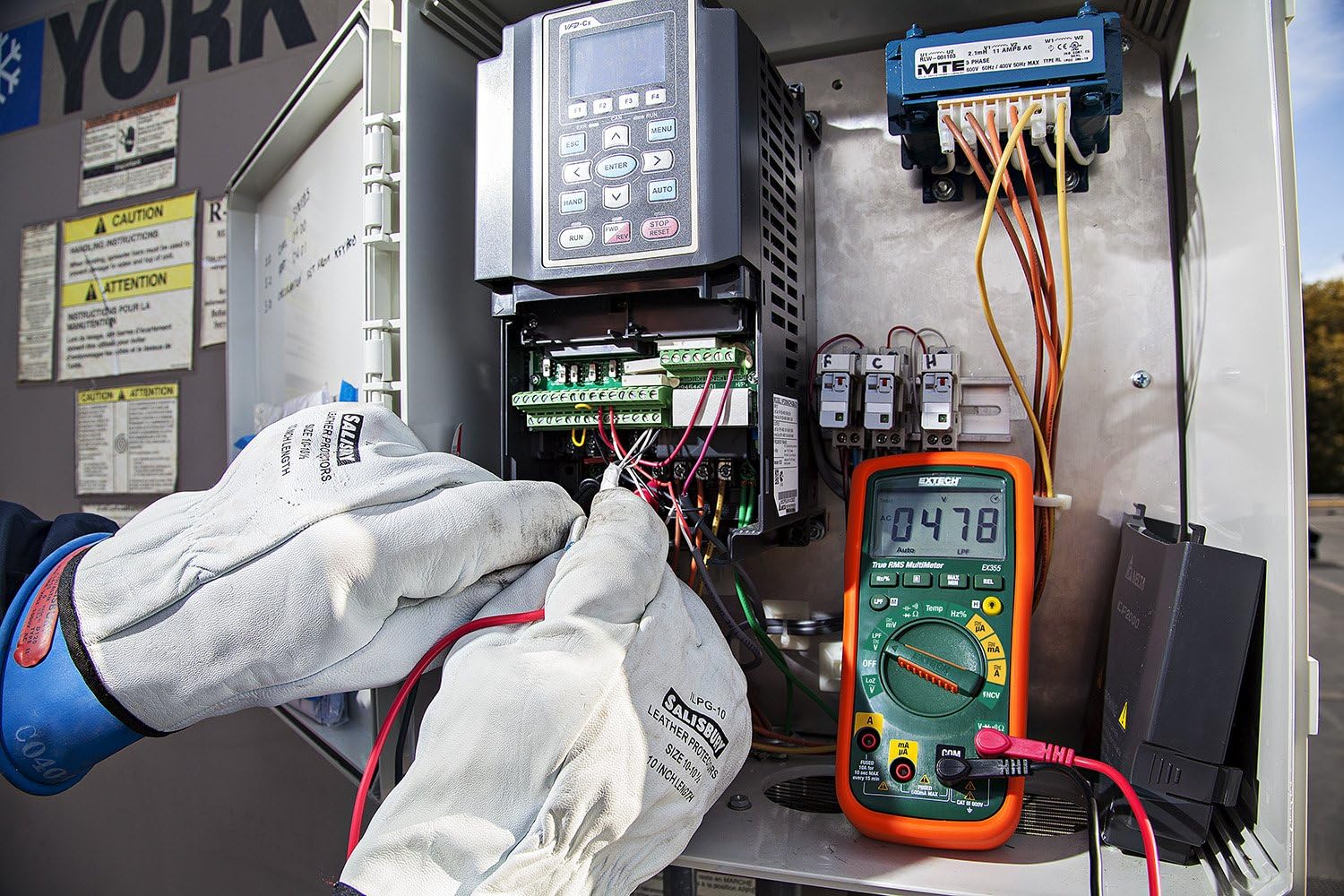
Figure 3: The Extech EX355 Multimeter in use, connected to an electrical control panel. This image demonstrates the multimeter's application in industrial or commercial electrical diagnostics.

Figure 4: The Extech EX355 Multimeter connected to a fuse box. This image illustrates the multimeter being used for testing within a residential or commercial electrical distribution system.
5.10 Data Hold, Min/Max, Relative Mode
- Zadrževanje podatkov: Pritisnite PRIDRŽI gumb za zamrznitev trenutnega odčitka na zaslonu. Ponovno pritisnite za sprostitev.
- Min/Max: Pritisnite MIN / MAX button to enter Min/Max recording mode. The meter will display the maximum reading. Press again to cycle through minimum and average readings. Hold the button to exit.
- Relativni način: Pritisnite REL button to store the current reading as a reference value. Subsequent measurements will be displayed as a difference from this reference. Press again to exit.
5.11 Preizkus prevodnosti in diod
Opozorilo: Ensure the circuit is de-energized before performing continuity or diode tests.
- Kontinuiteta: Nastavite vrtljivi gumb na Ω (Upor) in pritisnite IZBERI gumb, dokler se ne prikaže simbol za neprekinjenost (♫) appears. A continuous beep indicates a low resistance path (continuity).
- Preizkus diode: Nastavite vrtljivi gumb na Ω (Upor) in pritisnite IZBERI gumb, dokler simbol diode (→|) appears. Connect the red lead to the anode and black lead to the cathode for forward bias voltage drop. Reverse leads for reverse bias.
6. Vzdrževanje
6.1 Zamenjava baterije
Refer to section 4.1 for detailed instructions on replacing the two AA batteries. Always use fresh, high-quality AA batteries.
6.2 Zamenjava varovalke
If the current measurement functions cease to work, the fuse may need replacement. This procedure should only be performed by qualified personnel.
- Ensure the multimeter is powered off and all test leads are disconnected.
- Remove the battery compartment cover and batteries.
- Unscrew the case screws and carefully separate the two halves of the meter casing.
- Locate the blown fuse(s). The EX355 typically uses two fuses: a 0.5A/600V fast-blow fuse for the mA/µA input and a 10A/600V fast-blow fuse for the 10A input.
- Replace the fuse(s) with fuses of the exact same type and rating. Never use a fuse with a different rating.
- Carefully reassemble the meter casing, ensuring all screws are tightened. Reinstall batteries and the battery cover.
6.3 Čiščenje in skladiščenje
- Clean the meter regularly with a damp krpo in blag detergent. Ne uporabljajte abrazivov ali topil.
- Pred uporabo se prepričajte, da je merilnik popolnoma suh.
- When storing the meter for extended periods, remove the batteries to prevent leakage.
- Merilnik shranjujte na hladnem in suhem mestu, stran od neposredne sončne svetlobe in ekstremnih temperatur.
7. Odpravljanje težav
| Težava | Možen vzrok | rešitev |
|---|---|---|
| Ni prikaza ali pa je prikaz bled | Prazne ali prazne baterije | Zamenjajte baterije (glejte poglavje 4.1). |
| Nepravilni odčitki | Incorrect function/range selected; Damaged test leads; External interference; Blown fuse (for current) | Verify function/range; Inspect/replace test leads; Move away from strong electromagnetic fields; Check/replace fuses (refer to Section 6.2). |
| Brez piska za neprekinjenost | Open circuit; High resistance; Incorrect mode | Ensure circuit is closed; Check for high resistance; Verify continuity mode is selected. |
| Merjenje toka ne deluje | Blown fuse; Incorrect lead connection | Check and replace appropriate fuse (refer to Section 6.2); Ensure leads are in the correct current jacks. |
| NCV ne zaznava volumnatage | Brez AC voltage present; Weak field; Incorrect mode | Preverite glasnost klimatske napravetage with direct contact method; Ensure NCV mode is selected; Move closer to the conductor. |
8. Specifikacije
The following table outlines the key specifications for the Extech EX355 True RMS Multimeter:
| Parameter | Vrednost |
|---|---|
| Številka modela | EX355 |
| Merilne funkcije | AC/DC Voltage, AC/DC Current, Resistance, Capacitance, Frequency, Duty Cycle, Temperature, Diode, Continuity |
| Pravi RMS | ja |
| Brezkontaktna voltage (NCV) | ja |
| Low Impedance (LoZ) | ja |
| Nizkoprepustni filter (LPF) | ja |
| Največja delovna glasnosttage | 600 volta |
| Natančnost merjenja | +/-0.5% (typical, varies by function/range) |
| Zaslon | 4000 Count LCD |
| Vir napajanja | 2 x AA baterije (priložene) |
| Dimenzije (D x Š x V) | 8.1 x 4.8 x 17 cm (3.2 x 1.9 x 6.7 palca) |
| Teža predmeta | 372 g (0.82 lbs) |
| Material | ABS |
| Certificiranje | IEC 61010-1, CE, CAT III 600V |
| Vključene komponente | Test leads, two AA batteries, general purpose bead wire temperature probe |
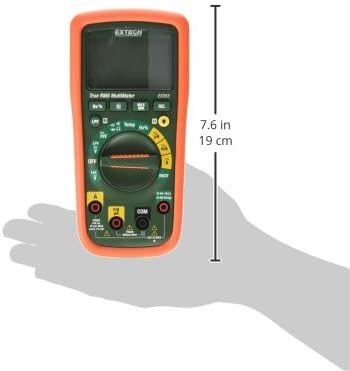
Figure 5: Extech EX355 Multimeter with approximate dimensions shown in inches and centimeters. This image provides a visual reference for the physical size of the device.
9. Informacije o garanciji
Extech provides a warranty for its products. Specific warranty terms and conditions, including duration and coverage, may vary by region and product. For detailed warranty information, please refer to the warranty card included with your product or visit the official Extech webspletnega mesta. Račun shranite kot dokazilo o nakupu za morebitne garancijske zahtevke.
10. Podpora strankam
For technical assistance, troubleshooting, or service inquiries regarding your Extech EX355 Multimeter, please contact Extech customer support. You can typically find contact information, including phone numbers and email addresses, on the official Extech webspletnem mestu ali v dokumentaciji, ki je priložena vašemu izdelku.
Spletni viri: Visit the official Extech website for FAQs, product downloads, and additional support resources.


