Uvod
This manual provides comprehensive instructions for the operation and maintenance of your ONN X5 HiFi Music Player. Please read this manual thoroughly before using the device to ensure proper functionality and to maximize your listening experience. The ONN X5 is designed to deliver high-fidelity audio playback in a compact and user-friendly format.
Konec izdelkaview
The ONN X5 is a portable HiFi music player featuring a 2.0-inch TFT screen and an aluminum alloy shell. It supports a wide range of audio formats, including lossless files, and offers expandable storage via a MicroSD card.
Ključne značilnosti:
- Zvok visoke kakovosti: Supports WAV, FLAC, ALAC, APE, OGG lossless formats, and high-definition music up to 24Bit/192 KHz.
- Zaslon: 2.0-inch TFT screen (176x220 pixels) for clear navigation and information display.
- Shranjevanje: 8GB internal memory, expandable up to 32GB with a MicroSD/TF card.
- Trajna zasnova: Lightweight aluminum alloy body (60g) for enhanced durability and reduced external interference noise.
- Uporabniški vmesnik: Intuitive key-based operation.
- Dodatne funkcije: FM Radio support.
- Baterija: High-capacity rechargeable lithium polymer battery.
- Večjezična podpora: English, Russian, Korean, German, Japanese, Polish, Indonesian, Chinese.
Postavitev naprave:

Slika: spredaj view of the ONN X5 HiFi Music Player, showing its display and control buttons. The screen displays track information, audio quality (e.g., 24BIT, 88HHZ), and playback status.

Slika: Stran view of the ONN X5 HiFi Music Player, illustrating the location of the MicroSD card slot on the right side of the device.

Slika: Spredaj in zadaj view of the ONN X5 HiFi Music Player. The back panel shows the model number "X5" and branding information.
Nastavitev
1. Polnjenje naprave:
- Connect the ONN X5 to a power source using the provided USB cable.
- Indikator baterije na zaslonu bo prikazal stanje polnjenja.
- A full charge is recommended before first use. The device uses a high-capacity rechargeable lithium polymer battery.
2. Inserting a MicroSD/TF Card:
- Locate the MicroSD/TF card slot on the side of the player.
- Gently insert a compatible MicroSD/TF card (up to 32GB) into the slot until it clicks into place.
- Da preprečite poškodbe, se prepričajte, da je kartica pravilno vstavljena.

Image: Contents of the ONN X5 package, showing the player, USB charging cable, and other accessories. This illustrates the components available for setup.
3. Prenos glasbe Files:
- Connect the ONN X5 to your computer using the USB cable.
- Naprava se bo prikazala kot izmenljivi pogon za shranjevanje.
- Povlecite in spustite želeni zvok files (MP3, WMA, APE, FLAC, WAV, ALAC, OGG) into the player's internal storage or the MicroSD card.
- Preden odklopite kabel USB, napravo varno izvrzite iz računalnika.
Navodila za uporabo
Vklop/izklop:
- To power on, press and hold the power button (usually marked with a universal power symbol) until the screen illuminates.
- Za izklop pritisnite in držite gumb za vklop, dokler se naprava ne izklopi.
Navigacija:
The ONN X5 uses physical buttons for navigation. Refer to the device layout for button identification.
- VOL.: Prilagodi glasnost.
- M (Meni): Accesses menus and confirms selections.
- Puščične tipke (< / >): Navigate through menus, select tracks, or fast forward/rewind during playback.
- Gumb za vklop: Also functions as a play/pause button during music playback.
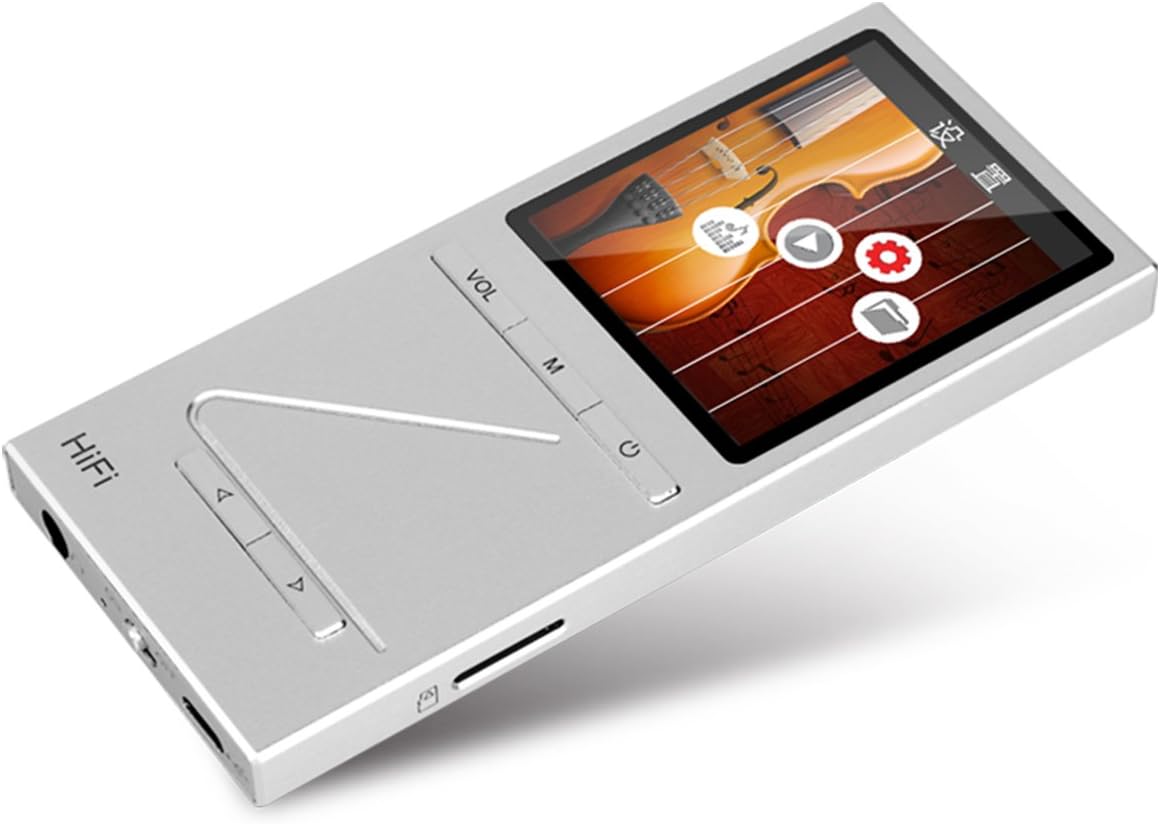
Slika: Pod kotom view of the ONN X5 HiFi Music Player, showing the screen with various menu icons, indicating the user interface for navigation.
Predvajanje glasbe:
- From the main menu, navigate to "Music" or "Files ".
- Browse through your folders and select a track to play.
- Press the Power/Play button to start or pause playback.
- Use the arrow buttons to skip tracks or fast forward/rewind.
- Adjust volume using the VOL button.
FM radio:
- Navigate to the "FM Radio" option from the main menu.
- Z navigacijskimi gumbi poiščite postaje ali ročno nastavite frekvenco.
- Ensure headphones are connected as they often act as the antenna for FM radio.
Jezikovne nastavitve:
Naprava podpira več jezikov. Če želite spremeniti jezik:
- Go to "Settings" from the main menu.
- Select "Language" and choose your preferred language from the list (English, Russian, Korean, German, Japanese, Polish, Indonesian, Chinese).
Vzdrževanje
- Čiščenje: Za čiščenje naprave uporabljajte mehko, suho krpo. Izogibajte se tekočim čistilom ali abrazivnim materialom.
- Shranjevanje: Predvajalnik shranjujte na hladnem in suhem mestu, stran od neposredne sončne svetlobe in ekstremnih temperatur.
- Vzdrževanje baterije: Da podaljšate življenjsko dobo baterije, se izogibajte pogostemu popolnemu praznjenju baterije. Napravo redno polnite, tudi če je dalj časa ne uporabljate.
- Izogibajte se udarcem: The aluminum alloy shell provides durability, but avoid dropping the device or subjecting it to strong impacts.
- Izpostavljenost vodi: Ta naprava ni vodoodporna. Izogibajte se izpostavljanju vodi ali visoki vlažnosti.
Odpravljanje težav
Device Will Not Power On:
- Prepričajte se, da je baterija napolnjena. Napravo priključite na vir napajanja in jo pustite, da se polni vsaj 30 minut, preden jo poskusite znova vklopiti.
- Try performing a hard reset (if applicable, refer to manufacturer's specific instructions for hard reset, usually involves holding power button for an extended period).
Ni zvoka:
- Preverite glasnost in se prepričajte, da ni izklopljena.
- Verify that headphones or external speakers are properly connected.
- Test with different headphones or audio output devices.
- Zagotovite zvok file is not corrupted or in an unsupported format.
Prenos ni mogoč Files:
- Prepričajte se, da je kabel USB varno priključen tako na predvajalnik kot na računalnik.
- Poskusite z drugim USB-vhodom na računalniku ali z drugim USB-kablom.
- Verify that the device is recognized by your computer as a removable drive.
- Check if the MicroSD card is properly inserted and not full.
Screen Not Responding / Frozen:
- Pritisnite in držite gumb za vklop približno 10–15 sekund, da prisilite ponovni zagon.
- Če težava ne izgine, se prepričajte, da je baterija napolnjena.
Specifikacije
| Funkcija | Podrobnost |
|---|---|
| Številka modela | X5 |
| Znamka | ONN |
| Velikost zaslona | 2.0 Inches TFT (176x220 PIXEL) |
| Notranji pomnilnik | 8 GB |
| Razširljiv prostor za shranjevanje | MicroSD/TF card up to 32 GB |
| Podprti zvočni formati | APE, FLAC, ALAC, WAV, WMA, OGG, MP3 (up to 24Bit/192 KHz) |
| Tehnologija povezljivosti | Pomožni, USB |
| Posebna funkcija | FM radio |
| Baterija | 1 Lithium Ion battery required (High-capacity rechargeable lithium polymer) |
| Teža predmeta | 7 unče (približno 0.2 kilograma) |
| Dimenzije paketa | 6.21 x 4.7 x 1.2 palcev |
| Proizvajalec | SZTZWY |
Garancija in podpora
For detailed warranty information, please refer to the warranty card included with your purchase or visit the official ONN product support website. For technical assistance or further inquiries, please contact ONN customer support through their official channels.