1. Uvod
The Noyafa NF-909C is a compact and easy-to-use 2-in-1 testing instrument designed for optical fiber networks. It integrates both an optical power meter and an optical light source, making it suitable for absolute optical power measurements and insertion loss tests. This device offers a wide range of power measurement, high accuracy, and stable output, providing a cost-effective solution for fiber optic testing.
2. Varnostne informacije
- Preberite priročnik: Before operating the device, thoroughly read and understand this user manual.
- Varnost baterije: Use only specified 1.5V batteries (3x AAA). Do not mix old and new batteries or different types of batteries. Remove batteries if the device will not be used for an extended period.
- Laserska varnost: The optical light source emits laser radiation. NE look directly into the optical output port or into a fiber connected to the light source. Direct exposure to laser light can cause severe eye damage.
- Okoljski pogoji: Operate the device within the specified operating temperature range (-10°C to +60°C). Avoid exposure to extreme temperatures, humidity, or dust.
- Čiščenje: Keep optical connectors clean. Use only approved cleaning methods and materials to avoid damaging the fiber end-faces.
- Vzdrževanje: Ne poskušajte odpirati ali popravljati naprave. Vsa servisna dela prepustite usposobljenemu osebju.
3. Vsebina paketa
Ob razpakiranju preverite, ali so vsi predmeti prisotni in v dobrem stanju:
- Noyafa NF-909C Fiber Optic Tester Unit
- Uporabniški priročnik
- Protective Cap for Optical Ports
- (Batteries may or may not be included depending on the retailer)
4. Izdelek je končanview
The NF-909C features a clear LCD display, intuitive control buttons, and standard optical connectors for versatile use.
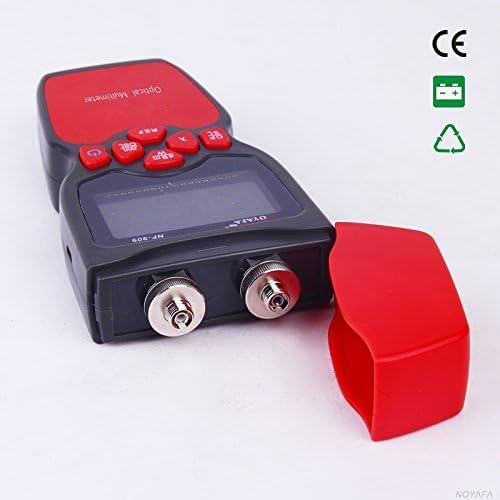
Slika 1: Spredaj view of the Noyafa NF-909C Fiber Optic Tester. This image shows the device's display screen, the red control buttons (Power, REF, dBm/W, λ, Hz), and the two optical input/output ports on the front, protected by a red cap. The device is black and red.
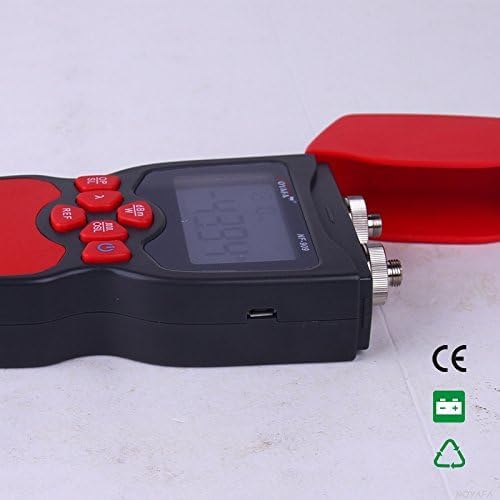
Slika 2: Stran view of the Noyafa NF-909C Fiber Optic Tester. This image highlights the micro USB port located on the side of the device, which may be used for power or data transfer, though its primary function is typically for charging or external power supply. The red protective cap is shown detached.
Ključne komponente:
- LCD zaslon: Shows measurement readings, selected wavelength, unit, and battery status.
- Gumbi za upravljanje: Power On/Off, Reference (REF), Unit (dBm/W), Wavelength (λ), Frequency (Hz).
- Optical Power Meter Input: Typically supports SC, ST, LC connectors (optional).
- Optical Light Source Output: Typically FC connector (SC, ST, LC optional).
- Predal za baterije: Located on the rear, for 3x 1.5V batteries.
- Vrata za mikro USB: For power supply or charging (refer to Figure 2).
5. Nastavitev
5.1 Namestitev baterije
- Poiščite pokrov predalčka za baterije na zadnji strani naprave.
- Potisnite ali odpnite pokrov, da ga odprete.
- Vstavite tri (3) 1.5 V baterije AAA in pri tem pazite na pravilno polarnost (+/-), kot je označeno v notranjosti predala.
- Varno namestite pokrov prostora za baterije.
5.2 Začetni vklop
Pritisnite in držite Moč button to turn on the device. The LCD display will illuminate, showing the current mode and settings.
6. Navodila za uporabo
6.1 Optical Power Meter Mode
This mode measures the absolute optical power or relative loss in optical fiber networks.
- Povežite se z optičnimi vlakni: Connect the optical fiber to be tested to the Power Meter input port. Ensure the connector is clean.
- Izberite valovno dolžino: Pritisnite λ button to cycle through the available calibrated wavelengths: 850nm, 1300nm, 1310nm, 1490nm, 1550nm, 1625nm. Select the wavelength matching your light source.
- View Merjenje: The display will show the optical power in dBm.
- Change Unit: Pritisnite dBm/W button to switch between dBm and W (Watts) units.
- Set Reference (REF): For relative measurements (loss), connect a known good fiber to a stable light source and the power meter. Press the REF button to set the current power reading as the reference (0dB). Subsequent measurements will show the loss relative to this reference.
- Frequency Identification: The power meter can identify modulation frequencies from 10Hz to 60KHz. If the incoming signal is modulated, the frequency will be displayed.
6.2 Optical Light Source Mode
This mode provides a stable optical signal for testing fiber optic cables.
- Povežite se z optičnimi vlakni: Connect the optical fiber to be tested to the Light Source output port. Ensure the connector is clean.
- Izberite valovno dolžino: Pritisnite λ button to cycle through the available wavelengths: 1310nm and 1550nm. Select the desired wavelength.
- Select Modulation Frequency: Pritisnite Hz button to cycle through modulation frequencies: 270Hz, 1KHz, 2KHz, or continuous wave (CW).
- Izhodni signal: The device will emit a stable optical signal at the selected wavelength and modulation.
6.3 Funkcija samodejnega izklopa
The device features an auto-off function to conserve battery life. If no operation is performed for approximately 15 minutes, the device will automatically power off. Press the Moč gumb, da ga znova vklopite.
7. Vzdrževanje
- Čiščenje optičnih konektorjev: Always ensure optical connectors are clean before use. Use lint-free wipes and appropriate optical cleaning solutions. Dirty connectors can lead to inaccurate measurements and damage to the device or fiber.
- Zamenjava baterije: When the battery indicator on the display shows low power, replace all three 1.5V AAA batteries promptly.
- Shranjevanje: When not in use, store the device in a dry, cool place, away from direct sunlight and extreme temperatures. Always replace the protective caps on the optical ports to prevent dust and damage.
- Zunanje čiščenje: Zunanjost naprave očistite z mehko, damp krpo. Ne uporabljajte abrazivnih čistil ali topil.
8. Odpravljanje težav
- Naprava se ne vklopi:
- Preverite, ali so baterije pravilno vstavljene s pravilno polarnostjo.
- Zamenjajte s svežimi baterijami.
- Inaccurate power meter readings:
- Ensure optical connectors are clean.
- Verify the selected wavelength on the power meter matches the light source wavelength.
- Check if the fiber under test is properly connected and not damaged.
- No light output from light source:
- Ensure the device is powered on and in light source mode.
- Preverite nivo baterije.
- Verify the fiber is properly connected to the output port.
- Auto-off activates too quickly:
- The auto-off is fixed at 15 minutes of inactivity. This is normal operation.
9. Specifikacije
| Funkcija | Specifikacija |
|---|---|
| Optical Power Meter Module | |
| Detector Measurement Range | -50 ~ +26 dBm |
| Calibrated Wavelengths | 850, 1300, 1310, 1490, 1550, 1625 nm |
| Resolucija | 0.01 dBm |
| Identification Frequency Range | 10Hz ~ 60KHz |
| Optični priključek | SC, ST, LC (optional) |
| Optical Light Source Module | |
| Emitter Wavelengths | 1310 / 1550 nm (other wavelengths customizable) |
| Izhodna moč | -7 dBm |
| Stabilnost izhoda | 0.05 dB / 15 mins; 0.1 dB / 8 hours |
| Modulation Frequencies | 270 Hz, 1 KHz, 2 KHz |
| Optični priključek | FC (SC, ST, LC optional) |
| Splošne specifikacije | |
| Napajalnik | 3 x 1.5V AAA baterije |
| Čas samodejnega izklopa | 15 minut (pribl.) |
| Delovna temperatura | -10°C ~ +60°C |
| Dimenzije (D x Š x V) | 160 x 75 x 32 mm |
| Teža | 400 g (unit only) / 150 g (item weight from specs) |
| Minimalna delovna voltage | 1.5 volta |
| Največja delovna glasnosttage | 5 volta |
| Specifikacija izpolnjena | UL 61010-1, IEC 61010-2-030 |
| Proizvajalec | Shenzhen Noyafa Electronic |
10. Garancija in podpora
For warranty information, technical support, or service inquiries, please refer to the warranty card included with your product or contact your authorized Noyafa dealer or the manufacturer directly. Keep your purchase receipt as proof of purchase.


