1. Uvod
This manual provides detailed instructions for the installation, operation, and maintenance of your Zmodo Outdoor Security Camera System, Model ZM-W0002-4. This system offers 1080p Full HD surveillance for your property, featuring night vision, motion detection, and weatherproof construction.
2. Vsebina paketa
Preverite, ali so v paketu vsi elementi:
- 4 x Zmodo Outdoor Security Cameras
- 4 x napajalnika
- 1 x Hitri vodnik
3. Nastavitev in namestitev
Za nastavitev varnostnih kamer Zmodo sledite tem korakom:
3.1. Namestitev kamere
Select optimal locations for your cameras. Consider areas that provide a clear view of entry points or critical zones. Ensure the chosen location is within range of your Wi-Fi network and has access to a power outlet.

Image: Zmodo outdoor security camera mounted on a wall, illustrating its weatherproof design and typical installation scenario.
3.2. Napajalni priključek
Connect each camera to its respective power supply and plug it into a standard electrical outlet. The camera will power on automatically.
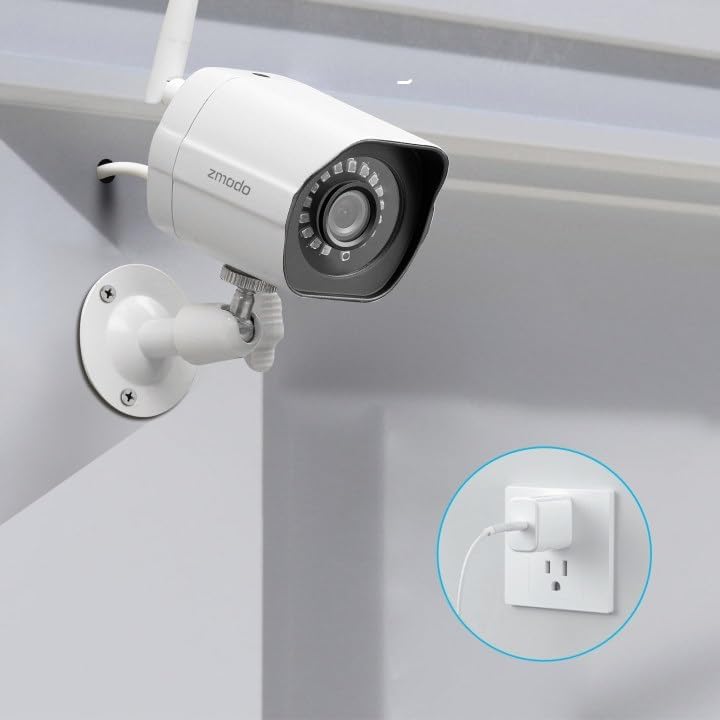
Image: A Zmodo outdoor security camera with its power cable plugged into a wall outlet, demonstrating the power connection process.
3.3. Prenos aplikacije in ustvarjanje računa
Download the Zmodo app from your smartphone's app store (iOS or Android). Create a new account or log in if you already have one.
3.4. Seznanjanje fotoaparata
Follow the in-app instructions to add your cameras. Zmodo cameras typically use QR code pairing technology for straightforward setup. Ensure your smartphone is connected to the 2.4GHz Wi-Fi network that the cameras will use.

Image: A set of four Zmodo outdoor security cameras, illustrating the product's appearance and external antenna design for enhanced Wi-Fi signal.
4. Delovanje
Once your cameras are set up, you can access and manage them through the Zmodo app.
4.1. V živo View
Open the Zmodo app to view live 1080p Full HD video streams from your cameras. You can monitor up to four camera feeds simultaneously on one screen.

Image: A smartphone screen showing a four-panel live video feed from multiple Zmodo cameras, demonstrating the multi-camera viewing funkcijo.
4.2. Zaznavanje gibanja in opozorila
The cameras are equipped with motion detection. When motion is detected, you will receive instant alerts on your smartphone. Review recorded clips via the app.

Image: A smartphone displaying a push notification for motion detected by a Zmodo camera, indicating the alert system.

Image: A Zmodo camera with an illustration of AI-powered motion detection, highlighting its ability to accurately detect and identify humans, pets, and vehicles.
4.3. Nočni vid
The cameras feature adjustable night vision with built-in IR lights, providing clear images up to 65 feet in low-light conditions.
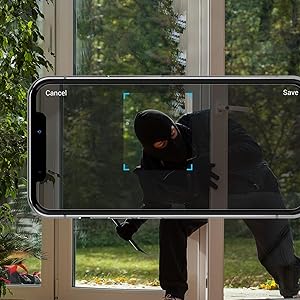
Image: A Zmodo camera mounted outdoors at night, with its red IR lights active, demonstrating its night vision capability.
4.4. Shranjevanje v oblaku
Zmodo offers a cloud service for secure storage of your video footage. A subscription plan is required for this feature. This ensures continuous recording and access to past events.
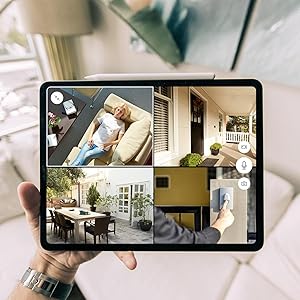
Image: An abstract graphic depicting a secure cloud with a padlock icon, symbolizing the bank-level encryption used for Zmodo's cloud storage service.
4.5. Integracija z Alexo
The cameras are compatible with Amazon Alexa. Use voice commands like "Alexa, show me the front door" to view live streams on compatible Alexa-enabled devices.

Image: An Amazon Echo Show device displaying a live feed from a Zmodo camera, illustrating the Alexa integration feature.
5. Vzdrževanje
Redno vzdrževanje pomaga zagotoviti optimalno delovanje in dolgo življenjsko dobo vaših kamer.
- Čiščenje leč: Objektiv fotoaparata občasno očistite z mehko krpoamp krpo, da odstranite prah, umazanijo ali vodne madeže, ki lahko vplivajo na jasnost slike. Izogibajte se abrazivnim čistilom.
- Preverjanje napajalne povezave: Ensure power cables are securely connected and free from damage.
- Stabilnost vgradnje: Verify that the cameras remain securely mounted to prevent accidental dislodgement.
- Posodobitve programske opreme: Keep the Zmodo app updated to the latest version for new features and security enhancements.
6. Odpravljanje težav
Če imate težave s kamerami Zmodo, si oglejte naslednje pogoste rešitve:
- Kamera brez povezave:
- Preverite priključek za napajanje, da se prepričate, da kamera prejema napajanje.
- Preverite, ali vaše omrežje Wi-Fi deluje in ali je kamera v dosegu.
- Restart the camera by unplugging and replugging its power supply.
- Ensure your router's 2.4GHz Wi-Fi band is enabled and the camera is connected to it.
- Slaba kakovost slike:
- Očistite lečo fotoaparata.
- Prepričajte se, da v vidnem polju kamere ni ovir view.
- Check your Wi-Fi signal strength; a weak signal can affect video streaming quality.
- Zaznavanje gibanja ne deluje:
- Verify motion detection settings are enabled in the Zmodo app.
- Adjust motion sensitivity settings if necessary.
- Prepričajte se, da je kamera view ni oviran.
- No Alerts Received:
- Check your smartphone's notification settings for the Zmodo app.
- Prepričajte se, da ima vaš telefon aktivno internetno povezavo.
7. Specifikacije
Key technical specifications for the Zmodo Outdoor Security Camera System (Model ZM-W0002-4):
| Funkcija | Podrobnost |
|---|---|
| Ime modela | ZM-W0002-4 |
| Ločljivost zajema videa | 1080p Full HD |
| Notranja/zunanja uporaba | Na prostem |
| Tehnologija povezljivosti | Wi-Fi (2.4 GHz) |
| Območje nočnega vida | Do 65 čevljev |
| Odpornost na vremenske vplive | IP66 (odporen na vremenske vplive) |
| Zaznavanje gibanja | Yes (Motion Only, AI-powered) |
| Združljive naprave | Pametni telefon, Amazon Alexa, Google Assistant |
| Vir napajanja | Električni z vrvico (12 voltov, 5 vatov) |
| Dimenzije (D x Š x V) | 2.2 x 2.1 x 3.4 palcev |
| Teža predmeta | 3.04 pounds (per camera) |
| Hitrost sličic | 25 sličic na sekundo |
| Material | Plastika |
8. Informacije o garanciji
For specific warranty details regarding your Zmodo Outdoor Security Camera System, please refer to the warranty card included in your product packaging or visit the official Zmodo weblokacija. Za podaljšano kritje so morda na voljo tudi načrti zaščite.
9. Podpora strankam
If you require further assistance or have questions not covered in this manual, please contact Zmodo customer support through their official website or the Zmodo app. Support resources, including FAQs and troubleshooting guides, are often available online.
Zmodo Official Webspletno mesto: www.zmodo.com


