Uvod
This manual provides instructions for the HAVIT HV-KB366L RGB Backlit Mechanical Gaming Keyboard. This keyboard features blue mechanical switches, full anti-ghosting, and customizable RGB backlighting, designed for reliable performance.
Navodila za namestitev
Priključitev tipkovnice
- Poiščite razpoložljiva vrata USB na vašem računalniku.
- Connect the USB cable from the HAVIT HV-KB366L keyboard to the USB port on your computer.
- Tipkovnica je plug-and-play in jo mora vaš operacijski sistem samodejno prepoznati.
Združljivost sistema
- Compatible with Windows 10 and other Windows operating systems.
- Mac OS supports 6-key rollover only.
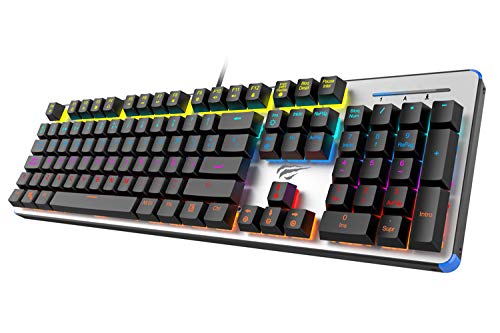
Figure 1: HAVIT HV-KB366L RGB Backlit Mechanical Gaming Keyboard. An overhead view tipkovnice, prikazasing its full layout with RGB lighting on the keys and a white frame.
Navodila za uporabo
Mehanski ključni stikali
The keyboard is equipped with blue mechanical switches, providing tactile feedback and an audible click with each keystroke. This design is intended for precise input during typing and gaming.
Anti-Ghosting Feature
The full key anti-ghosting mechanism ensures that all key presses are registered accurately, even when multiple keys are pressed simultaneously. This feature is beneficial for fast-paced gaming.
Prilagoditev osvetlitve ozadja
- To change the backlight color or mode, press the Fn hkrati s tipko Osvetljen od zadaj key. Repeated presses will cycle through available modes and colors.
- Marquee Mode: In 7-color backlit mode (non-breathing), press the Osvetljen od zadaj key once to activate marquee mode. Press the Osvetljen od zadaj key again to deactivate marquee mode and return to 7-color backlit mode.
- Stopnje svetlosti: The backlight offers 4 levels of brightness adjustment.
- Breathing Rate: The breathing effect has 10 adjustable levels.
Vzdrževanje
Čiščenje tipkovnice
- Pred čiščenjem tipkovnico odklopite iz računalnika.
- Za brisanje površine tipkovnice uporabite mehko, suho krpo.
- Za prah in umazanijo med tipkami uporabite stisnjen zrak.
- Avoid using harsh chemicals or abrasive materials, as these can damage the finish or keycaps.
Vzdržljivost
The keyboard features an aluminum top housing with a sanded finish and a metal base, contributing to its overall durability and stable performance.
Odpravljanje težav
Tipkovnica se ne odziva
- Prepričajte se, da je kabel USB varno priključen tako na tipkovnico kot na računalnik.
- Poskusite tipkovnico priključiti na drug USB vhod na računalniku.
- Preizkusite tipkovnico na drugem računalniku, da ugotovite, ali je težava v tipkovnici ali v vratih USB računalnika.
Osvetlitev ozadja ne deluje ali je nepravilna
- Verify that the keyboard is properly connected and receiving power.
- Pritisnite Fn + Backlit key to cycle through backlight modes and ensure it is not turned off or set to a very low brightness.
- Refer to the "Backlight Adjustment" section for detailed instructions on changing modes and brightness.
Specifikacije
| Znamka | HAVIT |
| Številka modela | HV-KB366L |
| Proizvajalec | HAVIT |
| Dimenzije izdelka | 50.5 x 17.6 x 6 centimetrov |
| Teža predmeta | 1.33 kg |
| Tehnologija povezljivosti | Žično (USB) |
| Opis tipkovnice | Gaming mehanska tipkovnica |
| Posebna funkcija | RGB Backlit, Anti-Ghosting |
| Platforma strojne opreme | Prenosni računalnik, PC |
| Operacijski sistem | Windows 10 (and compatible), Mac OS (6-key rollover) |
| voltage | 5 volta |
| Vključene komponente | USB kabel |
Garancija in podpora
Informacije o garanciji
Specific warranty details for the HAVIT HV-KB366L keyboard are not provided in the product data. Please refer to the product packaging or contact HAVIT directly for warranty terms and conditions.
Podpora uporabnikom
For technical assistance, troubleshooting, or further inquiries, please contact HAVIT customer support through their official webspletno mesto ali kontaktne podatke, ki ste jih prejeli ob nakupu.