1. Uvod
This manual provides essential instructions for the safe and efficient use of your Epson LQ-310 24-Pin Narrow Carriage Impact Printer. Please read this manual thoroughly before operating the printer and keep it for future reference.
The Epson LQ-310 is a compact and reliable dot matrix printer designed for fast and efficient printing of various documents, including multi-part forms, invoices, and reports. It features versatile connectivity options including USB, Serial, and Parallel ports.
2. Varnostne informacije
Observe the following safety precautions to ensure safe operation and to prevent damage to the printer or injury to yourself.
- Tiskalnik vedno postavite na stabilno, ravno površino.
- Do not block or cover the ventilation slots on the printer.
- Uporabljajte samo napajalni kabel, ki je priložen tiskalniku.
- Do not expose the printer to water, moisture, or excessive heat.
- Unplug the printer from the power outlet before cleaning or performing maintenance.
- Hraniti izven dosega otrok.
3. Vsebina paketa
Preverite, ali so v paketu prisotni vsi elementi:
- Epson LQ-310 Printer Unit
- Napajalni kabel
- Trak za vložek
- Uporabniški priročnik (ta dokument)
- Driver CD (may vary by region)
4. Nastavitev
4.1 Razpakiranje in namestitev
- Odstranite tiskalnik iz embalaže.
- Odstranite vse zaščitne trakove in embalažni material.
- Place the printer on a flat, stable surface with adequate ventilation.
4.2 Priključitev napajalnega kabla
Napajalni kabel priključite na tiskalnik in nato na ozemljeno električno vtičnico.
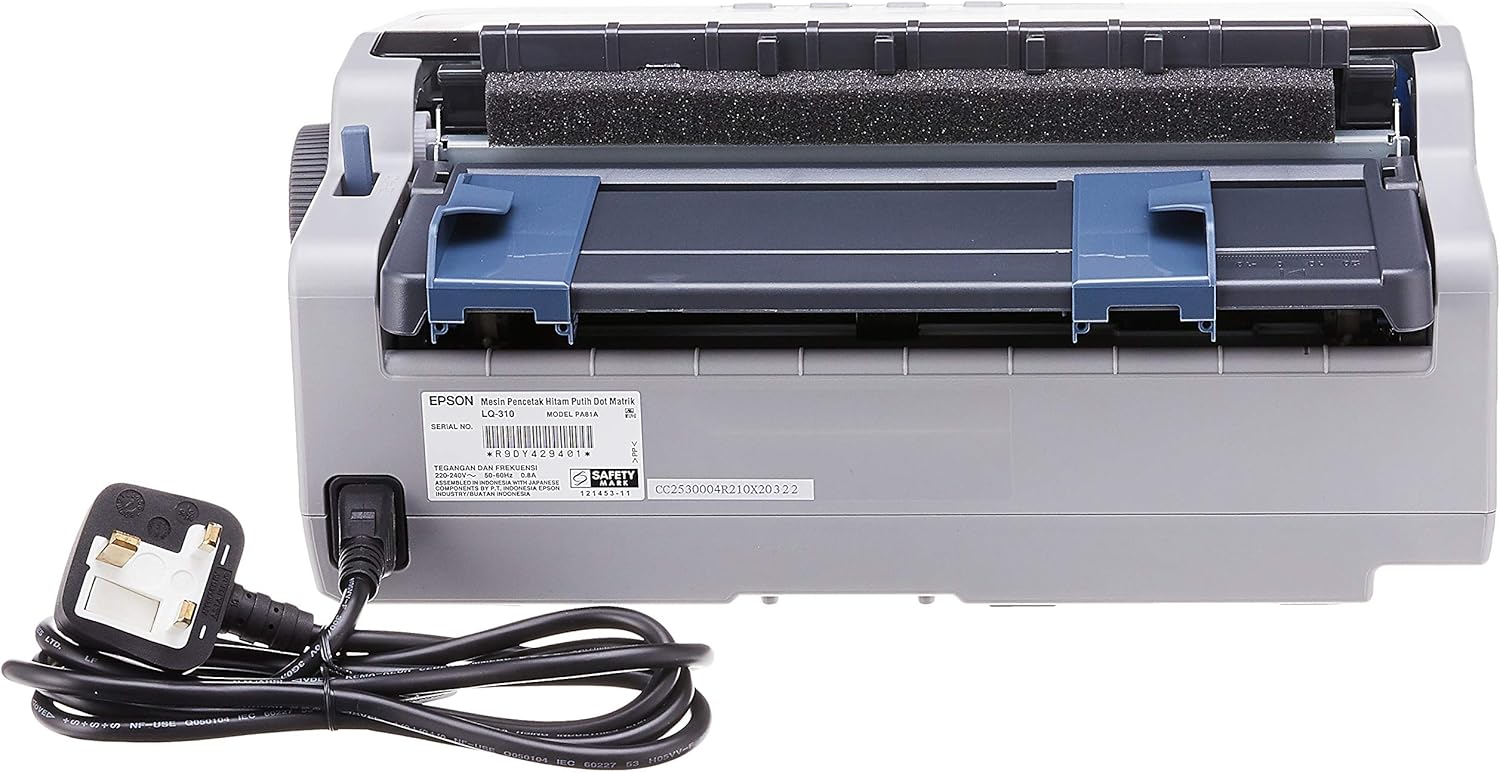
Slika 4.2.1: Zadaj view of the Epson LQ-310 printer, highlighting the power input and various data ports (USB, Serial, Parallel) for connection to a computer.
4.3 Povezava z računalnikom
The LQ-310 supports USB, Serial, and Parallel connections. Choose the appropriate cable for your computer and connect it to the corresponding port on the printer.
- USB povezava: Use a standard USB A-B cable.
- Serijska povezava: Use a serial cable (RS-232C).
- Vzporedna povezava: Use a parallel cable (Centronics).
4.4 Namestitev kasete s trakom
- Prepričajte se, da je tiskalnik izklopljen.
- Odprite pokrov tiskalnika.
- Unpack the new ribbon cartridge.
- Align the ribbon cartridge with the guides inside the printer and press down firmly until it clicks into place.
- Turn the ribbon feed knob on the cartridge to ensure the ribbon is taut and not twisted.
- Zaprite pokrov tiskalnika.

Slika 4.4.1: The ribbon cartridge for the Epson LQ-310 printer, which needs to be installed correctly for printing.
4.5 Nalaganje papirja
The LQ-310 can handle various paper types, including continuous forms and single sheets.
- For Continuous Forms: Place the forms on the tractor feed mechanism at the rear of the printer. Adjust the tractor guides to match the paper width and engage the pins.
- For Single Sheets: Insert a single sheet into the front paper slot, ensuring it is straight.
4.6 Namestitev gonilnika
After connecting the printer, install the necessary drivers on your computer. You can typically find these on the included CD or download them from the official Epson support webmesto.
5. Navodila za uporabo
5.1 Konec nadzorne ploščeview
The control panel on the front of the printer allows you to manage basic functions.

Slika 5.1.1: Spredaj view of the Epson LQ-310 printer, showing the control panel with buttons for Tear Off, LF/FF, Load/Eject, Paper Out, Pause, Lock, Font, Item, Micro Adjust, and Set.
- Gumb za vklop: Vklopi ali izklopi tiskalnik.
- Paper Out Indicator: Lights up when the printer is out of paper.
- Gumb za premor: Začasno ustavi tiskanje. Za nadaljevanje pritisnite znova.
- Gumb LF/FF (pomik za vrstico/pomik obrazca): Advances paper by one line or one page.
- Gumb za nalaganje/izmet: Loads a single sheet of paper or ejects the current sheet.
- Tear Off Button: Advances continuous paper to the tear-off position.
- Font Button: Selects different fonts.
- Item/Set Buttons: Used for menu navigation and setting options.
5.2 Osnovno tiskanje
- Prepričajte se, da je tiskalnik vklopljen in povezan z računalnikom.
- Load paper according to the instructions in Section 4.5.
- Odprite dokument, ki ga želite natisniti, v računalniku.
- Select the Epson LQ-310 as your printer in the print dialog.
- Po potrebi prilagodite nastavitve tiskanja (npr. velikost papirja, kakovost tiskanja).
- Kliknite »Natisni«.
6. Vzdrževanje
6.1 Zamenjava kasete s trakom
Replace the ribbon cartridge when print quality deteriorates or the ribbon is visibly worn.
- Izklopite tiskalnik in izvlecite napajalni kabel.
- Odprite pokrov tiskalnika.
- Stari trak previdno odstranite tako, da ga dvignete ven.
- Install a new ribbon cartridge as described in Section 4.4.
- Close the printer cover and reconnect the power.
6.2 Čiščenje tiskalnika
Regular cleaning helps maintain printer performance.
- Izklopite tiskalnik in izvlecite napajalni kabel.
- Zunanjost tiskalnika obrišite z mehko,amp krpo. Ne uporabljajte abrazivnih čistil ali topil.
- Gently clean the print head area with a soft, lint-free cloth if necessary, being careful not to touch the pins.
- Odstranite prah ali ostanke papirja s poti papirja.
7. Odpravljanje težav
This section addresses common issues you might encounter with your LQ-310 printer.
7.1 Printer Does Not Turn On
- Ensure the power cable is securely connected to both the printer and a working electrical outlet.
- Preverite, ali vtičnica deluje, tako da vanjo priključite drugo napravo.
7.2 "Paper Out" Indicator is On
- Load paper correctly as described in Section 4.5.
- Ensure the paper sensor is not obstructed.
7.3 Ni izpisa
- Verify the printer is powered on and connected to the computer.
- Check if the correct printer driver is installed and selected in your application.
- Ensure the ribbon cartridge is installed correctly and has ink.
- Check the printer's status on your computer; clear any pending print jobs.
7.4 Slaba kakovost tiska
- The ribbon cartridge may be old or running out of ink. Replace it if necessary.
- Prepričajte se, da je vrsta papirja primerna za udarni tisk.
- Clean the print head area if there is visible debris.
8. Specifikacije
| Funkcija | Specifikacija |
|---|---|
| Tehnologija tiskanja | 24-Pin Narrow Carriage Impact Dot Matrix |
| Hitrost tiskanja | Up to 347 / 416 cps (10 / 12 cpi) |
| Povezljivost | 1 Full-Speed USB 2.0, Serial Port, Parallel Port |
| Izhod tiskalnika | Colour (Ink Color: Black) |
| Resolucija | 240 x 170 dpi (Max Print Resolution Black and White: 240 dpi) |
| Teža predmeta | 4.1 kilogramov |
| Mere izdelka (D x Š x V) | 27.5 D x 36.2 Š x 15.4 V centimetrov |
| Največja velikost medija | Letter/A4 |
| Tiskarski mediji | Papir (navaden) |
| Ime modela | LQ 310 |
| Številka modela | LQ-310 |
9. Garancija in podpora
The Epson LQ-310 printer comes with a limited warranty. For detailed warranty information, please refer to the warranty card included with your product or visit the official Epson webmesto.
For technical support, driver downloads, or further assistance, please visit the Epson support website or contact your local Epson customer service center. Have your printer model number (LQ-310) and serial number ready when contacting support.


